
A computer is only as good as the components that power it. Typically, I try to stick with a system that fits into the midrange area of power, but what happens when I get my hands on a graphics card powered by NVIDIA’s GeForce RTX 5080 GPU? Well, my mind becomes completely blown away by the performance and finer details dazzling across my screen. With that said, let’s take a closer loop at this GPU to see exactly what NVIDIA is bringing to the table.
PNY
First and foremost, I must give PNY a proper shout-out as they let me test their newly released RTX 5080 16GB Dual-Fan Slim OC. I was massively surprised at the form factor upon first gaze. The 5080 itself is a robust and powerful chip that really delivers, but the cooler and fan design is what threw me for a whirl. I am used to large graphics cards that are about the same size and weight as a newborn baby. Instead, what we have here is a slimmed down, two-slot card that doesn’t sacrifice a single thing in the name of performance.

Since every design is unique to each manufacturer, I want to quickly examine the card’s form factor. I already mentioned how it is slimmer compared to other graphics cards. The two-slot design saves space at the back of your case while the rest of the cooling mechanisms save space. Not only are you getting access to various PCIe slots on your motherboard, but you are also able to put this into cases that most likely couldn’t support the larger form factors. It measures 11.8 x 5.9” with a thickness of just 1.6”. This makes PNY’s RTX 5080 a serious contender for small builds. If you happen to have a studio space where every inch of room counts, this graphics card can easily fit in a variety of small form factors.
Keeping the RTX 5080 cool are dual 120mm fans and a pass-through design accompanied by a mix of aluminum fins and piping. Under serious testing, PNY’s RTX 5080 Dual-Fan Slim was able to maintain thermal temperatures way below the danger zone (more on this later). Designing the graphics card with two larger fans rather than three smaller ones does pose an advantage for a graphics card of this caliber. Generally speaking, the bigger the fan the lower the RPMs. Here, we have wider fans that run slower but provide a wider cooling area while also reducing overall fan noise.
The specific number given to me is that the GPU runs 36% quieter than the triple-fan model running at the same RPM. This places the graphics around 28 dB which is considered “library quiet” levels of performance. Upon my testing, I can’t say the exact decibel level, but they were quieter than my case’s 125mm fans at full load, so I can at least say that the sound performance was well within my range of ideal. Finally, there is an absence of RGB colorization, which I personally like, and if you are someone who doesn’t want to see flashing lights, this is an easy consideration.
The Specs
The RTX 5080 is built on NVIDIA’s Blackwell Architecture, which utilizes fifth-gen Tensor cores to maximize AI performance, optimize neural shaders, and can even assist with designing intricate 3D geometry in various modeling applications. The RTX 5080 supports the full suite of NVIDIA DLSS 4.5 technologies, including Super Resolution and Dynamic Multi Frame Generation. Additionally, the 50 Series powers high-framerate path tracing, and livestreaming capabilities. In other words, the RTX 5080 packs an absolute punch and keeps the future in mind when it comes to graphical fidelity whether you are designing games, playing games, or streaming games.
Packed with 10752 CUDA cores, this RTX 5080 can achieve an OC boost clock speed up to 2.7 GHz. Of course, it’s not just clock speed that matters as we also have 16GB of GDDR7 memory. Altogether, the RTX 5080 offers a maximum memory speed up to 30 Gbps and up to 960 GB/s memory bandwidth across the card’s 256-bit memory interface and PCIe 5.0 x16 bus.
The TDP for the RTX 5080 here is 360W, which is a good chunk of power. I’d advise that if you are looking at getting your own RTX 5080, make sure you have a solid power supply that can push at least 850W in total. I personally have a 1000W power supply which gives me ample headroom and enables the PSU to operate more efficiently.
Testing
Now that we have briefly discussed PNY’s excellent design choices here and NVIDIA’s architecture, it is time to see how this thing operates at various loads. We are going to be working with the following specs across our benchmarking tests. So, if you like numbers and seeing performance profiles, we have you covered.
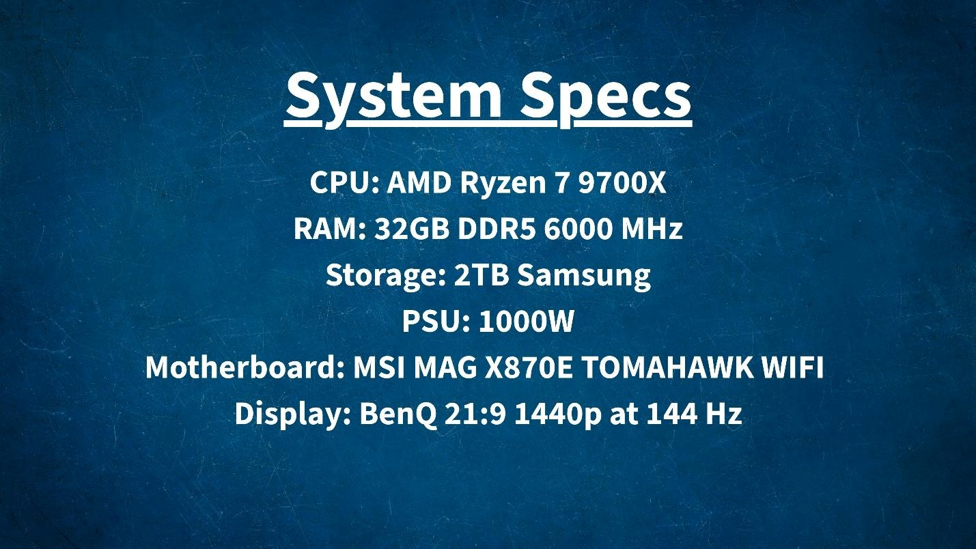
The first big piece of information is the processor I am using which is the AMD Ryzen 7 9700X which is a solid processor that can handle everything. It manages to maintain the PCIe 5.0 standard to optimize throughput for the GPU. This means that there is nothing bottlenecking my system in terms of graphical performance. Computing power that rests on the CPU does not affect the GPU testing from the results I have seen.
Most CPU utilization results have been far from topping out and have plenty of headroom with clock speeds reaching up to 5.5 GHz while maintaining an optimization level of around 50 to 60 percent depending on the load. Additionally, temperatures hovered around the 68 degrees Celsius at full loads across both benchmarking and game testing experiences.
Using 3Dmark, I ran four separate tests. Each one was designed for specific performance architectures. Steel Nomad is a testing benchmark for DirectX 12, which is often used when developing games using Unreal Engine 5, which is a very heavy application that uses a ton of resources, but it can produce incredibly detailed graphics. On my system, we saw an average of 82 frames per second.
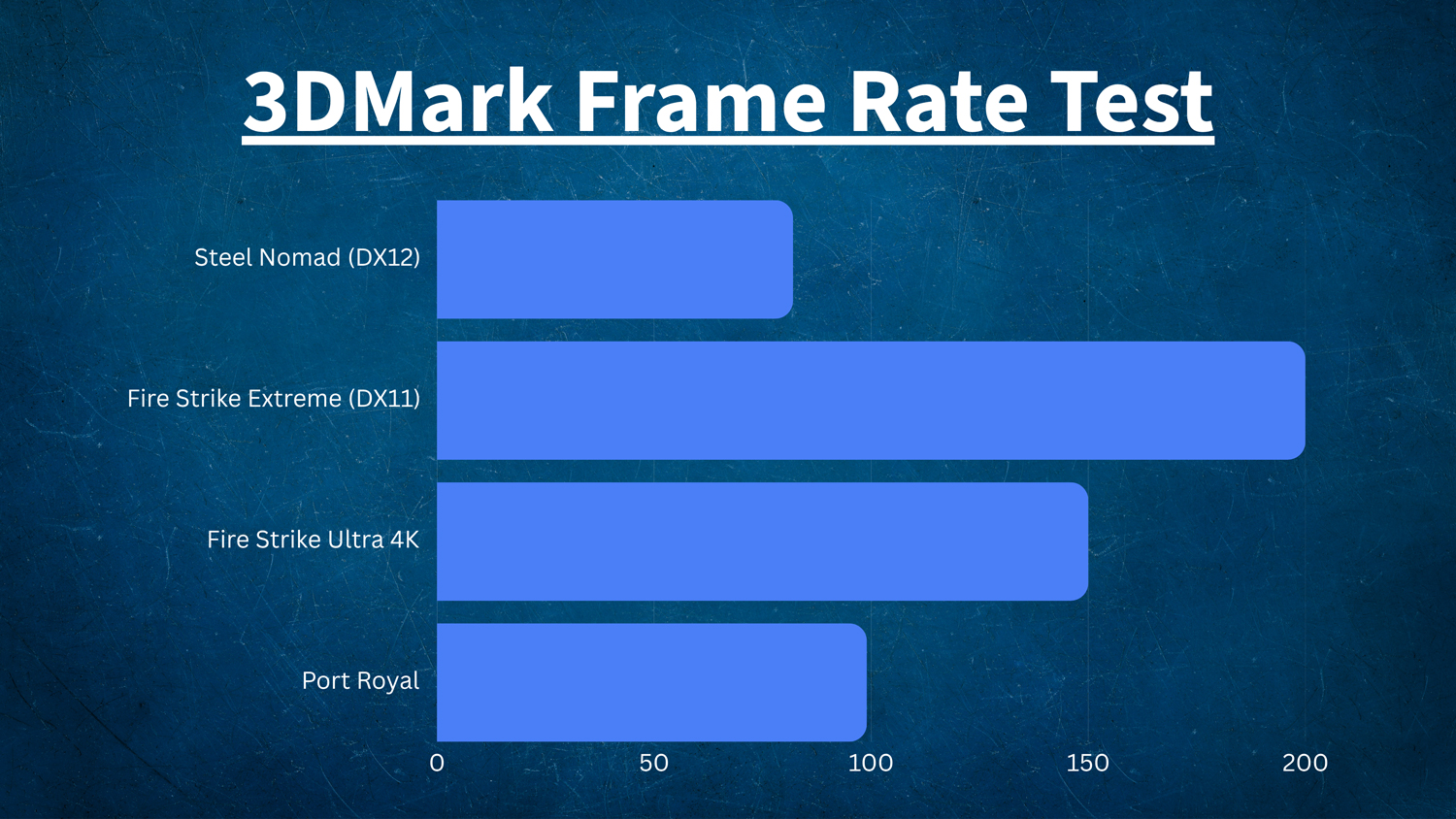
Fire Strike Extreme is a similar test for DirectX 11, which a lot of games still operate on. Thousands of games since 2009 have used this specific platform with many developers still using it today. Due to the length of time the platform has been out for, developers were able to leverage the technology, giving me over 200 frames per second in my testing. Taking it up a notch, I also ran Fire Strike Ultra 4K, which resulted in an average of 150 fps.
Finally, I ran Port Royal, which is a ray tracing test. This measures performance in regard to reflections and lighting arrangements within various games. Here we saw an average of 99 fps, which is also good! Ray tracing technology is still rather difficult to pull off in games, which is why a lot of titles that leverage this technology tend to lower the frame rate down to 60 fps to maintain performance.
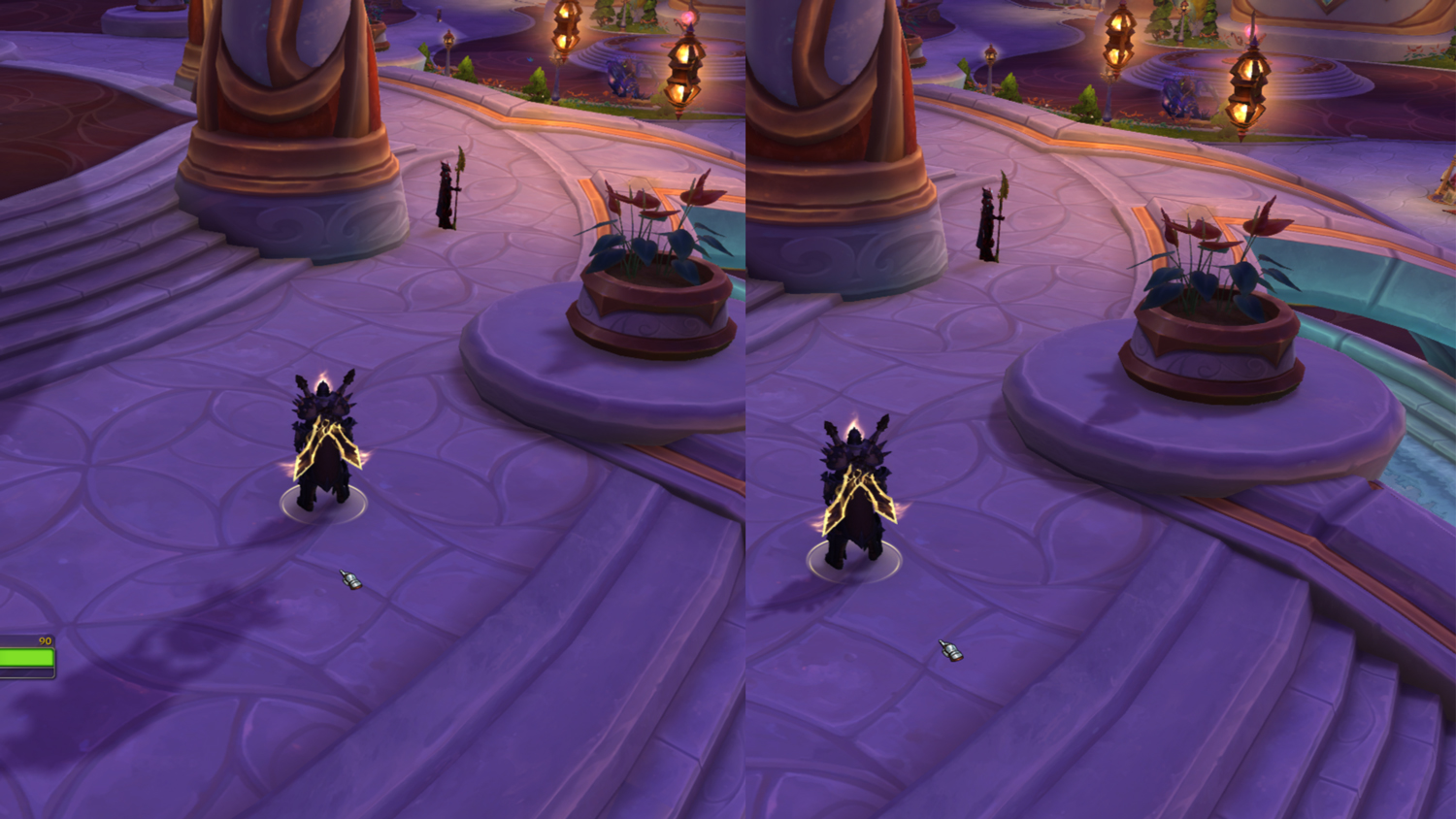
To show off the difference in ray-tracing shadows versus standard, I am going to pull some images from World of Warcraft. On the left side of the image above we see blurry shadows while the right side of the image shows more refined shadows. This creates a more authentic effect around the character model and the potted plan that adds to the level of immersion. Warcraft is not exactly a resource-demanding game, but due to the overall flatness and lack of super-detailed environments, it is easier to see certain elements truly shine.
Game Testing with Visuals
While frame rate performance is rather good here, let’s start looking at the visual artifacts that I experienced with a handful of games. The games I am going to be using today include Cyberpunk 2077, Red Dead Redemption 2, Forza Horizon 5, and Shadow of the Tomb Raider, which all have their own bult-in benchmark applications. Baldur’s Gate 3 and Crimson Desert do not have benchmark capabilities, so I tracked frame rate and overall performance using NVIDIA’s built-in overlay.
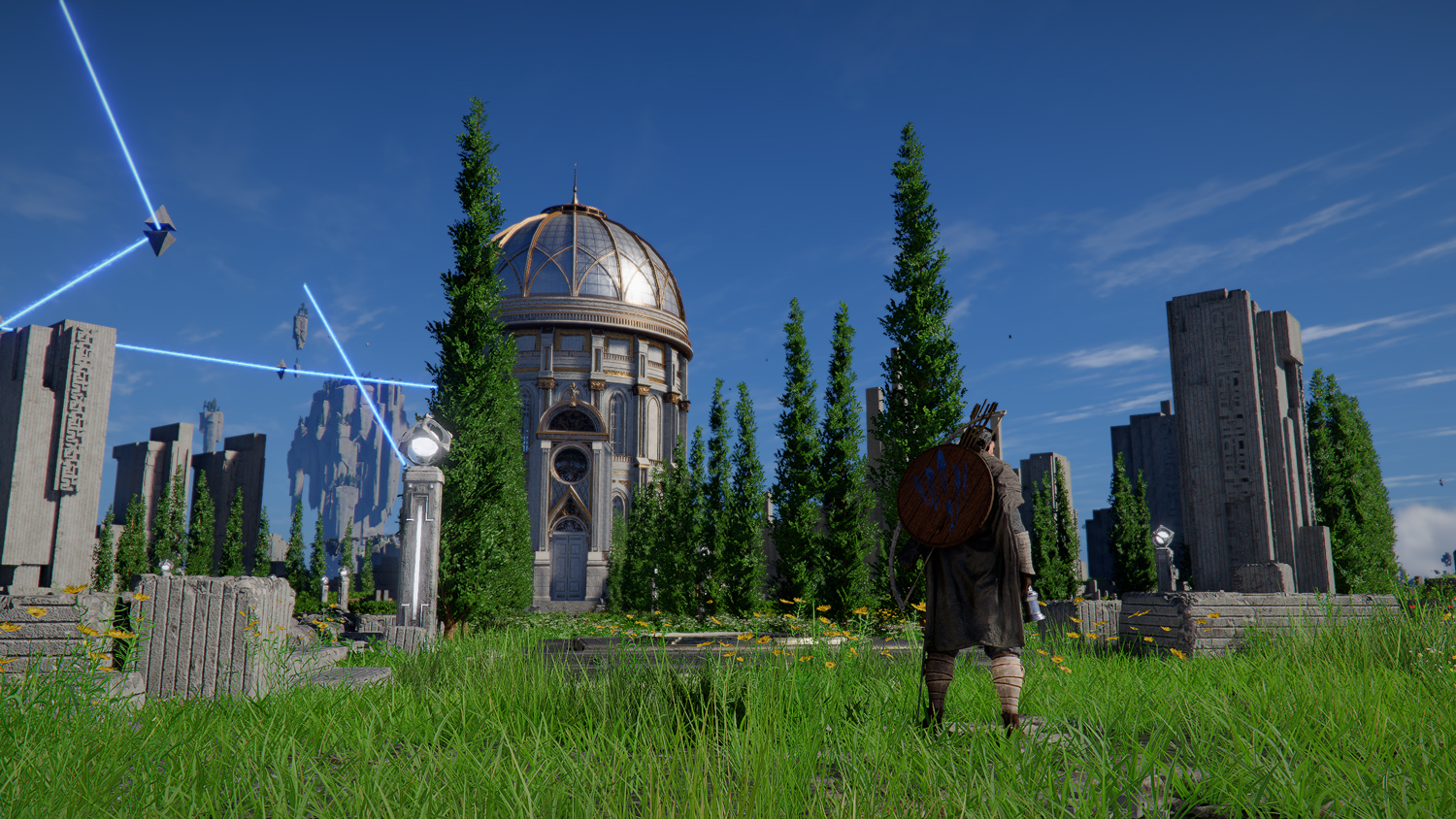
We are going to start with Crimson Desert, which looks absolutely breathtaking on the RTX 5080! As we see with the image above, we have superbly detailed grass with ample shadowing that really leverages the lighting techniques from the sun, which we can see reflecting off the domed tower in the distance. Other effects like the blue laser beams are smooth, especially with the added particle effects that surround the beams.
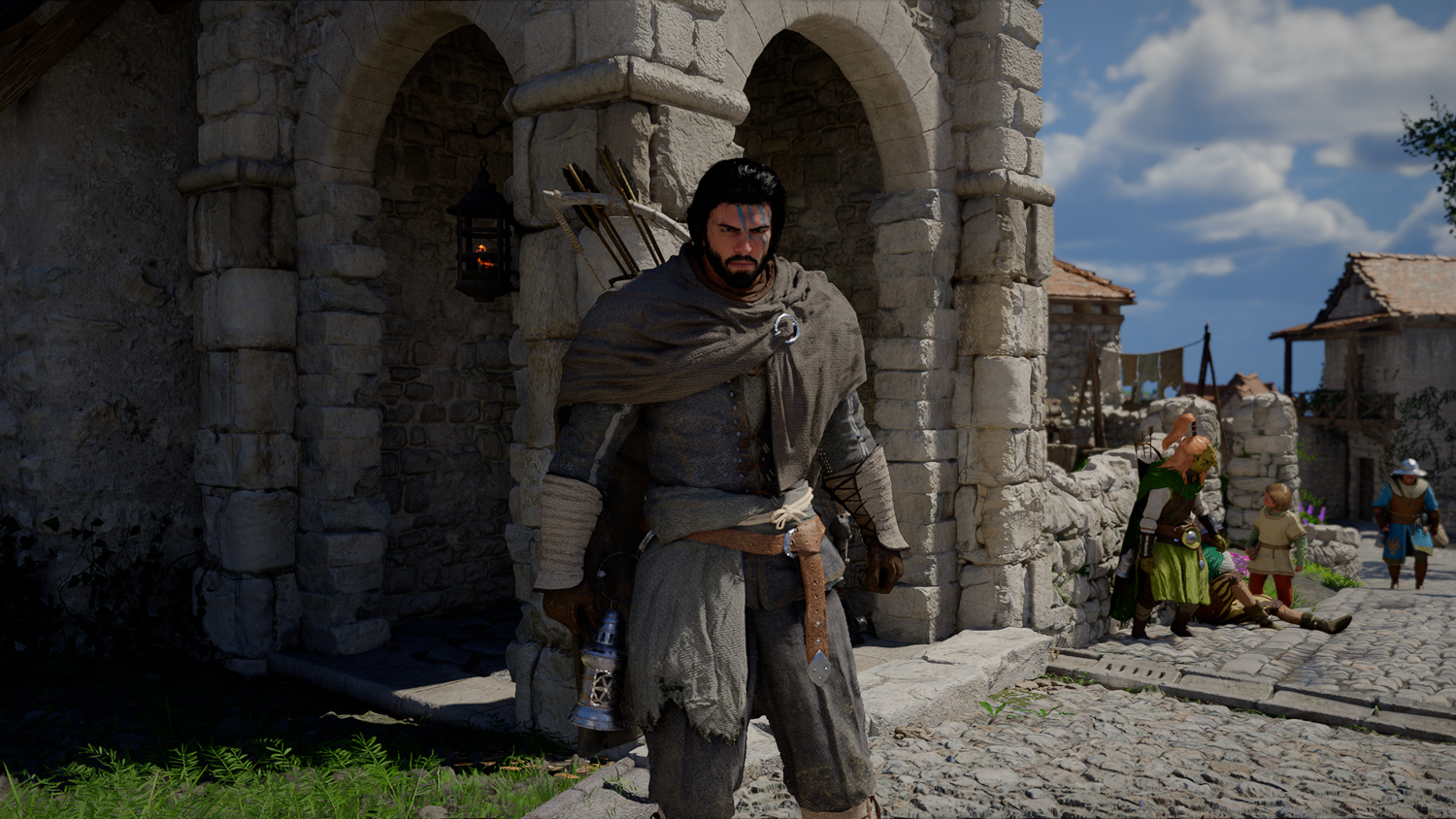
At a closer look here, we have the main character draped in dirty rags. The background is an ancient stonework accompanied by a ground stone pathway. We have a small patch of grass and dirt in the lower left part of the photo. What we really want to look at here is how detailed the cloth looks upon the main character. There is a realistic mesh layer here that stands out. We also see more in-depth lighting effects with how the light and shadow works to give a realistic visual tone to the main character’s outfit. The cobblestone effects both on the archways behind the character and on the ground, look absolutely jaw dropping!
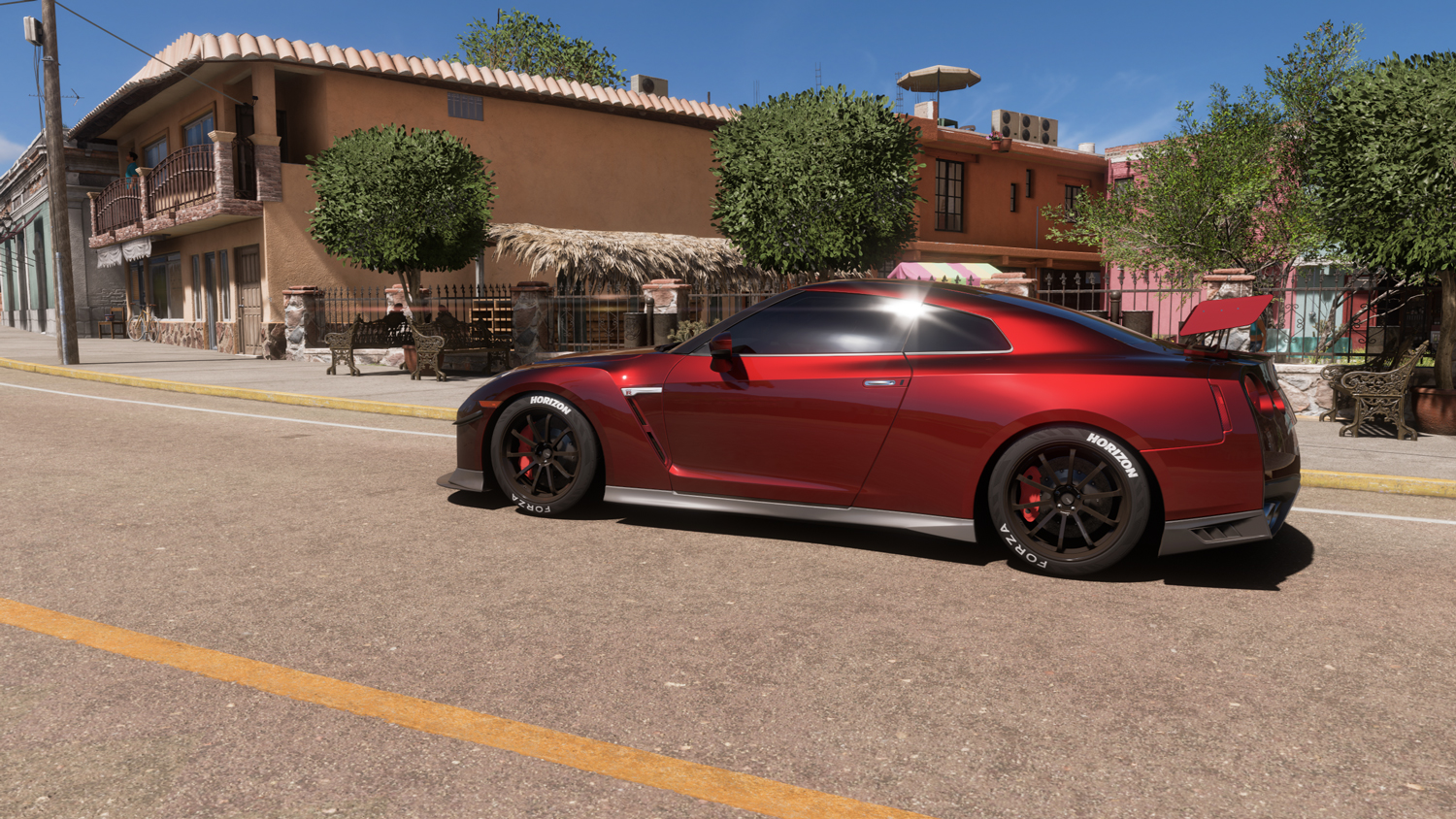
Forza Horizon 5 is also a fantastic example of lighting and shadow techniques. On the top part of this Nissan, we can see the sun reflect, but we also see a solid shadow underneath the car. There is no blurring, no staircasing, it is as smooth as you can get.
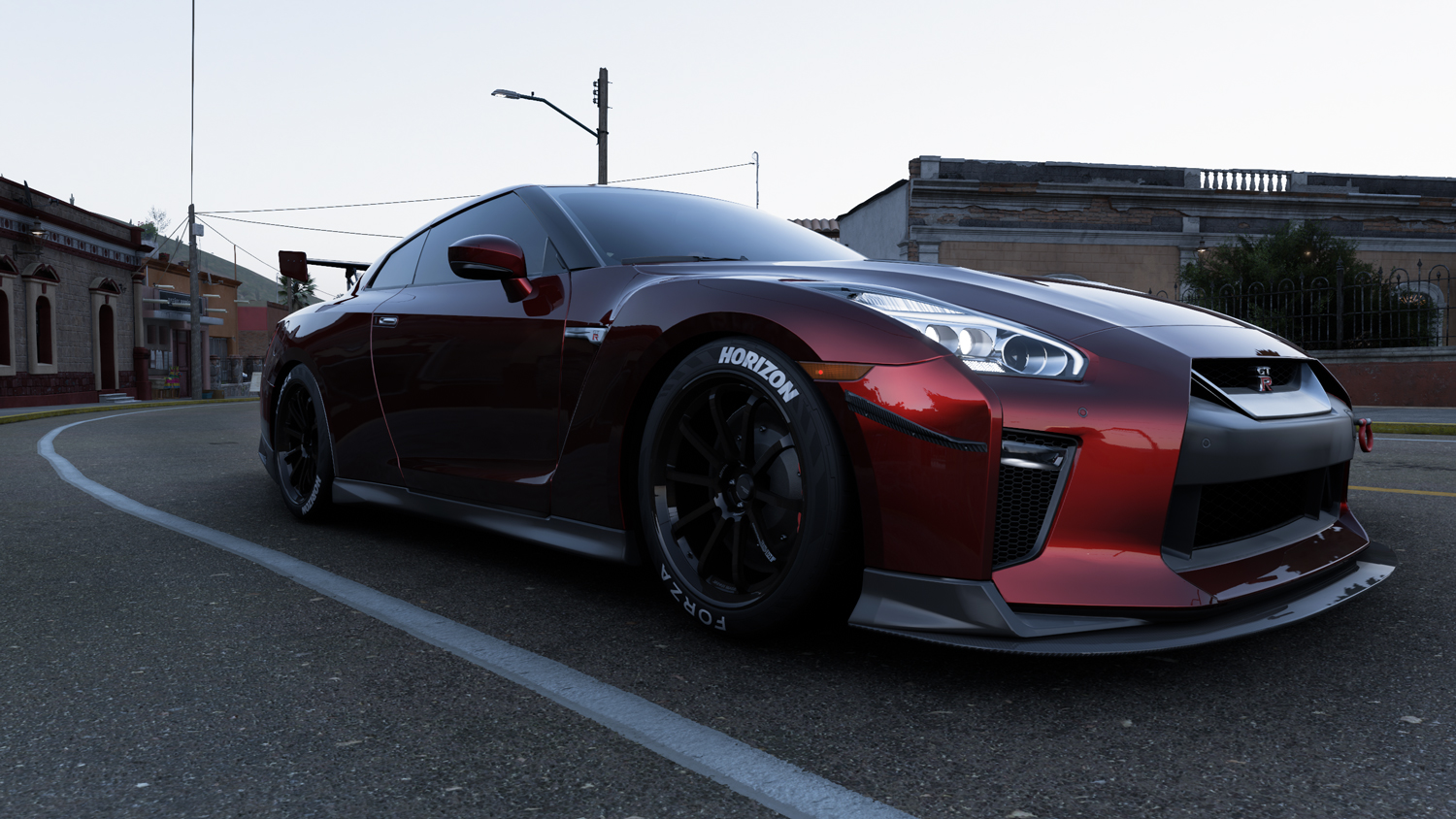
When we get closer to the other side of the vehicle, you can see some more detailed reflections in the shiny paint. Real-time reflections are in action right here, giving you a deeply immersive experience, especially if you are someone who likes to paint and photograph cars in game. Not only that, but we can see some amazing details in the tires and even some gradients. You can see where all the design work went by comparing the car to the power lines behind it, off in the distance. When zoomed in, you can see a jagged line, which is staircasing. This is a distant asset, which is important to how a game like this is made by lowering a background resolution to upgrade the foreground resolution to get that optimal car photo. This also works when racing.
One more image I would like to highlight is the lighting effects and details found in Cyberpunk 2077. Instead of using ray tracing as the primary lighting option, I chose to engage the path tracing option, which is more advanced and computationally intensive. Path tracing is a physically accurate simulation of light, therefore providing a more in-depth and realistic experience that feels more immersive.
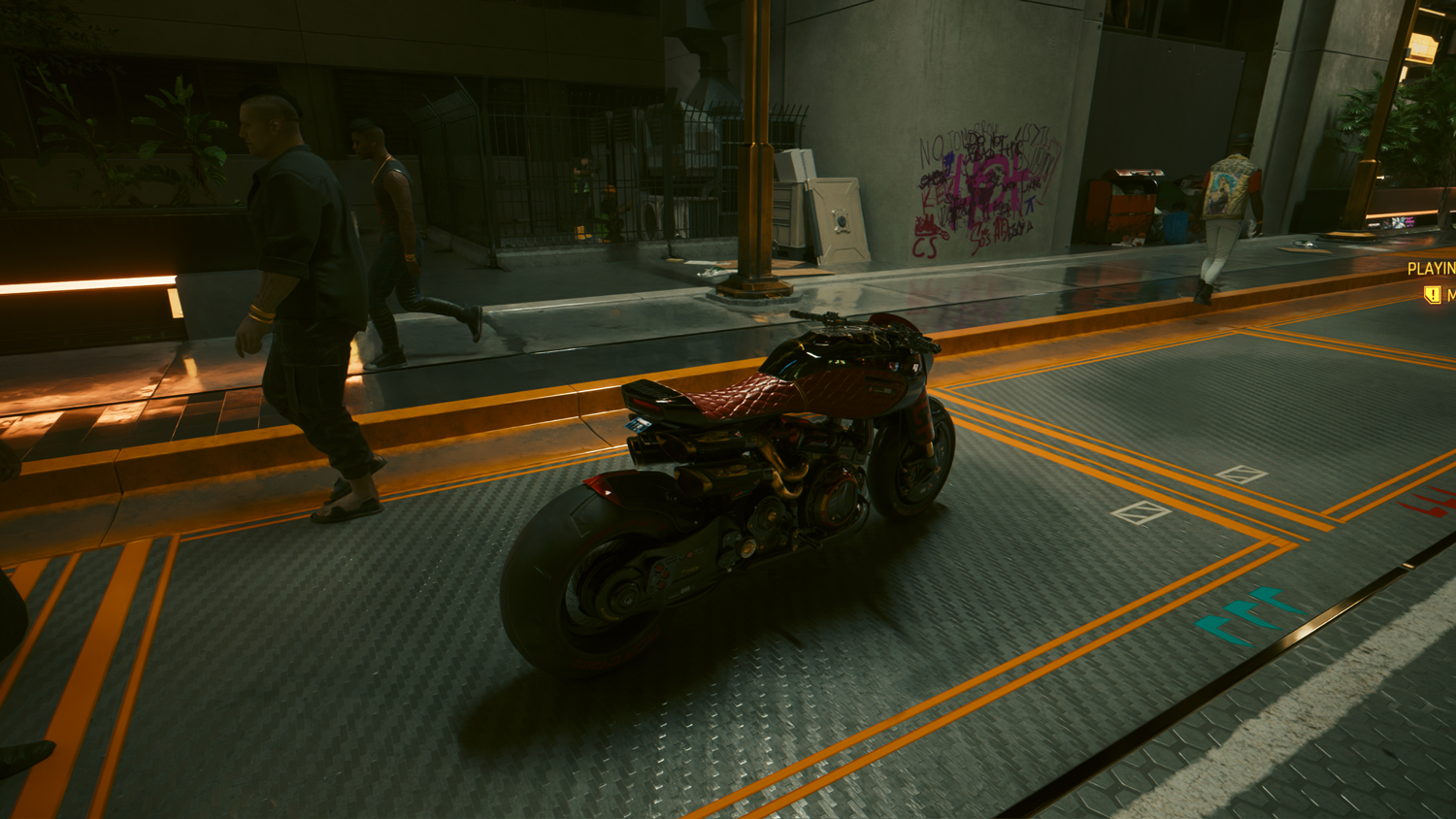
As we see in the image above, lighting has a major influence. Not only do we see a glowing neon bar on the left side of the image, but we can see how it reflects the glowing orange light up to a certain distance, just like how a real light would react. The mixture of textures on the ground with the bouncing reflective lighting arrangement enhances the entire landscape and adds to that futuristic tone the game sets. Personally, I love seeing how light reflects off the textured motorcycle seat. You can tell it has a semi-plush feel with stitching patterns you can see from a distance. This shows an absolute passion for detail and exactly how powerful a graphics card can be.
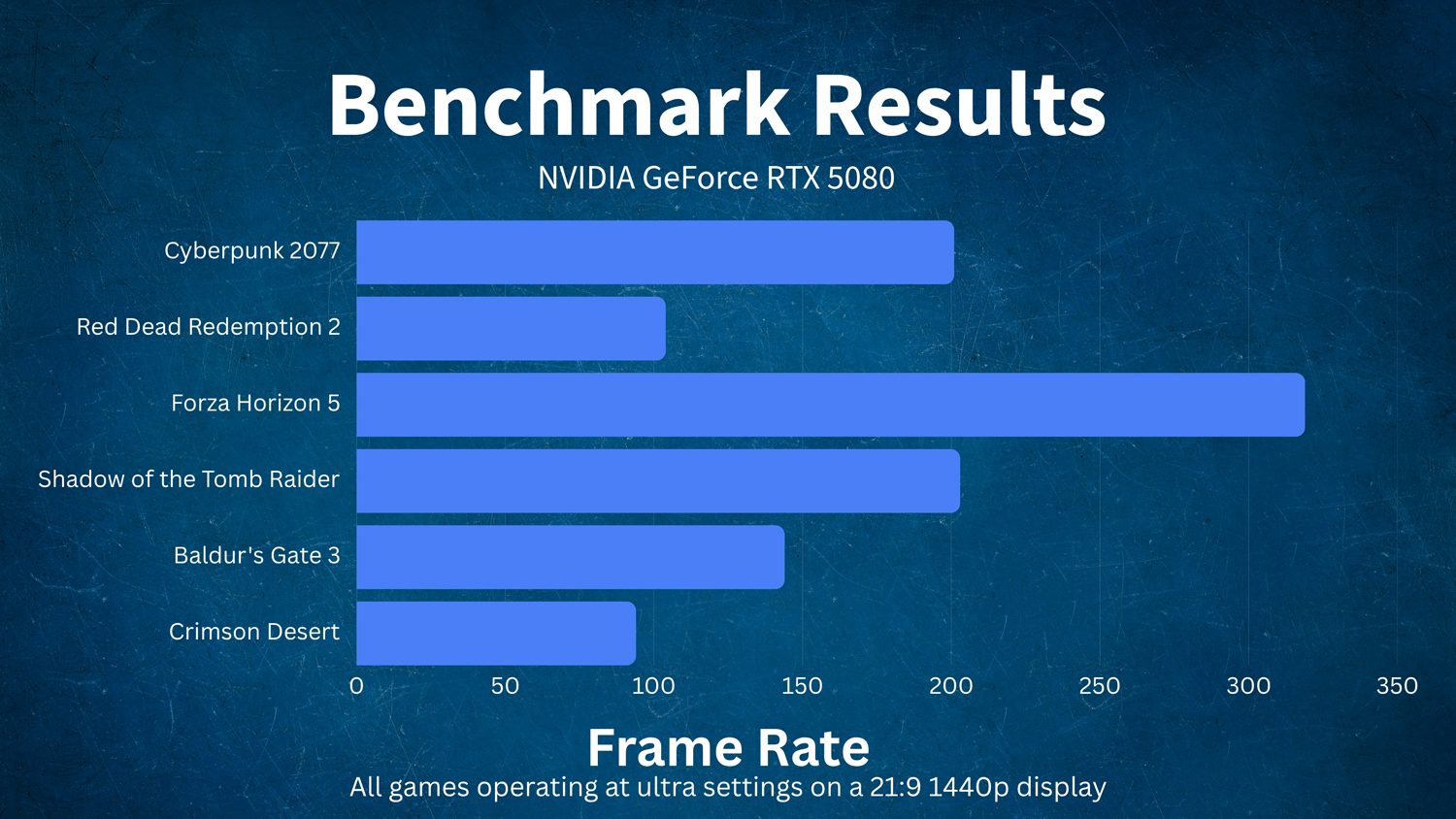
For a full breakdown of the games I have tested, here is a neat graph showing exactly the performance levels of the RTX 5080 within each game. Crimson Desert and Red Dead Redemption 2 are both very heavy games due to the living nature of their respective open worlds. We are talking about vast landscapes with tons of interactive NPCs roaming around. Forza Horizon 5 is a racing game that lacks human elements outside of various menus, which is why we see such a high-performance yield. Baldur’s Gate 3 has an interesting frame rate approach, which allows me to run at the maximum 144 Hz that my display can handle without screen tearing or any sort of misalignment within the virtual assets.
For Creatives
One great advantage to having a more powerful GPU is you can expect greater uplift in creative performance. Yes, having a better GPU means that you can render projects faster than before! NVIDIA GeForce RTX GPUs unlock access to the NVIDIA Studio platform of creative tools and tech, delivering industry-leading performance, exclusive RTX-accelerated AI and creative features, and Studio drivers optimized for maximum performance across 130+ creator apps. If you are someone who works with Adobe software, then we have some great news when it comes to streamlining your creative tasks.
We ran several Puget Systems benchmarks for the three most popular Adobe software programs: Photoshop, Premiere, and After Effects. Results were right in line with various scores recorded on systems that may be optimized with faster CPUs and greater memory pools. For the system that I have already highlighted above, we have some great looking results!
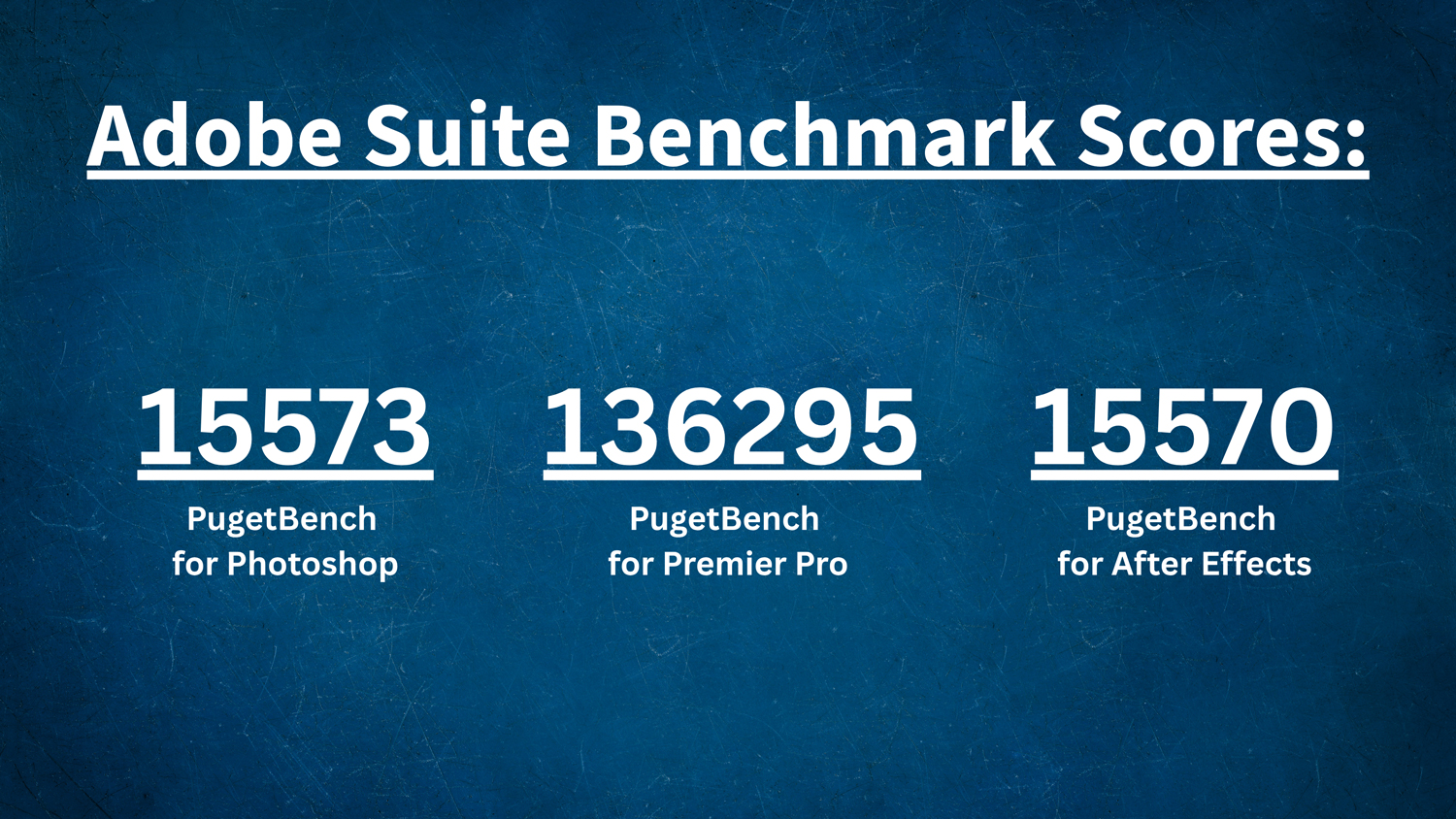
PugetBench for Adobe Photoshop had a result of 15573, which places the GPU in the above average area. We performed a standard test on Photoshop version 27.6 and it was completed in 8.43 minutes, which for a full benchmark test is great! It can perform various tasks quickly, such as RAW File Opening time taking less than a second! The longest task came down to file saving with PNG file types taking up to 20.41 seconds long to fully save. Meanwhile other tasks like lens correction filters take 13.61 seconds.
When running PugetBench for Adobe Premiere, I was surprised to see a massive 136295 score with a complete timetable of 5.16 minutes. When it comes to rendering speeds and frame rates, we have a solid spread across the board. When processing 4K, we see a high of 225 fps in DNxHR LB Intraframe along with some other callouts like 129 fps with Nikon N-RAW and 93 fps with RED R3D RAW.
Finally, PugetBench for Adobe After Effects nabbed a score of 15570, which places the RTX 5080 a little over average in performance results. Render wise, we see a lot of different results, which are still quite surprising! The 2D score in most standard cases equals to be 198.45 while the 3D score is 153.56, which once again places the RTX 5080 in the above average area. When we break it down into some notable results we can see 2D behavior animation presets render at 24.41 fps, realistic rain 2D render at 7.49 fps, and 3D solar system render at 3.44 fps.
When it comes to the creative aspects of the RTX 5080, we can say that it pushes some limits here and can perform quite well under various workloads. These numbers tend to go up when we include larger pools of memory and faster processing. Currently, the system I am testing this GPU on isn’t bottlenecked by the processor or memory exactly, but these are two elements that can drastically change how the GPU operates, especially if resources like CPU threads are taken up by various high-grade storage solutions as well as the GPU itself. In any case, if you are upgrading from a previous generation card of the same series (an RTX 3080 or 4080 for example), we do see a significant uplift across the three platforms.
Conclusion
Naturally, I find the RTX 5080 to be one of the best graphics cards of the modern day that will suit everyone running at 1440p or even 4K resolutions. If you are a user with a 1080p display, this would be considered overkill to me but consider upgrading your display if you are grabbing this card.
Ray and path tracing architectures both work nicely, delivering solid experiences without bogging down the rest of the system. NVIDIA also has other exclusive applications, like the NVIDIA Broadcast app, which I have talked about in the past. If you are a streamer, YouTuber, or content creator, I’d check that out.
Once again, a special thank you to PNY, which helped make this review possible. Not only do their products like the RTX 5080 16GB Dual-Fan Slim OC operate wonderfully, but they also happen to be the closest to MSRP pricing compared to other brands. If you are looking for a solid upgrade, this is one of the strongest recommendations I could make.
NVIDIA still has a lot coming down the pipeline, so for more information about what we talked about or if you are looking for some more tech-related articles, stick with B&H.
