
Keyboards, the tool you absolutely need when it comes to navigating a computer. There are so many different types of keyboards that feature a slew of elements that make some keyboards good for one thing, but not so good for another. How do we know what is best for you? By educating you on the features, how they work, and why you would get one for any specific reason. So, if you are shopping around for your next keyboard, this is the place to be!
Types of Keyboards
There are a bunch of different types of keyboards, but what makes them specific to certain scenarios? Can you use a gaming keyboard for your business computer? Absolutely, but you might find it to be a bit of a nuisance to use when it comes to entering large swaths of data, or maybe the feeling just doesn’t vibe with what you’re doing. That is why it is important to break down exactly what each type of keyboard delivers.

We can classify keyboards into different specialties. We have casual keyboards, business keyboards, gaming keyboards, creative professional keyboards, and ergonomic keyboards. Each one fits into a specific niche designed to give you a very specific feel. While you can have a business keyboard that is also ergonomic, it doesn’t mean that every ergonomic keyboard is made for business. There is a bit of crossover between a few categories, but not enough to shake up the core elements.
Casual
Casual keyboards are designed for the everyday person who doesn’t use a computer often. Most of the time, if you buy a computer, the casual user will be fine with the keyboard that comes in the box if one is included. There is nothing fancy with these types of keyboards as they are designed to just get the job done.

Because they don’t have many over-the-top features, casual keyboards can be quickly replaced without breaking the bank. I’ve seen a few range around the $10 to $20 price range, not often going above and beyond that price range.
Business
These types of keyboards look like the casual keyboard that comes with your PC, but they tend to have a bit more going on under the hood. Casual keyboards tend to have an internal membrane switch type (we will get into those in a second) while business keyboards may have mechanical switches.
Business keyboards tend to be designed specifically for enterprise environments. They are made for rapid deployment across multiple systems and have enhanced security protocols that encrypt various signals for added security. Sometimes referred to specifically as “Business Editions,” they cost a bit more than the traditional keyboard.

Those who type a lot tend to fall into the business-type of keyboard due to their longevity. Expert typists tend to reach over 15,000 keypresses per hour, and not any keyboard will be able to handle the speed or provide the accuracy needed to keep that momentum going. Business keyboards can provide that level of performance without literally breaking under the weight and speed of one’s fingers.
Gaming
If you are like me and really love gaming, then you’ll want a solid gaming keyboard. In many cases, a standard membrane keyboard will do the trick in a pinch, but don’t expect top performance out of them. Gaming keyboards have a huge price range going from roughly $60 for an entry-level keyboard all the way up to several hundred dollars. Granted, the most expensive models out there tend to be custom-made keyboards, but we aren’t going to focus on those right now.

Gaming keyboards often feature mechanical switches, some sort of custom lighting effects, and come in many different shapes and sizes. They also tend to be mostly wired with wireless options being few and far between. A new trend in gaming keyboards are hot-swappable switches, which allows you to outfit the keyboard in ways that conform to your liking. A few brands allow you to install third-party switches while others want you to only use a specific brand, typically their own. We are going to break down the most popular switches and what the differences are a bit later.

Another feature that gaming keyboards may have include programmable macro buttons that perform multiple functions in a row with a simple press of a single button. These tend to be useful in competitive games where you want a bit of an edge. Some gaming keyboards do require free, downloadable software in order to use these additional functions (among other abilities) to be fully utilized. A few gaming keyboards are starting to feature knobs and dedicated buttons for media controls, scrolling through web pages, and more.
One of the growing tech concepts that came from the custom keyboard world that is now becoming more widespread is hot swappable switches. This allows you to change the inner mechanisms that determine your typing experience without having to disconnect your keyboard. Right now, these are typically found in gaming keyboards but are slowly spreading out to other types. They are massively popular because instead of swapping out an entire keyboard upon failure, people can just pull out a switch or two, replace them, and be back in business.
Creative Professional
We are now entering an area of the keyboard world that I would call “creative professional.” These tend to be keyboards that are designed for a specific purpose or in conjunction with special software on a creative level. While you can use a standard keyboard with various hot keys to perform the tasks, these types of keyboards offer dedicated keys designed to simplify your workload.

They may also feature various glyphs and iconography designed to streamline your productivity, placing functions literally at your fingertips. Keyboards like the Blackmagic Design DaVinci Resolve Editor is one of these types of keyboards that goes beyond what a traditional keyboard features. In addition to the knob, there are additional keys that provide an easier way to perform certain tasks like cut, trim, and more!
Ergonomic
I like to place ergonomic keyboards into their own category because they are made for all types of people, specifically those who may suffer from pain brought on by continuous typing. Ergonomic keyboards tend to have this unique look typically in the form of a wave with the occasional split down the middle. These curves and buttons are designed to provide ease of use, matching the natural positioning of your hands and fingers.

Ergonomic keyboards tend to start at a fair price and can get more expensive, scaling to the feature set. Most ergonomic keyboards are equipped with membrane switches which provides a smooth feel to better accommodate typists. A few also have integrated wrist rests and keys that are easy to reach from all positions.
Although, the landscape is beginning to change just a little. More expensive ergonomic keyboards are now incorporating mechanical switches, RGB colorization, and a whole lot more! These tend to be crossover keyboards which are not uncommon. Manufacturers like Logitech, Keychron, and plenty of others are embracing the wild world of ergonomic keyboards, making different types for all different scenarios from gaming to business use!
Keyboard Technologies
Aside from the general purpose of specific keyboards, there are tons of technology packed into the body of each one. A few keyboards are thin, some are thick. There are a few with backlights while others don’t have any. Switches are also incredibly important when it comes to your keyboard and understanding these gives you a better idea of what you’re getting out of that specific keyboard.
Switch Types
Depending on the keyboard you are using also depends on the technology under the keys. This has a huge impact on the quality of your keyboard while also narrowing down that keyboard’s specialty. This is often determined by the switches which is the mechanism that activates by each key press. For example, I am typing this on a keyboard that uses plunger switches, which feature a plunger on the bottom of the key that pushes down against a dome. The dome has a carbon center that touches what is known as a key matrix, and that produces the words that you are reading right now.
Membrane
Some keyboards use something called a membrane, which uses a singular rubberized material that stretches from one side of the keyboard to the other. Patterns are printed on the membrane and when you press a key down, it closes an electrical circuit, allowing you to type whatever you want. Membrane keyboards are the most affordable types out there, which are good for the wallet, but they lack any sort of solid tactile response. They are also much more difficult to repair and, in many cases, because they are inexpensive, you are better off just buying a new one. They are often disposable and found within many casual-friendly keyboards.
Mechanical Switches
We also have mechanical switches which are slowly starting to become standard across a lot of keyboards. Gaming keyboards tend to use mechanical switches because they offer a ton of benefits. Switches also come in different flavors ranging from quiet and silent types to loud and sometimes obnoxious types.

All keyboard switches have something called actuation force which isn’t as impactful for other keyboards but are super important when it comes to keyboards with mechanical switches. This is the amount of pressure it takes to activate the switch, and not all types of switches are created equally as we are about to see.
Mechanical switches can be boiled down to three main types: linear, tactile, and clicky. Each one has a color coordination that allows folks to discern which one means what. Linear switches are red, tactile switches are brown, and clicky switches are blue. There are tons of other subcategory colors like yellow, silver, and black, but even those will fall into one main category.

One big note that I have to make is how some manufacturers may use different terminology when referencing their switches. Not everyone sticks to the basics and there isn’t a real industry standard when it comes to switches. For example, Gateron has a switch series called “North Pole,” which is one of their specialty linear switches. These tend to be sold separately and are considered specialty switches that tend to come in custom keyboards. Otherwise, the following switches are the most common out there that you will find in most stock gaming-focused keyboards.
Linear
Linear switches are smooth, great for rapid keypresses, and seem to be the all-around default for many keyboards. They also feature a low actuation force, no clicking sound, and no physical bump when you press them down. Chances are if they are smooth and you’re not feeling much feedback, it is a linear or red switch.
Tactile
Tactile switches change it up a bit. These brown switches feature a physical bump that you feel when pressing them down typically right near the actuation point. This provides a sense of feedback for players who have mastered the art of feeling where that press is. There is no clicking sound when pressing them down, but they are a tiny bit louder than linear switches. Yet, they are not as loud as the next ones.
Clicky
Coming in the blue color, clicky switches are the enemy of quiet environments. They have a bump much like tactile switches and have a loud audible click that sounds reminiscent of the typewriter days. They have a firm actuation force which requires you to press down just a bit harder to get any sort of action. Clicky switches have fallen out of style with modern gamers due to their ability to be heard over mics and audio equipment.
Other Colors
As I mentioned before, there are a bunch of other colors out there that seem to embrace the various aspects of the previously mentioned switches. These don’t have specific names and are often referred to by their color. Black is linear with heavy actuation force, yellow switches are smooth and made for speedy presses, green is loud and have tactile features.
These types of switches tend to be found in custom keyboards and are manufactured by a bunch of different brands with the three most popular being Cherry, Gateron, and Kailh. You’ll be surprised by what keyboards use these brands as I have found them in both gaming and non-gaming keyboards alike!
Everything Else
Finally, we have the “everything else” type of keyboard, which are rare and slowly being phased out due to the various contacts becoming easily worn out over time. Metal contact and foam element keyboards are the two types that are still floating around but not often used. Metal contact switches have a spring-loaded key which is similar to mechanical keys but have a strip of metal on the bottom of the plunger. When the two metal contacts meet, a letter pops up on the screen! The foam element keyboard works in a similar way but with a piece of spongy foam between the bottom of the plunger and the metal strip. Foam element keyboards are a bit more reliable and offer a more tactical feel than the metal contact type.
Hall Effect Switches
I have to give an honorable mention to the Hall Effect (HE) switches because they are the next upcoming player in the keyboard switch space. These are switches that use magnetic fields instead of physical contacts. This allows keyboards to have adjustable actuation points, enable gaming-centric features like Rapid Trigger, and also provide faster response times. They are at the top of the list when it comes to keyboard switches. Unfortunately, they do cost a bit extra and are often found on custom keyboards.
Wired vs. Wireless
As I mentioned before, you’re going to have two types of keyboards that revolve around connectivity options: wired or wireless. Depending on what you are doing depends on which one you should get. They each have their own pros and cons, and while I personally prefer a wired keyboard, some folks may opt for a wireless one. So, let’s break that down.
Wired
Wired keyboards are the most reliable in terms of connectivity. You don’t have to worry about battery upkeep, and you maintain a level of performance that may be limited on wireless keyboards. This includes enhancements like faster response times and lower latency. The downside is that you must run a cable from your PC to said keyboard, which may deem an annoyance especially if you are like me and tend to place the keyboard at certain angles, depending on what you’re doing.

Wired keyboards are simple: you simply plug them into any USB port, and they should work without a hitch. Some folks will look at the back panel of their computer and assume that they need the fastest connection so that their keyboard will work without issue. But that isn’t true.
Keyboards can operate on the USB 2.0 interface, which offers a bit of electrical power and data transfer speeds up to 480 Mb/s—not the fastest speed in the world. But, for what the internals of a keyboard does, it really doesn’t need anything faster than USB 2.0 speeds. Essentially, as you press a key down, that key is telling the motherboard what is happening and that signal gets sent to your computer, giving you the words you are seeing right now.
Keyboards don’t just send data to your system once you press a button, it happens constantly like a signal. The speed at which this data is transmitted to your computer is called the polling rate, and they can get incredibly fast depending on the keyboard. But in almost every case of keyboards that can reach over 1000 Hz polling rate, they must be wired. Those types of keyboards are often found in the gaming world where, once again, speed matters.
Wireless
Wireless keyboards are becoming more common these days because people yearn for cable-less freedom from the PC. Not only are they convenient but it makes your desktop look a whole lot nicer without the stray wire hanging about. Wireless keyboards don’t need to be physically connected to your system and operate over either radio frequency or Bluetooth; sometimes both. Each type of wireless protocol has its own pros and cons, but with keyboards that offer both options, you get the best of both worlds.

Sometimes people will bring up latency as a main issue to pick wired connections over wireless. Fortunately, with the rise of technology, wireless latency doesn’t negatively impact typing or performing basic tasks. It does matter when time is of the essence, which is why for gaming, it is often suggested to use a wired keyboard.
Radio Frequency Keyboards
Radio Frequency (RF) keyboards tend to include a receiver which plugs into your computer and operates on a 2.4 GHz radio signal. These receivers are often particular to the device that it comes with so you can’t mix and match different receivers with different keyboards. This enables the keyboard to be used immediately as if the keyboard was directly wired to your system. RF signals are more reliable and stronger than Bluetooth, but they also tend to drain the battery a little faster.

RF keyboards also have the added benefit of being plug and play, meaning there is less setup needed to get started. While rare, if you happen to find a keyboard that offers only an RF signal, it will often be cheaper than the Bluetooth counterpart. But these days, keyboards tend to feature both technologies.
Bluetooth Keyboards
Bluetooth keyboards connect to your system via wireless protocol that doesn’t require any sort of receiver. Some manufacturers like Logitech happen to leverage beamforming Bluetooth technology that enables a single device to connect up to multiple systems. For example, their Signature Comfort Plus MK880 keyboard that I am using right now can quickly swap between three devices with the press of a button. This is useful for folks like developers who may design something on one computer, have it render, and then need to quickly swap to another system.

The only downside with Bluetooth technology is how vast the versions are and that can influence your overall experience. Some Bluetooth versions are slower than others, which could cause a bit of lag or miscommunication between your keyboard and your system. More recent versions of Bluetooth technologies tend to incorporate all the older versions, enabling you to use a Bluetooth 6.0 keyboard on a system that may only have Bluetooth 5.0, for example.
Knobs
Another concept that is becoming more common in keyboards is the utilization of knobs! You might find it a bit odd, but they tend to be quite useful. Most keyboards that feature a knob will also have some sort of software that allows you to customize what that knob does. You can have it perform tasks like adjusting volume or maybe you want it to control a cursor size for when you are working on creative tasks. Sometimes, video editors will change it to quickly speed through the timeline of their project. You don’t always need to have a knob, but I have found them to be quite convenient!
Risers
Some keyboards will have a fixed height; others will have risers which are the little feet under the keyboard. Even better, there are keyboards with adjustable feet or multiple height options. It sounds like something that doesn’t usually matter, but as someone who has been typing for over 25 years of their life, I can tell you it absolutely does. It has everything to do with comfort and preventing the dreaded carpal tunnel which could cause massive amounts of stress and strain on your writs and hands. Having more options means you have more chances to prevent potential stress for a long-lasting typing experience. Ergonomic keyboards tend to have this built in.
Sizes
I wouldn’t say that this is necessarily a technology, but this is something to pay attention to at the very least. Some keyboards are designed for smaller desks or focus on one aspect of computing over others. Keyboards go from 100% down to 60%, and every step of the way something is removed, resized, or adjusted to better accommodate the user.

Full sized or 100% keyboards feature everything a traditional keyboard is supposed to have. We are talking about the standard QWERTY key layout, a numpad, function keys, and more! Then we have 80% keyboards also known as “Tenkeyless” which removes the numpad completely. Everything else is still intact. The 75% keyboard condenses a few buttons like “insert” and “page up” and instead gives you custom macro buttons instead. They do have a default option but most times they can be customized using manufacturer software.

Now, I know what you are thinking, keyboards can’t get any smaller. But you’re wrong, they absolutely can get smaller and they do! There are 65% keyboards which remove more keys and even 60% keyboards which remove even more than the last one! When you get into these sizes you start to see a lot of modifier buttons that enable additional functionality between each key. For example, those “insert” and “page up” keys might still be accessible as long as you hold another key before pressing them. Additionally, this is where we stop seeing dedicated function keys, which are then combined with number keys.
Questions and Answers
Okay, we spent a lot of time going over some of the basic technologies inside keyboards, the different types, and so on. It is easy to say that you may have a few questions. So hopefully I can answer a few of them right here.
Can a gaming keyboard be used for typing?
Honestly, most keyboards have multiple functions and many of them can be used to cover multiple basis. You can type on a gaming keyboard just like you can use a gaming keyboard for business or casual use. But is it the best? Most likely not. A lot of keyboards can be used for both work and play but it doesn’t mean it should. If you are spending a lot of money on a gaming keyboard that has several must-have functions, there is a good chance you also don’t want to type on it all day long. It will wear down your switches faster and gives it a bigger opportunity to fail when you least expect it. I personally swap between keyboards for this reason alone.
What can damage a keyboard?
A lot of things could cause some keyboard trouble, which is why it is important that you clean them off every so often. If you have a keyboard with mechanical switches, you can actually remove the keycaps to get underneath them. I have a little brush that I like to use to get rid of the debris that finds its way between my keys. If you don’t have a mechanical keyboard, some canned air will do just fine.
Which keyboard switch is best?
Honestly, there is no singular best keyboard switch, only best switches. For instance, I really like linear switches for some situations while tactile are best for others. Sometimes a mix of both really helps, like when I play games, my WASD keys might be different than the rest of my keyboard because those are going to be my most used keys for moving around. As I said before, HE switches are currently on the rise and seem to be the best for gaming.

If you are really unsure about what switches to get, you can typically request a sampler which includes several keys that you can press down and get the ideal feel. These tend to be manufacturer specific.
What is a low profile and normal profile keyboard?
These are two different styles of keyboards that relate to the overall form factor. Low profile keyboards tend to be thinner and lighter, ideal for ergonomic builds and traveling around with. Normal profile keyboards are standard keyboards. More than likely, you are using a normal profile keyboard as we speak.
Is there a difference between Windows and Mac keyboard?
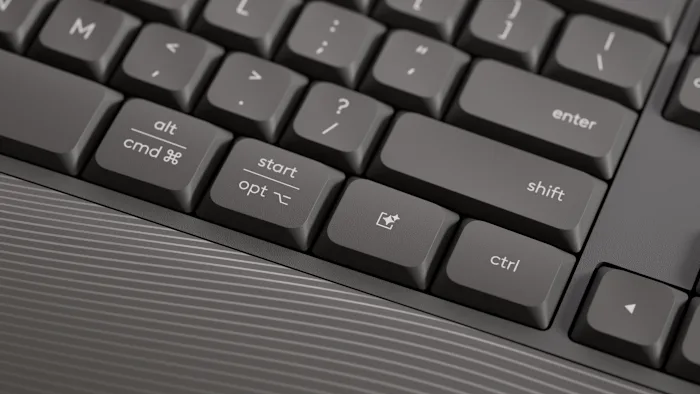
Absolutely there is! Mac systems tend to have different keys than Windows systems which means you may have to pay extra attention to which keyboard you are buying. But there is also some good news as many manufacturers are starting to embrace the hybrid design that incorporates both operating systems into the same keyboard. A few might feature a physical switch while others have multiple glyphs on the keys themselves.
How to Buy
We went over a bunch of information here and now it is time to shop around. How do you know which keyboard to get? What if you want multiple? It is quite easy.
First, figure out what you are using the keyboard for. Is it for typing? Gaming? Maybe you want it to do multiple things at once? These will be the building blocks leading you to the next step.
Once you figure out the purpose, you can then start going deeper. Looking for an ergonomic keyboard? Well, there are a few to choose from!

Finally, you may have the option to get a wired or wireless version as well as color. Choose what you want and then you’re done!
If you are looking for gaming keyboards, you pretty much do all of this and then look at the types of switches you want. You might not have the wired or wireless option, so you have to begin to weigh your options. If the keyboard you want is wired but you want a wireless version, you have to either make a tough decision or find an alternative.
If you are looking for anything in particular and want a few examples of some great keyboards for each category, check out this article and we can dive into a few great options to get your search started!
