
OLED panels have become massively popular over the last few years, growing from a niche technology into something more widely adopted by entertainment enthusiasts all over. While it is praised for its vivid colors, wide contrast ratio, and lightning-fast performance, it was seen as a bit heavy on the wallet. Luckily, the price has started to become more standardized across the board, leading people to easily embrace the technology. This brings us to ASUS and their Republic of Gamers Stix OLED XG32UCDS gaming monitor. While it manages to balance performance and price, the question still remains: Is it worth it? Today, we are going to answer that question and many more.

Specifications
Let's start by looking at the specifications of the display. We got a 31.5" 16:9 OLED panel with a resolution of 3840 x 2160, 165 Hz refresh rate, and 0.03 ms response time, all delivering great visuals with enhanced speed so you can experience games unlike ever before. Both G-Sync and FreeSync Premium vertical synchronization technologies are built into the display for smoother performance in various scenarios. The display also has a wide 1500000:1 contrast ratio, 1000 nits of peak brightness, and support for 1.07 billion colors with true HDR10 capabilities, meeting 99% of the DCIP-P3 color space. It also has two HDMI ports, one DisplayPort, and a USB-C input.

On paper, this is an incredibly promising display packed with tons of features that would matter to those who really want to fully immerse themselves in their favorite games. And for a while now I have been using it as my daily driver, trying out tons of games and playing various forms of media to really see if my real-world experience matches what we see here.
I'll note that this particular display features QD-OLED technology, which uses quantum dots to produce pure red, green, and blue colors directly, enabling the screen to produce higher color saturation and image volume. This adds to the overall color accuracy, making it better than most traditional OLED displays.
Scalability
Whenever you are using a 4K display, you should also think about your graphics card. This is because not all cards can produce games with high resolutions, detailed textures, and fast frame rates, leading to misunderstandings of how graphics cards and displays interact with each other. You can have highly detailed images and assets, but it could reduce the speed at which you play and vice versa. This is why resolution scaling technologies like FSR and DLSS are around, to help give you the most of your GPU and display while retaining a level of consistency when it comes to interacting with your games.

For this review, I am using an AMD Radeon RX 9070 XT, which can deliver games in 4K resolution at around 60 frames per second. When I bump the resolution down to 1440p, I can run resource-demanding games at even faster frames. But when I have this behemoth of a display, I must go big. Personally, I've never been bothered by playing at 60 Hz, but if you are someone who wants something a bit more flexible, you might want to invest in a nicer GPU to get the fullest experience—something along the lines of the NVIDIA RTX 5080 or even an RTX 5090!
Performance
In less demanding titles like World of Warcraft, the monitor ran great at natural 4K resolution with frame rates getting as high as 120 Hz. Color-wise, the game looked great. Environmental edges and character armor elements both felt sharp. I didn't see any staircasing, artifacting, or any other visual hiccups. Even gradient effects flowed properly without any noticeable imperfections. Overall, it felt like a perfect mixture of color and motion that paid off in ways I didn't expect. Of course, because Warcraft is a very colorful game, I noticed a ton of vibrancy thanks to the display's HDR, which brings out a ton of those colorful details in everything from the main menu to the effects I discussed before. The display might be a bit overkill for a game like this, but it sure does make it look pretty!


If we go a step further and look at one of this year's most popular games, ARC Raiders, we get a great look at how contrast and darkness leverage the power of the OLED panel. Unlike Warcraft, which places an emphasis on vibrancy and brightness, ARC Raiders acts as a measurement of how well shadow effects and how neutral visual tones stand out.


Since OLED panels can get the deepest blacks compared to any other type of panel, it makes this particular game even more impressive. When something dark is on screen, the area of pixels on the display shut off completely, producing the purest level of darkness anyone can possibly have. In a game like ARC Raiders where dim lighting plays a huge part in the overall atmosphere, it changes how I approached certain scenarios.


While scouring for resources, I found my experience to be a bit more tense because I couldn't see anything until I shined my flashlight on it. I had to rely on my hearing to tell if someone or something was near me. There is an added benefit here as glowing elements can cut through the shadows, potentially giving away enemy locations. Needless to say, the XG32UCDS performs wonderfully in this circumstance.
Finally, I threw on some Cyberpunk 2077 to get a feel of how the dynamic lighting effects would play into my experience. Lo and behold, my conclusion was just as I expected. To sum up the experience in one word it would be "awesome." From the darker shadows to the bright sun on the outskirts of Night City, Cyberpunk 2077 feels like an entirely new game that I have already played over and over again.


I specifically paid attention to the neon lighting that is almost everywhere within the city and noticed how much more vibrant the colorization was, especially when you look at neon lights that bathe the streets of New York City. There is a sense of realism here that helps build the case for switching over to OLED.
Beyond Visuals
The XG32UCDS is a versatile display that provides gaming enthusiasts with plenty of neat features on top of just delivering outstanding performance. It features Aspect Ratio Control so you can change the presentation of what you are playing, which is great for retro games or legacy titles that opt for the 4:3 aspect ratio. There is also GameVisual which has preloaded visual effects to best accommodate the type of game you are playing. This covers Racing, MOBA, Cinema, RTS/RPG, FPS, sRGB, and Scenery modes. I swapped each setting and found them all to be incredibly useful for their given scenario, but I still preferred the color of RTS/RPG mode for mostly everything I ran.

I played around with the GamePlus feature which enabled me to add various on-screen tools. Stopwatch, crosshair, timer, fps counter, sniper mode, and alignment tools all provide an added benefit to my experience. I didn't use them all the time, but I found these added elements to be useful for those who are really trying to practice their skills in the competitive world. I didn't have much use for a timer or stopwatch, but the fps counter sure did come in handy when it came to this review!
One final bit that I noticed that I really liked about the display is how the included stand features a threaded inlet to connect webcams and other mountable devices. Streamers can connect the webcam and adapter to this point to streamline their setup. If you like to have your screen as high up, you might want to invest in some sort of extension to get a better angle. Otherwise, I found this to be quite the neat add-on.
One final neat feature is the 15W charging via USB-C that allows you to keep your connected device powered up while in use. It might not be as strong as the power supply that came with your laptop, but it is definitely enough to get a few hours of work done or even charge a smartphone if you're in a pinch.
Burn-in Reduction
While OLED technology has grown, people are still quite cautious about the potential of image burn-in. Keeping static images on your screen for extended periods of time could cause irreparable damage to your display. ASUS knows that people can be extra weary about this topic, so they integrated several counter-technologies to help alleviate the woes that come with this type of panel.
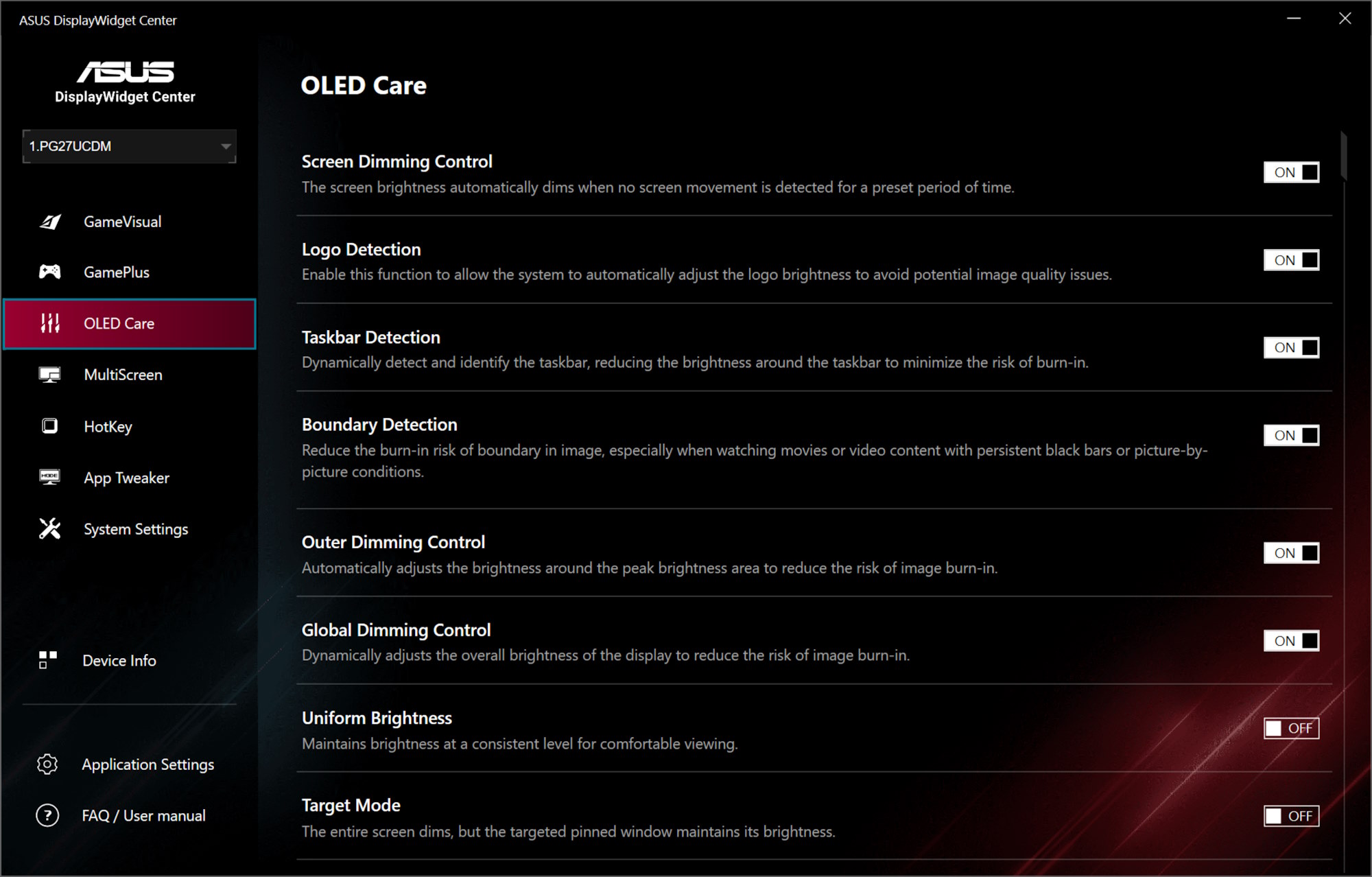
First, there is an on-screen prompt that shows up every so often telling you about Pixel Cleaning. This is a process that can take up to 6 minutes but automatically occurs when turned off. There is also Screen Move, which slightly shifts images around from one pixel to the next; you'll barely notice when it happens. There is also Boundary Detection, which picks up on any potential black bars found on the side and reduces the brightness while also shifting pixels to give you the fullest experience possible without causing any damage. There are several other useful settings, including Screen Saver—which dims the display—and Logo Brightness Adjustment, which reduces brightness around static logos.
Perhaps my favorite feature built-in Neo Proximity Sensor, which adjusts the screen according to detected movement. If you stand up and walk away, the display automatically transitions to a black image. When you sit back down, the screen returns to wherever it was when you walked away. This didn't disrupt my gameplay at all! If anything, it gave me a good ole peace of mind whenever I had to take a step away from my computer to get my kid a snack or dispose of an invading insect.

To add even greater relief, ASUS offers a limited 3-year warranty that covers panel burn-in. If you grow attached to this type of technology, this is a great thing to see.
Some Compromises
In another article, I mentioned how OLED technology would become more affordable in 2026. I didn't expect my prediction to come true so quickly. The XG32UCDS is a lot of monitor that comes in at a lower price point compared to other displays and getting to that price point means you will have to make a few considerations.
For one, the XG32UCDS doesn't have any built-in speakers, which isn't necessarily a make-or-break feature. Many users prefer separate speakers or opt for a headset for a more personal experience. Also, I should note that the display lacks any KVM capabilities, which some people may want for multitasking or managing multiple devices like a gaming station and/or a work laptop. While these two aspects are missing, I think it is a reasonable trade-off, especially when you consider the price. There is a saying in the world of hardware development: there are no decisions, only compromises.
Closing Comments
I definitely recommend the XG32UCDS. It is a great monitor that feels and looks amazing! The only real issue I have is that I now that I've used the XG32UCDS, I'm not sure how I'm supposed to go back to LCD.
If you are like me and maybe prefer a display with the 21:9 ultrawide aspect ratio, ASUS is releasing the Republic of Gamers Strix XG34WCDG Curved Ultrawide Gaming Monitor sometime in early 2026. It features all the wonderful features of the XG32UCDS, with a few minor changes, including a 3440 x 1440 resolution, a refresh rate of 175 Hz, and a robust I/O to enable KVM capabilities. I, for one, am looking forward to seeing that one on my desktop.
