Search results for: video tips solutions video production workflow guide
About 17 filtered results
by Luke Rollins · Posted
Content creation has exploded into a multi-billion-dollar industry with no signs of slowing down. While it’s true that anyone with a smartphone can become a content creator, the shift toward polished productions might have you browsing some more professional gadgets. Luckily, affordable, easy-to-use gear is widely available for every kind of content creator. Let’s explore some options you might consider snagging for your new hobby or upcoming project.
Best vlogging cameras for content creators
by Luke Rollins · Posted
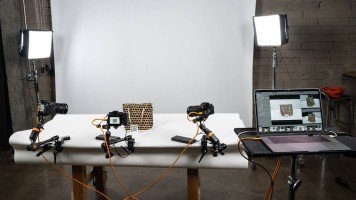
At its most basic, tethered shooting involves connecting your camera, wired or wirelessly, to your computer as you shoot. You’ve likely seen it in some behind-the-scenes video for a professional studio shoot, or you just have a friend who swears it’s the best thing since sliced bread. Tethering is a shooting technique that can benefit many a photographer’s workflow significantly, though upon first hearing of it, the idea of tethering can be something that first requires a bit of education. Hopefully, this introduction will help get you started
by Luke Rollins · Posted
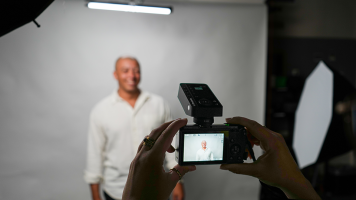
At first glance, studio photography and the compact camera may seem strange bedfellows. The type of work associated with the studio—still life, product photography, portraiture, macro photography—usually wants cameras with larger sensors and interchangeable lenses, especially in professional applications. Compact, point-and-shoot cameras, for their part, have their natural home in everyday, travel, nightlife, and street applications, where their discretion and size become virtues.
It might seem almost cruel to introduce the compact to the
by Zack Young · Posted
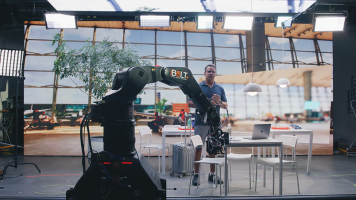
On-set virtual production (OSVP) is the real-time mixing of live-action footage with computer-generated imagery to create amazing in-camera visual effects (ICVFX). These days, most OSVP happens on a volume, a studio space with seamless LED panels (or cabinets, as they’re known in OSVP) grouped together to display rendered images that are then captured live in-camera alongside human talent. These cabinet configurations can be as simple as a flat backdrop stacked from the ground up, and as complicated as a full curved 360° wrap hung from trusses

by Zack Young · Posted
Virtual production (VP) is a professional video technique that combines live-action footage with computer-generated imagery (CGI) in real time. Virtual production typically happens on “volume” stages where seamless interlocked LED panels display rendered photo-real backdrops that change and adapt as the camera moves. This creates impressive in-camera virtual effects (ICVFX) that require little to no post-production work. Let’s jump into the exciting capabilities of

by Zack Young · Posted
With all the time and effort it takes to set up a virtual production volume, it’s vitally important to schedule regular maintenance on your LED panels to ensure they stay clean, calibrated, and ready to be used at a moment’s notice. Knowing how best to repair, store, and transport cabinets is also an important part of lengthening the lifespan of these hefty investments. The number one resource is always going to be the documentation that came with your OSVP panels, whether that be a manual, an online database, manufacturer best practices, or

by Zack Young · Posted
A media server is a key step in the on-set virtual production (OSVP) pipeline, sending assets like background plates, LUTs, and tracking data over a network so that they can be used to create unique real time in-camera virtual effects (ICVFX). Whether it be a rendered set from Unreal Engine or an uncompressed prerecorded background plate, the media server is what stores and transmits these virtual pieces to the LED walls and processors. Let's dive deeper into what these servers do.
What's Important in a Media Server?
Media servers for virtual

by Freddy Gerngross · Posted
Choosing a Digital Audio Workstation, or DAW, is a major decision. For beginners, it will define their learning curve, workflow, and operating knowledge—for professionals, compatibility, functionality, and familiarity is key. In this guide, we will give some detailed overviews of the most popular DAWs in the audio industry, what their strengths and weaknesses are, and some of their unique features.
If you’re in a rush, here’s a quick rundown of the best DAWs for a variety of common purposes:
If you’re a songwriter/producer: Ableton, Logic,

by Staff Writer · Posted
FUJIFILM X ambassador John Branch IV joins B&H for a comprehensive video series on wedding photography. From gear and preparation, to shooting the ceremony and reception, to post-production workflows and business management, this series will guide you through the stress of the big day to a state of post-nuptial bliss.

by Gabby Bloch · Posted
Here at B&H, we’ve written countless articles on podcasting, including guides on editing, mixing, and mastering your podcast. But if you’re still having trouble getting the sound you want, we recommend simplifying your production process. Let’s discuss how to separate and streamline your production tasks to get a better final product with hopefully less effort.
Separate the Recording and Mixing Processes
Many people feel the

by Zack Young · Posted
Enter the Sony BURANO 8K Digital Motion Picture Camera, Sony's newest jack-of-all-trades cinema camera that aims to combine the best features from the company's CineAlta, FX, and Alpha lines. Part of its versatility comes from the array of recording formats and resolutions it can capture, as well as a physical camera body that can accommodate a range of accessory options. So, what recording modes should you be using and how

by Mary Latvis · Posted
Welcome to Filmmaking 101, where we offer some tips on how to go about creating your movie masterpiece. Read on to discover suggestions for your pre-production, production, and post-production phases.
Pre-Production
Scriptwriting
You have your idea for an arthouse masterpiece or an action-based blockbuster; now how do you translate that into a script―the backbone of your production? You can use MS Word, Google Docs, or another document program. But using dedicated screenwriting software provides the standard formatting, outline tools,

Posted
A little goes a long way when it comes to color grading. Dean Peterson shows you how to color-grade RAW footage in a way that visually tells the story you want. Peterson color-grades this video to look cinematic and dramatic; however, these tips can apply to any look you desire!
0:00 - Introduction
0:31 - Adding LUT & Initial Adjustments
5:49 - Power Windows, Skin Tones, and Qualifiers
12:05 - Storytelling Through Color
15:31 - Soften and Glow
19:21 - Grain
21:07 - Adjustments
23:45 - Before and After (Showing Each Step)
26:03 - Final

by Bjorn Petersen · Posted
With many people moving to working from home indefinitely, there are new hurdles to overcome in terms of efficiency and security, especially regarding file sharing for photographers, videographers, and other content creators in general. Working in an office space or other professional environment often included access to a variety of tools one might take for granted, including secure networks and the ability to share files with people locally with little regard to any potential mishaps. With remote work happening now more than ever, a solid

by Ronald Francis · Posted
The Canon EOS C70 Cinema Camera, with Canon’s recently developed RF lens mount, is designed with a comprehensive feature set suitable for virtually all types of projects and venues, notably the online education market.
Canon EOS C70
Its features include Dual Gain Output (DGO), auto ISO and auto gain, unlimited recording, vertical