Computer Monitor & Displays


ASUS ProArt Display PA248QV 24.1" 16:10 Adaptive-Sync IPS Monitor
- In-Plane Switching (IPS) Panel
- HDMI | VGA | DisplayPort Inputs
- 1920 x 1200 WUXGA Resolution
- 1000:1 Static Contrast Ratio
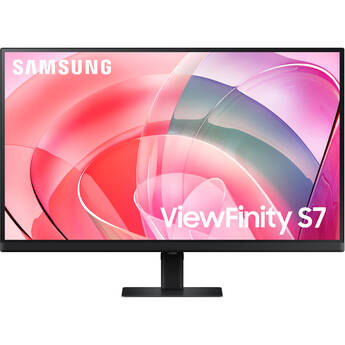
Samsung ViewFinity S70D 27" 4K HDR Monitor (Black)
- 27" 16:9 IPS Panel
- HDMI | DisplayPort | 3.5mm
- UHD 4K 3840 x 2160 at 60 Hz
- 5 ms (GtG) Response Time
Samsung Odyssey G95C 49" Dual 1440p HDR 240 Hz Curved Ultrawide Gaming Monitor (Black)
- 49" 32:9 1000R Curved VA Panel
- HDMI | DisplayPort
- Dual QHD 5120 x 1440 at 240 Hz
- FreeSync Premium Pro
HP Series 3 Pro 322pf 21.5" Full HD Monitor
- 21.5" 16:9 IPS Panel
- HDMI 1.4 | DisplayPort 1.2 | VGA
- Full HD (1080p) 1920 x 1080 at 100 Hz
- 5 ms (GtG) Response Time with Overdrive
ViewSonic VA2456A-MHD 23.8" Full HD 120 Hz Monitor
- 23.8" 16:9 IPS Panel
- HDMI | DisplayPort | VGA
- Full HD (1080p) 1920 x 1080 at 120 Hz
- 1 ms Response Time (MPRT)
Samsung ViewFinity S80UD 37" 4K HDR Monitor
- 37" 16:9 VA Panel
- HDMI | DisplayPort | USB-C (90W)
- UHD 4K 3840 x 2160 at 60 Hz
- 5 ms (GtG) Response Time
Dell P2424HEB 24" 16:9 IPS Video Conferencing Monitor
- 24" 16:9 IPS Panel
- HDMI | DisplayPort | USB-C
- Full HD 1920 x 1080 at 60 Hz
- Built-In Webcam
Apple 27" Studio Display (2026, Standard Glass, Tilt- and Height-Adjustable Stand)
- 27" Retina LCD Panel
- Thunderbolt 5 (96W)
- UHD 5K 5120 x 2880 at 60 Hz
- 600 nits Brightness
Dell Pro 22" Full HD VA Monitor with Fixed Monitor Stand
- 21.5" 16:9 Full HD VA Panel
- HDMI | DisplayPort | VGA
- 1920 x 1080 Resolution at 100 Hz
- 5 ms Response Time
Dell 24" P2425E USB-C Hub Monitor
- 24" 16:10 IPS Panel
- HDMI | DisplayPort | USB-C
- 1920 x 1200 at 100 Hz
- 5 ms (GtG) Response Time
MSI G242L E14 23.8" Full HD HDR 144 Hz Gaming Monitor
- 23.8" 16:9 IPS Panel
- HDMI 1.4b | DisplayPort 1.2a
- Full HD (1080p) 1920 x 1080 at 144 Hz
- FreeSync
Philips 27B2N2100 27" Full HD 100 Hz Monitor
- 27" 16:9 IPS Panel
- HDMI 1.4 | VGA
- Full HD (1080p) 1920 x 1080 at 100 Hz
- 1500:1 Static Contrast Ratio
ASUS VA279HG 27" Eye Care Monitor
- 27" 16:9 IPS Panel
- HDMI 1.4 | VGA | 3.5mm
- Full HD 1920 x 1080 at 120 Hz
- Adaptive-Sync and VRR
Samsung G5 Odyssey 34" 21:9 Curved 165 Hz FreeSync WQHD HDR VA Gaming Monitor
- 34" Vertical Alignment (VA) Panel
- 1000R Curved Design
- DisplayPort 1.2 + HDMI 2.0 Inputs
- 3440 x 1440 WQHD Resolution @ 165 Hz
Acer Predator X27U Z1bmiiprx 26.5" 1440p HDR 280 Hz Gaming Monitor
- 27" 16:9 QD-OLED Panel
- DisplayPort 1.4 | HDMI 2.1 | 3.5mm
- QHD (1440p) 2560 x 1440 at 280 Hz
- 0.03 ms GtG Response Time
ASUS ZenScreen Duo OLED 14" Portable HDR Monitor
- Dual 14" 16:10 OLED Panels
- USB-C | Mini-HDMI
- 1920 x 1200 at 60 Hz
- 1 ms (GtG) Response Time
Dell Dual 27" Pro Plus P2725QE 4K Monitor Kit
- 27" 16:9 IPS Panel
- HDMI | DisplayPort | USB-C
- 3840 x 2160 at 100 Hz
- 5 ms (GtG) Response Time
BenQ PhotoVue SW272Q 27" 1440p HDR Monitor
- 27" 16:9 IPS Panel
- HDMI | DisplayPort | USB-C
- QHD (1440p) 2560 x 1440 at 60 Hz
- 5 ms (GtG) Response Time
BenQ PD3225U DesignVue Designer 31.5" 16:9 HDR 4K IPS Monitor
- 31.5" 16:9 IPS Black Panel
- Thunderbolt 3 | HDMI | DisplayPort
- UHD 4K 3840 x 2160 at 60 Hz
- 5 ms Response Time (GtG)
ASUS Republic of Gamers Swift OLED PG27AQWP-W 26.5" 1440p HDR 540 Hz / Full HD 720 Hz Dual Mode Gaming Monitor (White)
- 26.5" 16:9 TrueBlack Glossy OLED Panel
- HDMI 2.1 | DisplayPort 2.1
- QHD (1440p) 2560 x 1440 at 540 Hz
- Full HD 1920 x 1080 at 720 Hz
Samsung Odyssey Neo G9 57" Dual 4K HDR 240 Hz Curved Ultrawide Gaming Monitor
- 57" 32:9 Quantum Mini-LED VA Panel
- HDMI | DisplayPort
- Dual 4K 7680 x 2160 at 240 Hz (140 PPI)
- FreeSync Premium Pro
Apple 27" Studio Display (2026, Standard Glass, VESA Mount Adapter)
- 27" Retina LCD Panel
- Thunderbolt 5 (96W)
- UHD 5K 5120 x 2880 at 60 Hz
- 600 nits Brightness
BenQ GW2490 23.8" Monitor
- 23.8" 16:9 IPS Panel
- HDMI | DisplayPort
- Full HD 1920 x 1080 at 100 Hz
- 5 ms Response Time
MSI PRO MP243W E14 23.8" Full HD HDR 144 Hz Monitor
- 23.8" 16:9 IPS Panel
- HDMI 1.4b | DisplayPort 1.2a
- Full HD (1080p) 1920 x 1080 at 144 Hz
- 1 ms (MPRT) Response Time
BenQ GW2790 27" Monitor
- 27" 16:9 IPS Panel
- HDMI | DisplayPort
- Full HD 1920 x 1080 at 100 Hz
- 5 ms Response Time
Dell Pro 27" Full HD IPS Monitor
- 27" 16:9 Full HD IPS Panel
- HDMI | DisplayPort | VGA
- 1000:1 Contrast Ratio
- 1920 x 1080 Resolution at 100 Hz
LG 27U631A-B 27" 1440p HDR 100 Hz Monitor
- 27" 16:9 IPS Panel
- HDMI | USB-C (15W)
- QHD (1440p) 2560 x 1440 at 100 Hz
- 5 ms (GtG) Response Time
Shopping Computer Monitors and Displays
Computer monitors and displays connect to desktop PCs and other devices so you can view content. The type of monitor to buy depends upon the types of work you do on your computer. After deciding on a screen size, look for features such as design, panel, resolution, and connectivity.
Types of Computer Monitors
For basic computing tasks, consider a Full HD monitor with a screen size between 19 and 24 inches. Pair work and entertainment PCs with bigger displays, to take advantage of the extra screen real estate. To keep up with high-intensity video game actions, opt for gaming monitors. These have very high resolutions, fast response times, high refresh rates, and wide viewing angles. Whether you need a display at home or in the office, consider widescreen computer monitors for maximum production. These have an aspect ratio 16:9 or 16:10, display dimensions that let you open multiple apps side-by-side, and make movies and games look cinematic.
Ultrawide monitors have an aspect ratio of 21:9. They can accommodate even more windows, and they make video games more immersive. Touchscreen monitors feature touch-enabled screens that allow gestures such as swiping, tapping, and pinch-to-zoom. Consider smart display clients when looking for touchscreen monitors for work. These are all-in-one desktop computers running Windows and other operating systems.
Computer Monitor Panel Types and Resolution
The majority of computer displays use LCD panels. For brighter images, look for an LED monitor, which is an LCD panel with light-emitting diode backlighting. An LED computer monitor is thinner than a regular LCD panel and uses less power. The three types of LCD panels used for monitors are TN, VA, and IPS, each with distinct benefits:
- TN panels have high refresh rates and fast response times.
- VA panels offer good viewing angles and the best contrast.
- IP panels render vibrant colors with excellent contrast and impressive viewing angles.
The stellar responsiveness of TN panels makes them ideal as gaming monitors. For the best image quality, choose an IPS computer monitor. An HD computer display has a resolution of 1280 x 720 pixels. This is the minimum resolution to look for in a monitor to enjoy crisp text and images as well as vivid colors. For 20-inch and larger monitors, opt for Full HD or 1080p resolution to make images look sharp. Quad HD (1440p) and Ultra HD (4K) models deliver sharper images and are best for multimedia editing and gaming. For health care offices, medical diagnostic displays feature such high-resolution panels and boast high color accuracy.
What's the Benefit of a Curved Computer Monitor?
A curved monitor keeps its entire screen within your field of view. Flat monitors measuring 27 inches and wider look imposing when you're sitting close to them, and you have to move your head to see the edges. A monitor with curved sides, however, brings its edges closer to keep you in the sweet spot while reducing glare and without sacrificing image quality.
Whether you're looking for computer monitors and displays to stream movies, play video games, or multitask at work, you can find the right model among B&H Photo and Video's selection of new and used computer monitors.