Graphic Display Cards

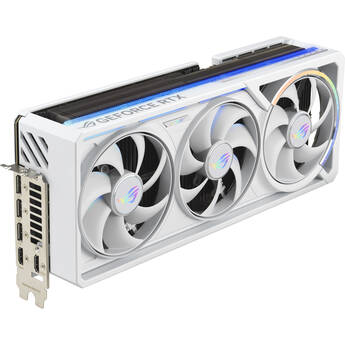
ASUS GeForce RTX 5080 Republic of Gamers Astral White OC Graphics Card
- 10,752 CUDA Cores
- Blackwell Architecture
- 16GB of GDDR7 VRAM
- 256-Bit Memory Interface
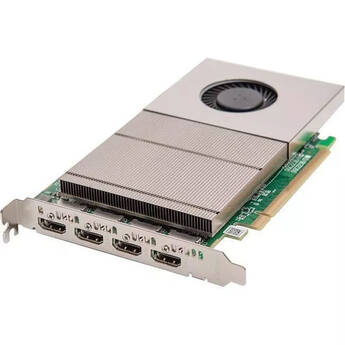
DATAPATH Image2K 4-Channel HDMI PCIe Graphics Card
- 4-Channel HDMI PCIe Graphics Card
- PCI Express x16 Mechanical, x8 Electrical (Gen. 3)
- 4 Outputs of 2560x1600 at 60 Hz
- 2 Outputs of 3840x2160 at 60 Hz
Matrox M9188 PCIe x16 Multi-Display Octal Graphics Card
- ATX Form Factor
- 2 GB Memory
- Native PCIe x16 Performance
- Stretched & Independent Desktop Modes
PNY NVIDIA RTX 4500 Ada Generation Graphics Card
- 7680 CUDA Cores
- Ada Lovelace Architecture
- 24GB of ECC GDDR6 VRAM
- 192-Bit Memory Interface
NVIDIA RTX PRO 4000 Blackwell Generation SFF Graphics Card
- 8960 CUDA Cores
- Blackwell Architecture
- 24GB of ECC GDDR7 VRAM
- 192-Bit Memory Interface
AMD Radeon Pro W7900 Professional Graphics Card
- 6144 Stream Processors
- RDNA 3 Architecture
- 48GB of GDDR6 VRAM
- 384-Bit Memory Interface
ASUS GeForce RTX 5090 TUF GAMING Graphics Card
- 21,760 CUDA Cores
- Blackwell Architecture
- 32GB of GDDR7 VRAM
- 512-Bit Memory Interface
Gigabyte GeForce RTX 5090 WINDFORCE OC Graphics Card
- 21,760 CUDA Cores
- Blackwell Architecture
- 32GB of GDDR7 VRAM
- 512-Bit Memory Interface
MSI GeForce RTX 5090 VENTUS 3X OC Graphics Card
- Boostable to 2452 MHz (OC)
- 21,760 CUDA Cores
- Blackwell Architecture
- 32GB of GDDR7 VRAM
PNY NVIDIA GeForce RTX 5090 ARGB EPIC-X RGB OC Graphics Card
- 21,760 CUDA Cores
- Blackwell Architecture
- 32GB of GDDR7 VRAM
- 512-Bit Memory Interface
PNY NVIDIA GeForce RTX 5090 OC Triple Fan Graphics Card
- 21,760 CUDA Cores
- Blackwell Architecture
- 32GB of GDDR7 VRAM
- 512-Bit Memory Interface
ASUS GeForce RTX 5090 TUF GAMING OC Graphics Card
- 21,760 CUDA Cores
- Blackwell Architecture
- 32GB of GDDR7 VRAM
- 512-Bit Memory Interface
Gigabyte GeForce RTX 5090 GAMING OC Graphics Card
- 21,760 CUDA Cores
- Blackwell Architecture
- 32GB of GDDR7 VRAM
- 512-Bit Memory Interface
MSI GeForce RTX 5090 GAMING TRIO OC Graphics Card
- Boostable to 2497 MHz (OC)
- 21,760 CUDA Cores
- Blackwell Architecture
- 32GB of GDDR7 VRAM
Gigabyte RTX 5090 AORUS AI Box External GPU
- 32GB of GDDR7 VRAM
- 2 x Thunderbolt 5 Ports
- DisplayPort 2.1b | HDMI 2.1b
- USB-C & USB-A Gen 2
Gigabyte GeForce RTX 5090 MASTER ICE Graphics Card
- 21,760 CUDA Cores
- Blackwell Architecture
- 32GB of GDDR7 VRAM
- 512-Bit Memory Interface
MSI GeForce RTX 5090 SUPRIM SOC Graphics Card
- Boostable to 2580 MHz (OC)
- 21,760 CUDA Cores
- Blackwell Architecture
- 32GB of GDDR7 VRAM
ASUS GeForce RTX 5090 ProArt OC Graphics Card
- Boostable to 2512 MHz (OC)
- 21,760 CUDA Cores
- Blackwell Architecture
- 32GB of GDDR7 VRAM
MSI GeForce RTX 5090 SUPRIM LIQUID SOC Graphics Card
- Boostable to 2580 MHz (OC)
- 21,760 CUDA Cores
- Blackwell Architecture
- 32GB of GDDR7 VRAM
Gigabyte GeForce RTX 5090 STEALTH ICE Graphics Card
- 21,760 CUDA Cores
- Blackwell Architecture
- 32GB of GDDR7 VRAM
- 512-Bit Memory Interface
ASUS GeForce RTX 5090 Republic of Gamers Astral Graphics Card
- 2467 MHz Boost Clock Speed (OC)
- 21,760 CUDA Cores
- Blackwell Architecture
- 32GB of GDDR7 VRAM
ASUS GeForce RTX 5090 Republic of Gamers Astral OC Graphics Card
- 2610 MHz Boost Clock Speed (OC)
- 21,760 CUDA Cores
- Blackwell Architecture
- 32GB of GDDR7 VRAM
ASUS GeForce RTX 5090 Republic of Gamers Astral BTF OC Graphics Card
- 2610 MHz Boost Clock Speed (OC)
- 21,760 CUDA Cores
- Blackwell Architecture
- 32GB of GDDR7 VRAM
ASUS GeForce RTX 5090 Republic of Gamers Astral White OC Graphics Card
- 2610 MHz Boost Clock Speed (OC)
- 21,760 CUDA Cores
- Blackwell Architecture
- 32GB of GDDR7 VRAM
NVIDIA RTX PRO 5000 Blackwell Generation Graphics Card (OEM)
- 14,080 CUDA Cores
- Blackwell Architecture
- 72GB of ECC GDDR7 VRAM
- 512-Bit Memory Interface
PNY NVIDIA RTX PRO 5000 72GB Blackwell GPU
- 14,080 CUDA Cores
- Blackwell Architecture
- 72GB of ECC GDDR7 VRAM
- 384-Bit Memory Interface
PNY NVIDIA RTX PRO 6000 Blackwell Max-Q Workstation Graphics Card
- 24,064 CUDA Cores
- Blackwell Architecture
- 96GB of ECC GDDR7 VRAM
- 512-Bit Memory Interface
NVIDIA RTX PRO 5500 Blackwell Workstation Edition Graphics Card
- 21,760 CUDA Cores
- Blackwell Architecture
- 84GB of ECC GDDR7 VRAM
- Designed for Rack Mounted Workstations
Choosing the Best Graphics Card for Your Needs
Graphics cards are essential to today's desktop computers. The cards vary in their abilities, so it's best to match the graphics card to the tasks that matter to you. For example, if you intend to play games on your PC, you'll want something like a PCI graphics card that handles intense requirements. Beyond graphics on screen, if you have multiple complicated calculations that need to be done simultaneously, you'll be impressed with the speed of server GPU graphics cards.
How a Graphic Card Works
A graphics card is a processor that's capable of completing multiple calculations at once. It takes the strain from the CPU, so it can perform other functions. In practical terms, the card is the component in your PC that renders the graphics on your monitor. If you notice that images on your screen take longer than expected to load, particularly while playing a game or editing a movie, that's usually the result of an overwhelmed card. You can fix this by purchasing a new desktop or simply by upgrading your card.
How to Choose a Gaming Graphics Card
Generally, games are constantly pushing the capabilities of graphics cards. If you typically buy the latest games and expect top performance while also streaming your exploits, then you want to look at top-end cards such as Asus graphics cards. It's also worth considering what kind of connection you'll use on your monitor. If you play games on a Mac, look for cards that are compatible with Mac OS, such as Matrox graphics cards. On the other hand, if you're playing on a laptop, an external graphics card is the easiest to integrate with your portable system.
What Graphics Card Is Compatible with My Motherboard?
Finding a graphics card that works with your PC requires some detective work. First, determine if the card will physically fit in the space. If you plug your monitor into a port that's located right next to all the other ports, for instance, your current card plugs directly into the motherboard. Locate the expansion slots and check the size of the opening. Keep in mind that higher-end cards often have their own fan or cooling systems, which may take up two of your expansion slots. You can easily connect them via the PCI Express slots, assuming the card fits in the space, because the cards are backwards-compatible with older technology.
Whether you want to upgrade an existing machine or are getting ready to purchase a new PC, having the right card will maximize your gaming experience. Check out B&H Photo and Video's selection of graphics cards to find everything you need to ensure smooth and uninterrupted images on your monitor.