Computer Keyboards

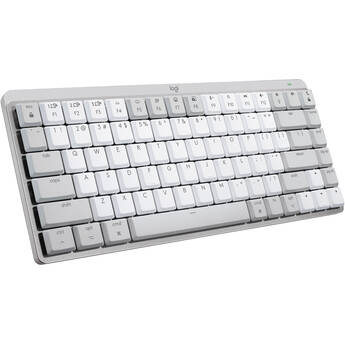
Logitech MX Mechanical Mini for Mac Wireless Keyboard (Pale Grey, Tactile Quiet)
- Bluetooth LE Wireless Connectivity
- Logitech Tactile Quiet Mechanical Switch
- Smart Illumination
- Logi Options+ Software Support
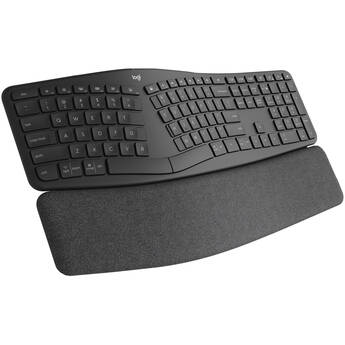
Logitech Ergo K860 Wireless Split Keyboard (Graphite)
- More Natural Hand and Finger Placement
- Fluid and Ultra-Precise Typing
- Pillowed Wrist Rest
- 71% Post-Consumer Recycled Plastics
Logitech Flip Folio for 13" iPad Air/Pro (Graphite)
- Protects 13" iPad Air or iPad Pro
- Case with Stowable Keyboard
- Front and Rear Protection
- Adjustable Viewing Angles
Brydge Max 11.0 Keyboard for 11" iPad Air and Pro (Carbon Gray)
- For 11" iPad Air and iPad Pro
- Aluminum Construction
- Multi-Touch Trackpad
- 270° View Hinge
Logitech Combo Touch Backlit Keyboard Case for Apple 11" iPad Pro 1st-4th Gen (Oxford Gray)
- For 11" iPad Pro (1st/2nd/3rd/4th Gen)
- Smart Connector
- Backlit Keys
- Touchpad
Keychron Q6 Ultra 8K Wireless Mechanical Keyboard (Black, Keychron Silk POM Red Switches)
- 2.4 GHz RF | Bluetooth 5.3 | USB-C Wired
- Keychron Silk POM Red Linear Switch
- Customizable RGB Backlight
- KSA Double-Shot PBT Keycaps
Logitech Combo Touch Backlit Keyboard Case for Apple 13" iPad Pro M4 & M5 (Graphite)
- For 13" iPad Pro M4 & M5
- Backlit Keys
- Touchpad
- Smart Connector
Logitech G G915 X LIGHTSPEED Low-Profile Wireless RGB Mechanical Gaming Keyboard (Carbon, GL Linear)
- LIGHTSPEED & Bluetooth Connectivity
- Logitech GL Red Linear Switches
- LIGHTSYNC RGB Lighting
- Programmable G-Keys
Microsoft Surface Pro Keyboard Cover with Slim Pen 2 (Sapphire)
- For 13" Surface Pro 8 or Later
- Mechanical Keys | Copilot Key
- Magnetic Connection (Keyboard)
- Glass Touchpad
Apple Magic Keyboard for 13" iPad Pro (Black, Latin American Spanish)
- For 13" iPad Pro M4 or M5
- Latin American Spanish Language
- Keyboard with Multi-Gesture Touchpad
- Glass Touchpad with Haptic Feedback
X-keys XK-128 Customizable USB Keyboard
- 128 Keys and 1 Programming Button
- Red and Blue LEDs Under Each Key
- Relegendable Key Caps
- Works with a Wide Variety of Programs
Adesso 18-Key Wireless Numeric Keypad
- 2.4 GHz Wireless Connectivity
- Quiet Membrane Key Switch
- Spill Resistant
- Compact and Lightweight
Kensington KB150 EQ Wireless Keyboard
- 2.4 GHz Wireless Connection
- Government-Grade AES 128-bit Encryption
- Spill-Proof Design
- LED Indicators
Adesso EasyTouch 132 Luminous 4x Large Print Multimedia Desktop Keyboard
- Wired USB
- Membrane Switch Technology
- Large-Print Keys
- Numerical Keypad
Adesso SlimTouch Mini Wired Keyboard (Black)
- Wired USB-A Connection
- Membrane Switches
- Slim Space-Saving Design
- Multimedia & Internet Hot Keys
Kensington Advance Fit Full-Size Slim Keyboard
- Wired USB
- Laptop-Style Keys
- Hot Keys
- Integrated Tilt Stands
CHERRY Stream Compact Wired Keyboard (Black)
- Wired USB-A Connectivity
- Cherry SX Scissor Switches
- 5.9' Cable
- LED Status Indicators
Macally 104 Key Full-Size USB Keyboard (White)
- Wired USB Keyboard
- 104 Full Size and Thin Keys
- 16 Mac OS X Shortcut Keys
- Long 5' USB Cable
Kensington Multi-Device Dual Wireless Compact Keyboard (Black)
- Dual Bluetooth and 2.4 GHz Connection
- Compact Design
- Connects to Three Devices
- 128-Bit AES Encryption
Dell KB500 Wireless Keyboard (Black)
- 2.4 GHz Connectivity
- Plunger Switches
- Built-In Hotkey Functions
- Numeric Keypad
Razer Ornata V3 X RGB Gaming Keyboard
- Wired USB Connection
- Silent Membrane Switches
- Low-Profile Design
- On-the-Fly Macro Recording
Mobile Pixels Wireless Foldable Keyboard (Gunmetal Gray)
- Bluetooth Connectivity
- Foldable Design
- Connect up to Three Devices
- For Windows, Mac, iOS, Android, Chrome
Satechi Bluetooth Extended Keypad for Mac (Silver)
- Bluetooth Wireless Connectivity
- Number, Function & Arrow Keys
- Rechargeable USB Type-C Port
- For macOS Devices
Satechi Bluetooth Extended Keypad for Mac (Space Gray)
- Bluetooth Wireless Connectivity
- Number, Function & Arrow Keys
- Rechargeable USB Type-C Port
- For macOS Devices
Matias USB-C Keyboard for Mac (Space Gray)
- Wired USB-C Connection
- Scissor Switches
- 2mm Travel
- Numeric Keypad
Satechi Slim LX3 Wired Keyboard (Silver)
- Wired USB-C Connectivity
- Integrated USB-C to USB-A Adapter
- OS Switch
- Slim Design
Logitech POP ICON KEYS Wireless Keyboard (Graphite & Green)
- Bluetooth & Logi Bolt Connectivity
- Low-Profile, Compact Design
- Pairs with 3 Devices
- Includes Logi Bolt Receiver
Kensington KB201C Simple Solutions Wired Keyboard with CAC Smart Card Reader
- Wired USB-A Connectivity
- Full-Sized Keyboard with Numeric Pad
- Quiet Click Keys
- Plug and Play
Choosing Computer Keyboards
Computers and keyboards go hand in hand. Even with the introduction of touchscreen displays, most people prefer the tactile feedback that a computer keyboard offers. Choosing the right keyboard can be tricky. Maybe you need a wireless keyboard for a flexible workspace, or a backlit keyboard that lets you work and play in the dark. The best way to ensure a comfortable keyboard experience is to consider your needs.
Wireless vs Wired Keyboards
Wireless computer keyboards are a good pick if you’re looking to cut down on clutter. Some models work at distances of up to thirty feet, which provides a lot of flexibility. Most wireless keyboards connect via a USB receiver or Bluetooth. You’ll find standard-sized models and compact options for hybrid computers. You’ll even find tablet keyboards.
Wired keyboards usually connect to a computer via a USB connection. They’re simple to set up, often ready in seconds. They draw their power from the computer, so you won’t have to worry about batteries. This is a preferred choice in situations where you need a solid connection with minimal lag, such as playing games.
Best Keyboards for Work
If you’re looking for a mouse-and-keyboard kit, choose models that offer optimal comfort. Ergonomic keyboards offer useful features that help limit wrist strain, such as elevated wrist rests, curved keys, and a natural arc that mimics the shape of the hand. Some application/editing keyboards feature multiple colors, and many have preset shortcuts for specific applications. There are even keyboards with a built-in mouse, and models you can separate to adjust to your typing needs.
Do All Keyboards Have the Same Layout?
While most keyboards come with a standard QWERTY layout, there are some slight differences to the position of other keys. Some keyboards have the function keys (F) in a four-key pod while others have them placed in a straight line. Keyboards may also have specials keys designed for a unique operating system. You’ll find keyboards that feature the Windows key, and Apple wireless keyboards for use with the Mac OS X.
How Do I Choose a Keyboard for Gaming or Watching Media?
Gaming keyboards come with features that help elevate the gaming experience. Programmable keys are a popular option because they allow you to create convenient shortcuts, giving you a tactical advantage. Most gaming keyboards also offer backlighting, and mechanical keys for sharper response. In addition, if you plan to watch a lot of media on your computer, look for backlit ergonomic keyboards that offer convenient media keys, play/pause buttons, and volume control.
Enjoy a comfortable keyboard experience. Check the wide selection of keyboards and computer accessories found at B&H Photo and Video.