Computer Keyboards

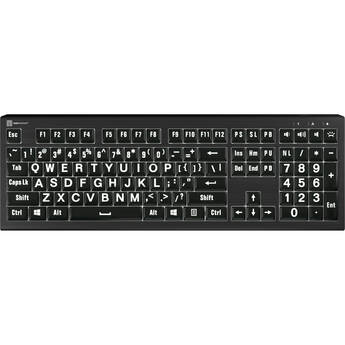
Logickeyboard ASTRA2 Large-Print White-on-Black Wired Keyboard (Windows, US English)
- White-on-Black Large-Print Keys
- Wired USB Connection
- 108 Keys
- Scissor-Switch Key Mechanism
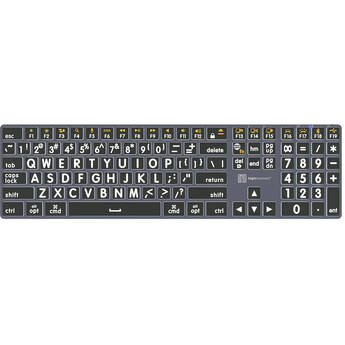
Logickeyboard TITAN Large-Print White-On-Black Wireless Keyboard (Mac, US English)
- Bold White Text on Black Background
- 108 Backlit Key Layout
- Bluetooth Wireless & USB-C Connection
- Low-Profile Scissor-Switch Keys
Logickeyboard Avid Media Composer Slim Line Windows Keyboard
- Wired USB Connection
- Scissor-Key Switches
- Avid Media Composer Hotkeys
- Fully Compatible with Windows
Logickeyboard Adobe Premiere Pro CC Nero Slimline Wired Keyboard (American English)
- Wired USB Type-A Connection
- Color-Coded and Labeled Shortcut Keys
- Two Built-In USB 2.0 Ports
- Scissor Key Switches
Matias Tactile Pro Keyboard for Mac (White)
- Designed for Typing
- Mechanical Keyswitches
- Sculpted Keytops
- Laser Etching
Keychron K2 HE Wireless Magnetic Switch Keyboard (Special Edition, White)
- 2.4 GHz RF | Bluetooth 5.2 Connectivity
- Gateron Double-Rail Magnetic Switch
- Customizable RGB Backlight
- OSA-Profile Double-Shot PBT Keycaps
Keychron K2 HE Wireless Magnetic Switch Keyboard (Special Edition, Black)
- 2.4 GHz RF | Bluetooth 5.2 Connectivity
- Gateron Double-Rail Magnetic Switch
- Customizable RGB Backlight
- OSA-Profile Double-Shot PBT Keycaps
CORSAIR K65 PLUS Wireless Gaming Keyboard (Glacier Blue)
- Wireless 2.4 GHz RF | Bluetooth
- Corsair MLX Red V2 Linear Switches
- Customizable Per-Key RGB Lighting
- Anti-Ghosting, N-Key Rollover
Microsoft Surface Pro Keyboard Cover with Pen Storage (Black, Bold Keyset)
- For 13" Surface Pro 8 or Later
- Mechanical Keys | Copilot Key
- Backlit Keys & Large Bold Font
- Glass Touchpad
Logickeyboard Davinci Resolve Classic TITAN Wireless Backlit US English Keyboard for Windows
- Wired USB-C & Wireless Connection
- For Davinci Resolve Classic
- 160+ Intuitive & Accessible Shortcuts
- 108 Keys
Logickeyboard ASTRA 2 PRO Backlit Keyboard for Avid Media Composer (Mac, US English)
- For Avid Media Composer
- Wired USB-A Connection
- 108 Keys with Full-Sized F-Row
- 135 Shortcuts
Logickeyboard ASTRA 2 Backlit Keyboard for Adobe Premiere Pro CC (Windows, US English)
- For Adobe Premiere Pro CC
- Wired USB-A Connection
- 104 Keys
- Scissor-Switch Key Mechanisms
Logickeyboard ASTRA 2 Avid Media Composer Keyboard for Windows 7, 8, 8.1, 10 (Silver)
- For Windows 7, 8, 8.1, 10
- 108 Scissor-Switch Keys
- Dimmable Backlight with Five Levels
- Color-Coded Shortcut Keys
CORSAIR K65 PLUS Wireless Gaming Keyboard (Frost White)
- Wireless 2.4 GHz RF | Bluetooth
- Corsair MLX Red V2 Linear Switches
- Customizable Per-Key RGB Lighting
- Anti-Ghosting, N-Key Rollover
Adesso EasyTouch 1500 Wireless RGB Backlit Mechanical Ergonomic Keyboard
- USB-C Wired | Bluetooth | 2.4 GHz RF
- Mechanical Red Switches
- Adjustable RGB LED Backlight
- CoPilot AI Hotkey
Logitech Flip Folio for 11" iPad Air/Pro (Graphite)
- Protects 11" iPad Air or iPad Pro
- Case with Stowable Keyboard
- Front and Rear Protection
- Adjustable Viewing Angles
Logitech MX Mechanical Mini Wireless Keyboard (Grey, Clicky)
- Bluetooth LE Wireless Connectivity
- Logitech Clicky Mechanical Switch
- Smart Illumination
- Logi Options+ Software Support
Belkin Connect Pro Keyboard Case with Magnetic Stand for iPad Air 13" & iPad Pro 12.9"
- Premium Leather
- Soft Anti-Slip Interior
- Cantilever Hinge
- Rechargeable Backlit Bluetooth Keyboard
Adesso EasyTouch Rackmount Touchpad Keyboard with Rackmount (1 RU)
- Built-In GlidePoint Touch Pad
- Membrane Key Switches
- Multimedia and Internet Hotkeys
- Plug-and-Play
Microsoft 12" Surface Pro Keyboard Cover with Slim Pen 2 (Slate)
- For 12" Surface Pro
- Mechanical Keys | Copilot Key | Lock Key
- Precision Touchpad
- Includes Slim Pen 2
Microsoft 12" Surface Pro Keyboard Cover with Slim Pen 2 (Violet)
- For 12" Surface Pro
- Mechanical Keys | Copilot Key | Lock Key
- Precision Touchpad
- Includes Slim Pen 2
Microsoft Surface Pro Keyboard Cover with Slim Pen 2 (Dune)
- For 13" Surface Pro 8 or Later
- Mechanical Keys | Copilot Key
- Magnetic Connection (Keyboard)
- Glass Touchpad
Apple Magic Keyboard for 11" iPad Pro (Black, Latin American Spanish)
- For 11" iPad Pro M4 or M5
- Latin American Spanish Language
- Keyboard with Multi-Gesture Touchpad
- Glass Touchpad with Haptic Feedback
Apple Magic Keyboard for 13" iPad Air M4 (US English, White)
- For 13" iPad Air M4
- US English Language
- Keyboard with Multi-Touch Gestures
- Glass Touchpad with Haptic Feedback
Microsoft Surface Pro Flex Keyboard (Black)
- For Surface Pro 11th Edition
- Also for Surface Pro 10/9/8
- Bluetooth LE Wireless Connectivity
- Durable Alcantara Material
HP 150 Wired Keyboard
Kensington Keyboard for Life
- Spill-Resistant Design
- Slim, Sleek Design
- Connects via USB
- Limited 3-Year Warranty
Belkin Secure Wired Keyboard for iPad with Lightning Connector
- Lightning Connector
- Apple MFi Certified
- Designed for Use in Classrooms
- Full-Size Keys
Choosing Computer Keyboards
Computers and keyboards go hand in hand. Even with the introduction of touchscreen displays, most people prefer the tactile feedback that a computer keyboard offers. Choosing the right keyboard can be tricky. Maybe you need a wireless keyboard for a flexible workspace, or a backlit keyboard that lets you work and play in the dark. The best way to ensure a comfortable keyboard experience is to consider your needs.
Wireless vs Wired Keyboards
Wireless computer keyboards are a good pick if you’re looking to cut down on clutter. Some models work at distances of up to thirty feet, which provides a lot of flexibility. Most wireless keyboards connect via a USB receiver or Bluetooth. You’ll find standard-sized models and compact options for hybrid computers. You’ll even find tablet keyboards.
Wired keyboards usually connect to a computer via a USB connection. They’re simple to set up, often ready in seconds. They draw their power from the computer, so you won’t have to worry about batteries. This is a preferred choice in situations where you need a solid connection with minimal lag, such as playing games.
Best Keyboards for Work
If you’re looking for a mouse-and-keyboard kit, choose models that offer optimal comfort. Ergonomic keyboards offer useful features that help limit wrist strain, such as elevated wrist rests, curved keys, and a natural arc that mimics the shape of the hand. Some application/editing keyboards feature multiple colors, and many have preset shortcuts for specific applications. There are even keyboards with a built-in mouse, and models you can separate to adjust to your typing needs.
Do All Keyboards Have the Same Layout?
While most keyboards come with a standard QWERTY layout, there are some slight differences to the position of other keys. Some keyboards have the function keys (F) in a four-key pod while others have them placed in a straight line. Keyboards may also have specials keys designed for a unique operating system. You’ll find keyboards that feature the Windows key, and Apple wireless keyboards for use with the Mac OS X.
How Do I Choose a Keyboard for Gaming or Watching Media?
Gaming keyboards come with features that help elevate the gaming experience. Programmable keys are a popular option because they allow you to create convenient shortcuts, giving you a tactical advantage. Most gaming keyboards also offer backlighting, and mechanical keys for sharper response. In addition, if you plan to watch a lot of media on your computer, look for backlit ergonomic keyboards that offer convenient media keys, play/pause buttons, and volume control.
Enjoy a comfortable keyboard experience. Check the wide selection of keyboards and computer accessories found at B&H Photo and Video.