Computer Keyboards

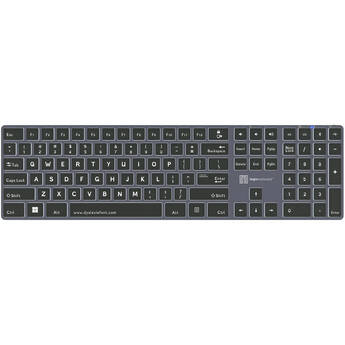
Logickeyboard TITAN Dyslexie Wireless Keyboard (Windows, US English)
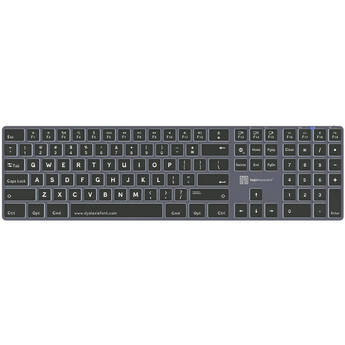
Logickeyboard TITAN Dyslexie Wireless Keyboard (Mac, US English)
Logickeyboard ASTRA 2 Backlit Keyboard for Adobe After Effects CC (Mac, US English)
- For Adobe After Effects CC
- Wired USB Connection
- Backlit Scissor Switch Keys
- Works with macOS 10.6 or Later
Logickeyboard XLPrint PC Slim Line Keyboard with Large Print (White on Black)
- Large-Type Commands for Easy-Reading
- Designed for the Visually Impaired
- Plug-and-Play USB Connectivity
- Dual USB 2.0 Ports
Logickeyboard XLPrint PC Slim Line Keyboard with Large Print (Yellow on Black)
- Large-Type Commands for Easy-Reading
- Designed for the Visually Impaired
- Plug-and-Play USB Connectivity
- Dual USB 2.0 Ports
Logickeyboard XLPrint PC Slim Line Keyboard with Large Print (Black on White)
- Large-Type Commands for Easy-Reading
- Designed for the Visually Impaired
- Plug-and-Play USB Connectivity
- Dual USB 2.0 Ports
Logickeyboard XLPrint PC Slim Line Keyboard with Large Print (Black on Yellow)
- Large-Type Commands for Easy-Reading
- Designed for the Visually Impaired
- Plug-and-Play USB Connectivity
- Dual USB 2.0 Ports
Logickeyboard Large Print ALBA Mac Pro American English Keyboard (Black on Yellow)
Logickeyboard Large Print ALBA Mac Pro American English Keyboard (Black on White)
Logickeyboard Large Print ALBA Mac Pro American English Keyboard (White on Black)
Logickeyboard XL Print NERO PC Slim Line Yellow on Black Keyboard
- Yellow Print on Black Keys
- Large Print on Keyboard
- Soft Touch Keystroke
- 2 x USB 2.0 Ports
Logickeyboard XL Print NERO PC Slim Line White on Black Keyboard
- White Print on Black Keys
- Large Print on Keyboard
- Soft Touch Keystroke
- 2 x USB 2.0 Ports
Logickeyboard XL Print NERO PC Slimline Large Print American English and Hebrew Keyboard (Black On Yellow)
Logickeyboard XL Print NERO PC Slimline Large Print American English and Hebrew Keyboard (Yellow On Black)
Logickeyboard XL Print NERO PC Slimline Large Print American English and Hebrew Keyboard (White On Black)
Logickeyboard XL Print NERO PC Slimline Large Print American English and Hebrew Keyboard (Black On White)
STM Dux Bluetooth Keyboard Trackpad Case for iPad 10th Gen (Black)
- Fits Apple 10.9" iPad 10th Gen
- Bluetooth Keyboard
- Built-In Trackpad
- Infinity Stand
Sahara Case Navigate Series Keyboard Folio Case for Samsung Galaxy Tab S10 Ultra and Tab S9 Ultra
- Removable Bluetooth Keyboard
- Built-In Mouse Pad
- Integrated Kickstand
- Raised Edges for Protection
Sahara Case Navigate Series Keyboard Folio Case for Samsung Galaxy Tab S10+, Tab S9+, and Tab S9 FE+
- Removable Bluetooth Keyboard
- Built-In Mouse Pad
- Integrated Kickstand
- Raised Edges for Protection
Razer Huntsman Mini RGB Gaming Keyboard (Mercury, Clicky Switch)
- Detachable Wired USB-C Connection
- Razer Purple Clicky Optical Switch
- N-Key Rollover & Anti-Ghosting
- 1000 Hz Ultrapolling
Satechi Slim SM3 Wireless Backlit Mechanical Keyboard (Dark)
- Rechargeable Keyboard w/ Extended Keypad
- Bluetooth Wireless Connectivity
- Compatible with Apple & Windows Systems
- Connects to 4 Devices
CHERRY Compact Keyboard with Touchpad (Black)
- Wired USB-A Connectivity
- Linear Mechanical Switches
- 106-Keys (96%) Layout
- Integrated Touch Pad
Microsoft 12" Surface Pro Keyboard Cover for Business (Slate, Bold Keyset)
- For the 12" Surface Pro
- Copilot Key | Lock Key
- Backlit Keys & Large Bold Font
- Precision Touchpad
Microsoft 12" Surface Pro Keyboard Cover for Business (Slate)
- For the 12" Surface Pro
- Mechanical Keys | Copilot Key | Lock Key
- Precision Touchpad
- Windows Shortcut and Control Keys
HP 975 Dual-Mode Wireless Keyboard
- Pair up to 3 Devices Simultaneously
- Connect with Bluetooth 5.0
- 2.4 GHz Wireless via Nano Dongle
- 20+ Programmable Keys
KB Covers Pro Tools Keyboard (macOS)
- 4 x Brightness Levels
- Ultrathin & Compact Aluminum Enclosure
- Color-Coded Shortcuts
- Increase Editing Speed
KB Covers Backlit Adobe Premiere Pro Keyboard (macOS)
- 4 x Brightness Levels
- Ultrathin & Compact Aluminum Enclosure
- Color-Coded Shortcuts
- Increase Editing Speed
KB Covers Backlit Pro Aluminum Keyboard for Logic Pro (macOS)
- 3 x Brightness Levels
- Aluminum Enclosure
- Color-Coded Shortcuts
- Increase Editing Speed
Choosing Computer Keyboards
Computers and keyboards go hand in hand. Even with the introduction of touchscreen displays, most people prefer the tactile feedback that a computer keyboard offers. Choosing the right keyboard can be tricky. Maybe you need a wireless keyboard for a flexible workspace, or a backlit keyboard that lets you work and play in the dark. The best way to ensure a comfortable keyboard experience is to consider your needs.
Wireless vs Wired Keyboards
Wireless computer keyboards are a good pick if you’re looking to cut down on clutter. Some models work at distances of up to thirty feet, which provides a lot of flexibility. Most wireless keyboards connect via a USB receiver or Bluetooth. You’ll find standard-sized models and compact options for hybrid computers. You’ll even find tablet keyboards.
Wired keyboards usually connect to a computer via a USB connection. They’re simple to set up, often ready in seconds. They draw their power from the computer, so you won’t have to worry about batteries. This is a preferred choice in situations where you need a solid connection with minimal lag, such as playing games.
Best Keyboards for Work
If you’re looking for a mouse-and-keyboard kit, choose models that offer optimal comfort. Ergonomic keyboards offer useful features that help limit wrist strain, such as elevated wrist rests, curved keys, and a natural arc that mimics the shape of the hand. Some application/editing keyboards feature multiple colors, and many have preset shortcuts for specific applications. There are even keyboards with a built-in mouse, and models you can separate to adjust to your typing needs.
Do All Keyboards Have the Same Layout?
While most keyboards come with a standard QWERTY layout, there are some slight differences to the position of other keys. Some keyboards have the function keys (F) in a four-key pod while others have them placed in a straight line. Keyboards may also have specials keys designed for a unique operating system. You’ll find keyboards that feature the Windows key, and Apple wireless keyboards for use with the Mac OS X.
How Do I Choose a Keyboard for Gaming or Watching Media?
Gaming keyboards come with features that help elevate the gaming experience. Programmable keys are a popular option because they allow you to create convenient shortcuts, giving you a tactical advantage. Most gaming keyboards also offer backlighting, and mechanical keys for sharper response. In addition, if you plan to watch a lot of media on your computer, look for backlit ergonomic keyboards that offer convenient media keys, play/pause buttons, and volume control.
Enjoy a comfortable keyboard experience. Check the wide selection of keyboards and computer accessories found at B&H Photo and Video.