Computer Keyboards

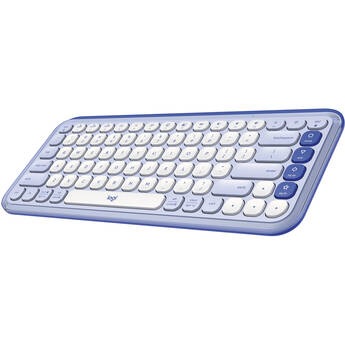
Logitech POP ICON KEYS Wireless Keyboard (Lilac & Off-White)
- Bluetooth & Logi Bolt Connectivity
- Low-Profile, Compact Design
- Pairs with 3 Devices
- Includes Logi Bolt Receiver
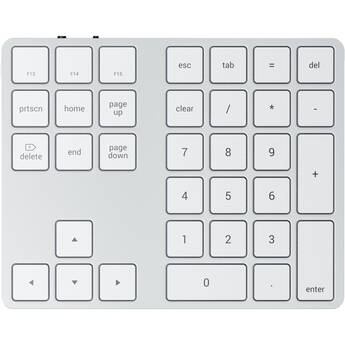
Satechi Bluetooth Extended Keypad for Mac (Silver)
- Bluetooth Wireless Connectivity
- Number, Function & Arrow Keys
- Rechargeable USB Type-C Port
- For macOS Devices
Satechi Bluetooth Extended Keypad for Mac (Space Gray)
- Bluetooth Wireless Connectivity
- Number, Function & Arrow Keys
- Rechargeable USB Type-C Port
- For macOS Devices
Matias Wireless USB-C Keyboard for PC (Black)
- For Windows PC
- Full-Size Form Factor
- Scissor Switches
- USB-C Wireless Nano Receiver
HP 405 Multi-Device Backlit Wired Keyboard
- Wired USB-C Connection w/ USB-A Adapter
- Quiet Keys
- Full-Sized Keyboard
- 12 Programmable Hotkeys
Evoluent EKB Compact Wired Keyboard
- Wired USB Connection
- Compact TKL Design
- 12 Shortcut Keys
- Fully Compatible with Windows
Satechi Slim LX3 Wired Keyboard (Space Black)
- Wired USB-C Connectivity
- Integrated USB-C to USB-A Adapter
- OS Switch
- Slim Design
Adesso Multi-Channel Touchpad Keyboard
- Wired USB-C Connection
- Full-Size Keyboard with 104-Key Layout
- Internet, Multimedia & Desktop Hotkeys
- Built-In Volume Scroll Wheel
ZAGG Messenger Folio 2 for 10.9" iPad
- For 10.9" iPad
- Bluetooth Connectivity
- Laptop-Style Keys
- Dedicated Media Keys
Satechi Slim EX1 Wireless Keyboard (Silver)
- Bluetooth 5.3 & 2.4 GHz RF Connectivity
- Low-Profile Scissor Keys
- Rechargeable 450mAh Battery via USB-C
- LED Indicators
Kensington Pro Fit Ergo KB675 EQ TKL Wired Keyboard
- Full-Size Split Layout
- 20 Programmable Keys
- Connects via USB-A
- Windows and macOS Compatible
X9 Performance Split Ergonomic Keyboard with Palm Rest
- Wired USB Type-A Host Connection
- Split Ergonomic Design
- 110 Full Size Keys
- 17 Preset Shortcut Keys
Adesso TAA Compliant Smart Card Reader Keyboard
- Built-in Smart Card Reader
- Made with antimicrobial material
- Quiet and Fast Membrane Keys
- 2X Print Size
HP Slim v2 Smartcard USB Keyboard
- USB-A Wired Connectivity
- Smart Card Reader
- LED Indicators
- Dedicated AI Copilot Key
Evoluent R3K Wired Right-Hand Keyboard
- Wired USB Connection
- Ergonomic Key Layout
- Number Pad on the Left
- Fully Compatible with Windows
Penclic MK1 Professional Typist Backlit Mechanical Keyboard
- Wired USB Connection
- Kailh Brown Switches
- Backlight Function
- Compatible with Windows, Linux, Mac
ASUS KW100 Marshmallow Keyboard (Iridescent White)
- Wireless Bluetooth 5.0 Connectivity
- Scissor Key Switches
- 75% Form Factor
- Compact and Ultrathin Design
ASUS KW100 Marshmallow Keyboard (Rose Clay)
- Wireless Bluetooth 5.0 Connectivity
- Scissor Key Switches
- 75% Form Factor
- Compact and Ultrathin Design
ASUS TUF Gaming K1 Wired Keyboard
- Wired USB 2.0 Connection
- 1000 Hz Report Rate
- Four Programmable Profiles
- 19-Key Rollover
ZAGG Pro Keyboard 15
- Bluetooth Connectivity
- 15" Keyboard with 99 Keys
- Rechargeable Lithium-Polymer Battery
- Wireless Charging
Lenovo Legion K510 Mini Pro Keyboard
- Wired USB-C 2.0 Connectivity
- Tactile Brown Mechanical Switches
- Customizable RGB Lighting
- 84-Key Design (75%)
Macally 104-Key Slim USB-A Keyboard (Space Gray)
- Wired USB-A Connectivity
- 104-Key Full-Size Layout
- Scissor-Key Keycaps
- 16 Mac Specific Shortcut Keys
ZAGG Education Wired USB-C Keyboard for Students
- USB-C Wired Connection
- Designed for Students
- 110-Key Full-Sized Keyboard
- Plug-and-Play
Macally 104-Key Slim USB-A Keyboard (Aluminum)
- Wired USB-A Connectivity
- 104-Key Full-Size Layout
- Scissor-Key Keycaps
- 16 Mac Specific Shortcut Keys
Matias Wired USB-C Aluminum Keyboard for Mac
- Wired USB-C Connection
- Built-In Two-Port USB 2.0 Hub
- Matias Scissor Switches
- 2mm Key Travel
Logitech KEYS-TO-GO 2 Wireless Keyboard with Cover (Lilac)
- Wireless Bluetooth Connection
- Scissor Keys
- Dedicated Shortcut Keys
- Pair with Up to 3 Devices
Satechi Slim EX3 Wireless Keyboard (Silver)
- Bluetooth 5.3 & 2.4 GHz RF Connectivity
- Low-Profile Scissor Keys
- Rechargeable 450mAh Battery via USB-C
- LED Indicators
Satechi Slim X1 Bluetooth Backlit Keyboard (Silver)
- Wireless Bluetooth Connection
- Backlit Keys Designed for macOS and iOS
- Compact Design
- For Select Apple Models
Choosing Computer Keyboards
Computers and keyboards go hand in hand. Even with the introduction of touchscreen displays, most people prefer the tactile feedback that a computer keyboard offers. Choosing the right keyboard can be tricky. Maybe you need a wireless keyboard for a flexible workspace, or a backlit keyboard that lets you work and play in the dark. The best way to ensure a comfortable keyboard experience is to consider your needs.
Wireless vs Wired Keyboards
Wireless computer keyboards are a good pick if you’re looking to cut down on clutter. Some models work at distances of up to thirty feet, which provides a lot of flexibility. Most wireless keyboards connect via a USB receiver or Bluetooth. You’ll find standard-sized models and compact options for hybrid computers. You’ll even find tablet keyboards.
Wired keyboards usually connect to a computer via a USB connection. They’re simple to set up, often ready in seconds. They draw their power from the computer, so you won’t have to worry about batteries. This is a preferred choice in situations where you need a solid connection with minimal lag, such as playing games.
Best Keyboards for Work
If you’re looking for a mouse-and-keyboard kit, choose models that offer optimal comfort. Ergonomic keyboards offer useful features that help limit wrist strain, such as elevated wrist rests, curved keys, and a natural arc that mimics the shape of the hand. Some application/editing keyboards feature multiple colors, and many have preset shortcuts for specific applications. There are even keyboards with a built-in mouse, and models you can separate to adjust to your typing needs.
Do All Keyboards Have the Same Layout?
While most keyboards come with a standard QWERTY layout, there are some slight differences to the position of other keys. Some keyboards have the function keys (F) in a four-key pod while others have them placed in a straight line. Keyboards may also have specials keys designed for a unique operating system. You’ll find keyboards that feature the Windows key, and Apple wireless keyboards for use with the Mac OS X.
How Do I Choose a Keyboard for Gaming or Watching Media?
Gaming keyboards come with features that help elevate the gaming experience. Programmable keys are a popular option because they allow you to create convenient shortcuts, giving you a tactical advantage. Most gaming keyboards also offer backlighting, and mechanical keys for sharper response. In addition, if you plan to watch a lot of media on your computer, look for backlit ergonomic keyboards that offer convenient media keys, play/pause buttons, and volume control.
Enjoy a comfortable keyboard experience. Check the wide selection of keyboards and computer accessories found at B&H Photo and Video.