Desktop Computer Cases

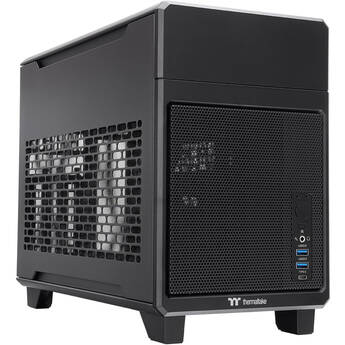
Thermaltake TR100 Mini Tower Mini-ITX Computer Chassis (Black)
- Compact, Dual-Chamber Mini-ITX Case
- Right Chamber for MB & PSU, Left for GPU
- Supports up to Two 120 or 140mm Top Fans
- AIO Coolers up to 280mm in Length
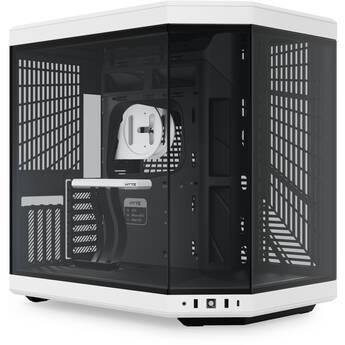
HYTE Y70 Mid-Tower Case (Panda)
- ATX, E-ATX, M-ATX, M-ITX Support
- Steel Frame & Glass Side Panel
- 4 x 2.5" Drive Bays
- 2 x 3.5" Drive Bays
HYTE Y70 Mid-Tower Case (Pitch Black)
- ATX, E-ATX, M-ATX, M-ITX Support
- Steel Frame & Glass Side Panel
- 4 x 2.5" Drive Bays
- 2 x 3.5" Drive Bays
Cooler Master MasterFrame 600 Mid-Tower ATX Case (Black)
- ATX, Micro-ATX, Mini-ITX & Mini-DTX
- Open Steel Frame and Windowed Side Panel
- 2 x 2.5/3/5" Combo Drive Bays
- 3 x 2.5" Drive Bays
ASUS TUF Gaming GT502 Horizon Mid-Tower Case (Black)
- ATX, Micro-ATX & Mini-ITX Support
- Dual Chamber Design
- Front & Side Tempered Glass Panels
- 4 x 3.5" Drive Bays
be quiet! Light Base 900 FX Full-Tower Case (White)
- E-ATX, XL-ATX, ATX, mATX & Mini-ATX
- Rear Connector Motherboard Support
- Panoramic Tempered Glass Panels
- Removable 3.5" / 2.5" Drive Cage
Fractal Design Era 2 Mini-ITX Case (Charcoal Gray)
- Mini-ITX Motherboard Support
- Aluminum and Steel Frame
- 4 x 2.5" Drive Bays
- 3 x Expansion Slots
iStarUSA 3 x 5.25" Bay Mini-ITX Tower with Front Plate (Black)
NZXT H9 Flow RGB+ Mid-Tower Case (White)
- ATX, Mini-ITX, Micro-ATX, E-ATX Support
- Steel Frame & Tempered Glass Panel
- 4+2 x 2.5" Drive Bays
- 2 x 3.5" Drive Bay
Fractal Design Meshify 3 Ambience Pro RGB Mid-Tower Case (White with Clear Tempered Glass)
- E-ATX, ATX, Micro-ATX & Mini-ITX Support
- Steel Frame w/ Glass Side Panel
- 2 x 3.5" or 4 x 2.5" Drive Brackets
- 2 x 2.5" Drive Mounts
ASUS ROG Strix Helios GX601 Mid-Tower Case (White)
- E-ATX, ATX, Micro-ATX & Mini-ITX Support
- Steel & Aluminum with Tempered Glass
- 2 x 2.5/3.5" Drive Bays
- 4 x 2.5" Drive Bays
be quiet! Light Base 900 FX Full-Tower Case (Black)
- E-ATX, XL-ATX, ATX, mATX & Mini-ATX
- Rear Connector Motherboard Support
- Panoramic Tempered Glass Panels
- Removable 3.5" / 2.5" Drive Cage
Lian Li O11 Dynamic EVO XL Full Tower Gaming Case (White)
- ATX, Micro-ATX, Mini-ITX, E-ATX Support
- Steel, Aluminum, Tempered Glass
- 3 x 2.5" Drive Trays
- 4 x 2.5/3.5" Drive Bays
NZXT H9 Flow RGB+ Mid-Tower Case (Black)
- ATX, Mini-ITX, Micro-ATX, E-ATX Support
- Steel Frame & Tempered Glass Panel
- 4+2 x 2.5" Drive Bays
- 2 x 3.5" Drive Bay
Fractal Design Torrent Mid-Tower Case with Light Tinted Tempered Glass Side Panel and RGB Fans (Black)
- E-ATX, ATX, M-ATX & M-ITX Support
- 2 x 3.5" Bays
- 4 x 2.5" Bays
- 7 x Expansion Slots
Fractal Design Define 7 XL Full-Tower Case (Black, Dark-Tint Tempered Glass)
- Supports EE-ATX. E-ATX, ATX, mATX & mITX
- Steel Frame & Dark-Tint Tempered Glass
- Two 5.25" Drive Bays
- Eight 2.5/3.5" Drive Bays
ASUS ROG Strix Helios GX601 Mid-Tower Case (Black)
- E-ATX, ATX, Micro-ATX & Mini-ITX Support
- Steel & Aluminum with Tempered Glass
- 2 x 2.5/3.5" Drive Bays
- 4 x 2.5" Drive Bays
Lian Li O11 Dynamic EVO XL Full Tower Gaming Case (Black)
- ATX, Micro-ATX, Mini-ITX, E-ATX Support
- Steel, Aluminum, Tempered Glass
- 3 x 2.5" Drive Trays
- 4 x 2.5/3.5" Drive Bays
MSI MAG PANO 120R PZ Mid-Tower Computer Case
- Supports Back-Connect ATX Motherboard
- E-ATX, M-ATX, and ITX Support
- 270° Panoramic Tempered Glass Panel
- 1 x 2.5" and 2 x 3.5" Drive Bays
ASUS ProArt PA602 Wood Edition Mid-Tower Case (Modern Black)
- E-ATX, ATX, & Mini-ITX Support
- Tempered Glass Left Side Panel
- 4 x 2.5/3.5" Bays
- 4 x 2.5" Bays
Cooler Master MasterFrame 360 Stage LCD Mid-Tower Case
- ATX, Micro-ATX, & Mini-ITX Support
- Aluminum Frame w/ Tempered Glass Panel
- Open Design with LCD Screen
- 1 x 3.5" Drive Bay
ASUS Republic of Gamers Strix Helios II Mid-Tower Case (White)
- E-ATX, ATX, mATX & Mini-ITX Support
- Aluminum Frame & Windowed Side Panel
- 2 x 3.5"/2.5" Drive Bays
- 4 x 2.5" Drive Mounts
CORSAIR iCUE 7000X RGB Full Tower Desktop Case (Black)
- E-ATX, ATX, Micro-ATX, Mini-ITX Support
- Steel Frame & Tempered Glass
- 6 x 3.5" Drive Bays
- 3 x 2.5" Drive Bays
iStarUSA Compact Stylish 3x 3.5" Hotswap Trayless mini-ITX Tower (Silver HDD Handles)
iStarUSA Compact Stylish 3x 3.5" Hotswap Trayless mini-ITX Tower (Red HDD Handles)
iStarUSA Compact Stylish 3x 3.5" Hotswap Trayless mini-ITX Tower (Black HDD Handles)
HYTE Y70 Touch Infinite Mid-Tower Case (Pitch Black)
- ATX, E-ATX, M-ATX, M-ITX Support
- Steel Frame & Glass Side Panel
- 4 x 2.5" Drive Bays
- 2 x 3.5" Drive Bays
HYTE Y70 Touch Infinite Mid-Tower Case (Snow White)
- ATX, E-ATX, M-ATX, M-ITX Support
- Steel Frame & Glass Side Panel
- 4 x 2.5" Drive Bays
- 2 x 3.5" Drive Bays
Shopping for a Desktop Computer Case
Desktop computer cases are the first step to building a customized PC. The empty chassis is waiting for you to add a hard drive, motherboard, graphics cards, and other components you desire, so your machine serves your exact needs. Many also have sleek and stylish designs, and even external lighting.
How to Choose a Desktop Computer Case
Computer cases often feature a number of ports. Make sure there are enough to serve your requirements, and that they line up with the motherboard form factor that you install. If you want to be able to see your components, choose a case with one side made of tempered glass, which serves as a durable but transparent barrier. Size also matters, so choose a tower that's large enough to hold all the components you want to include, including extra fans and other cooling systems if your goal is a gaming system. If style is important, many cases feature lighting or other cool design touches that add visual appeal.
Difference Between a Mid Tower and Full Tower Case
A mid tower case is smaller than a desktop full tower case, and accommodates smaller micro-ATX form factor motherboards. With a full tower size, you have more room for adding components, which is especially useful for building a gaming PC that uses graphic cards and sound cards to maximize performance. Mid tower cases take up less room, making them well suited for areas where space is limited. They can still house sufficient components to build a powerful PC or home server.
Parts that Comprise a Custom Computer
At a minimum, you'll need a motherboard with the right form factor to fit the case, as well as a processor, memory, and a hard drive or solid-state drive. A gaming PC should have room for a dedicated graphics card, and any additional cooling fans or lights you may want.
Installing an SSD in a Desktop Case
If you choose to add a solid-state drive to your PC case, mounting is simple and easy. Open the case and select an empty drive bay. Many SSDs require mounting brackets to fit inside a drive bay, so attach those to the drive first. Slide the drive into the bay and connect the cable. Be sure to keep yourself and the work area grounded to prevent static discharge.
How to Cool a Computer
Most desktop PC cases have space for installing fans, maintaining airflow and keeping processors and other components cool during high-demand operations. Some full tower cases even accommodate as many as a dozen fans. There are often mesh panels on the front, back, or sides of the tower. In the space provided by a full tower, there's also the option to install a liquid cooling system. This is a good solution for those who plan to overclock their processor and get the most performance possible. It dissipates the high heat generated by overclocking, and does it with a low amount of noise.
When you're building a PC to fit your specific needs, B&H Photo and Video has a wide selection of desktop computer cases to get you started.