
Sony Global
Computer Hubs

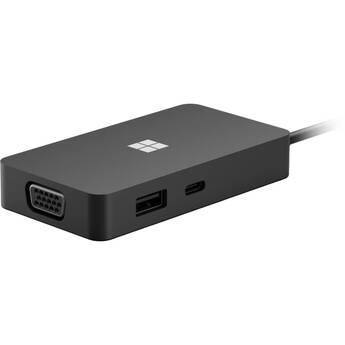
Microsoft USB-C Travel Hub (Black)
- Integrated USB-C Cable
- 1 x USB-C 3.2 Gen 2 Female Port
- 1 x USB-A 3.2 Gen 2 Female Port
- 1 x HDMI 2.0 Female Port
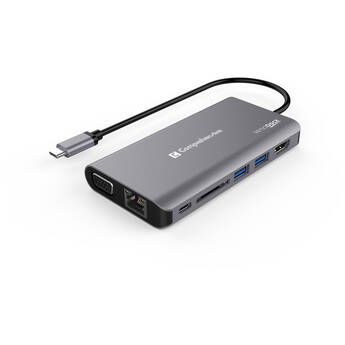
Comprehensive VersaDock USB Type-C 4K Dual Display Docking Station
- USB Type-C Host Connection
- HDMI and VGA Display Outputs
- 1 x USB 3.1 Gen 1 Type-C, 2 x Type-A
- Gigabit Ethernet, SD Card, 3.5mm Audio
ALOGIC MX2 USB-C Dual Display Dock
- 2 x HDMI Outputs
- 3 x USB-A 3.2 Gen 1 Ports
- 2 x USB-C 3.2 Gen 1 Ports
- Gigabit Ethernet LAN
Logitech SmartDock Flex Expansion Kit
- Designed for Skype for Business Calls
- AV Passthrough for Non-Skype Meetings
- USB 2.0 Interface
- 3 x HDMI Ports
j5create Multi-Angle Dual HDMI Docking Stand
- Holds Most Laptops up to 16"
- Detachable Mini Docking Station
- 2 x USB-A | 1 x USB-C 3.2 Gen 1
- 2 x HDMI | Gigabit Ethernet
j5create 12-in-1 USB-C Dock with Dual 4K HDMI
- 1 x USB-C & USB-A 3.2 Gen 2
- 1 x USB-C & USB-A 3.2 Gen 1
- Supports up to Two 4K Displays
- 1 x HDMI 4K60 | 1 x HDMI 4K30
Comprehensive VersaDock USB-C 4K Dual Display Docking Station
- Convert Laptop Into a Workstation
- Two HDMI / Two USB-A 3.1 Ports
- SD/microSD Slot
- Fast Charging up to 100W
Kramer KDock-3 7-Port Multi-Adapter Hub
- 2 x USB 3.0 / 3.1 Gen 1 Type-A Ports
- 1 x USB 3.0 / 3.1 Gen 1 Type-C Port
- 1 x HDMI Output
- 1 x DisplayPort Output
Satechi USB-C Multimedia Adapter M1
- USB-C Host Connectivity
- 2 x HDMI Port
- 2 x USB-A 3.0 Port
- 1 x USB-C 3.0 Port
SIIG 7-in-1 MST USB Type-C Docking Station
- USB 3.1 Gen 1 Type-C Host Connection
- 1 x DisplayPort | 1 x HDMI
- Up to 3840 x 2160 Resolution @ 30 Hz
- 2 x USB 3.1 Gen 1 Type-A | 1 x Type-C
ALOGIC Dual 4K Universal DisplayPort Compact Docking Station
- 2 x DisplayPort Outputs
- USB-A & USB-C 3.2 Gen 2 Ports
- RJ45 Networking Port
- SD UHS-II Card Reader
ATEN US3310 2-Port USB 3.2 Gen 1 Sharing Switch with Power Pass-Through
- 2 x USB 3.2 Gen 2 Type-A Ports
- 1 x HDMI 1.4 Port
- 2 x USB 3.2 Gen 1 Type-C Host Connector
- 1 x USB Type-C Power Pass-Through Port
Kensington UH1510P EQ USB-C Triple Video Driverless Mobile Dock
- 3 x USB-A 3.2 Gen 1 Ports
- 2 x USB-C Ports
- 1 x microSD Card Slot
- 1 x SD Card Slot
Verbatim 15-in-1 USB-C Pro Docking Station with 256GB Vi3000 SSD
- 2 x HDMI Ports
- 1 x DisplayPort
- Supports up to 8K (7680 x 4320) at 30 Hz
- 1 x RJ45 Gigabit Ethernet Port
Plugable 3-Port Thunderbolt 4 and USB4 Hub
- 3-Port Thunderbolt/USB-C Hub
- Thunderbolt 3|Thunderbolt 4|USB 3.2|USB4
- Up to 40Gb/s Data Transfer Rate
- Supports Dual 4K Displays at 60Hz
C2G USB-C 9-in-1 Dual Display Docking Station (TAA Compliant)
- USB-C Host Connection
- 1 x USB-C Power Delivery
- 3 x USB-A 3.0 Ports
- 2 x USB-A 2.0 Ports
Comprehensive VDK-2300 VersaDock Docking Station
- 4K 60 Hz Single Display Support
- 4K 30 Hz Dual Display Support
- 3 x USB-A 3.2 Gen 1 Ports
- USB-C Port with 18W Charger
Black Box ICI104A 4-Port Industrial USB 2.0 Hub
- 4 x USB 2.0 Type-A Ports
- USB Type-B Host Connector Port
- Up to 480 Mb/s Transfer Speeds
- Optimized for Industrial Environments
C2G USB-C 9-in-1 Dual Display Docking Station with 60W Power Supply (TAA Compliant)
- USB-C Host Connection
- 1 x USB-C Power Delivery
- 3 x USB-A 3.0 Ports
- 2 x USB-A 2.0 Ports
ALOGIC Dual 4K Universal HDMI Compact Docking Station
- 2 x HDMI Outputs
- USB-A & USB-C 3.2 Gen 2 Ports
- RJ45 Networking Port
- SD UHS-II Card Reader
UGREEN 12-in-1 Fast Charge Universal Docking Station
- 2 x USB-A 3.2 Gen 1, 1 x USB-A Gen 2 Port
- 1 x USB-C 3.2 Gen 2 Port
- 2 x HDMI, 1 x DisplayPort Video Output
- SD & microSD Card Slots
Kensington Thunderbolt 4 and USB4 Quad Video Docking Station
- Thunderbolt 4 Host Port (100W)
- 1 x USB-C 3.2 Gen 2 Port
- 4 x USB-A 3.2 Gen 2 Ports
- 2 x USB-A 3.2 Gen 1 | 1 x USB-A 2.0
C2G 11-in-1 UHD Docking Station
Panasonic Desktop Dock for TOUGHBOOK 40 Laptop
- For Panasonic TOUGHBOOK 40 Laptop
- 3 x USB-A | 3 x USB-C
- 1 x HDMI | 1 x Serial
- 2 x RJ45 LAN Ports
Bullet Train USB 3.1 Gen 1 Fiber Optic Extension Cable with 4-Port Hub (65.6')
- Up to 5 Gb/s Throughput
- USB 3.1 Gen 1 Type-A Host Connection
- 4-Port USB Type-A Hub
- Includes Power Adapter
Bullet Train USB 3.1 Gen 1 Fiber Optic Extension Cable with 4-Port Hub (16.4')
- Up to 5 Gb/s Throughput
- USB 3.1 Gen 1 Type-A Host Connection
- 4-Port USB Type-A Hub
- Includes Power Adapter
Bullet Train USB 3.1 Gen 1 Fiber Optic Extension Cable with 4-Port Hub (32.8')
- Up to 5 Gb/s Throughput
- USB 3.1 Gen 1 Type-A Host Connection
- 4-Port USB Type-A Hub
- Includes Power Adapter
Bullet Train USB 3.1 Gen 1 Fiber Optic Extension Cable with 4-Port Hub (49.2')
- Up to 5 Gb/s Throughput
- USB 3.1 Gen 1 Type-A Host Connection
- 4-Port USB Type-A Hub
- Includes Power Adapter
What You Need to Know About Computer Hubs & USB Hubs
Computer hubs serve as network hardware devices that expand a single USB port into several ports that you can connect with other devices such as printers, computers, and other peripheral hardware for convenient data exchange. You can also use your computer hub to share a local area network and its bandwidth with multiple computers.
What Are Computer USB-C Hubs?
USB-C hubs have USB extenders that expand the female USB-C port on your devices to allow multiple possibilities of connectivity. They have the ability to connect to HDMI output cables, producing crystal clear video streaming with incredible fluency. USB-C hubs also have a slim and compact design that's perfect for everyday carrying. Models like the Thunderbolt 3 hub come with Ethernet ports to offer direct access to internet cables. With these multi-port USB hubs, you can connect keyboards, mice, thumb drives, cameras, scanners, and other devices. They also enable you to charge and synchronize your mobile devices to a local network. To achieve the connectivity to various USB ports, some hubs may require USB controller cards. Ethernet network interface cards are essential to connect computers to FireWire hubs for quick transfer of data.
Powered vs. Unpowered USB Hubs
USB hubs are available as powered or unpowered. Powered USB hubs use an external power source to bring each hub port into the same energy level as the system port. They also don't divide power consumption across all connected devices, but have converters and splitters, which split data bandwidth across all the devices. They're ideal for offices, as you can connect and charge multiple devices without any lag on your system.
Unpowered USB hubs lack an external power source and use the power from the computer's USB port. Since computer USB ports produce small amounts of current, they're ideal for devices that need low voltages like smartphones and tablets. Additionally, most of these models are portable and easy to use—simply plug and play.
Check out B&H Photo and Video's wide selection of computer hubs to find the right accessory for your USB connectivity needs.