CPU Coolers & Fans

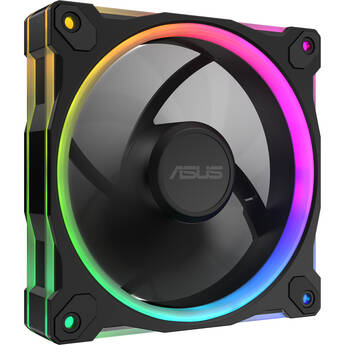
ASUS Prime MR120 ARGB Reverse Blade PWM Fan (Black)
- 1 x 120mm Reverse Blade Fan
- PWM Control
- Up to 1600 rpm Fan Speeds
- 21 dBA Maximum Noise Level
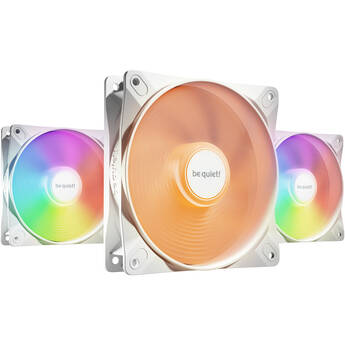
be quiet! Light Wings LX HS ARGB 120mm Fan (White, 3-Pack)
- 120mm PWM Fan
- Up to 2100 rpm Fan Speed
- 16 x ARGB LEDs
- 61.8 CFM Airflow
Cooler Master Elite Liquid 240 ARGB AIO Liquid CPU Cooler (White)
- 240mm Aluminum Radiator
- Supports AMD and Intel LGA Chip Sockets
- 2 x 120mm ARGB Fans
- Up to 2100 rpm Fan Speeds
Fractal Design Momentum 12 RGB 120mm Fan (Black, 3-Pack)
- 120mm PWM Fan
- Up to 2200 rpm Fan Speed
- Liquid Crystal Polymer Blade Design
- 62.44 CFM Airflow
Fractal Design Radius 240mm RGB AIO Liquid CPU Cooler (Black)
- 240mm Aluminum Radiator
- 2 x 120mm PWM Fans
- Rifle Bears
- Up to 2200 rpm Fan Speed
NZXT Kraken Plus 240 RGB AIO Liquid CPU Cooler (Black)
- 240mm Aluminum Radiator
- 2 x 120mm RGB Fans
- Fluid Dynamic Bearings
- 240 x 240 1.54" LCD Screen at 30 Hz
be quiet! Pure Loop 3 LX 360mm ARGB AIO Liquid CPU Cooler
- 360mm Aluminum Radiator
- 3 x Light Wings LX 120mm PWM Fans
- ARGB LEDs on Fans & Pump
- Rifle Bearing Fans
be quiet! Light Loop 360mm ARGB AIO Liquid CPU Cooler (Black)
- 360mm Aluminum Radiator
- Light Wings LX 120mm PWM Fans
- ARGB LEDs on Fans & Pump
- Rifle Bearing Fans
ASUS ProArt LC 420 All-in-One CPU Liquid Cooler
- 3 x Noctua NF-A14 Industrial Fans
- 800 - 2000 rpm Fan Speed
- Illuminated CPU Block
- 3-Phase Motor Pump
ASUS Prime MR120 ARGB PWM Fan (Black)
- 1 x 120mm Fan
- PWM Control
- Up to 1600 rpm Fan Speeds
- 21 dBA Maximum Noise Level
CORSAIR RS120 ARGB 120mm PWM Fan (Black)
- 120 x 25mm PWM Fan
- Customizable RGB Lighting
- Corsair Magnetic Dome Bearing
- Up to 2100 rpm Fan Speed
Fractal Design Momentum 12 120mm Fan (White)
- 120mm PWM Fan
- Up to 2200 rpm Fan Speed
- Liquid Crystal Polymer Blade Design
- 67.34 CFM Airflow
Fractal Design Momentum 12 120mm Fan (Black)
- 120mm PWM Fan
- Up to 2200 rpm Fan Speed
- Liquid Crystal Polymer Blade Design
- 67.34 CFM Airflow
CORSAIR RS120 ARGB 120mm PWM Fan (White)
- 120 x 25mm PWM Fan
- Customizable RGB Lighting
- Corsair Magnetic Dome Bearing
- Up to 2100 rpm Fan Speed
CORSAIR iCUE LINK RX120 RGB 120mm PWN Fan (Black)
- Works with iCUE LINK System Hub
- 120mm PWM Fan Size
- Up to 2100 RPM
- 8 x RGB LEDs
Thermaltake CT200 ARGB Sync PC Cooling Fan (Black)
- Compatible with PC
- 200mm PWM Fan Size
- 500 to 900 rpm
- 27.2 dBA Noise Level
Fractal Design Momentum 12 RGB 120mm Fan (Black)
- 120mm PWM Fan
- Up to 2200 rpm Fan Speed
- Liquid Crystal Polymer Blade Design
- 62.44 CFM Airflow
Lian Li 120mm UNI FAN TL Wireless RGB Reverse Blade Case Fan (Black)
- 1 x 120mm PWM Fan w/ Reverse Blades
- L-Wireless Sync Support
- Up to 2300 rpm Fan Speed
- Customizable RGB Lighting
ASUS ROG Strix XF 120mm PWM Fan
- 1 x 120mm Fan
- Magnetic-Levitation Bearing
- Up to 1800 rpm Fan Speeds
- PWM Control
Fractal Design Momentum 14 RGB 140mm Fan (Black)
- 140mm PWM Fan
- Up to 1800 rpm Fan Speed
- Liquid Crystal Polymer Blade Design
- 74.39 CFM Airflow
Lian Li 140mm UNI FAN SL-INFINITY Case Fan (White)
- 1 x 140mm PWM Fan
- Infinity Mirror Design
- Customizable RGB Lighting
- Up to 1600 rpm Fan Speed
Lian Li UNI FAN SL-INF Wireless 120 Reverse Blade (Black)
- One Fan
- Seven Fan Blades
- Triple-Zone ARGB Lighting
- Pulse-Width Modulation
Thermaltake TOUGHAIR 110 CPU Cooler (Gray)
- 120mm Fan Compatible with Intel and AMD
- Fan Speed: 500 to 2000 rpm
- Air Flow: 58.35 CFM
- Static Pressure: 2.41mm H2O
Cooler Master MasterFan A120 120mm Fan
- 120mm Form Factor
- Two-Ball Bearing
- Three-Phase Motor
- Pulse Width Modulation Control
Thermaltake CT140 PC Cooling Fan with ARGB (Black, 2-Pack)
- 2 x 140mm PWM Fans
- Hydraulic Bearings
- 4-Pin PWM Connection
- 500 to 1500 rpm
be quiet! Pure Rock 3 CPU Air Cooler
- Intel and AMD Socket Compatible
- Aluminum Heatsink
- Pure Wings 120mm PWM Fan
- 4 x Heat Pipes
be quiet! Light Wings LX HS ARGB 120mm Fan (Black, 3-Pack)
- 120mm PWM Fan
- Up to 2100 rpm Fan Speed
- 16 x ARGB LEDs
- 61.8 CFM Airflow
ASUS Prime MR120 ARGB PWM Fan (Black, 3-Pack)
- 3 x 120mm Fans
- PWM Control
- Up to 1600 rpm Fan Speeds
- 23 dBA Maximum Noise Level
Learning About CPU Coolers, PC Cooling Fans & Liquid Coolers
CPU processors generate heat inside the tower case while performing tasks, which is why CPU coolers are so important. Keeping your CPU and other computer components cool is a essential aspect of safe and efficient PC operation. The type of cooling solution you need depends on how you use your computer.
Do CPUs Come with Fans?
Most packaged CPUs include not only 120mm computer fans, but also heat sinks to keep them cool. Separate cooling fans are available, and typically plug into the motherboards using 4-pin connectors. A heat sink is made of metal that absorbs and conducts heat, drawing it away from the processor and working with the fan to keep the temperature down. Your computer may still require additional fans to circulate air and further lower the temperature. Since many computers come with motherboards and processors already installed, you would only require a separately-packaged CPU and CPU fan when making a custom build device or performing a system upgrade or repair.
Keeping a PC Cool
PC towers typically feature mesh panels on the front, back, and/or sides to allow for airflow. Customizable tower cases also accommodate more than one computer cooling fan so that you can install them as needed to keep air moving throughout the interior of the case. This keeps not only the CPU cool, but also other components such as graphic display cards, which often feature onboard fans of their own. Ensuring you have enough fans installed, and that you regularly clean the mesh panels to remove dust, goes a long way toward keeping temperatures low and extending the unit's lifespan.
Fans are not the only cooling devices available. You can also apply a non-corrosive thermal paste or compound to the CPU to conduct heat through the heat sink even more efficiently. Fan controllers, hubs, and other cooling accessories are available for turning the individual fans in your chassis on and off as needed. Those with ultra-high-performance machines should consider liquid cooling.
What's Liquid Cooling?
Liquid cooling systems use a combination of fans and hoses which channel a special liquid coolant through the interior of the computer case. The liquid takes on the heat before the fans cool it off in a continuous cycle. While most typical PCs won't require anything beyond a basic CPU air cooler, you may want to install one if you plan to overclock your processor or otherwise exert your machine's components to the furthest limits.