CPU Coolers & Fans

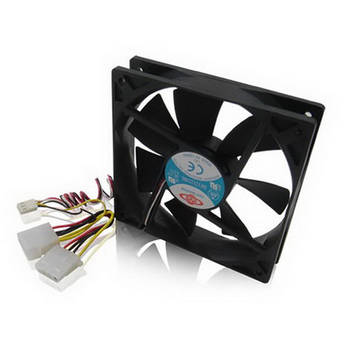
iStarUSA Ball-Bearing Fan for Select Chassis Models (120mm)

Lian Li 120mm UNI FAN SL Wireless ARGB Case Fan (White)
- 1 x 120mm PWM Fan
- L-Wireless Sync Support
- Up to 2000 rpm Fan Speed
- Customizable ARGB Lighting
Lian Li 120mm UNI FAN SL Wireless ARGB Reverse Blade Case Fan (Black)
- 1 x 120mm PWM Fan w/ Reverse Blades
- L-Wireless Sync Support
- Up to 2000 rpm Fan Speed
- Customizable ARGB Lighting
Thermaltake CT120 PC Cooling Fan (White, 2-Pack)
- 2 x 120mm PWM Fans
- Hydraulic Bearings
- 4-Pin PWM Connection
- 500 to 2000 rpm
Cooler Master MasterFan MF140 HALO² Case Fan (Black)
- 140mm Form Factor
- Rifle Bearings
- Pulse Width Modulation Control
- Integrated RGB LEDs
be quiet! 140mm Silent Wings Pro 4 Case Fan (White)
- Single 140mm Fan
- Fluid-Dynamic Bearing
- Pulse Width Modulation (PWM) Control
- 36.8 dBA Noise Level
be quiet! 120mm Silent Wings Pro 4 Case Fan (White)
- Single 120mm Fan
- Fluid-Dynamic Bearing
- Pulse Width Modulation (PWM) Control
- 36.9 dBA Noise Level
be quiet! 140mm Silent Wings Pro 4 Case Fan (Black)
- Single 140mm Fan
- Fluid-Dynamic Bearing
- Pulse Width Modulation (PWM) Control
- 36.8 dBA Noise Level
be quiet! 120mm Silent Wings Pro 4 Case Fan (Black)
- Single 120mm Fan
- Fluid-Dynamic Bearing
- Pulse Width Modulation (PWM) Control
- 36.9 dBA Noise Level
Cooler Master Hyper 212 3DHP Black Edition CPU Air Cooler
- Intel & AMD Socket Compatible
- Mobius 120 PWM Fan
- Aluminum Fin Heatsink
- 3DHP Heat Pipe Design
Thermaltake UX200 SE ARGB Lighting CPU Cooler (Black)
- Compatible with Intel and AMD sockets.
- 120mm PWM Fan Size
- Up to 1800 RPM
- 15 High-Lumen LED
Thermaltake LE120 ARGB Sync PC Cooling Fan (3-Fan Pack, White)
Thermaltake LE120 ARGB Sync PC Cooling Fan (3-Fan Pack, Black)
Thermaltake TOUGHFAN 14 Pro High Static Pressure PC Cooling Fan (1-Pack)
- 140mm Fan
- Fan Speed: 500 to 2000 rpm
- Air Flow: 119.6 CFM
- Noise Level: 31.6 dBA
Cooler Master MasterFan M120 ARGB 120mm Fan
- 120mm Form Factor
- Magnetic Dynamic Bearing
- Pulse Width Modulation Control
- Integrated Addressable RGB LEDs
ASUS ProArt PF120 120mm Case Fan (White)
- 120mm PWM Fan
- Fluid Dynamic Bearing
- Up to 3000 rpm Speed
- 104.8 CFM Airflow
ASUS ProArt PF120 120mm Case Fan (Black)
- 120mm PWM Fan
- Fluid Dynamic Bearing
- Up to 3000 rpm Speed
- 104.8 CFM Airflow
Lian Li 120mm UNI FAN TL Wireless RGB Case Fan (Black)
- 1 x 120mm PWM Fan
- L-Wireless Sync Support
- Up to 2600 rpm Fan Speed
- Customizable RGB Lighting
Thermaltake Contac Silent 12 CPU Cooler
- 120mm PWM Fan
- 150W TDP Cooling
- 28.8 dBA Max Noise Level
- Copper Heat Pipes & Aluminum Fins
Thermaltake CT140 PC Cooling Fan (White, 2-Pack)
- 2 x 140mm PWM Fans
- Hydraulic Bearings
- 4-Pin PWM Connection
- 500 to 1500 rpm
Cooler Master MasterFan MF140 HALO² Case Fan (White)
- 140mm Form Factor
- Rifle Bearings
- Pulse Width Modulation Control
- Integrated RGB LEDs
Lian Li 120mm UNI FAN TL Wireless RGB Case Fan (White)
- 1 x 120mm PWM Fan
- L-Wireless Sync Support
- Up to 2600 rpm Fan Speed
- Customizable RGB Lighting
Lian Li UNI FAN SL-INF Wireless 120 (Black)
- One Fan
- Seven Fan Blades
- Triple-Zone ARGB Lighting
- Pulse-Width Modulation
be quiet! Pure Wings 3 140mm Case Fan (3-Pack)
- 140mm PWM Fan
- Up to 1200 rpm Fan Speed
- 57.4 CFM Airflow
- 0.96mm H2O Static Pressure
be quiet! Pure Wings 3 140mm HS Case Fan (3-Pack)
- 140mm PWM Fan
- Up to 1800 rpm Fan Speed
- 72.2 CFM Airflow
- 2.44mm H2O Static Pressure
Thermaltake CT120 PC Cooling Fan with ARGB (White, 2-Pack)
- 2 x 120mm PWM Fans
- Hydraulic Bearings
- 4-Pin PWM Connection
- 500 to 2000 rpm
Lian Li 140mm UNIFANTL Wireless RGB Reverse Blade Case Fan (White)
- 1 x 140mm PWM Fan w/ Reverse Blades
- L-Wireless Sync Support
- Up to 1800 rpm Fan Speed
- Customizable RGB Lighting
Thermaltake ASTRIA 200 ARGB CPU Cooler (Black)
- Compatible with Intel and AMD
- Fan Speed: 500 to 1800 rpm
- Air Flow: 65 CFM
- Acoustical Noise: 26.8 dBA
Learning About CPU Coolers, PC Cooling Fans & Liquid Coolers
CPU processors generate heat inside the tower case while performing tasks, which is why CPU coolers are so important. Keeping your CPU and other computer components cool is a essential aspect of safe and efficient PC operation. The type of cooling solution you need depends on how you use your computer.
Do CPUs Come with Fans?
Most packaged CPUs include not only 120mm computer fans, but also heat sinks to keep them cool. Separate cooling fans are available, and typically plug into the motherboards using 4-pin connectors. A heat sink is made of metal that absorbs and conducts heat, drawing it away from the processor and working with the fan to keep the temperature down. Your computer may still require additional fans to circulate air and further lower the temperature. Since many computers come with motherboards and processors already installed, you would only require a separately-packaged CPU and CPU fan when making a custom build device or performing a system upgrade or repair.
Keeping a PC Cool
PC towers typically feature mesh panels on the front, back, and/or sides to allow for airflow. Customizable tower cases also accommodate more than one computer cooling fan so that you can install them as needed to keep air moving throughout the interior of the case. This keeps not only the CPU cool, but also other components such as graphic display cards, which often feature onboard fans of their own. Ensuring you have enough fans installed, and that you regularly clean the mesh panels to remove dust, goes a long way toward keeping temperatures low and extending the unit's lifespan.
Fans are not the only cooling devices available. You can also apply a non-corrosive thermal paste or compound to the CPU to conduct heat through the heat sink even more efficiently. Fan controllers, hubs, and other cooling accessories are available for turning the individual fans in your chassis on and off as needed. Those with ultra-high-performance machines should consider liquid cooling.
What's Liquid Cooling?
Liquid cooling systems use a combination of fans and hoses which channel a special liquid coolant through the interior of the computer case. The liquid takes on the heat before the fans cool it off in a continuous cycle. While most typical PCs won't require anything beyond a basic CPU air cooler, you may want to install one if you plan to overclock your processor or otherwise exert your machine's components to the furthest limits.