Ask Our Experts212-444-6615
Hello, Log InAccount & Orders
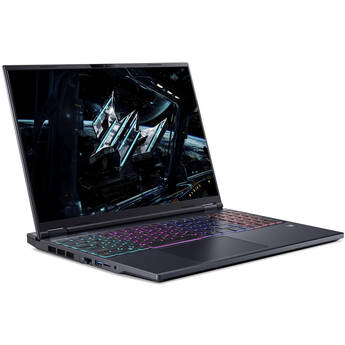
Acer 16" Predator Helios Neo 16 AI LED IPS Gaming Laptop
BH # ACPHN167395G MFR # PHN16-73-95G8
Key Features
- 2.1 GHz Intel Core Ultra 9 24-Core
- 32GB DDR5 | 1 TB PCIe Gen 4 SSD
- 16" 2560 x 1600 240 Hz LED IPS
- NVIDIA GeForce RTX 5070 (8GB GDDR7)
Available in other Styles, Configurations & Kits
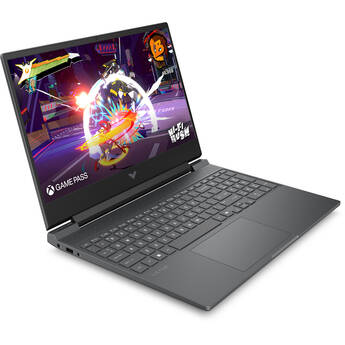
HP 15.6" Victus 15-fa2777nr Gaming Notebook
BH # HEBM5Y7UA MFR # BM5Y7UA#ABA
Key Features
- Intel Core i7-13620H 10-Core (13th Gen)
- 16GB DDR5 RAM | 512GB PCIe 4.0 M.2 SSD
- 15.6" 1920 x 1080 144 Hz IPS Display
- NVIDIA GeForce RTX 5050 (8GB GDDR7)
Lenovo 15.3" Legion 5i Gaming Laptop
BH # LE83VK004US MFR # 83VK0004US
Key Features
- Intel Core Ultra 7 251HX 18-Core
- 32GB DDR5 | 1TB M.2 SSD
- 15.3" 2560 x 1600 OLED 165 Hz Display
- NVIDIA GeForce RTX 5060 GPU (8GB GDDR7)
Available in other Styles, Configurations & Kits
Deep ImmersionExperience stunning graphics with the 2560 x 1600 OLED display, powered by NVIDIA GeForce RTX 5060 graphics, AMD Ryzen 7 250 CPU, 16GB RAM & 512GB SSD
Expert Pick
Lenovo 15.3" Legion 5a Gaming Laptop
BH # LE83Q70068US MFR # 83Q70068US
Key Features
- 3.3 GHz AMD Ryzen 7 250 8-Core
- 16GB DDR5 | 512GB M.2 NVMe SSD
- 15.3" 2560 x 1600 OLED 165 Hz Display
- NVIDIA GeForce RTX 5060 (8GB GDDR7)
Acer 16" Nitro V 16S Gaming Laptop
BH # ACN16S7171BS MFR # ANV16S-71-71BS
Key Features
- 2.5 GHz Intel Core 7 240H 10-Core
- 16GB DDR5 | 1TB M.2 PCIe 4.0 SSD
- 16" 2560 x 1600 180 Hz IPS Display
- NVIDIA GeForce RTX 5070 (8GB GDDR7)
Available in other Styles, Configurations & Kits
Acer 16" Nitro V Gaming Laptop
BH # ACNV167273VJ MFR # ANV16-72-73VJ
Key Features
- 2.5 GHz Intel Core 7 240H 10-Core
- 32GB DDR5 | 512GB M.2 PCIe 4.0 SSD
- 16" 1920 x 1200 180 Hz IPS Display
- NVIDIA GeForce RTX 5060 (8GB GDDR7)
Discontinued
ASUS 13.4" Republic of Gamers Flow Z13 Multi-Touch 2-in-1 Gaming Laptop (Kojima Productions Collab)
BH # ASGZ302CXS99 MFR # GZ302EAC-XS99
Key Features
- 3.0 GHz AMD Ryzen AI MAX+ 395 16-Core
- 128GB LPDDR5x | 1TB M.2 PCIe NVMe SSD
- 13.4" 2560 x 1600 180 Hz IPS Touchscreen
- Integrated AMD Radeon 8060S Graphics
Available in other Styles, Configurations & Kits
Extreme PerformanceAn NVIDIA GeForce RTX 5090 GPU, Intel Core Ultra 9 CPU, 32GB DDR5 RAM & 240 Hz OLED Display Deliver Exceptional Responsiveness
Lenovo 16" Legion Pro 7i Gaming Laptop
BH # LE83F500M8US MFR # 83F500M8US
Key Features
- 2.7 GHz Intel Core Ultra 9 24-Core
- 32GB of DDR5 RAM | 2TB M.2 SSD Storage
- 16" 2560 x 1600 OLED 240 Hz Display
- NVIDIA GeForce RTX 5090 (24GB GDDR7)
Available in other Styles, Configurations & Kits
Lenovo 16" Legion Pro 7i Gaming Laptop
BH # LE83F500N1US MFR # 83F500N1US
Key Features
- Intel Core Ultra 9 290HX Plus 24-Core
- 32GB of DDR5 RAM | 1 x 2TB M.2 Storage
- 16" 2560 x 1600 OLED 240 Hz Display
- NVIDIA GeForce RTX 5070 Ti (12GB GDDR7)
Available in other Styles, Configurations & Kits
MSI 15.6" Cyborg A15 Gaming Laptop
BH # MSCA15AIB2HW MFR # CYBORG A15 AI B2HWFKG-030US
Key Features
- AMD Ryzen 7 260 8-Core
- 16GB DDR5 | 1TB M.2 NVMe SSD
- 15.6" 1920 x 1080 IPS 144 Hz Display
- NVIDIA GeForce RTX 5060 GPU (8GB GDDR7)
Dell 16" Alienware 16 Aurora Gaming Laptop
BH # DEC162507469 MFR # LAC16250-7469BLU-PUS
Key Features
- 2.5 GHz Intel Core 7 240H 10-Core
- 16GB DDR5 RAM | 1TB M.2 NVMe PCIe SSD
- 16" 2560 x 1600 120 Hz Display
- NVIDIA GeForce RTX 5060 (8GB GDDR7)
Available in other Styles, Configurations & Kits
ASUS 13.4" Republic of Gamers Flow Z13 2-in-1 Gaming Laptop
BH # ASGZ302EXS99 MFR # GZ302EA-XS99
Key Features
- 3.0 GHz AMD Ryzen AI MAX+ 395 16-Core
- 128GB LPDDR5X | 1TB M.2 PCIe NVMe SSD
- 13.4" 2560 x 1600 180 Hz IPS Touchscreen
- Integrated AMD Radeon 8060S Graphics
Available in other Styles, Configurations & Kits
MSI 16" Stealth A16 AI+ Gaming Laptop
BH # MSSA16A3099 MFR # STEALTH A16 AI+ A3HWHG-099US
Key Features
- AMD Ryzen AI 9 365 10-Core
- 32GB DDR5 RAM | 1TB M.2 NVMe SSD
- 16" 2560 x 1600 OLED 240 Hz Display
- NVIDIA GeForce RTX 5070 Ti (12 GDDR7)
Available in other Styles, Configurations & Kits
Lenovo 15.3" Legion 5i Gaming Laptop
BH # LE83VK0006US MFR # 83VK0006US
Key Features
- Intel Core Ultra 9 290HX Plus 24-Core
- 32GB DDR5 | 1TB M.2 SSD
- 15.3" 2560 x 1600 OLED 165 Hz Display
- NVIDIA GeForce RTX 5070 GPU (12GB GDDR7)
Available in other Styles, Configurations & Kits
Gigabyte 18" Gaming A18 GA83H Laptop
BH # GIGA183WHK MFR # GAMING A18 3WHK3USC64SH
Key Features
- 3.8 GHz AMD Ryzen 7 260 8-Core
- 32GB DDR5 | 1TB M.2 NVMe SSD
- 18" 2560 x 1600 165 Hz Display
- NVIDIA GeForce RTX 5070 (8GB GDDR7)
Available in other Styles, Configurations & Kits
ASUS 14" TUF Gaming A14 FA401EA Gaming Laptop
BH # ASFA401EDS96 MFR # FA401EA-DS96
Key Features
- 3.2 GHz AMD Ryzen AI MAX+ 392 12-Core
- 32GB LPDDR5X RAM | 1TB M.2 PCIe 4.0 SSD
- 14" 2560 x 1600 165 Hz IPS Display
- Integrated AMD Radeon 8060S Graphics
Lenovo 18" Legion 9i Gaming Laptop
BH # LE83EY006RUS MFR # 83EY006RUS
Key Features
- Intel Core Ultra 9 290HX Plus 24-Core
- 64GB DDR5 | 2TB M.2 NVMe PCIe SSD
- 18" 3840 x 2400 IPS 240 Hz Display
- NVIDIA GeForce RTX 5090 (24GB GDDR7)
Available in other Styles, Configurations & Kits
Lenovo 18" Legion 9i Gaming Laptop
BH # LE83EY006QUS MFR # 83EY006QUS
Key Features
- Intel Core Ultra 9 290HX Plus 24-Core
- 64GB DDR5 | 2TB M.2 NVMe PCIe SSD
- 18" 3840 x 2400 IPS 240 Hz Display
- NVIDIA GeForce RTX 5080 (16GB GDDR7)
Available in other Styles, Configurations & Kits
Gigabyte 16" GAMING A16 CVH Laptop
BH # GIGA16CVH894 MFR # GAMING A16 CVHI3US894SH
Key Features
- Intel Core i7 10-Core (13th Gen)
- 16GB DDR5 | 1TB M.2 NVMe SSD
- 16" 1920 x 1200 IPS 165 Hz Display
- NVIDIA GeForce RTX 5060 (8GB GDDR7)
MSI 16" Stealth A16 AI+ Gaming Laptop
BH # MSSA16A3097 MFR # STEALTH A16 AI+ A3HWIG-097US
Key Features
- AMD Ryzen AI 9 365 10-Core
- 32GB DDR5 RAM | 2TB M.2 NVMe SSD
- 16" 2560 x 1600 OLED 240 Hz Display
- NVIDIA GeForce RTX 5080 (16 GDDR7)
Available in other Styles, Configurations & Kits
Gigabyte 16" GAMING A16 5VH Laptop
BH # GIGA165VHP3U MFR # GAMING A16 5VHP3US893SH
Key Features
- 3.2 GHz AMD Ryzen 7 170 8-Core
- 16GB DDR5 | 512GB M.2 NVMe SSD
- 16" 1920 x 1200 IPS 165 Hz Display
- GeForce RTX 5060 Laptop GPU (8GB GDDR7)
ASUS 13.4" Republic of Gamers Flow Z13 2-in-1 Gaming Laptop
BH # ASGZ302EAX96 MFR # GZ302EA-XS96
Key Features
- 3.0 GHz AMD Ryzen AI MAX+ 395 16-Core
- 32GB LPDDR5X | 1TB M.2 PCIe NVMe SSD
- 13.4" 2560 x 1600 180 Hz IPS Touchscreen
- Integrated AMD Radeon 8060S Graphics
Available in other Styles, Configurations & Kits
ASUS 16" Republic of Gamers Strix SCAR 16 Gaming Laptop
BH # ASG635LXXS97 MFR # G635LX-XS97
Key Features
- Intel Core Ultra 9 275HX 24-Core
- 32GB DDR5 | 2TB M.2 NVMe PCIe 4.0 SSD
- 16" 2560 x 1600 240Hz Nebula HDR Display
- NVIDIA GeForce RTX 5090 (24GB GDDR7)
Available in other Styles, Configurations & Kits
Dell 16" Alienware 16 Aurora Gaming Laptop
BH # DEAC16250756 MFR # LAC16250-7568BLU-PUS
Key Features
- 2.5 GHz Intel Core 7 240H 10-Core
- 32GB DDR5 RAM | 1TB M.2 NVMe PCIe SSD
- 16" 2560 x 1600 120 Hz Display
- NVIDIA GeForce RTX 5060 (8GB GDDR7)
Available in other Styles, Configurations & Kits
New Release
Acer 16" Predator Helios Neo 16 AI Gaming Laptop
BH # ACPHN16I7190 MFR # PHN16-I71-90LV
Key Features
- 2.7 GHz Intel Core Ultra 9 24-Core
- 16GB DDR5 | 1TB M.2 PCIe 4.0 SSD
- 16" 2560 x 1600 IPS 240 Hz Display
- NVIDIA GeForce RTX 5070 Ti (12GB GDDR7)
Available in other Styles, Configurations & Kits
ASUS 18" Republic of Gamers Strix G18 Gaming Laptop
BH # ASG814PPDS94 MFR # G814PP-DS94
Key Features
- AMD Ryzen 9 8940HX 16-Core
- 16GB DDR5 | 1TB M.2 NVMe PCIe 4.0 SSD
- 18" 2560 x 1600 Nebula Display
- NVIDIA GeForce RTX 5070 (8GB GDDR7)
MSI 18" Titan 18 HX A2W Gaming Laptop
BH # MSTITAN18HXA MFR # TITAN 18 HX A2WJ-1258US
Key Features
- Intel Core Ultra 9 24-Core
- 64GB DDR5 | 2TB + 2TB M.2 NVMe SSD
- 18" 3840 x 2400 Mini-LED 240 Hz Display
- GeForce RTX 5090 Laptop GPU (24GB GDDR7)
New Release
Acer 18" Predator Helios 18 AI Gaming Laptop
BH # ACPH187396TR MFR # PH18-73-90TR
Key Features
- Intel Core Ultra 9 (Series 2) 24-Core
- 64GB DDR5 RAM | 4TB M.2 NVMe PCIe SSD
- 18" 3840 x 2400 IPS 120 Hz Display
- NVIDIA GeForce RTX 5090 (32GB GDDR7)