Tablet Tabletop Stands

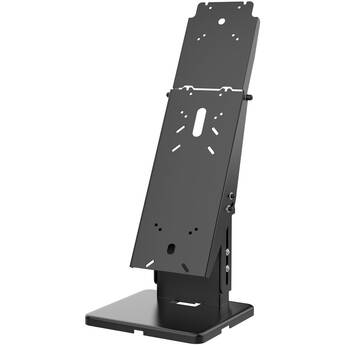
CTA Digital Multi-Enclosure Universal Desk Mount for VESA-Compatible Devices
- Supports VESA Mounting Standards
- One- or Two-Sided Operation
- Horizontal or Portrait Orientation
- Internal Cable Routing
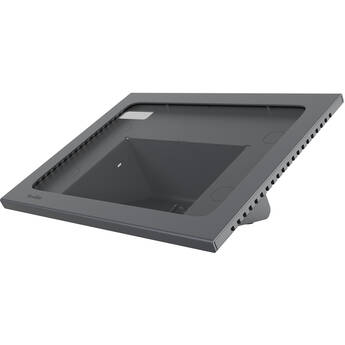
Heckler Zoom Rooms Console for iPad 10th Generation (Black/Gray)
- Comfortable On-Screen Typing
- Tamper-Resistant via Kensington Slot
- Supports Audio Broadcasting for Meetings
- Integrated Storage Compartment
Heckler Zoom Room Console for iPad mini 6th Gen (Black Gray)
- Ideal 30° Viewing Angle
- Heckler AV Cart Compatible
- Tamper-Resistant Assembly
- PoE Power & Ethernet Adapters Available.
CTA Digital Universal Security Tablet Enclosure Desk Mount with Printer Shelf Compartment
- Desk Mount Kiosk for 9.7 - 11" Tablets
- Locking Compartment for Receipt Printer
- Vertical/Horizontal Tablet Mounting
- Interior Cable Routing
CTA Digital Security Countertop Kiosk for iPad Pro 9.7" and iPad Air 2
- Fits iPad Pro 9.7" and iPad Air 2
- Key-Locking Enclosure
- 90° Rotation for Portrait & Landscape
- Front-to-Back Tilting Design
CTA Digital Angle-Adjustable Twin Tablet Stand for 7-10" Tablets
- Compatible with 7-10" Tablets
- Two Locking Tablet Holders
- Adjustable 360° Rotation
- Tilts on Flexible Hinges
CTA Digital Quick Release Secure Table Kiosk with Inductive Charging Case
- For Select 10.2 and 10.5" iPads
- Tabletop Stand
- Wireless Inductive Charging Pad
- Detachable Rubber Tablet Case
CTA Digital Lockpoint Tablet Kiosk Station
- Compatible with iPad Air, iPad Pro 9.7"
- Compatible with iPad Pro 10.5"
- Compatible with iPad Gen. 5 (2017)
- Compatible with Galaxy Tab S3 9.7"
CTA Digital Dual Security Enclosure Desk Mount with Storage Compartment (White)
- Dual Kiosk Enclosure for Select Tablets
- VESA Compatible
- Portrait or Landscape Orientation
- Locking Storage and Tablet Enclosures
CTA Digital Dual Security Enclosure Desk Mount with Storage Compartment (Black)
- Dual Kiosk Enclosure for Select Tablets
- VESA Compatible
- Portrait or Landscape Orientation
- Locking Storage and Tablet Enclosures
Heckler Zoom Room Console for iPad mini 6th Gen + Power & Data (Black Gray)
CTA Digital Triple-Enclosure Adjustable Desk Mount for 7 to 12" Tablets
- For 7 to 12" Tablets
- One-Sided and Two-Sided Configurations
- Height- and Tilt-Adjustable
- Heavy-Duty Security Enclosures
CTA Digital VESA Dual Plate POS Station with Paragon Enclosures
- Dual VESA Mounts with Paragon Enclosures
- Portrait & Landscape Orientations
- Interior Cable Mounting
- Scanner & Card Reader Holders
RAM Mounts RAM Powered Dock for Zebra ET60 and ET65 (Locking, Non-Heated Pins)
- For Zebra ET60 & ET65
- Locking Design
- Charge via 5.5mm DC Barrel Connector
- Cutouts for CAC Reader & Bottom Pins
CTA Digital Lockpoint Dual Tablet Kiosk Station
- Compatible with iPad Air, iPad Pro 9.7"
- Compatible with iPad Pro 10.5"
- Compatible with iPad Gen. 5 (2017)
- Compatible with Galaxy Tab S3 9.7"
CTA Digital Triple Screen Adjustable Kiosk with 3 Universal Security Enclosures
- 3 x Locking Paragon Enclosures
- Supports One- or Two-Sided Use
- 30° Tilt | Portrait & Landscape
- Integrated Cable Routing
Choosing the Right Tablet & iPad Table Stand
Tablet stands make it easier to use your favorite electronic device. These stands drastically increase the functionality and utility of your tablet by freeing up your hands during use. They can also reduce the stress on your neck when reading or watching movies. The right stand can improve your overall user experience by eliminating the glare from overhead lights. The most basic of these products holds your device in one convenient position. Complex models allow you to change the angle and height at which you place your device. If you want a tablet for car navigation, look into tablet car mounts.
Choosing a Tablet Stand for Desks
A variety of products will allow you to mount a tablet on your desk. Most tablet stands have a long, thin, adjustable neck that allows you to move your tablet to a comfortable position. Some models need a bit of setup, requiring you to drill holes and bolt the base to your desk. Others fasten to the edge of your desk with an adjustable clamp. Some require you to use tools like a screwdriver to secure the clamp, while some stands feature easy, tool-free installation. These choices don't typically reduce your working space. If you have enough surface area, you might consider a freestanding mount that doesn't need to be affixed to your table or desk at all. These items usually have a wider base that takes up some space; however, because they don't require installation, they're easy to move from room to room as needed. Once your desk mount is ready to go, consider some productivity enhancing tablet accessories like cases, adapters, and external storage.
How Do I Choose an Adjustable Tablet Stand?
What you should look for in a universal tablet stand depends on the way you intend to use your device. The first thing you need to determine is what kind of adjustability you require. Are you interested in a stand that swivels to the left and right, one that moves up and down, or something that tilts backward and forward? Products with articulating arms tend to allow you to tilt your tablet and move it both horizontally and vertically. These tablet holders are ideal if you use your device for work or businesses purposes. Some feature wide bases so you can place your stand precisely where you want it on the table in front of you. Risers are the most basic of the adjustable products. These simple-to-use options are ideal for propping up your tablet while watching videos. You can usually use iPads and media tablets of varying sizes with products featuring a riser-like design.
B&H Photo and Video has a large selection of tablet mounts and stands for you to consider in your search for added device convenience and functionality.