Video Chat with a Pro Video Expert - Live

MagiCue Studio 15" Prompter Package with Pro Software

BH #MAQSTUDIO15 • MFR #MAQ-STUDIO15
Print
MagiCue Studio 15" Prompter Package with Pro Software
Key Features
  • Complete, Modular Teleprompting Solution
  • Supports Cameras from Mini DV to ENG
  • Pro Software for Small Studio Setups
  • HDMI I/O; DVI, VGA, Composite Inputs
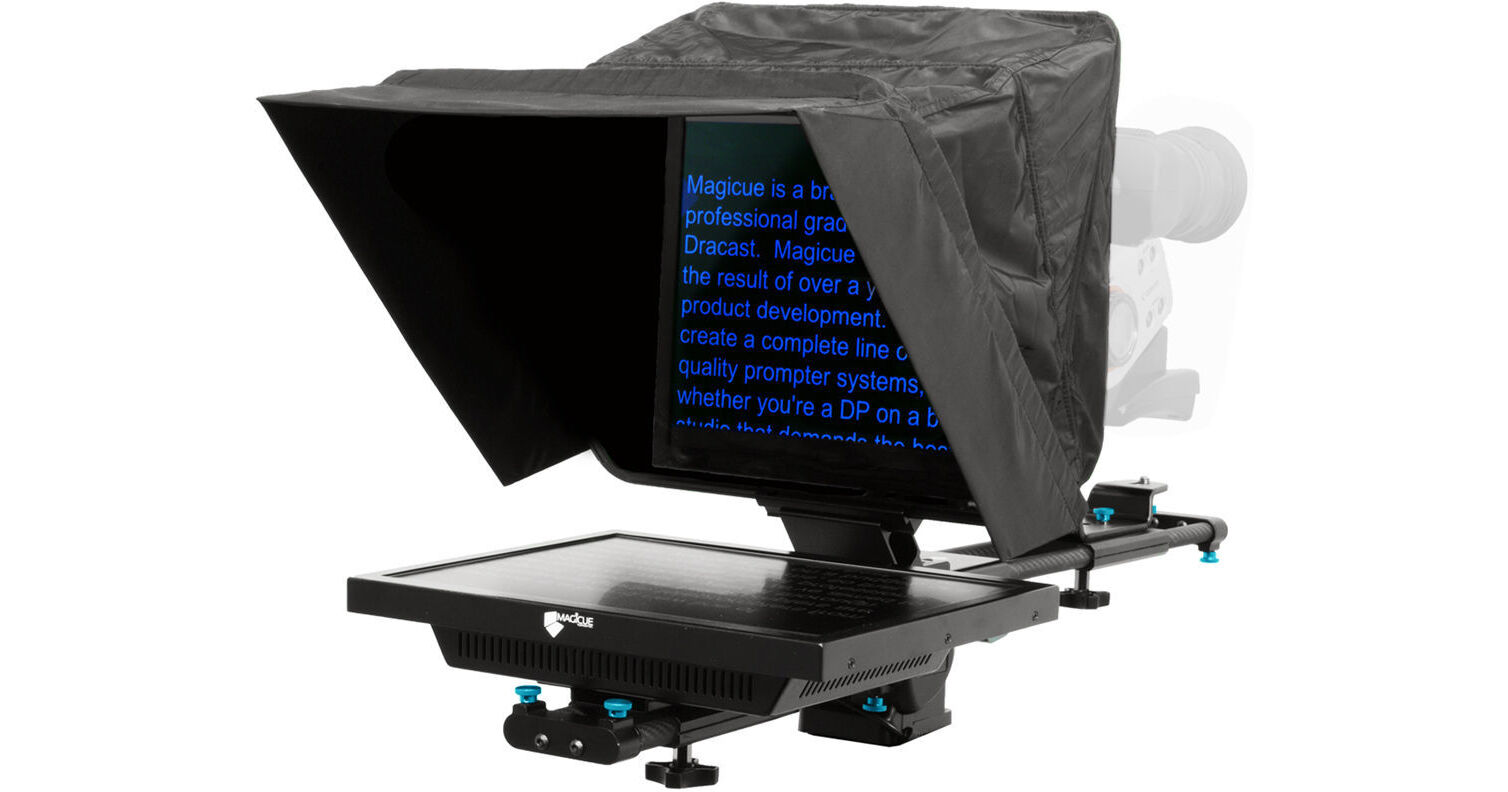
The MagiCue Studio 15" Prompter Package with Pro Software is a complete, modular teleprompting solution supporting cameras ranging from mini DV to ENG. It includes a downloadable PC/Mac compatible MagiCue Pro software, which is suited for small studio setups and on-the-fly revisions. The modular design of the teleprompter allows for riser-less positioning, allowing the camera to remain stationery while letting the pad and hood unit be lowered into an optimal viewing position. A 60/40 beamsplitter glass clearly displays scrolling text from up to a 17 ft reading range.
More Details
In Stock
No Store Display
Free Expedited Shipping
Protect Your Gear
Add a protection plan from $137.99
Monitor Size
Ask an Expert
800-606-6969

MagiCue Studio Prompter Overview

The MagiCue Studio 15" Prompter Package with Pro Software is a complete, modular teleprompting solution supporting cameras ranging from mini DV to ENG. It includes a downloadable PC/Mac compatible MagiCue Pro software, which is suited for small studio setups and on-the-fly revisions. The modular design of the teleprompter allows for riser-less positioning, allowing the camera to remain stationery while letting the pad and hood unit be lowered into an optimal viewing position. A 60/40 beamsplitter glass clearly displays scrolling text from up to a 17 ft reading range.

The system includes a 15" LCD monitor offering HDMI, DVI, VGA, and Composite inputs and an HDMI output. It works with any standard size tripod supporting the required payload capacity. Assembly/disassembly is toolless and the system folds flat for convenient transport and storage.

Key Features
  • Modular teleprompting solution supporting mini DV to ENG cameras
  • Riser-less positioning allows the camera to remain stationery and the pad and hood unit to be lowered
  • 15" LCD monitor with HDMI, DVI, VGA, and Composite inputs and HDMI output
  • 17 ft reading range
  • 60/40 beamsplitter glass
  • Carbon fiber rods
  • 150mm lens opening
  • Supports PC/Mac compatible MagiCue Pro software
  • Toolless assembly
  • Folds flat for transport and storage
  • Weighs 7
Magi Cue Software
  • Dual screen scrolling engine
  • Mirror secondary display
  • Quarter size operator display
  • Sensitivity control
  • Import RTF
  • Import TXT
  • Black and white fonts
  • Color fonts
  • Full unicode support
  • Black and white background
  • Find and replace function
  • Wireless controller option
  • Left/center/right text justification
  • Undo function
  • Variable line spacing
  • Preset font size/color/style
  • Foot pedal support
  • nterface in 9 languages
  • MagiCue Studio Prompter Specs

    Key Specs
    Reading Range
    15' / 4.6 m
    Size (Diagonal)
    15" / 38.1 cm
    Inputs/Outputs
    1x HDMI Input
    1x VGA Input
    1x RCA (Composite) Input
    1x HDMI Output
    General
    Reading Range
    15' / 4.6 m
    Beamsplitter Ratio
    60/40
    Lens Opening
    5.9" / 149.9 mm
    Monitor
    Size (Diagonal)
    15" / 38.1 cm
    Panel Type
    LCD
    Inputs/Outputs
    1x HDMI Input
    1x VGA Input
    1x RCA (Composite) Input
    1x HDMI Output
    Physical
    Weight
    7 lb / 3.2 kg
    Packaging Info
    Package Weight
    23 lb
    Box Dimensions (LxWxH)
    32 x 19 x 9"

    MagiCue Studio Prompter Reviews

    MagiCue Studio 15 -- A Really Solid Prompter

    By Miko
    Rated 4 out of 5
    Date: 2024-08-29

    I love the 15 MagiCue Studio Prompter but the software is a bit basic and clunky. The prompter itself is well made and requires a sturdy tripod due to its weight. It's easy to setup and operate and the 15 screen was the perfect size for my on-cam talent to comfortably read at a 10' distance. My rig actually paid for itself on the very first shoot I brought it out on. Their customer service gets 5 STARS!

    Don't bother

    By dan
    Rated 1 out of 5
    Date: 2017-05-09

    Not happy at all with this prompter. Returned it right away. The screw holes are threaded on both sides, so nothing can be properly tightened down. Every piece of it has play and wiggle and it weighs a ton. Been using IKAN prompters before and I'll just get another one of those. This just seems poorly thought out and poorly executed.

    See any errors on this page?

    question

    My existing set-up incorporates Google Docs as my script and don't want to use the provided software as it will disrupt my workflow. Does the VGA display just mirror the screen of a computer? I already found a Chrome Extension that will flip the screen horizontally. Thanks for your insight!
    Asked by: Anonymous
    Yes it does just mirror the display from your laptop or PC.Unfortunately the monitor has no provision to flip the video, this means that it is reflected by the mirrored glass upside down and backwards.Not what a teleprompter should do.We found this out after we had purchased this, the only way that the change in text orientation takes place is through software, we couldn't get it to work on our Windows 7 laptop so we don't even know how well it functions.
    Answered by: Chris R.
    Date published: 2018-08-25

    Does this have a USB hookup for a foot pedal?

    Does this have a USB hookup for a foot pedal?
    Asked by: Walter
    No, additional software is needed in order to do so. Please review the following items that is need to integrate a script pedal MagiCue Pro Software for Studio & Presidential Prompters https://bhpho.to/2WHM1pq foot pedal of choice
    Answered by: hectorm
    Date published: 2021-08-31

    question

    is there anyone who can give the total dimensions of the prompter ? Has it a 4/3 or a 16/9 screen ?Does the horizontal bar to mount the camera on the back is easily removable ?Thank you
    Asked by: r t.
    Teleprompters in general will be designed with a monitor that is closer to 4:3 than 16:9, including this item from MagiCue. This also features tool-less assembly and folds flat for transport and storage, because of that it should be easy to adjust the horizontal bar and mount cameras off and on it.
    Answered by: Joseph P.
    Date published: 2018-08-25

    Does this prompter support PTZ cameras like the ...

    Does this prompter support PTZ cameras like the AViPAS AV-1080?
    Asked by: Nick
    The camera will definitely mount and work with this prompter if rigged properly and if PTZ settings sat locked so that there is no panning or tilting on subject.
    Answered by: Bruno
    Date published: 2021-08-03

    How would one easily mount this on a desk? What ...

    How would one easily mount this on a desk? What sort of clamp arrangement would work well? Is there anything like the desk base Prompter People make?
    Asked by: James
    You could possibly use this clamp and screw the teleprompter onto the clamp: https://www.bhphotovideo.com/c/product/824360-REG/impact_cc_106r_super_clamp_with_ratchet.html
    Answered by: Geetika
    Date published: 2021-08-21

    I see that the hard case is no longer offered by ...

    I see that the hard case is no longer offered by the mfr. What size Pelican case would this fit in?
    Asked by: Sean
    Assuming one wants to have the "wheeled" option and ample room to pluck out dedicated sections of the foam inserts to fit all pieces, then the Pelican 1600 series would be our most considerable advice.
    Answered by: Bruno
    Date published: 2021-01-03

    What is the NATIVE resolution of the monitor?

    What is the NATIVE resolution of the monitor?
    Asked by: Brian
    At this time, MagiCue doesn't publish the native resolution of the MagiCue Studio 17" Prompter Package with Pro Software.
    Answered by: Elliot
    Date published: 2024-06-28

    question

    The reviewer mentions a remote to switch the Input to HDMI. Can you please link that here so I can purchase it?Thanks,Sandeep
    Asked by: Thorny B.
    That is correct. We do not have a remote available for this prompter. The only way to use a remote control would be to have one that worked with your computer, and then control the prompter by the computer with the computer remote. -- Also, if you have any other technical questions, feel free to contact us directly at any time at [email protected].
    Answered by: Draco Broadcast Dracast Expert
    Date published: 2018-08-25
    • y_2026, m_6, d_2, h_13CST
    • bvseo_bulk, prod_bvqa, vn_bulk_3.0.46
    • cp_1, bvpage1
    • co_hasquestionsanswers, tq_13
    • loc_en_US, sid_1102425, prod, sort_[SortEntry(order=HAS_STAFF_ANSWERS, direction=DESCENDING)]
    • clientName_bhphotovideo
    Whatever You Need, We've Got It