Video Chat with a Pro Audio Expert - Live

PageFlip Butterfly - Wireless Bluetooth Pedal

BH #PAPFBUTTERFL • MFR #PFBUTTERFLY01
Print
PageFlip Butterfly - Wireless Bluetooth Pedal
Key Features
  • Turn Digital Pages with Your Foot
  • Bluetooth Connectivity
  • Wireless Range: Up to 33'
  • Powered by Two AA Batteries
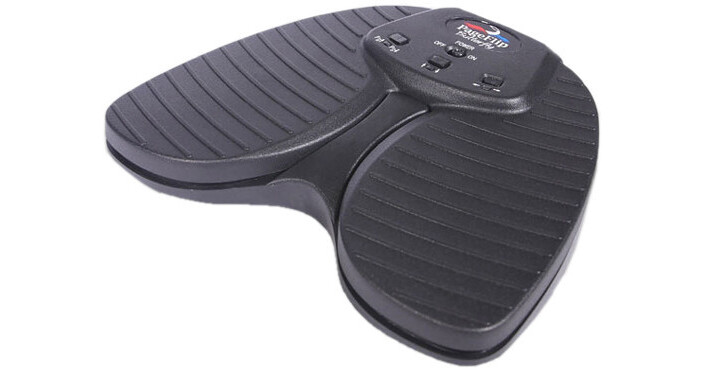
The Butterfly from PageFlip is a wireless Bluetooth dual-pedal designed to turn pages within any compatible iPad or Android app and is well suited for musicians, people with disabilities, or any individual wishing for hands-free operation. Building upon the success of the Cicada dual-pedal, the Butterfly is made with a heftier, rugged construction and a silent pedal action that mimics the feel of the flagship Firefly pedal. The pedal is compatible with select apps that accept keyboard commands and will also work with Windows, Mac, and Linux computers. If your computer does not have Bluetooth, you can purchase an optional Bluetooth USB dongle that you can plug into your computer's USB port for instant wireless Bluetooth support.
More Details
Top Seller
In Stock
No Store Display
$84.99
Free 2-Day Shipping
Protect Your Gear
Add a protection plan from $8.99
Number of Pedals
Ask an Expert
800-606-6969

PageFlip Butterfly Overview

The Butterfly from PageFlip is a wireless Bluetooth dual-pedal designed to turn pages within any compatible iPad or Android app and is well suited for musicians, people with disabilities, or any individual wishing for hands-free operation. Building upon the success of the Cicada dual-pedal, the Butterfly is made with a heftier, rugged construction and a silent pedal action that mimics the feel of the flagship Firefly pedal. The pedal is compatible with select apps that accept keyboard commands and will also work with Windows, Mac, and Linux computers. If your computer does not have Bluetooth, you can purchase an optional Bluetooth USB dongle that you can plug into your computer's USB port for instant wireless Bluetooth support.

  • Ease of Use: Simply open a digital file and press either pedal of the PageFlip. Butterfly to turn a page forwards or backwards
  • Convenience: Permits hands-free reading of vast libraries of scanned, purchased, or freely downloaded digital content. There is no need to stop playing your musical instrument or wait for a care-giver to turn the page
  • Reliability: Turns one page at a time with 100% accuracy. Navigation of digital content eliminates the risk of turning multiple pages at once, which is a problem typically associated with physical books
  • Versatility: Press a mode button to select pedal functions for enhanced software compatibility
    • Select one of three modes:
      • PageUp/PageDown
      • Up/Down arrow
      • Left/Right arrow
  • Wireless Connectivity: The PageFlip Butterfly communicates wirelessly with the computer up to a range of 33' using standard Bluetooth 3.0 technology. Even if your computer does not have Bluetooth, you can still bring it the full benefits of this wireless pedal by purchasing a Bluetooth USB dongle from www.pageflip.com and plugging it into the computer’s USB port
  • Compatibility: Works with iPad and Android tablets using select apps that accept keyboard commands, such as arrow. Also works with any Windows, Mac, or Linux computer
Compatible Apps
  • Android: MobileSheets, SongBook, Fakebook, Lyrics Flipper+, Moon+ Reader, EBookDroid, Cool Reader, ezPDF Reader, EP45 Pro, GuitarTapp Pro, MuseBook, MuseScore, Musicnotes, and all keyboard-compatible apps
  • iPad: ForScore, OnSong, unrealBook, Avid Scorch, Alto Prompter, Baritone Sax Prompter, DeepDish GigBook, DrumSetlist Manager, Finale SongBook, Flute Prompter, GoodReader, GuitarTapp Pro, Hymnals, iAutoCue, iBandManager Pro, iBooks, iClassicScores, iCue, iGigBook, iReal Pro, Loopy, Loopy HD, MuseScore, Music Binder, Musicnotes, MusicReader, MusicPodium, My Lyric Book, Newzik, NextPage, NextSong, Oboe Prompter, PiaScore HD, Planning Center Music Stand, Planning Center Projector, Play On Cue, Pocket Jamz Guitar Tabs, Pocket Jamz Piano Notes, PowerMusic, PowerPoint, PrompterPal, Recorder Prompter, SampleWiz, Scorecerer, Scorio Music Case, SeeScore, Set List Maker, Setlists, Sheet Music Direct, Scorecerer, Set List Maker, Setlists, SongBook+, SongBook ChordPro, SongSheet, Steinway Etude, Teleprompt+, Tempo - Metronome with Setlists, Tenor Sax Prompter, TheGigEasy, Trumpet Prompter, unrealBook, Video Scores, Virtual Sheet Music, and Word
UPC: 753182221489

PageFlip Butterfly Specs

Model Name
PageFlip Butterfly
Model Number
PFBUTTERFLY-01
Battery Life
200 hours of continuous turning or approximately 200,000 page turns
Connectivity
Wireless operation using Bluetooth 3.0
Sleep Mode
Enters sleep mode after 30-minute inactivity period. Press pedal to awaken within 3 seconds
Control Modes
Pedal Modes: PageUp/Dn, Up/Down arrows, Left/Right arrows
Operating Distance
32.8' / 10.0 m
Operating Frequency
2402-2480 MHz
Indicator LEDs
Off: Pedal Powered Off or Asleep
All LEDs Flash: Bluetooth discovery mode (Reset)
Quick Flash (1 sec): Attempting to pair with computer
Slow Flash (4 sec): Paired with computer
Three Quick Flashes: Low-battery condition
Power Consumption
Operating Mode 1.5 mA
Bluetooth Pairing 0.6 mA
Standby 0.5 mA
Sleep 0.02 mA
Power
2 x AA batteries
Output Power
-2 dBm to 4 dBm
Battery Life
Battery Life: 200 hours of continuous turning (approx. 200,000 page turns)
Temperature & Humidity
Operating Temperature: 32 to 140°F / 0 to 60°C
Storage Temperature: -4 to 140°F / -20 to 60°C
Relative Humidity: 15 - 90%
Dimensions
6.8 x 5.3 x 1.4" / 172.7 x 134.6 x 35.6 mm
Weight
13 oz / 368 g
Packaging Info
Package Weight
0.85 lb
Box Dimensions (LxWxH)
7.45 x 7.25 x 1.8"

PageFlip Butterfly Reviews

Easy to set up

By Jacob
Rated 5 out of 5
Date: 2026-04-12

Really great pedal! Something I can rely on in rehearsal and performance. Elegant design and good feel.

good choice for symphony musician

By Susan
Rated 5 out of 5
Date: 2025-08-06

This is working well for me for playing in a symphony orchestra. The pedal is absolutely silent, the LED flashes only occasionally, not noticeable, and it worked right out of the box with my iPad Air (M3) and forScore. It also had a soft padded base and fits easily into the pocket of the case I bought for the iPad.

See any errors on this page?

can this be used to take photos with iphone, ...

can this be used to take photos with iphone, ipad?
Asked by: Elliott
No, the PageFlip Butterfly is used together with an iOS or Android app to enable hand-free page turning for reading books or sheet music. It is not used for remote control of the shutter to take photos with smartphones or tablets. It sounds like the item you want is a wireless shutter release that operates via Bluetooth. Check out the Square Jellyfish Flashlight Remote (B&H # SQJLYREMG14) which allows you to take photos remotely with any Bluetooth-enabled Apple or Android smartphone or tablet and also has a built-in flashlight to light up your subject for crisp photography. The JOBY Impulse Bluetooth Remote (B&H # JOJB01473) and Sunpak Smartphone Mount & Bluetooth Remote (B&H # SUSPMBTR) are other options for remote shutter control. Please contact our mobile department through live chat on the website or by phone if you would like further assistance with the Bluetooth remote shutter controls to use with your iPhone and iPad..
Answered by: Lisa S
Date published: 2021-02-21

Does anyone know of a foot controller whcih lets ...

Does anyone know of a foot controller whcih lets you take a photo with ios? I know there are hand controllers but I want a foot controller. Thank you
Asked by: Elliott
Yes- The AirTurn will do that, per the AirTurn 2.0 : Hand and Foot Control All Foot controllers except the PED allow you to remove the BT-106 Transceiver and use it as a handheld remote. There are six different Modes that are programmed into the transceiver to control, music, effects, presentations, iTunes and other media players, iOS cameras and video devices. From Apple: Set up Switch Control on iPhone If you have physical difficulties, you can use Switch Control to operate iPhone using one or more switches. With switches, you can select, tap, drag, type, and even draw freehand. You use a switch to select an item or location on the screen, then use the same (or a different) switch to choose an action. Add a switch You can use any of the following sources as a switch: An external adaptive switch: Choose a Bluetooth switch or Made For iPhone (MFi) switch that plugs into the Lightning connector on iPhone. The iPhone screen: Tap the screen to trigger the switch. The iPhone front camera: Move your head left or right while facing the camera to trigger the switch. Before you add an external switch, connect it to iPhone, following the instructions that came with the switch. If the switch connects using Bluetooth, pair it with iPhone—turn on the switch, go to Settings > Bluetooth, turn on Bluetooth, tap the name of the switch, then follow the onscreen instructions. Go to Settings > Accessibility > Switch Control > Switches. Tap Add New Switch, then choose a source. Assign an action to the switch. To ensure Switch Control functions correctly, you must assign a switch to the Select Item action and another switch to the Move to Next Item action.
Answered by: james
Date published: 2021-02-22
  • y_2026, m_7, d_13, h_13CST
  • bvseo_bulk, prod_bvqa, vn_bulk_3.0.47
  • cp_1, bvpage1
  • co_hasquestionsanswers, tq_2
  • loc_en_US, sid_1303962, prod, sort_[SortEntry(order=HAS_STAFF_ANSWERS, direction=DESCENDING)]
  • clientName_bhphotovideo
Whatever You Need, We've Got It