Ask Our Experts800-606-6969
Hello, Log InAccount & Orders
Video Chat with a Pro Audio Expert - Live
Key Features
- Turn Digital Pages with Your Foot
- Bluetooth Connectivity
- Wireless Range: Up to 33'
- Powered by Two AA Batteries
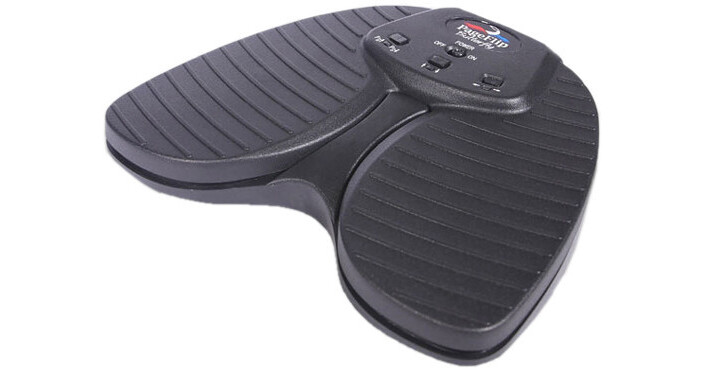
The Butterfly from PageFlip is a wireless Bluetooth dual-pedal designed to turn pages within any compatible iPad or Android app and is well suited for musicians, people with disabilities, or any individual wishing for hands-free operation. Building upon the success of the Cicada dual-pedal, the Butterfly is made with a heftier, rugged construction and a silent pedal action that mimics the feel of the flagship Firefly pedal. The pedal is compatible with select apps that accept keyboard commands and will also work with Windows, Mac, and Linux computers. If your computer does not have Bluetooth, you can purchase an optional Bluetooth USB dongle that you can plug into your computer's USB port for instant wireless Bluetooth support.
More DetailsTop Seller
In Stock
$84.99
Protect Your Gear
Add a protection plan from $8.99
See Options
See any errors on this page?
can this be used to take photos with iphone, ...
can this be used to take photos with iphone, ipad?
No, the PageFlip Butterfly is used together with an iOS or Android app to enable hand-free page turning for reading books or sheet music. It is not used for remote control of the shutter to take photos with smartphones or tablets. It sounds like the item you want is a wireless shutter release that operates via Bluetooth. Check out the Square Jellyfish Flashlight Remote (B&H # SQJLYREMG14) which allows you to take photos remotely with any Bluetooth-enabled Apple or Android smartphone or tablet and also has a built-in flashlight to light up your subject for crisp photography. The JOBY Impulse Bluetooth Remote (B&H # JOJB01473) and Sunpak Smartphone Mount & Bluetooth Remote (B&H # SUSPMBTR) are other options for remote shutter control. Please contact our mobile department through live chat on the website or by phone if you would like further assistance with the Bluetooth remote shutter controls to use with your iPhone and iPad..
Date published: 2021-02-21
Does anyone know of a foot controller whcih lets ...
Does anyone know of a foot controller whcih lets you take a photo with ios? I know there are hand controllers but I want a foot controller. Thank you
Yes- The AirTurn will do that, per the AirTurn 2.0 :
Hand and Foot Control
All Foot controllers except the PED allow you to remove the BT-106 Transceiver and use it as a handheld
remote. There are six different Modes that are programmed into the transceiver to control, music,
effects, presentations, iTunes and other media players, iOS cameras and video devices.
From Apple:
Set up Switch Control on iPhone
If you have physical difficulties, you can use Switch Control to operate iPhone using one or more switches. With switches, you can select, tap, drag, type, and even draw freehand. You use a switch to select an item or location on the screen, then use the same (or a different) switch to choose an action.
Add a switch
You can use any of the following sources as a switch:
An external adaptive switch: Choose a Bluetooth switch or Made For iPhone (MFi) switch that plugs into the Lightning connector on iPhone.
The iPhone screen: Tap the screen to trigger the switch.
The iPhone front camera: Move your head left or right while facing the camera to trigger the switch.
Before you add an external switch, connect it to iPhone, following the instructions that came with the switch. If the switch connects using Bluetooth, pair it with iPhone—turn on the switch, go to Settings > Bluetooth, turn on Bluetooth, tap the name of the switch, then follow the onscreen instructions.
Go to Settings > Accessibility > Switch Control > Switches.
Tap Add New Switch, then choose a source.
Assign an action to the switch.
To ensure Switch Control functions correctly, you must assign a switch to the Select Item action and another switch to the Move to Next Item action.
Date published: 2021-02-22