
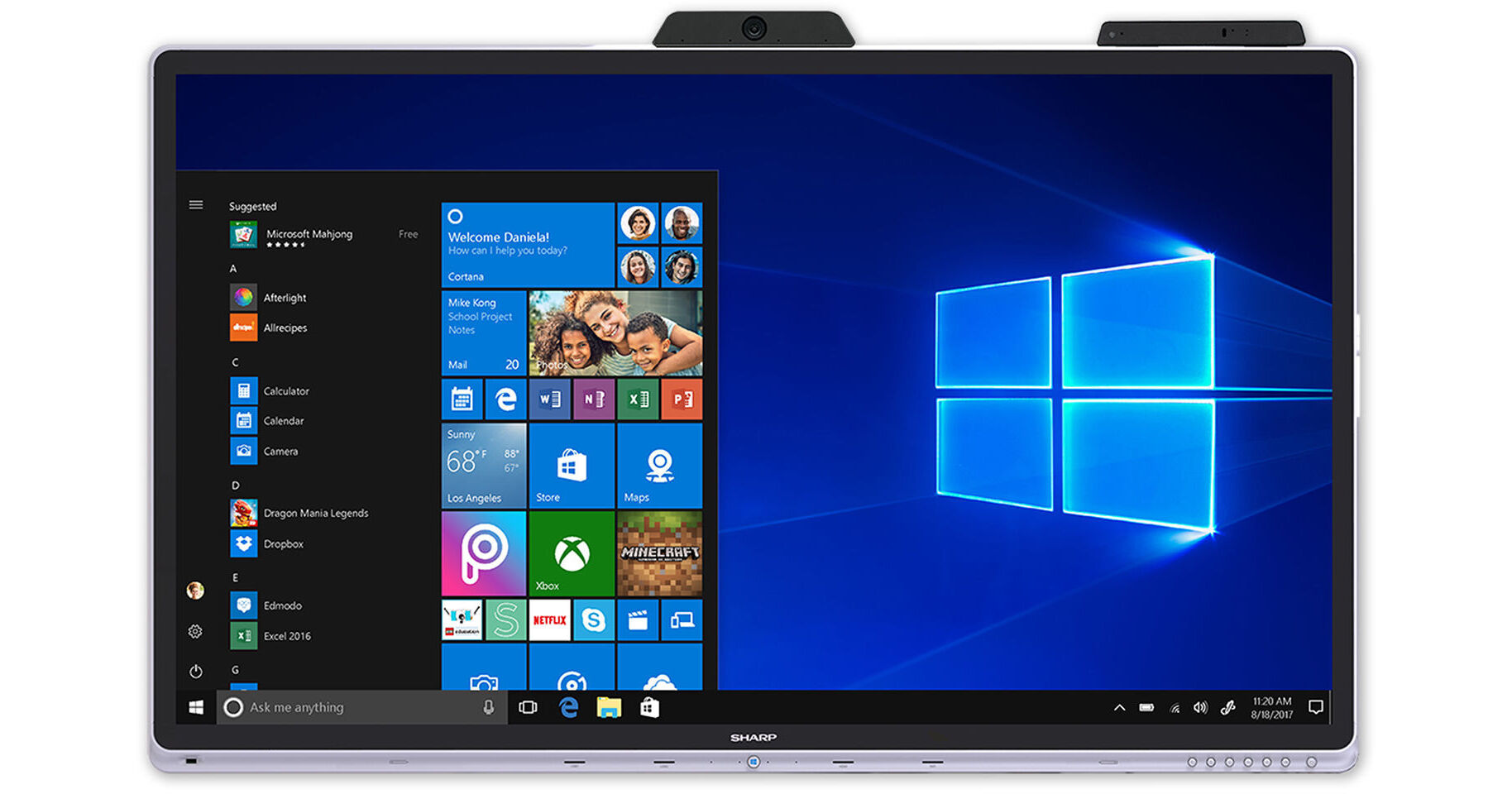
With a built-in Windows operating system and 4K UHD video camera, the Sharp PN-CD701 70" Class 4K UHD Touchscreen Teleconferencing Display provides a variety of tools to suit your needs. It features HDMI and USB Type-C inputs to display your digital HD content from compatible sources, and built-in Wi-Fi and Ethernet connectivity lets you and other meeting attendees stream wirelessly from compatible devices. It uses capacitive touch technology and supports up to 10 touch points at once. The four-microphone array helps ensure clear audio pickup for your teleconferencing needs. The PN-CD701 also has two built-in 12W speakers for presenting visual content with audio.
Walk In, Plug In, and Work Together
Setting up the technology needed for a meeting can be very time consuming and frustrating. But you simply plug and play with the Windows collaboration display. It is so simple to walk into a room, plug in your device, and start working together right away. Just connect with its specially engineered, 26.2' long USB Type-C cable and it automatically switches to the right input for whatever information you want to display. You're instantly ready to start your meeting – saving up to 10 minutes time trying to set up connections.
This single USB Type-C connector provides high-speed, high-bandwidth data transfer for multiple functions, including 4K video, internet, network, and application data. And it can also provide power for attached mobile devices.
However, for added flexibility, a wireless connection is included for lower bandwidth data transfer. And, any hardware without a USB Type-C connection can still use the full functionality of the Windows collaboration display using a HDMI and USB Type-B cable combination.
This single USB Type-C connector provides high-speed, high-bandwidth data transfer for multiple functions, including 4K video, internet, network, and application data. And it can also provide power for attached mobile devices.
However, for added flexibility, a wireless connection is included for lower bandwidth data transfer. And, any hardware without a USB Type-C connection can still use the full functionality of the Windows collaboration display using a HDMI and USB Type-B cable combination.
Better Places to Meet
Creating a comfortable environment in your meeting rooms pays real dividends in terms of helping people concentrate and improving productivity. The Windows collaboration display from Sharp has built-in sensors that can connect to the Microsoft Azure Digital Twins IoT platform, and other commercially available cloud and subscription services such as Sharp Synappx WorkSpaces as part of a smart building environment.
IoT Sensors
- Occupancy: A motion sensor detects the presence of any people in the room. An additional artificial intelligence (AI) service can analyze this data and count the numbers of people. Further AI services could automatically switch on displays and other equipment to enable a faster setup and help improve the scheduling of room bookings. During a meeting, the sensor can also be used by another AI service to detect the location of whoever is speaking and control a three-dimensional microphone array to focus on the relevant person.
- Temperature: Its intelligent climate measurement can be used by an AI service to automatically regulate the room temperature and relative humidity to make the room feel more comfortable. By intelligently optimizing the operation of the air-conditioning, it also helps reduce costs.
- Light: An ambient light sensor helps with intelligent lighting control, as it automatically measures the level of light. An AI service could then adjust the in-room lighting system with changing day and night conditions, which can reduce eye strain and may save money on wasted energy.
- Air quality: The Windows collaboration display continually measures and analyzes the ambient air quality in the meeting room and can assist another AI service in automatically adjusting the air conditioning to provide the best possible working environment.
Actively using the data collected by the Windows collaboration display and making physical changes to how rooms are used and controlled is best achieved with a Facility Manager using the latest industry smart tools and technologies. Sharp is working with a number of leading businesses to build a comprehensive ecosystem for the creation of smart meeting spaces that enable truly effective collaboration.
Simply Much Easier
With its 10-point projected capacitive (PCAP) touch technology and direct optical bonding, it provides a more accurate and natural Sharp Pen-on-Paper experience. Writing on-screen is just as quick and effortless as writing on a flipchart or whiteboard. By using either a finger or pen, notes and comments can be quickly added as simple text or by drawing freehand to highlight changes and annotate the information on-screen. This means that, in
boardroom presentations, you can quickly give the big picture overview, but also focus on key details to keep everyone engaged and "eyes up."
Thanks to the Windows collaboration display's exceptional responsiveness and ease of use, it also:
Thanks to the Windows collaboration display's exceptional responsiveness and ease of use, it also:
- Speeds-up collaboration – users can work together immediately, with no training, which encourages more engagement and interactivity.
- Builds confidence – users feel more confident and willing to participate and present and share information.
- Increases concentration – users can focus on the delivery of content with no technical distractions.
Fast, Precise Control
The Windows collaboration display comes with a passive pen as standard. Designed with a precise 2mm tip, this powerful and ergonomic stylus sits comfortably in the hand and enhances the Pen-on-Paper experience. It is ideal for discussing complex technical information or graphics, such as architectural plans or engineering designs, where you need to review even the smallest details.
All You Need to Do More
Business teams come in all shapes and sizes – from tactical workgroups to large-scale, established project teams – and often span both local and global locations. But to be truly effective, they need to share ideas openly and inclusively.
The Windows collaboration display offers the highest quality audio and video and provides the best ways to connect and collaborate using the power and productivity of optional Microsoft 365 software at room scale.
The Windows collaboration display offers the highest quality audio and video and provides the best ways to connect and collaborate using the power and productivity of optional Microsoft 365 software at room scale.
- Microsoft 365 provides familiar Microsoft Office applications that enable people to be more creative, work together more effectively and have a more productive experience. It also includes advanced security and device management capabilities to help safeguard your business.
- Microsoft Teams is a complete chat, notes, attachments, and online meetings solution. It includes annotation, overlay, and presentation tools, along with seamless video conferencing and collaboration tools. So whether everyone is in a meeting room or spread around the world, it still feels like you're all together.
- Microsoft Azure Digital Twins is an IoT platform that creates a comprehensive model of physical environments. Data from multiple IoT sensors is stored in a reliable and secure private cloud database and can be analyzed, for example, by a third-party smart building dashboard solution, to help optimize the management of office space.
Stylish Design
The display has an attractive and elegant edge to edge design that looks good in even the most prestigious corporate boardroom:
- The on screen display (OSD) buttons are discretely located on the front for quick and easy control.
- The high-quality videoconferencing camera and IoT sensor hub have been integrated neatly on the top of the display.
- An integrated directional microphone picks up sound from anywhere in your collaboration space.
Effortless Device Sharing
The Windows collaboration display has built-in wireless casting that works with Windows and Android devices. As a result, you can simply connect your own device to the display and easily share and display any information.
Up to five devices can be connected simultaneously and the Touch Back control enables you to control screen content from either the display or the source device. So it is ideal for dynamic workgroups discussions or interactive training sessions as it allows you to work more efficiently, encourages active involvement, and provides a more effective way of learning.
The Windows collaboration display can split into two separate screens, putting it into Picture by Picture (PbP) mode. The Windows collaboration display will show up to two different connected devices out of the five possible options. The two screens can be any combination of inputs – for example, one USB Type-C plus one wireless, or HDMI and wireless.
Touch Back is also a feature that works in PbP mode, with whichever attached device is active. Touch Back control automatically switches between the two PbP displays, depending on which side is touched.
Up to five devices can be connected simultaneously and the Touch Back control enables you to control screen content from either the display or the source device. So it is ideal for dynamic workgroups discussions or interactive training sessions as it allows you to work more efficiently, encourages active involvement, and provides a more effective way of learning.
The Windows collaboration display can split into two separate screens, putting it into Picture by Picture (PbP) mode. The Windows collaboration display will show up to two different connected devices out of the five possible options. The two screens can be any combination of inputs – for example, one USB Type-C plus one wireless, or HDMI and wireless.
Touch Back is also a feature that works in PbP mode, with whichever attached device is active. Touch Back control automatically switches between the two PbP displays, depending on which side is touched.
Enjoy a Smarter Way to Monitor and Improve Meeting Room Usage and Conditions
Sharp Synappx WorkSpaces is a software as a service solution (SaaS) that helps you make the best use of data from the IoT Sensor hub on the Windows collaboration display. It provides clear, visual information to enable more efficient room booking and utilization and create comfortable meeting and training room environments for more productive collaboration and learning, while also improving overall facilities management.
By collecting and analyzing real-time data from across the digital and physical worlds, it automatically detects meeting room usage, monitors ambient conditions and helps optimize the use of space once connected to the analytics of a smart building management system.
This all happens through the Microsoft Azure Digital Twins IoT platform, which is a powerful, managed cloud service that acts as a central data store and can provide additional data processing intelligence.
By collecting and analyzing real-time data from across the digital and physical worlds, it automatically detects meeting room usage, monitors ambient conditions and helps optimize the use of space once connected to the analytics of a smart building management system.
This all happens through the Microsoft Azure Digital Twins IoT platform, which is a powerful, managed cloud service that acts as a central data store and can provide additional data processing intelligence.
A Better Place to Work
Sharp Synappx WorkSpaces service delivers real-time analysis of the environmental conditions in your boardrooms and meeting spaces as part of a temperature monitoring system. It continually measures the ambient temperature and relative humidity levels as well as the light and air quality and it can help you ensure maximum comfort in each room.
For example, the temperature in a room occupied by three people is likely to differ if the number increases to 10 people. So, based on the information gathered by Sharp Synappx WorkSpaces, the air-conditioning in every room can be adjusted manually or automatically to suit the number of people. As well as improving the comfort of everyone in the meeting, it also reduces costs by avoiding any unnecessary heating or cooling.
And, even better, the service can handle all the data from a fleet of multiple screens installed in different buildings. You can then see all activity and data from any mobile device.
For example, the temperature in a room occupied by three people is likely to differ if the number increases to 10 people. So, based on the information gathered by Sharp Synappx WorkSpaces, the air-conditioning in every room can be adjusted manually or automatically to suit the number of people. As well as improving the comfort of everyone in the meeting, it also reduces costs by avoiding any unnecessary heating or cooling.
And, even better, the service can handle all the data from a fleet of multiple screens installed in different buildings. You can then see all activity and data from any mobile device.
Always Room for Improvement
Using data intelligence captured by room occupancy sensors, Sharp Synappx WorkSpaces can actively monitor when meeting rooms are being used. Once connected to in-house systems, such as a meeting room booking system, you can also see which rooms are booked, as well as seeing when a meeting room becomes free after a period of time.
In addition, you can allocate the most suitable rooms to use depending on the number of attendees. Sharp Synappx WorkSpaces can also help you detect and prevent repeat phantom meetings – where somebody has booked a room but not turned up.
To help understand and improve the long-term occupancy rates, Sharp Synappx WorkSpaces service's reporting tools can show what type of meetings are taking place, such as Scheduled (booked and used), Unscheduled (not booked but used), and Phantom (booked and not used). It also highlights the trends of how often each room is used, including the peak and low occupancy times and most regular usage periods, and can generate a variety of alerts for the Facilities Manager.
In addition, you can allocate the most suitable rooms to use depending on the number of attendees. Sharp Synappx WorkSpaces can also help you detect and prevent repeat phantom meetings – where somebody has booked a room but not turned up.
To help understand and improve the long-term occupancy rates, Sharp Synappx WorkSpaces service's reporting tools can show what type of meetings are taking place, such as Scheduled (booked and used), Unscheduled (not booked but used), and Phantom (booked and not used). It also highlights the trends of how often each room is used, including the peak and low occupancy times and most regular usage periods, and can generate a variety of alerts for the Facilities Manager.
Extra Comfort for Better Collaboration
Creating a meeting environment in which everyone is relaxed can pay real dividends by improving the productivity of group work. Sharp Synappx WorkSpaces gives businesses of all sizes the information intelligence to adapt the ambient conditions in each meeting room to suit the number of people and the type of activities taking place. These conditions include the temperature, humidity, air quality, and lighting, all conducive to creating the perfect environment.
So, every time a new meeting or training sessions starts, organizers and participants don't have to worry about adapting the conditions of the room as it is automatically optimized for their needs. This can happen if the Windows collaboration display sensor data is connected to a smart building system, so custom integration may be required. By ensuring that people are physically more comfortable, everyone can simply pay attention to what's on the agenda and focus on working more collaboratively.
So, every time a new meeting or training sessions starts, organizers and participants don't have to worry about adapting the conditions of the room as it is automatically optimized for their needs. This can happen if the Windows collaboration display sensor data is connected to a smart building system, so custom integration may be required. By ensuring that people are physically more comfortable, everyone can simply pay attention to what's on the agenda and focus on working more collaboratively.
Keep Control of Your Data
Sharp Synappx WorkSpaces offers the best performance when running on Microsoft's Azure cloud services, which includes highly secure data encryption. However, if you prefer, you can also use other cloud platforms or even create a premise-based solution using custom-built software, which would be based in your physical location and running on your own computers and local servers.
Less Hassle, Less Cost
As a software as a service (SaaS) solution, Sharp Synappx WorkSpaces is easy to set-up, provision, and use – all you need is a simple pairing code that's entered from the Windows collaboration display.
There's also a no-charge 90-day trial license with the purchase of each Windows collaboration display unit. Sharp Synappx WorkSpaces then offers you the flexibility to choose from various options through its SaaS subscription model.
There's also a no-charge 90-day trial license with the purchase of each Windows collaboration display unit. Sharp Synappx WorkSpaces then offers you the flexibility to choose from various options through its SaaS subscription model.
Additional Features
- Direct optically bonded touchscreen
- Palm rejection technology
- Supports wireless casting from Windows and Android
- Computer power management
- 4-microphone array built into the camera
- 13 to 20' sound collecting distance
- Microwave motion sensor with 140 x 70° (H x V) detection area at 0 dB
- Light sensor with 128, 256, 512, 1024, and 2048 lux selectable ranges
- Light sensor with 50/60 Hz flicker noise and IR rejection
- Air quality sensor detects eCO2 and TVOC gas types
- Temperature & humidity sensor detects -40 to 212°F and 0 to 100% humidity