Ask Our Experts800-606-6969
Hello, Log InAccount & Orders
Video Chat with a Pro Audio Expert - Live
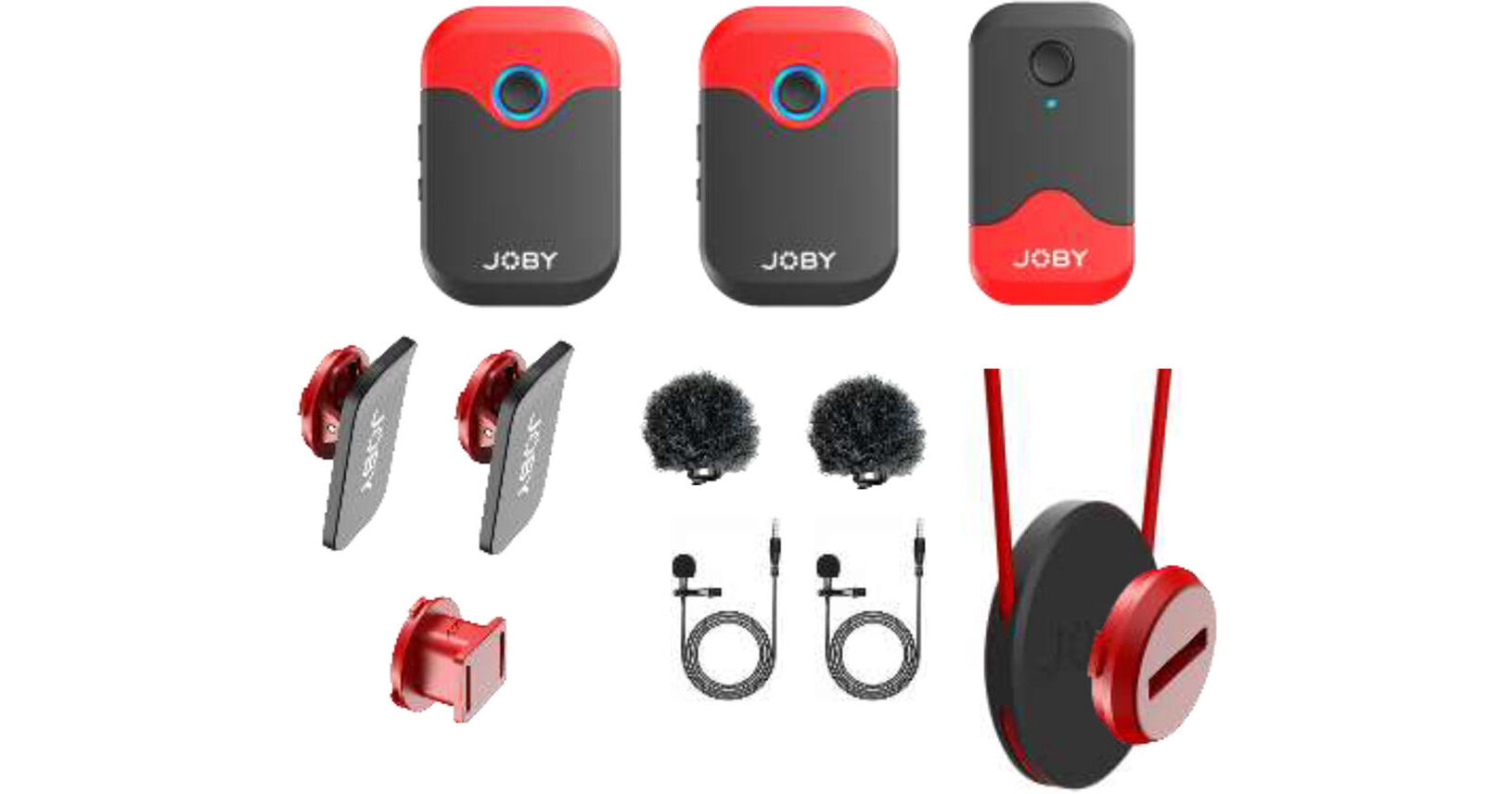
Key Features
- 2-Person Interviews, Vlogs, Video Shoots
- 2 Omni Lav Mics and Built-In Omni Mics
- 2 Ultracompact Clip-On Transmitters
- Ultracompact Dual-Channel Receiver
For content creators, videographers, and interviewers at all levels, the JOBY Wavo AIR digital true wireless microphone system offers relieving simplicity, confidence-inspiring sound quality, and all the elements needed to easily record two subjects to a camera or mobile device. The transmitters not only work with the supplied external lavalier mics, but also feature built-in omni mic capsules so they can be used as wire-free, clip-on microphones.
More DetailsIn Stock
$29.99
Save $294.96
Limited supply at this price
+
Protect Your Gear
Add a protection plan from $8.99
See Options
See any errors on this page?
Is there a headphone output on the receiver to mon
Is there a headphone output on the receiver to monitor levels?
The JOBY Wavo AIR 2-Person Digital Wireless Lavalier Microphone System (2.4 GHz) features a 1x 1/8" / 3.5 mm TRS headphone output connector on the receiver for monitoring.
Date published: 2026-07-14
Work with iPhone wirelessly?
Work with iPhone wirelessly?
Yes, the JOBY Wavo AIR 2-Person Digital Wireless Lavalier Microphone System can be used with an iPhone. The transmitters send audio wirelessly to the receiver which connects to the iPhone with a cable. You can use the included 3.5mm TRS to TRRS receiver output cable combined with the Apple Lightning to 3.5mm Headphone Jack Adapter (B&H # APLAADAP) or as another option, just use the Comica Audio CVM-D-SPX(MI) 3.5mm TRS Male to Lightning Output Cable for Audio to iPhone (B&H # COCVMDSPXMI).
Date published: 2022-02-06
Can someone explain why they would make half of ...
Can someone explain why they would make half of it red and not all black?
I thought at first the color would be a problem - however, they are a lot easier for me to find them when I am shooting multiple 2-4 person conversations for training purposes. I also use Picogear, which I really like, but it has been hard to keep track of the transmitters. Joby solved a lot of the color problem by including a lavalier mic when I want the mike to be more discreet. I am very happy!
Date published: 2022-02-03
Does anyone know how transferring files works?
Does anyone know how transferring files works?
There is no file transferring with the JOBY Wavo AIR 2-Person Digital Wireless Lavalier Microphone System because it does not record anything. You would connect it to the microphone input on a camera, or a mobile device, or a portable digital audio recorder and it would record audio files to that device. You would connect a USB cable to that device after you are done recording, to move the recorded files from that device into your computer.
Date published: 2022-02-03
Does the 'Wireless System Only' come with a ...
Does the 'Wireless System Only' come with a charger?
The "Wireless System Only" version of the JOBY Wavo AIR 2-Person Digital Wireless Lavalier Microphone System does not include a charger, however it does come with 3 x USB Type-C to USB Type-A Cables for charging.
Date published: 2022-02-07
Are the two microphones recorded on separate left ...
Are the two microphones recorded on separate left and right channels, or mixed together?
The JOBY Wavo AIR 2-Person Digital Wireless Lavalier Microphone System sends a combined signal with the audio from both transmitters mixed together on the left and right.
Date published: 2022-05-30
Can additional transmitters be paired with one ...
Can additional transmitters be paired with one receiver? I would love to have 3-4 mics attached to the receiver in my scenarios.
The receiver in the JOBY Wavo AIR 2-Person Digital Wireless Lavalier Microphone System (2.4 GHz) can connect to a maximum of two transmitters at one time. Increasing the number of transmitters would require more receivers to accommodate them.
Date published: 2022-02-03
What wattage should the charging box have?
What wattage should the charging box have?
The JOBY Wavo AIR 2-Person Digital Wireless Lavalier Microphone System can be charged by a USB connection on a computer or by a wall adapter utilizing USB power delivery such as the standard USB wall adapter for iOS devices.
Date published: 2022-02-07