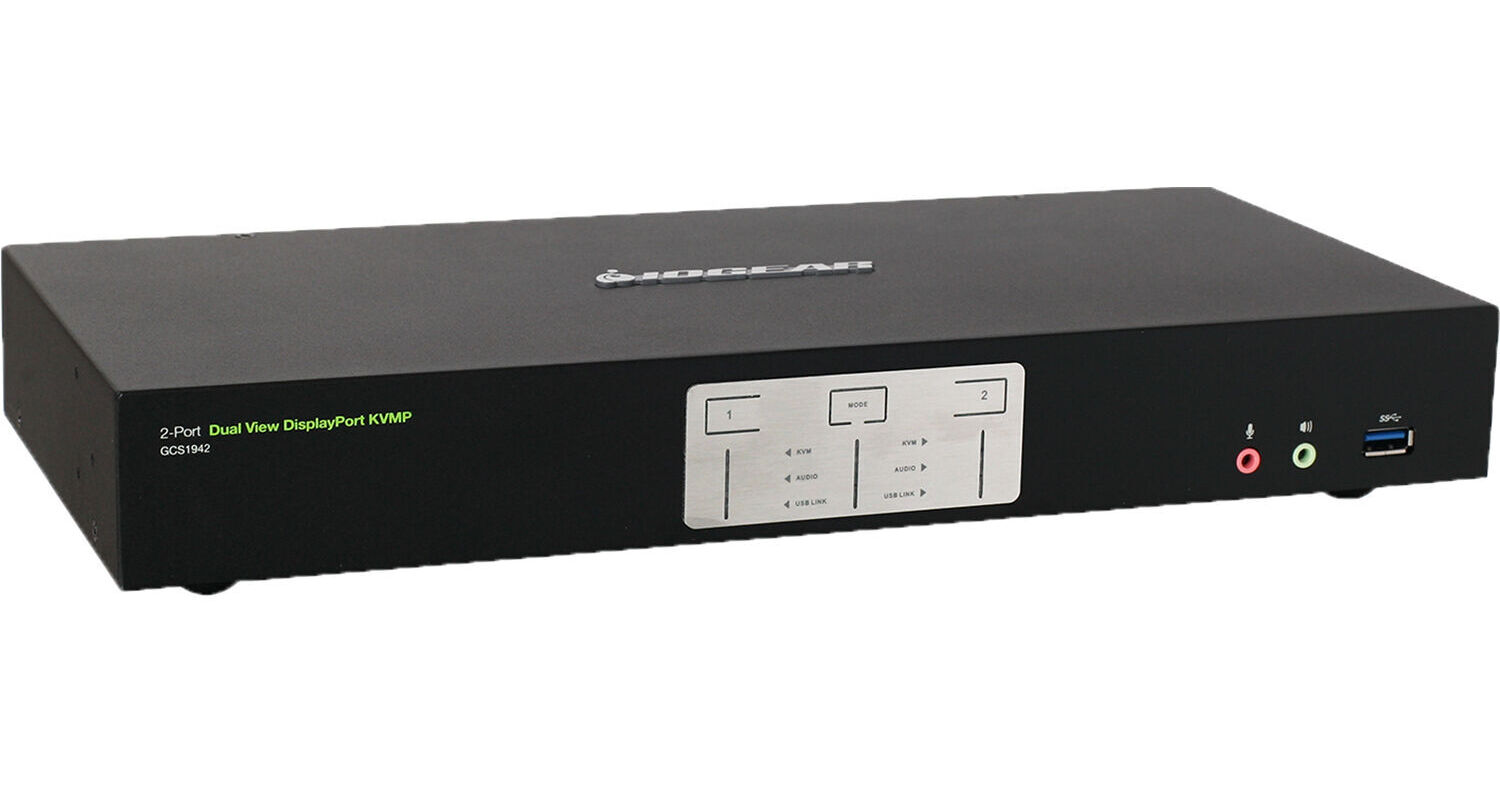
IOGEAR 2-Port Dual View TAA Compliant KVM Switch

BH #IOGCS1942NC • MFR #GCS1942NC
Print
IOGEAR 2-Port Dual View TAA Compliant KVM Switch
Key Features
  • Supports Two Dual-Screen Systems
  • DisplayPort 1.2 Video Interfaces
  • 4096 x 2160 Resolution Support
  • 60 Hz Refresh Rate Support
Control multiple systems and devices independently with the 2-Port Dual View TAA Compliant KVM Switch from IOGEAR. Whether you are looking to control server systems or workstations, this switch allows you to shift over to a separate connection seamlessly from a single desktop, ideal for IT professionals and creatives with multiple setups.
More Details
In Stock
No Store Display
Free 2-Day Shipping
Protect Your Gear
Add a protection plan from $26.00
Ask an Expert
800-606-6969

IOGEAR GCS1942 Overview

Control multiple systems and devices independently with the 2-Port Dual View TAA Compliant KVM Switch from IOGEAR. Whether you are looking to control server systems or workstations, this switch allows you to shift over to a separate connection seamlessly from a single desktop, ideal for IT professionals and creatives with multiple setups.

Designed to support multi-monitor setups, this switch provides you with screen resolutions up to 4096 x 2160 and 60 Hz refresh rates. Easily change over from one system to the other with hotkey, mouse, and manual push-button controls for enhanced productivity and convenience. Navigate menus and basic functions from a single keyboard and three-button mouse with an emulation mode that works with Windows, macOS, and Linux devices. This KVM switch is TAA compliant, making it suitable for operations within government facilities.

DisplayPort Video
DisplayPort 1.2 ports allow you to connect two systems with dual-monitor support, giving you enhanced support whether they are workstations or severs. HDCP compliance allows you to watch protected and secure media and is compatible with active HDMI and DVI adapters. Multi-Stream Transport (MST) capabilities allow daisy-chaining with compatible monitors or support for an external DisplayPort MST hub.
Audio Support
Experience 7.1-channel HD audio via DisplayPort connections, ideal for editing on multiple workstations. Several 3.5mm audio jacks allow you to connect microphones as well as audio-out devices like headphones and speakers with 2.1-channel audio. Additionally, the front panel offers convenient access to audio connections.
Connection Support
Two USB 2.0 Type-A connections provide support for your mouse and keyboard while two USB 3.2 Gen 1 Type-A ports provide connection access to your system for additional peripheral support. Dual USB Type-B ports connect to your system's ports with optional cables and provide up to 5 Gb/s data transfer speeds, ideal for moving information around. The KVM switch features a USB 3.2 Gen 1 Type-A port conveniently located at the front of the device for quick access. Additionally, the RJ45 port allows you to connect an additional KVM switch to expand your capabilities to control up to 4 total devices.
Compatibility
You can use this KVM switch on a wide range of Windows 7, 8.1, 10, macOS, and Linux systems. Keyboard and mouse emulation allow you to control a macOS-based device with a standard Windows keyboard. Multilingual keyboard mapping supports English, French, and German keyboards for optimal support.
Additional Features
The KVM switch enables a wide range of additional features designed to streamline your setup and quality of life with RS-232 commands, auto-scan mode, power-on detection, upgradable firmware, and hot-pluggable support.
UPC: 881317520654

IOGEAR GCS1942 Specs

Key Specs
# of Systems Supported
2 (2 Cascade)
Console I/O
1x RJ45
2x DisplayPort
2x USB-A 3.0 / 3.1/USB 3.2 Gen 1
2x USB-A 2.0
2x 1/8" / 3.5 mm Microphone
2x 1/8" / 3.5 mm Headphone
KVM I/O
4x DisplayPort
2x 1/8" / 3.5 mm Headphone
2x 1/8" / 3.5 mm Microphone
2x USB-B
Supported Resolutions
4096 x 2160 @ 60 Hz
# of Systems Supported
2 (2 Cascade)
Console I/O
1x RJ45
2x DisplayPort
2x USB-A 3.0 / 3.1/USB 3.2 Gen 1
2x USB-A 2.0
2x 1/8" / 3.5 mm Microphone
2x 1/8" / 3.5 mm Headphone
KVM I/O
4x DisplayPort
2x 1/8" / 3.5 mm Headphone
2x 1/8" / 3.5 mm Microphone
2x USB-B
OS Compatibility
Linux / Windows / macOS
Supported Resolutions
4096 x 2160 @ 60 Hz
USB Keyboard/Mouse Emulation
Yes
Power Source
AC Adapter
Operating Conditions
32 to 104°F / 0 to 40°C up to 80% Humidity
Storage Conditions
-4 to 140°F / -20 to 60°C
Certifications
TAA
Rack Mountable
No
Material of Construction
Metal
Dimensions
13.2 x 6.1 x 2.1" / 33.5 x 15.5 x 5.4 cm
Weight
3.5 lb / 1.6 kg
Packaging Info
Package Weight
5.82 lb
Box Dimensions (LxWxH)
21.3 x 9.1 x 4.9"

IOGEAR GCS1942 Reviews

Good, but has some hiccups

By Chris
Rated 3 out of 5
Date: 2026-03-18

Working with the monitors is no problem, but I have an issue with the switch work with my DasKeyboard keyboard. There is a serious lag when connected to my Apple Powerbook. I have changed to a USB 3.0 to thunderbolt cable, and that didn't seem to fix it. Very unfortunate.

Great Product

By Rishi
Rated 5 out of 5
Date: 2021-11-11

Great Price - Thanks BH

See any errors on this page?

Hi, will this support a 2k monitor at 144hz?

Hi, will this support a 2k monitor at 144hz?
Asked by: Ronny
Sorry, no. The IOGEAR 2-Port Dual View TAA Compliant KVM Switch will only display 4096 x 2160 @ 60 Hz.
Answered by: Zev
Date published: 2022-02-18

Would I be able to use this KVM switch to have ...

Would I be able to use this KVM switch to have audio playing out my studio monitors? I use the scarlett 2i2 interface to connect to a pc via USB. Would it be possible to connect both PC towers to the KVM switch and use the same Scarlett USB audio interface to switch playback for the studio (audio) monitors from each pc tower?
Asked by: Kevin
While the Focusrite Scarlett 2i2 2x2 USB Audio Interface could be connected to multiple PCs using the IOGEAR 2-Port 4K Dual View DisplayPort KVMP Switch with USB 3.0 Hub and Audio, it would not be able to serve as an audio source for two separate software programs running on two PCs at the same time. It could be used with software on one PC and then, if that software is closed or the Scarlett is disconnected from it, could be used again with another software on a separate PC.
Answered by: Matt Z
Date published: 2023-12-23

Will this KVM switch work with a 5K monitor?

Will this KVM switch work with a 5K monitor?
Asked by: Robert
While you are able to connect a 5K monitor to the IOGEAR 2-Port 4K Dual View DisplayPort KVMP Switch with USB 3.0 Hub and Audio, the resolution will only be able to hit up to 4K.
Answered by: Zev
Date published: 2022-11-02

Is there rack mount hardware available for this ...

Is there rack mount hardware available for this unit? If so, could you please link to it?
Asked by: Damien
Yes, please see the following link : https://www.bhphotovideo.com/c/product/1480830-REG/iogear_gxs24kit_rackmount_kit_for_2.html?sts=pi&pim=Y
Answered by: Luz
Date published: 2021-04-16

Are the auxiliary cables necessary for the input ...

Are the auxiliary cables necessary for the input devices sound? It should accept sound from inputs through HDMI, right?
Asked by: Jared
Yes, the IOGEAR 2-Port 4K Dual View HDMI KVMP Switch with USB Hub and Audio can accept audio via HDMI.
Answered by: Calvin M
Date published: 2023-09-26

I'd be using this KVM switch in a studio ...

I'd be using this KVM switch in a studio environment, does this BH #IOGCS1942 unit have fans/produce noise? If it does, is it comparable to noise produced by PC fans or louder?
Asked by: Kevin
I have not noticed any fan noise.
Answered by: Cody
Date published: 2023-12-23

is this hdcp 2.2 compliant?

is this hdcp 2.2 compliant?
Asked by: Jason
Yes, this model would be hdcp 2.2 compliant.
Answered by: dariusb
Date published: 2022-08-01

I have a HDMI 42 Inch monitor. With a DP ...

I have a HDMI 42 Inch monitor. With a DP converter on the HDMI cable into the KVM, will the KVM work with one monitor? I have no need for two monitors.
Asked by: Thomas
Yes, the IOGEAR 2-Port 4K Dual View DisplayPort KVMP Switch with USB 3.0 Hub and Audio (TAA Compliant) can be used with a single monitor.
Answered by: dariusb
Date published: 2022-06-02
  • y_2026, m_9, d_11, h_10CST
  • bvseo_bulk, prod_bvqa, vn_bulk_3.0.48
  • cp_1, bvpage1
  • co_hasquestionsanswers, tq_13
  • loc_en_US, sid_1667210, prod, sort_[SortEntry(order=HAS_STAFF_ANSWERS, direction=DESCENDING)]
  • clientName_bhphotovideo
Whatever You Need, We've Got It