
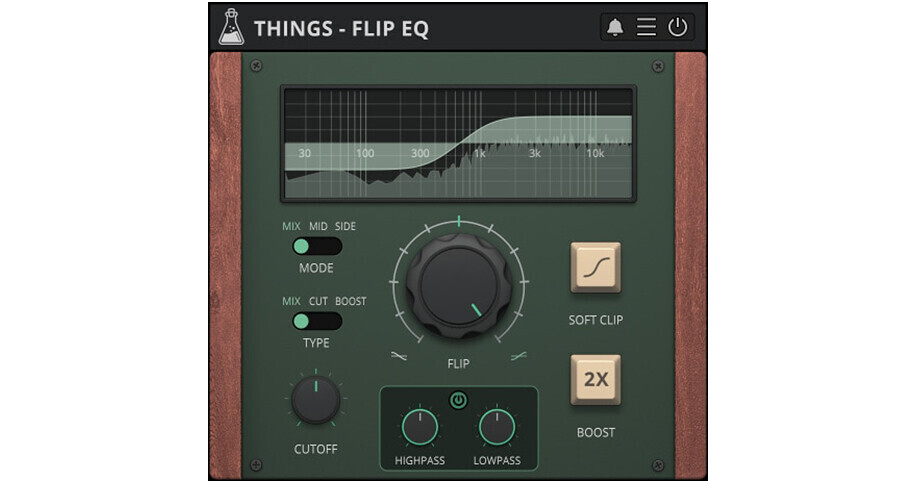
Music producers and sound engineers looking for a simple tone-balancing EQ will be impressed with the AudioThing Flip EQ, a tilting equalizer with Mid and Side modes. The device will boost and/or cut high and low frequencies. Turning the knob to the right will boost highs and cut the lows, while turning to the left will boost the lows and cut the highs. The Mid and Side modes allow you to apply the EQ to either the mid or side of a stereo signal to further enhance the stereo depth. The Flip EQ is compatible with Mac and Windows and works within most major DAWs that support VST, AU, and AAX formats.
At a Glance
- Tilting EQ
- Mid-side operation
- Cut, boost, mix
- Cutoff and boost controls
- Resizable window
Mid and Side
What do mid and side mean?
- In a stereo signal, the mid channel contains both left plus right channels in a stereo setup. Boosting the mid channel results in a centered, mono sound.
- The side channel contains the difference between the left and right channels, such as any difference caused by panning an instrument left or right, or recording an instrument that's say, off to the right or left in a room when recording with a stereo mic setup. Boosting the side channel creates a sense of stereo width—a more spacious or wider sound—when you have frequencies that are different between left and right channels in a stereo setup.
Mid and Side Modes
- Flip EQ can be applied to the mid or side part of the signal. This can be useful to create a wider stereo image on a full mix or individual tracks.