Video Chat with a Pro Audio Expert - Live

CEDAR Audio Cedar Studio 9 Complete Plug-In Bundle

BH #CES9COMPLETE • MFR #CS9 COMPLETE
Print
CEDAR Audio Cedar Studio 9 Complete Plug-In Bundle
Key Features
  • All Eleven Cedar Studio 9 Processes
  • Audio Restoration and Noise Suppression
  • Cedar Studio 9 Retouch
  • Cedar Studio 9 Restore
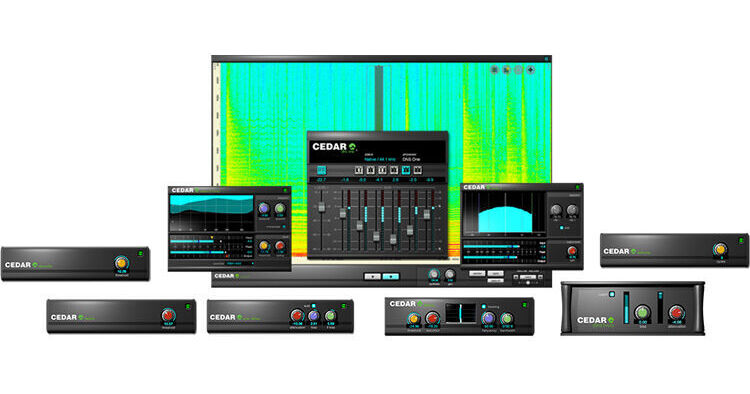
Containing all eleven Cedar Studio 9 processes, CEDAR Audio Cedar Studio 9 Complete is a plug-in bundle for advanced audio restoration and noise suppression. It includes the Cedar Studio 9 Retouch spectral-editor plug-in for removing individual sounds, correcting wrong notes, and much more. The Cedar Studio 9 Restore plug-in helps you eliminate clicks, crackle, and thumps, plus its built-in Adaptive Limiter is ideal for mastering and maximizing audio. The Cedar Studio 9 DNS plug-in gives you the ultimate tool for dialog noise suppression in film and TV post.
More Details
No Longer Available
No Store Display
Ask an Expert
800-606-6969
Kit Contains:

Containing all eleven Cedar Studio 9 processes, CEDAR Audio Cedar Studio 9 Complete is a plug-in bundle for advanced audio restoration and noise suppression. It includes the Cedar Studio 9 Retouch spectral-editor plug-in for removing individual sounds, correcting wrong notes, and much more. The Cedar Studio 9 Restore plug-in helps you eliminate clicks, crackle, and thumps, plus its built-in Adaptive Limiter is ideal for mastering and maximizing audio. The Cedar Studio 9 DNS plug-in gives you the ultimate tool for dialog noise suppression in film and TV post.

CEDAR Audio Cedar Studio Retouch 9 Plug-In

Part of CEDAR Studio suite of advanced audio processors, CEDAR Audio Retouch 9 is a spectral-editor plug-in compatible with most DAWs operating in AU, VST2, VST3, and AAX formats. With its enhanced Machine Learning and AI capabilities, it is the tool of choice for mastering studios, mix suites, post houses, forensic laboratories, and anyone else who needs to identify, isolate, and manipulate individual sounds within an audio file to eliminate a wide range of common problems and significantly improve the sound quality of their audio.

Unlike conventional restoration tools, Retouch 9 provides a wide range of time/frequency editing (TFE) capabilities and allows you to define the temporal and spectral content of the sound you want to remove. The software enables you to mark and process complex areas in its spectrogram using the types of tools commonly found in powerful photographic and image manipulation software. This makes it possible to identify all manner of sounds and noises, which can then be manipulated using any of the processing tools at your disposal.

Retouch is supplied as a standalone application to VST and AU users. No workstation or other host software is required.

Note:
CEDAR Studio Retouch 9 is authorized using an iLok.
Using Machine Learning to Identify Problems
Matching
Match allows you to mark one of the offending sounds and then ask the machine learning algorithm in Retouch 9 to find all of the other instances within the recording. A threshold control even allows you to bias its decision making toward including more or fewer possibilities, so you can find the level that includes everything that you want to remove but precludes events that seem similar but are actually wanted signal.

Having identified all of the matches, you can then eliminate them using the appropriate Retouch tool. You can process them individually, authorizing and applying the chosen tool to each, or you can process all of the matches as a group. Retouch 9 will fly through the whole file in a tiny fraction of the time needed with human intervention.

Retouch Tools
Interpolation
This is the classic spectral editing mode that suppresses or removes problems seamlessly. It allows you to define an unwanted sound, remove it at the touch of a button, and replace it using powerful models that analyze the surrounding audio and then rebuild what would have been there had the noise not occurred.
Repair: Putting the AI into Spectral Repair
If you use spectral editing regularly, you already know the scenario: you mark a region, and you want to affect a single sound within it, suppressing or accentuating it while leaving the background untouched. Repair uses AI to achieve precisely that. Just mark the sound and some of the surrounding signal in the usual fashion and then use a single knob to suppress or accentuate it. Unlike other spectral editing tools, only the significant signal within the region is identified and processed; all low-level signals as well as the ambience are left unaffected.
Patch
Patch mode allows you to replace an area of audio with another of the same duration and the same range of frequencies (although not necessarily of the same frequencies). Think of this as copying the data from elsewhere in the spectrogram to the region that you initially defined. It includes a pitch-shifting algorithm that takes into account the relative pitch of components within the audio selection, greatly aiding the correction of harmonically rich material and even allowing you to correct the pitches of incorrect notes within musical material. It's also invaluable when working with background/atmos.
Copy
Copy mode allows you to move an area of audio to another position. You can think of this as copying the data from a defined region to anywhere else in the spectrogram. This tool includes a pitch-shifting algorithm that takes into account the relative pitch of components within the audio selection, greatly aiding the correction of harmonically rich material and even allowing you to correct the pitches of incorrect notes within musical material—invaluable when working with atmos.
Erase
This mode provides a quick and simple way to erase unwanted audio quickly and accurately and replace it with background/atmos calculated from the surrounding audio.
Volume
You may affect the amplitude of the signal within a region, and independently affect the amplitude of the signal lying outside that region. This allows you, for example, to reveal individual sounds or utterances within a file, either by amplifying the wanted sounds or by suppressing the rest of the audio, or both. By marking multiple regions simultaneously and reducing the amplitude of the outside to its minimum, you can use this to retain only the sounds or words wanted in an audio file.
Cleanse
Despite the power of Interpolation, Patching, and Copying modes, there are times when those modes are unable to eliminate unwanted sounds quickly and efficiently. Examples of this include restoring sounds such as wanted speech in the presence of strong, but relatively short-lived background noises such as gusts of wind blowing across a microphone. Cleanse mode was developed specifically to help in these situations, and will separate the wanted signal from the unwanted and allow you to suppress the noise at the touch of a button. Don't be misled; this isn't a rehash of existing noise reduction methods, but a powerful new patented process.
Revert
Revert allows you to define any part of the spectrogram and return it to its original, unprocessed form. Much more powerful than stepping backward and forward through a list of actions, this allows the user to reinitialize any part of the audio no matter where it came in the process history, thus leaving later work untouched. You don't even have to revert whole retouch operations. If you like the result of a single process, say, the end of a note, but feel that you could do better at the start of the note, you can reinitialize and reprocess this section of the audio no matter how many Retouches you have performed elsewhere since then. It's so quick and so powerful that you'll wonder how you ever worked without it.
CEDAR Audio Cedar Studio 9 Restore Plug-In Suite

Part of CEDAR Studio's suite of advanced audio processors, the CEDAR Studio Restore Plug-In combines eight advanced audio-restoration algorithms into a single package. Ideal for all your audio-processing needs, it enables you to eliminate a huge number of common problems encountered in film and TV post, whether you're transferring audio from old and damaged media, cleaning up soundtracks, or restoring material for broadcast. The software is compatible with most DAWs operating in AU, VST2, VST3, and AAX formats.

Note:
CEDAR Studio Restore is authorized using an iLok.
Eight Advanced Audio-Restoration Algorithms
Eliminate Clicks with Minimum Fuss
Declick offers enhanced impulsive noise detection and an interpolator that rivals any other plug-in declicker. This results in superior performance across a wider range of material than ever before. Indeed, this performance is so good that, in most cases, it's not possible to hear that the signal was damaged prior to restoration.
Dig Deeper to Eliminate Crackle and Other Problems
Decrackle boasts a remarkable ability to dig into the damaged signal to identify and remove all manner of ground-in and grungy crackle without damaging the wanted audio. It also removes many forms of buzz and some amplitude distortions from material ranging from cylinder recordings to current broadcasts contaminated with lighting buzz.
Automatic Dehissing that Really Works
  • Auto Dehiss embodies an advanced algorithm that is far less susceptible to the unwanted side effects sometimes called twittering, glugging, underwater sound, or even space monkeys.
  • In short, it's able to determine the broadband noise content and remove it without the introduction of these unwanted artefacts. A manual mode is also offered for fine-tuning the results when wanted.
Eliminate Buzz and Hum
  • Debuzz quickly and easily removes all manner of buzzes and hums with fundamentals as high as 500 Hz, and it can eliminate unwanted signal components across the entire audio spectrum.
  • It will track wandering tones and, unlike traditional filters, can successfully restore audio without unwanted side effects such as limited bandwidth or hollow sound introduced by comb filters.
Reconstruct Clipped Audio
  • Declip 2 effortlessly removes clipped samples and reconstructs the original signal, improving clarity, eliminating distortion, and restoring the original dynamic range of the damaged audio.
  • This latest algorithm even tracks the clipping amplitude, so material that has later been processed with dynamics packages can still be restored.
Remove Extended Clicks and Scratches (Pro Tools Only)
  • Manual Declick is ideal for restoring the extended scratches and clicks encountered on many audio media—film, tape, or disk, analog or digital.
  • Unique dual algorithms optimized for long clicks and scratches remove noises such as those found on optical soundtracks, as well as dropouts and extended digital errors.
Removing Bumps and Thumps (Pro Tools Only)
  • Dethump eliminates the extended low-frequency thumps that cannot be restored using conventional declicking processes and filters.
  • It replaces the unwanted sound with restored low-frequency audio and is the ideal tool for removing many of the previously intractable problems associated with optical soundtracks, cylinders, 78 rpm discs, and even modern recordings when, for example, microphones and stands are bumped.
Finish Your Audio Using a Unique Limiter
  • Adaptive Limiter 2 employs another unique algorithm developed by CEDAR that constrains the peak level of the output while retaining the integrity of the input.
  • The result is a perfectly controlled signal that remains much more natural than audio processed using traditional limiters.
  • Use it as an unsurpassed loudness maximizer with its advanced resampling and noise-shaping capabilities, ideal for mixing, final mastering, and other creative duties.
CEDAR Audio Cedar Studio 9 DNS Plug-In

Part of CEDAR Studio suite of advanced audio processors, the CEDAR Audio Cedar Studio 9 DNS Plug-In is the world standard for dialog noise suppression in film and TV post. The plug-in includes both the DNS One and DNS Two processors, which utilize CEDAR's proprietary LEARN capability to allow the processes to adapt continually to changes in the unwanted noise, even when the wanted signal is present. Cedar Studio 9 DNS makes unusable interviews intelligible, helps save huge costs in ADR, and has rescued dialog for countless movies. The software is compatible with most DAWs operating in AU, VST2, VST3, and AAX formats.

Note:
CEDAR Studio DNS is authorized using an iLok.
CEDAR DNS One
  • If you work with film dialog, the speed, flexibility, and ease of use of DNS One provides solutions to audio problems that you could not previously solve. It's the standard for multichannel postproduction in the film, video, and TV industries.
  • It's also ideal for removing motor noise from recordings, for eliminating electrical interference, and for helping to clean up recordings suffering from unfavorable acoustics and poor microphone locations.
CEDAR DNS Two
  • Designed to emulate the DNS 2 hardware unit, the algorithm in DNS Two has already proved to be the quickest, simplest, and most effective dialog noise suppressor ever developed by the company.
  • In almost all cases, using DNS Two is as simple as switching on LEARN and then adjusting the attenuation to obtain the desired amount of noise reduction. If you're working with location sound recordists and studios who use DNS 2s, DNS Two will allow you to replicate their work precisely and fine-tune the audio for the best possible results.
More about LEARN
  • LEARN allows DNS One and DNS Two to calculate an adapting estimate of the background noise level and determine suitable noise attenuations at each frequency for optimum suppression.
  • LEARN is not a noise fingerprint, and you do not need to find a section of the audio that contains little or no wanted signal to take a noise measurement. Yes, you can use LEARN to take a snapshot of existing conditions, but its real power lies in leaving it switched on so that it can adapt to changes in the background and surroundings.
  • With LEARN, DNS One and DNS Two retain the zero latency they have always boasted. LEARN not only adapts to changes in just a tiny fraction of a second, but it differentiates between the wanted signal and the noise, so you obtain superb noise suppression at all times.
Kit Contains:

CEDAR Audio Cedar Studio Retouch 9 Plug-In

Delivery Format
Download
License Type
Standard: Perpetual License
User Support
1 User
Standalone Operation
Yes
System Compatibility/Requirements
Operating System: Windows/macOS
Plug In Formats: VST3 / VST2 / AAX (Native) / AU
USB Key Authentication: Required (iLok)

CEDAR Audio CS9 COMPLETE Reviews

See any errors on this page?
Whatever You Need, We've Got It