Sony Global

Video Chat with a Pro Audio Expert - Live

Mackie MainStream Live Streaming and Video Capture Interface

BH #MALSVCIPROKY • MFR #MAINSTREAM
Print
Mackie MainStream Live Streaming and Video Capture Interface
Key Features
  • For Streaming, Gaming & Content Creation
  • Combo XLR-1/4" Input, Revolution Preamp
  • Up to 2K60 Streaming & 4K60 Pass-Through
  • Six Customizable SMART Pads
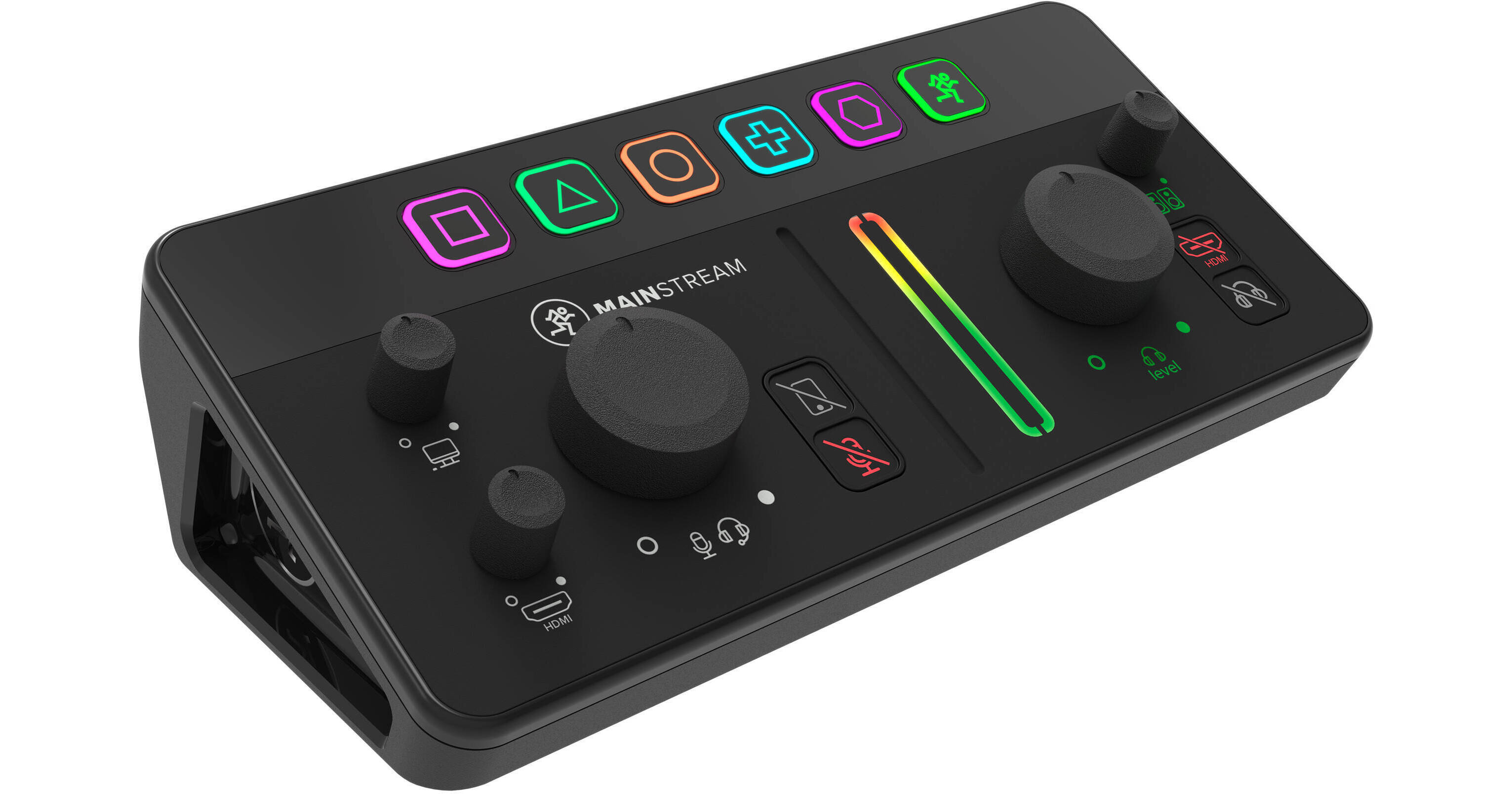
Integrate video, audio, and stream control into a single, powerful device with the Mackie MainStream. Simply connect your mic, game feed, and other sources straight into Mackie MainStream for a sleek all-in-one solution that puts essential controls right at your fingertips.
More Details
In Stock
On Display in Store
Free Next Day Shipping
Express Store Pickup
Protect Your Gear
Add a protection plan from $26.00
Ask an Expert
800-606-6969

Mackie MainStream Overview

From Manufacturer

Integrate video, audio, and stream control into a single, powerful device with the Mackie MainStream. Simply connect your mic, game feed, and other sources straight into Mackie MainStream for a sleek all-in-one solution that puts essential controls right at your fingertips.

The device includes high-quality inputs and outputs; everything you need to create an engaging stream including USB-C, HDMI, and professional audio connections, plus powerful features like programmable keys that let you trigger samples, control transitions, and engage your online community in new ways. MainStream includes Mackie Matrix software (Mac/Windows) for total control and customization.

At a Glance
Top Panel

  • 6 multifunction keys
  • Mic level control
  • Level indicator
  • PC audio return level control
  • HDMI audio level control
  • Mic and aux mutes
  • Stereo output metering
  • Headphone and monitor level control
  • HDMI audio mute
  • Headphone/monitor mute

Rear Panel

  • XLR/TRS combo mic input (+48V) (60dB)
  • Headset mic and return
  • Direct monitoring on/off
  • Aux input
  • 1/4" headphone out
  • 1/4" monitor outs
  • HDMI input (2K x 60 fps capture)
  • HDMI passthrough (4K x 60 fps)
  • Dual USB-C input hub
  • Single USB-C interface (bus powered)
Make Connections
Mackie MainStream is the easiest way to start a pro-quality live stream, integrating video, audio, and stream control into a single, powerful device. Simply connect your mic, game feed, and other sources straight into Mackie MainStream for a sleek, all-in-one solution that puts essential controls right at your fingertips.
HDMI In and Thru
Mackie MainStream features an HDMI input with a video capture card (1080p x 60 fps) and pristine HDMI passthrough for your monitor (4K x 60 fps), so you can stream live and game at a high quality. It's a shame what happened to the radio star, but it's time to move on.
USB-C Hub for Your Devices
Consolidate and streamline your entire setup with two USB-C inputs for extra cameras, USB microphones, thumb drives, and any other USB devices you want to connect to your live streaming computer while only taking up one port.
Analog Inputs
It wouldn't be Mackie without high-quality analog audio. In addition to the main mic input (+60 dB), MainStream includes a chat headset input, smartphone input for live streaming phone calls, a headphone output, and stereo line outs that are perfect for speakers.
Keep Your Controls at Your Fingertips
When you're streaming live, the last thing you want is to end up menu diving on your computer. MainStream gives you tactile control over levels, plus a row of programmable keys for triggering samples and transitions.
Gaming Console Streaming Setup
MainStream acts as a capture card for Switch, Xbox, PlayStation and other gaming consoles. Just connect your console to HDMI in and the HDMI passthrough to your television. You can stream with a lightweight laptop and your headset for a low-cost, high-quality option.
Gaming PC Streaming Setup
Run a professional live streaming battle station through Mackie MainStream, including a high-end DSLR camera through the HDMI, USB webcam for an extra angle, plus a high-quality XLR broadcast mic and headphones. It all connects to your PC with one USB-C cable.
Just Chatting Streaming Setup
The flexibility of Mackie MainStream makes it the perfect interface for any type of stream. This just-chatting setup uses a DSLR camera, USB mic, and a smartphone for chatting with a call-in guest. (Mix minus ensures the caller doesn't hear an echo).
Matrix Software
The free Matrix software is entirely optional, but extremely powerful. Add up to 6 virtual inputs (like Discord or Spotify) and 4 hardware inputs and route them all to your live stream. Add vocal effects, tweak your mix and create and trigger samples with 24 virtual pads. You can even use Matrix with devices other than MainStream. It won't get jealous.
UPC: 810128260633

Mackie MainStream Specs

Key Specs
Channels of I/O
2 Inputs / 2 Outputs
Maximum Sampling Rate
48 kHz / 24-Bit
Number of Microphone Inputs
1
Analog Audio I/O
1x Combo XLR-1/4" TRS Mic/Line Input
1x 1/8" / 3.5 mm TRS Line/Aux Input
2x 1/4" TRS Line Output
1x 1/8" / 3.5 mm TRS Headphone Output
1x 1/8" / 3.5 mm TRRS Headset In/Out
Digital Audio I/O
No
Host Connection
2x USB-C
Power Requirements
USB Bus Power
General
Display
No
Channels of I/O
2 Inputs / 2 Outputs
Built-In DSP
No
Maximum Sampling Rate
48 kHz / 24-Bit
Number of Microphone Inputs
1
Built-In Microphone
No
Signal Processing
Pad
No
High-Pass Filter
No
Solo/Mute
Mute per Input Channel
Connectivity
Analog Audio I/O
1x Combo XLR-1/4" TRS Mic/Line Input
1x 1/8" / 3.5 mm TRS Unbalanced Line/Aux Input
2x 1/4" TRS Line Output
1x 1/8" / 3.5 mm TRS Headphone Output
1x 1/8" / 3.5 mm TRRS Headset In/Out
Phantom Power
No
Digital Audio I/O
No
Host Connection / USB
2x USB-C
Host Connection Protocol
USB 2.0, USB 3.1/3.2 Gen 2
USB (Non-Host)
1x USB-C (USB 3.1 Gen 2, Power Input)
Sync I/O
No
Network I/O
No
MIDI I/O
No
Expansion Slots
No
Other I/O
1x HDMI Expansion Input
1x HDMI Expansion Thru
Wireless
No
Digital Audio
Sample Rates
48 kHz
Sample Rate Conversion
No
Bit Depths
24-Bit
Sync Sources
No
Audio Storage & Playback
Media/Memory Card Slot
No
Compatibility
OS Compatibility
macOS / Windows
Mobile Device Compatibility
No
Required Hardware
USB-C Port
Power
Power Requirements
USB Bus Power
Physical
Dimensions
8.4 x 3.7 x 2.4" / 21.3 x 9.4 x 6.1 cm
Weight
1.3 lb / 0.6 kg
Packaging Info
Package Weight
2.12 lb
Box Dimensions (LxWxH)
9.8 x 4.9 x 4.6"

Mackie MainStream Reviews

See any errors on this page?

Is there a delay with a USB-C connected cam ...

Is there a delay with a USB-C connected cam camera vs an HDMI with an XLR connected mic?
Asked by: Lance
The camera inputs for video capture on a streaming device for both video and audio, like the Mackie MainStream Live Streaming and Video Capture Interface are HDMI, not USB-C. As another option for a similar device with an XLR mic input, you may like the RODE X Streamer X Audio Interface and Video Streaming Console.
Answered by: Lisa S
Date published: 2024-04-19

If I have 2 cameras (HDMI & USB-C Webcam) ...

If I have 2 cameras (HDMI & USB-C Webcam) connected, How to choose which one goes to the computer for streaming?
Asked by: Emmanuel
The Mackie MainStream Live Streaming and Video Capture Interface can be used to connect both HDMI and USB-C video sources to your computer at the same time. These can be managed as sources or scenes in your streaming software.
Answered by: Calvin M
Date published: 2024-01-18

Can the interface record to an external hard ...

Can the interface record to an external hard drive via the usb-c connection in the back?
Asked by: Lance
No, the Mackie MainStream Live Streaming and Video Capture Interface would need a computer between an external hard drive and the mixer.
Answered by: Manny C
Date published: 2024-01-21
  • y_2026, m_5, d_18, h_13CST
  • bvseo_bulk, prod_bvqa, vn_bulk_3.0.43
  • cp_1, bvpage1
  • co_hasquestionsanswers, tq_3
  • loc_en_US, sid_1799269, prod, sort_[SortEntry(order=HAS_STAFF_ANSWERS, direction=DESCENDING)]
  • clientName_bhphotovideo
Whatever You Need, We've Got It