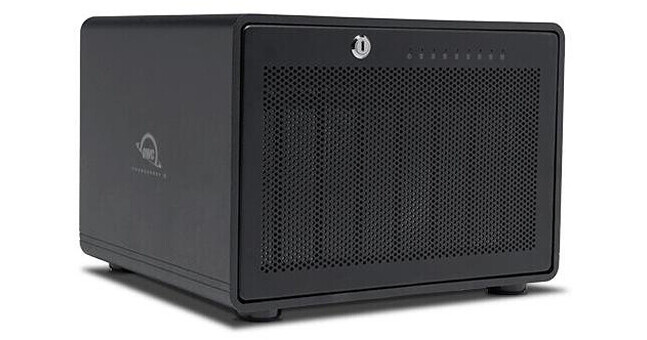
OWC ThunderBay 8 192TB 8-Bay Thunderbolt 3 RAID 5 Array (8 x 24TB Enterprise)

BH #OWTB38SRE192 • MFR #OWCTB38SRE192
Print
OWC ThunderBay 8 192TB 8-Bay Thunderbolt 3 RAID 5 Array (8 x 24TB Enterprise)
Key Features
  • 8 x 24TB Enterprise-Class HDDs
  • 8 x 3.5"/2.5" SATA Drive Bays
  • 2 x Thunderbolt 3 Ports
  • 1 x DisplayPort 1.2
Streamline data storage and protection with the ThunderBay 8 192TB 8-Bay Thunderbolt 3 RAID 5 Array from OWC, which is optimized to handle raw, 4K, large format, and VR workflows. Utilizing 8 drive bays, each of which has a 24TB 7200 rpm SATA III hard, the ThunderBay 8 Enterprise features 192TB of storage. Preconfigured in RAID 5, this array also supports RAID 0, 1, 4, 1+0 (10), and JBOD modes and is capable of transfer rates up to 2586 MB/s. Compatible with 2.5 or 3.5" HDDs or SSDs, the ThunderBay 8 also supports hot swapping. Connecting to a host via a Thunderbolt 3 port, this RAID array features an extra Thunderbolt 3 port for accessories. A DisplayPort supports a monitor up to 4K while the Thunderbolt 3 port supports a monitor up to 5K.
More Details
In Stock
No Store Display

Business Financing Options

Free Expedited Shipping
Protect Your Gear
Add a protection plan from $649.99
Ask an Expert
800-606-6969

OWC ThunderBay 8 External HDD Overview

From Manufacturer

Streamline data storage and protection with the ThunderBay 8 192TB 8-Bay Thunderbolt 3 RAID 5 Array from OWC, which is optimized to handle raw, 4K, large format, and VR workflows. Utilizing 8 drive bays, each of which has a 24TB 7200 rpm SATA III hard, the ThunderBay 8 Enterprise features 192TB of storage. Preconfigured in RAID 5, this array also supports RAID 0, 1, 4, 1+0 (10), and JBOD modes and is capable of transfer rates up to 2586 MB/s. Compatible with 2.5 or 3.5" HDDs or SSDs, the ThunderBay 8 also supports hot swapping. Connecting to a host via a Thunderbolt 3 port, this RAID array features an extra Thunderbolt 3 port for accessories. A DisplayPort supports a monitor up to 4K while the Thunderbolt 3 port supports a monitor up to 5K.

A 92mm cooling fan ensures drives don't become overheated, while LED indicators allow for easy monitoring of drive activity and power. Utilizing an aluminum enclosure, the ThunderBay 8 sports a locking front panel and a lock slot on the rear panel for added security. OWC SoftRAID Premium software is included, providing easy drive management. The ThunderBay 8 is compatible with Windows 10 and later and macOS 10.13 and later.

Pro Storage Built by Creators for Creators
OWC understands your needs as a creative professional, and they understand that every project is unique. They designed the ThunderBay 8 with the speed, capacity, and flexibility to adapt to your evolving needs. Whether you're changing cameras from a Sony FX9 to a Canon C300 or RED KOMODO, the ThunderBay 8 has you covered.
How Much Video Footage Can You Store?
  • XAVC Intra 4K Class 300 (10-bit at 23.976 fps, 100GB per hour): up to 1600 hours in RAID 0 and up to 1400 hours in RAID 5.
  • ProRes 422 HQ 4K (23.976 fps, 396GB per hour): up to 404 hours in RAID 0, up to 354 hours in RAID 5.
  • REDCODEC RAW 8K (8:1 compression and 23.976 fps, 571GB per hour): up to 280 hours in RAID 0, up to 245 hours in RAID 5.
SoftRAID
SoftRAID works with macOS 10.14 or later and Windows 10 or later. SoftRAID is licensed per computer. The SoftRAID serial number will work with both Mac and Windows but can only be active on one computer at a time. Additional seats can be purchased. RAID 4 and 1+0 (10) are currently Mac only at this time.
Work Faster
Up to 2586 MB/s speeds for up to 8K multi-stream video editing and AR/VR workflows.
Work Bigger
Access, backup, and archive up to 192TB of irreplaceable footage, images, and files on either HDD or SSD storage.
Built for RAID
Bundled with OWC SoftRAID, a fast and flexible tool for RAID 0, 1, 4, 5, and 1+0 (10). Also supported is Apple RAID and Windows Disk Manager.
Expansive
Daisy-chain up to five additional ThunderBay 8 or other Thunderbolt storage devices via the second Thunderbolt port.
The Pro Storage Choice
The ThunderBay 8 is designed for video editors, colorists, VFX compositors, DITs, music artists, and more.
Mac Ready Across the Board
The ThunderBay 8 checks all the functional boxes to make you a more efficient content creator: lightning-fast data access, massive capacity, centralized file location, and it works with Macs (Intel-based as well as the latest Apple Silicon M1, M2, M3, and M4 machines) and Windows PCs. What makes ThunderBay 8 a great 8 bay storage solution available is its ability to give you peace of mind your data is safely protected today and tomorrow. Gone is the fear of a costly slow down—or gulp—losing irreplaceable data because you didn't select the right RAID solution.
A Powerful RAID Tool
SoftRAID is a fast and flexible application to configure, maintain, and protect your RAID volumes on Mac and PC. OWC enclosures include three years of SoftRAID Premium.
  • High-Performance RAID 0/1/4/5/1+0 (10) volumes
  • Predictive Health Monitoring proactively notifies of Volume and Disk issues well before failure—provided on your computer and remotely
  • Seamless Cross-Platform Sharing with support for Apple-formatted APFS and HFS+ SoftRAID volumes between Mac and Windows at no additional cost

Please note that this is a 3-year license.

Daisy-Chain Possibilities
The ThunderBay 8 isn't just about high-capacity, high-performance storage. It's about giving you all the options you need to work at your best. Attach a 5K Thunderbolt display or two 4K displays. Place a USB-C device at the end of a daisy chain. With an extra Thunderbolt port, you have the flexibility to add to your daisy-chain and master any task at hand.
A Data Safe House
With a locking front panel and backside security slot, the ThunderBay 8 is like a safe house for precious data. Additionally, implementing a redundant RAID setup, such as RAID 5 on SoftRAID, will protect against data loss from disk failure.
Professional Grade = Ready to Work
We understand having confidence in gear reliability is paramount to creative professionals. That's why every ThunderBay 8 undergoes OWC's multi-hour burn-in performance certification prior to shipping. This ensures your ThunderBay 8 arrives operating properly and immediately ready for demanding use.
Thunderbolt Made Easy
OWC makes it easy to choose the right gear. Their Thunderbolt-certified products offer the same performance and functionality whether they are Thunderbolt 3 or Thunderbolt 4. And if you're rocking a beloved Thunderbolt 2 machine, OWC offers a certified Thunderbolt 3 (USB-C) to Thunderbolt 2 Adapter so you can plug into their universe of solutions. No hassles, no confusion. That's the OWC Difference.
OWC Thunderbolt Cable Included
OWC Thunderbolt Pro Dock comes with a certified 2.3' OWC Thunderbolt cable. But if your workflow demands a different length to make the connection, OWC Thunderbolt (USB-C) Cables are a great choice.
Work with Ultimate Confidence
Active workspaces expose gear to unexpected bumps and shoves. OWC ClingOn custom cable stabilizers (sold separately) screw into the OWC Dock or OWC Drive housing to reduce—if not completely eliminate—cable strain on Thunderbolt and USB-C connections so you can work with ultimate confidence even in the highest foot traffic environments.
UPC: 810179170929

OWC ThunderBay 8 External HDD Specs

Key Specs
Storage Capacity
192 TB
Included Drives
8x 24 TB SATA III 3.5" HDD 7200 RPM
RAID
Yes: Supported RAID Modes: 0 / 1 / 4 / 5 / 10 / JBOD (Preconfigured in RAID 5)
Number of Bays
8x 2.5"/3.5" SATA III
Inputs/Outputs
2x USB-C Thunderbolt 3 (40 Gb/s)
Computing
Bridge Chipset
Intel JHL-6540
JMicron JMB-585
Drives
Storage Capacity
192 TB
Included Drives
8x 24 TB SATA III 3.5" HDD 7200 RPM
RAID
Yes: Supported RAID Modes: 0 / 1 / 4 / 5 / 10 / JBOD (Preconfigured in RAID 5)
Transfer Rates
2586 MB/s (RAID Mode Unspecified)
2419 MB/s (Read in RAID 0)
2412 MB/s (Write in RAID 0)
General
Number of Bays
8x 2.5"/3.5" SATA III
Inputs/Outputs
2x USB-C Thunderbolt 3 (40 Gb/s)
Media Card Slots
No
PCI Expansion
No
Software
OS Compatibility
Windows 10 or Later
Windows Server 2022
macOS 10.14 to 15
Security
Encryption
No
Security Features
Kensington Security Slot, Lockable Bay Door
Electrical
Input Power
12 VDC at 25 A
90 to 264 VAC, 50 / 60 Hz at 1.8 to 3.5 A
PSU
1 x 300 W
Physical
Operating Conditions
41 to 95°F / 5 to 35°C at 8 to 90% Humidity
Storage Conditions
-4 to 140°F / -20 to 60°C at 5 to 95% Humidity
Certifications
BSMI, CE, FCC, RCM, VCCI
Cooling
1x 92 mm Fan
Material of Construction
Aluminum
Dimensions
10.2 x 9.4 x 7.1" / 25.9 x 23.9 x 18 cm
Weight
27.9 lb / 12.7 kg
Packaging Info
Package Weight
36.53 lb
Box Dimensions (LxWxH)
18.8 x 17.8 x 16.6"

OWC ThunderBay 8 External HDD Reviews

Best RAID for Post Production

By Christopher
Rated 5 out of 5
Date: 2025-07-31

A feature film that I worked on used these at the edit stations and for finishing work. I was really impressed with the speed, reliability, and build quality. So I purchased one for myself to use on other edit and VFX projects. Highly recommend if you need storage that can handle Red Raw 6k, and Blackmagic 4k media.

Great Storage Value, M1Pro/Max Users See the Review

By Edward
Rated 5 out of 5
Date: 2021-12-14

This is a great storage value! So far the Software based RAID setup has performed very well. For new Apple Silicon users, there are a few hoops to jump through that I was unaware of. The disk would not mount initially, but after I reached out to OWC tech support, they gave me detailed instructions on how to get everything sorted out. But, just be aware of that if you are a Mac M1Pro/Max chip user. The only other gripe I've had is that the provided thunderbolt cable is very short, too short. It's only about 18 long.

See any errors on this page?

What drives are included? Specifically, what ...

What drives are included? Specifically, what brand drives are they?
Asked by: Phontaine
This drive you mentioned "Seagate ST2000DM008" is a Barracuda retail drive which is not NAS rated. Can you please re-check what brand and what mfr. part number do these drives have. thanks
Answered by: Menachem
Date published: 2021-08-08

Does this come with Softraid software License?

Does this come with Softraid software License?
Asked by: Cameron
Yes, it is included.
Answered by: OWC Andy
Date published: 2021-08-18

What is the transfer speed when configured to ...

What is the transfer speed when configured to raid 5?
Asked by: John
Unfortunately the manufacturer does not specify what the transfer speed may be when configured to RAID 5. This is likely because speeds may vary depending types of drive you use and other variations with computer spec.
Answered by: Geoff
Date published: 2022-07-07

I'm looking at getting something Could you add ...

I'm looking at getting something Could you add SSDs at a later date? or will this enclosure only accept HDDs?
Asked by: Kenton
Yes, you can add SSD's at a later date.
Answered by: OWC Andy
Date published: 2020-08-03

at raid 5 how much usable storage is there on ...

at raid 5 how much usable storage is there on this 32tb model?
Asked by: Keith
This configuration of the OWC ThunderBay 8 32TB 8-Bay Thunderbolt 3 RAID 5 Array has 8 drives, that each hold 4 TB. There is 28 TB capacity for storage, with 4 TB dedicated to parity, in case of drive failure.
Answered by: Jordan K
Date published: 2022-09-02

Are 20TB drives supported?

Are 20TB drives supported?
Asked by: Dave
Currently (11/22), the OWC ThunderBay 8 16TB 8-Bay Thunderbolt 3 RAID 5 Array supports up to 18TB drives in the unit.
Answered by: Zev
Date published: 2023-05-20

What drive speed to you get when on RAID 5 ...

What drive speed to you get when on RAID 5 configuration ??
Asked by: Joe
RAID5 affords 2x read speed with 1x write speed and one drive redundancy loss capability.
Answered by: Michael M
Date published: 2021-08-08
  • y_2026, m_7, d_28, h_9CST
  • bvseo_bulk, prod_bvqa, vn_bulk_3.0.48
  • cp_1, bvpage1
  • co_hasquestionsanswers, tq_7
  • loc_en_US, sid_1893022, prod, sort_[SortEntry(order=HAS_STAFF_ANSWERS, direction=DESCENDING)]
  • clientName_bhphotovideo
Whatever You Need, We've Got It