
Sony Global

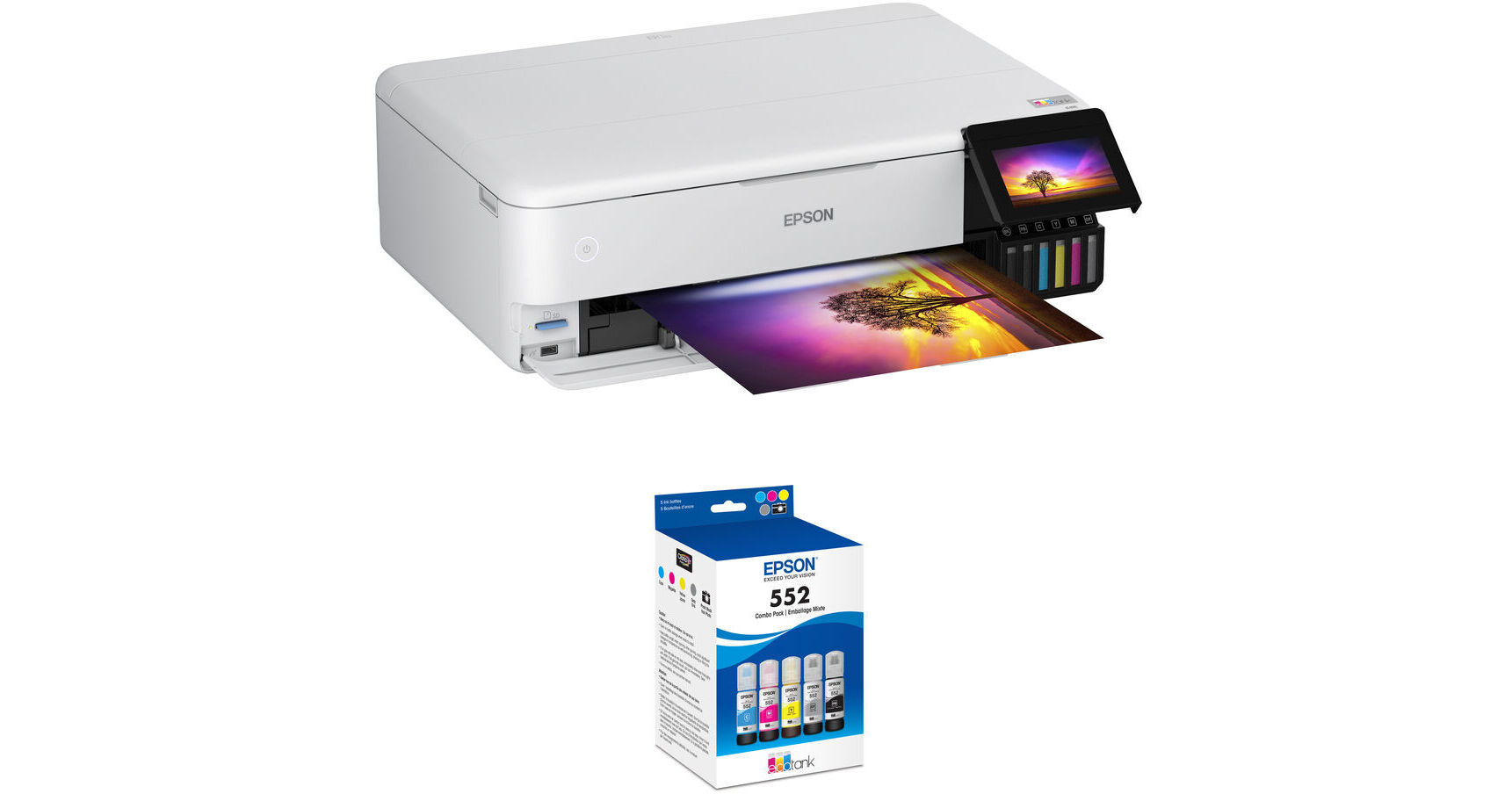
Epson EcoTank Photo ET-8550 All-in-One Supertank Printer with Claria ET Premium T552 5-Pack Kit

BH #EPET8550KIT1 (B&H Kit)
Print
Epson EcoTank Photo ET-8550 All-in-One Supertank Printer with Claria ET Premium T552 5-Pack Kit
Key Features
  • Print, Scan, Copy
  • Automatic 2-Sided Printing
  • Max Print Resolution: 5760 x 1440 dpi
  • Borderless Photos up to 13 x 19"
Print photos with the Epson EcoTank Photo ET-8550 All-in-One Supertank Printer with Claria ET Premium T552 5-Pack Kit from B&H. This printer features an economical cartridge-free printing system. This kit includes the Claria ET Premium T552 5-Pack, which includes one bottle each of photo black, gray, cyan, magenta, and yellow.
More Details
In Stock
Free Next Day Shipping
Express Store Pickup in 30 mins
Protect Your Gear
Add a protection plan from $64.99
Ask an Expert
800-606-6969
Kit Contains:

From Manufacturer

Print photos with the Epson EcoTank Photo ET-8550 All-in-One Supertank Printer with Claria ET Premium T552 5-Pack Kit from B&H. This printer features an economical cartridge-free printing system. This kit includes the Claria ET Premium T552 5-Pack, which includes one bottle each of photo black, gray, cyan, magenta, and yellow.

Epson EcoTank Photo ET-8550 All-in-One Supertank Printer

Print everything from everyday documents to lab-quality photos and graphics with the EcoTank Photo ET-8550 Wireless Color All-in-One Supertank Printer from Epson. Featuring an economical cartridge-free printing system, this printer offers low-cost replacement ink bottles without sacrificing print quality. Each replacement ink bottle set is equivalent to approximately 100 individual ink cartridges. The ET-8550 lets you print everything from 3.5 x 5" to 13 x 19" borderless photos to customized CDs and DVDs. A six-color Claria ET Premium Ink system delivers vibrant colors and sharp text for all your creative projects, and you can even print on cardstock and other media up to 1.3mm thick.

A 4.3" color touchscreen offers fast and easy performance and voice-activated printing is supported as well. Mobile-ready, you can print, scan, and more with the Epson Smart Panel app, which lets you monitor and operate your printer directly from your iOS or Android mobile device. Additionally, a SD card slot and USB port are provided for direct printing. For scanning, an 8.5 x 14" flatbed scanner delivers high-resolution scans up to 4800 x 1200 dpi, and the unit lets you make up to 99 copies at a time.

  • Cartridge-free printing for lab-quality photos, graphics, and creative projects
  • Claria ET Premium 6-color inks for vibrant colors and bright text
  • Prints on cardstock, CDs and DVDs, and specialty media up to 1.3mm thick
  • Low-cost replacement ink bottles eliminate cartridge waste
  • Uniquely keyed bottles for easy filling of each color
  • Compatible with Epson Smart Panel app, Apple AirPrint, Mopria, and more
  • Voice Activation via Siri, Google Assistant, Epson Connect, and Amazon Alexa
  • High-Speed USB and Ethernet connectivity
UPC: 010343952492
Epson Claria ET Premium T552 Pack of 5 Color Ink Bottles (70mL)

Refill your professional EcoTank ET-8500 or ET-8550 Printer with this 70mL Claria ET Premium T552 Pack of 5 Color Ink Bottles from Epson. This ink is high-capacity for remarkable image quality based for longevity and for accurate color reproduction.

High-capacity ink for remarkable image quality.
High-capacity EcoFit 70mL ink bottles uniquely keyed for easy filling.
Compatible with the EcoTank ET-8500 and ET-8550.
Claria ET Premium Ink with dye-based cyan, magenta, yellow, photo black, and gray (for smooth gradations and accurate color reproductions).
UPC: 010343959545
Kit Contains:

Epson EcoTank Photo ET-8550 All-in-One Supertank Printer

Key Specs
Functions
Print, Scan, Copy
Printing Technology
Inkjet
Color Type
Color
Configuration
6x Built-In Tank
Ink Type
Pigment-Based (Black)
Dye-Based (Gray, Photo Black)
Dye-Based (Cyan, Magenta, Yellow)
Ink Color
1x Black
1x Photo Black
1x Gray
1x Cyan
1x Magenta
1x Yellow
Print Resolution
Color: 5760 x 1440 dpi
Media Sizes
Input Tray 1
Maximum: 5 x 7" / 12.7 x 17.8 cm
Input Tray 2
Maximum: 8.5 x 14" / 21.6 x 35.5 cm
Input Tray 3
Maximum: 13 x 19" / 33 x 48.3 cm
Scanner Type
Flatbed Scanner
Scanner Maximum Resolution
Flatbed
1200 x 4800 dpi (Hardware)
Scanner Color Depth
48-Bit (Internal)
Wireless
Wi-Fi 5 (802.11ac)
Power Source
AC Power (Cable Built-In/Included)
Functions
Print, Scan, Copy
Printer
Printing Technology
Inkjet
Color Type
Color
Configuration
6x Built-In Tank
Ink Type
Pigment-Based (Black)
Dye-Based (Gray, Photo Black)
Dye-Based (Cyan, Magenta, Yellow)
Ink Color
1x Black
1x Photo Black
1x Gray
1x Cyan
1x Magenta
1x Yellow
Compatible Cartridges
Epson T552
Print Resolution
Color: 5760 x 1440 dpi
Borderless Printing
Yes: Up to 13 x 19" / 33 x 48.3 cm
Duplex Printing
Yes
Printer Language
ESC/P-R
Print Speed (By Time)
16 ppm (Black)
12 ppm (Color)
6 ppm (Black Duplex)
5 ppm (Color Duplex)
Printer Media Handling
Media Handling
1 x Input Tray, 2 x Input Tray, 3 x Input Tray, Output Tray
Media Sizes
Input Tray 1
Minimum: 4.1 x 5.8" / 10.4 x 14.7 cm
Maximum: 5 x 7" / 12.7 x 17.8 cm
Input Tray 2
Minimum: 4.1 x 5.8" / 10.5 x 14.8 cm
Maximum: 8.5 x 14" / 21.6 x 35.5 cm
Input Tray 3
Minimum: 4.1 x 5.8" / 10.4 x 14.7 cm
Maximum: 13 x 19" / 33 x 48.3 cm
Media Weight
Input Tray 1: 64 to 90 gsm / 16 to 24 lb
Media Thickness
Sheet: 3.9 to 51.2 mil / 0.1 to 1.3 mm
Margins
No
Paper Capacity
Input Tray 1: 20 x Sheet
Input Tray 2: 100 x Sheet
Output Tray: 50 x Sheet
Special Media Support
Envelopes, CDs
Scanner
Type
Flatbed Scanner
Maximum Resolution
Flatbed
1200 x 4800 dpi (Hardware)
Scan Modes
Color
Color Depth
48-Bit (Internal)
Grayscale Depth
24-Bit (External)
Image Sensor
1x Contact Image Sensor (CIS)
File Formats
BMP, JPEG, PDF, PNG, TIFF
Scanner Media Handling
Scan Sizes
Flatbed
Minimum: 1 x 1" / 2.5 x 2.5 cm
Maximum: 8.5 x 11.7" / 21.6 x 29.7 cm
Copier
Number of Copies
Up to 99 Copies
Reduction/Enlargement
25 to 400%
Duplex Copying
No
Copy Resolution
600 x 600 dpi
Connectivity
Data I/O
1x USB-B 2.0 Input
1x USB-A 2.0 Input (Flash Drive Only)
1x RJ45 Input
Wireless
Wi-Fi 5 (802.11ac)
Direct Printing
Android, Apple AirPrint, Epson Connect, Mopria, USB Port, Wi-Fi Direct
Media/Memory Card Slot
Single Slot: SD/SDHC/SDXC
Scanner Drivers
TWAIN, WIA
OS Compatibility
Windows / macOS
General
Display Size
4.3"
Display Type
Color Touchscreen LCD
Power Source
AC Power (Cable Built-In/Included)
Battery
No
Input Power
110 VAC, 50 / 60 Hz
Power Consumption
17 W (Maximum)
7.5 W (Ready)
0.8 W (Sleep)
0.2 W (Off)
Max Acoustic Noise
48 dBA (Pressure)
Operating Conditions
50 to 95°F / 10 to 35°C at 20 to 80% Humidity
Storage Conditions
-4 to 104°F / -20 to 40°C at 5 to 85% Humidity
Certifications
ENERGY STAR, RoHS
Dimensions (W x H x D)
20.6 x 16.9 x 29.8" / 52.3 x 42.9 x 75.7 cm (Fully Assembled)
20.6 x 6.7 x 14.9" / 52.3 x 17 x 37.8 cm (Storage)
Weight
24.5 lb / 11.1 kg (Fully Assembled)
Packaging Info
Package Weight
32.32 lb
Box Dimensions (LxWxH)
25.7 x 18 x 10.1"

Epson ET-8550 Reviews

Incapable of handling 13x19 paper

By benjamin
Rated 2 out of 5
Date: 2026-05-07

This printer has good print quality but it simply doesn't work as advertised. It cannot handle 13x19 paper and will repeatedly jam and ruin the paper. It is entirely unusable for printing for these purposes and it has wasted countless hours of my time and ruined countless sheets. Look elsewhere if you actually need to use the advertised features

Great work horse for the photo classroom!

By Andrew
Rated 5 out of 5
Date: 2026-03-20

I absolutely love this printer. It's very reliable and Prince beautifully at a very low cost. These are keys for any high school or college photo class. The fact that it uses ink tanks means that the cost of the ink is no longer much of a factor in allowing student students to print. The only downsides are that the 4 x 6 photo tray seems to never work right. Additionally, sometimes it gets jammed when printing double-sided a brochure paper. It has to do with the drying time. Other than that, the prints look amazing, last a long time and make printing affordable again. If you have a photo class or a graphic design class or if you're a high school that needs to support an ASB class or posters for kids running for class offices, etc., I highly recommend this printer. I routinely print hundreds of full color pages a month and probably only go through $200-300 of ink a year or less. This includes printing all of the tickets for school dances, kids running for ASB, photos for multiple photo classes, large exhibition prints, as well as school brochures, and multiple page programs for plays, etc. Stop thinking and just do it, you won't regret it!

See any errors on this page?

What is the heaviest weight of paper the printer ...

What is the heaviest weight of paper the printer can handle?
Asked by: Suzanne
The Epson EcoTank Photo ET-8550 All-in-One Supertank Printer is capable of printing on 80-lb card stock.
Answered by: Boyd H
Date published: 2025-02-17

Will the Epson ET-8550 print borderless (to the ...

Will the Epson ET-8550 print borderless (to the edge of the paper) for it's max paper size of 13"x19"?
Asked by: Dale
Yes, this Epson EcoTank Photo ET-8550 All-in-One Supertank Printer is capable of 13" x 19" borderless prints.
Answered by: Jordan K
Date published: 2026-02-16

WILL INK CLOG IF UNUSED FOR 2 WEEKS?

WILL INK CLOG IF UNUSED FOR 2 WEEKS?
Asked by: Tim
Not printing with the Epson EcoTank Photo ET-8550 All-in-One Supertank Printer for 2 weeks will not cause ink to clog, no.
Answered by: Jessica G
Date published: 2025-08-26

Does this printer need nozzle checks?

Does this printer need nozzle checks?
Asked by: Barbara
Yes the Epson EcoTank Photo ET-8500 and all other inkjet printers will occasionally need to run a nozzle check pattern and/or cleaning cycle to clear any possible clogs.
Answered by: Dan W
Date published: 2025-08-25

I am most interested in making black and white ...

I am most interested in making black and white prints. Will this print real grays w/o purple or green tints?
Asked by: Frank
Yes the Epson ET-8550 can print black and white without a color cast. However, it only has 1 gray ink. In my opinion the Epson P700 produces better quality black and white prints because it has 2 grays plus it uses archival pigment inks. Please take a look at the following link: https://bhpho.to/3DYAsgL
Answered by: Dan W
Date published: 2023-02-02

Is the 14.9 inch depth including the power plug? ...

Is the 14.9 inch depth including the power plug? I need to fit it into a tight space.
Asked by: Robert
The 14.9 inch depth for the Epson EcoTank Photo ET-8550 All-in-One Supertank Printer does not factor in the power cord. The 20.6 x 14.9 x 6.7" / 52.3 x 37.8 x 17 cm size is for storage and the cord can be removed before storing. When in use it is 29.8 x 20.6 x 16.9" / 75.7 x 52.3 x 42.9 cm (Fully Assembled).
Answered by: Dan W
Date published: 2024-11-08

Dimension Question. The printer is listed 14.9D ...

Dimension Question. The printer is listed 14.9D stored and 29.8D printing. Does the extra depth come forward?
Asked by: James
Yes, the extra depth comes forward when printing with the Epson EcoTank Photo ET-8550 All-in-One Supertank Printer, (B&H # EPET8550).
Answered by: Miguel M
Date published: 2023-12-13

is it I use this printer for sublimation print ...

is it I use this printer for sublimation print with this supplayed ink ?
Asked by: mahesh
No, the Epson EcoTank Photo ET-8550 All-in-One Supertank Printer cannot be used for sublimation printing.
Answered by: Kenneth C
Date published: 2025-11-29
  • y_2026, m_5, d_18, h_13CST
  • bvseo_bulk, prod_bvqa, vn_bulk_3.0.43
  • cp_1, bvpage1
  • co_hasquestionsanswers, tq_61
  • loc_en_US, sid_1947826, prod, sort_[SortEntry(order=HAS_STAFF_ANSWERS, direction=DESCENDING)]
  • clientName_bhphotovideo
Whatever You Need, We've Got It