
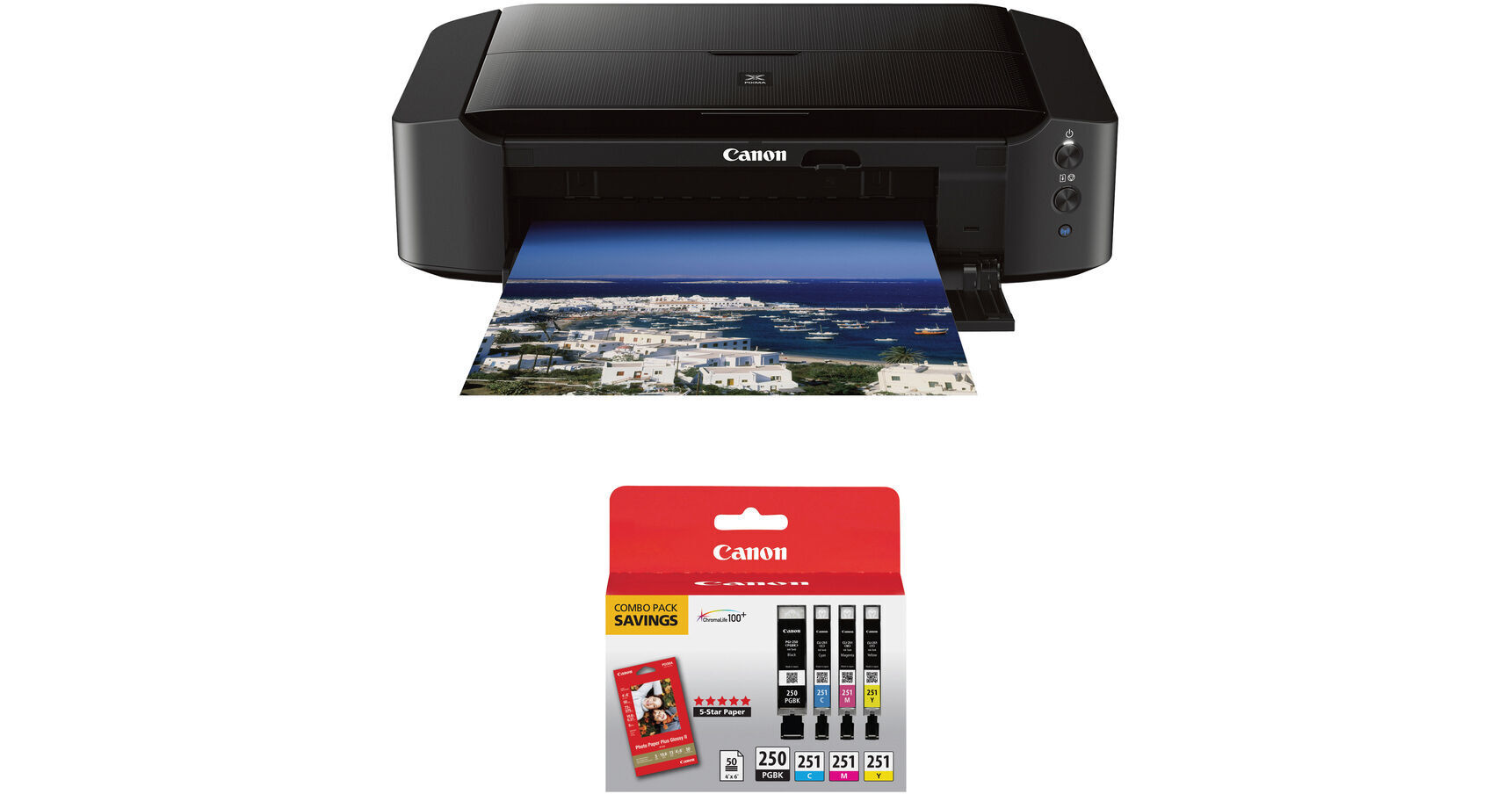
Canon PIXMA iP8720 Wireless Inkjet Photo Printer with GI-250 & CLI-251 4-Cartridge Combo Pack and 4 x 6" Photo Paper Kit

BH #CAIP8720K6 (B&H Kit)
Print
Canon PIXMA iP8720 Wireless Inkjet Photo Printer with GI-250 & CLI-251 4-Cartridge Combo Pack and 4 x 6" Photo Paper Kit
Key Features
  • Print Resolution: 9600 x 2400 dpi
  • Up to 13 x 19" Print Size
  • Prints Borderless 4 x 6" Photo in 36 sec
  • 802.11 b/g/n Wi-Fi Connectivity
Print photos via USB or Wi-Fi with the PIXMA iP8720 Wireless Inkjet Photo Printer with GI-250 & CLI-251 4-Cartridge Combo Pack and 4 x 6" Photo Paper Kit from B&H. This kit includes PGI-250 & CLI-251 4-cartridge combo pack and 50 sheets of 4 x 6" Canon PP-301 Photo Paper Plus Glossy II.
More Details
Kit Contains:

From Manufacturer

Print photos via USB or Wi-Fi with the PIXMA iP8720 Wireless Inkjet Photo Printer with GI-250 & CLI-251 4-Cartridge Combo Pack and 4 x 6" Photo Paper Kit from B&H. This kit includes PGI-250 & CLI-251 4-cartridge combo pack and 50 sheets of 4 x 6" Canon PP-301 Photo Paper Plus Glossy II.

Canon PIXMA iP8720 Wireless Inkjet Photo Printer

The Canon PIXMA iP8720 Wireless Inkjet Photo Printer allows you to create high resolution 9600 x 2400 dpi full color prints. It can even print borderless up to 13 x 19" and produce a 4 x 6" full color photograph in about 36 seconds. Additionally, with 802.11 b/g/n Wi-Fi connectivity, many more wireless printing options are available.

For paper handling the iP8720 utilizes a 150-sheet automatic feeder. This enables it to print 14.5 black ipm and 10.4 color ipm without worry of refilling the printer. Also, this printer has a 6-color ink configuration, including gray, that enables excellent tonalities and color reproduction for your images.

You can print directly onto CD, DVD, and Blu-ray discs with the use of the disc tray. Other features include automatic power on and off for power management when the printer is not in use as well as compatibility with the PIXMA Printing Solutions smartphone application.

Full-photolithography Inkjet Nozzle Engineering (FINE) can produce ink droplets as small as 1 pL
Six-color ink setup includes gray ink for better tonality in black & white images as well as a pigment black for crisp text
ChromaLife100+ system works with genuine Canon inks and photo papers to create prints with an archival album life of 300 years
Full HD Movie Print lets you print images from HD videos captured with select Canon cameras
My Image Garden provides photo organization and editing, including filters, a calendar, layout options, and more
CREATIVE PARK PREMIUM gives access to photos, templates, and additional material for use in your projects
Quiet mode allows you to work without disturbing those around you
Wi-Fi connectivity allows you to print from any Wi-Fi enabled computer in the network
AirPrint, Google Cloud Print, and Wireless PictBridge allow for wireless printing from a range of mobile devices
Uses a standard USB connection to plug into a computer
UPC: 013803230840
Canon PGI-250 & CLI-251 4-Cartridge Combo Pack with Photo Paper (4 x 6", 50 Sheets)

The Canon PGI-250 & CLI-251 4-Cartridge Combo Pack with Photo Paper (4 x 6", 50 Sheets) includes the PG-250 Pigment Black, CLI-251 Cyan, CLI-251 Magenta, and CLI-251 Yellow ink cartridges as well as 50 sheets of 4 x 6" Photo Paper Plus Glossy II photo paper. The PGI-250 black ink is pigment-based and produces professional document quality with crisp, smudge-resistant text, and the CLI-251 color inks provide vibrant colors for all your photos. Additionally, these inks are designed with FINE (Full Photolithographic Inkjet Nozzle Engineering) technology, which provide your prints with added sharpness, detail and quality.

Compatible Printers
  • PIXMA iP7220
  • PIXMA iP8720
  • PIXMA iX6820
  • PIXMA MG5420
  • PIXMA MG5520
  • PIXMA MG5620
  • PIXMA MG6320
  • PIXMA MG6420
  • PIXMA MG6620
  • PIXMA MG7120
  • PIXMA MG7520
  • PIXMA MX922
  • UPC: 660685050921
    Kit Contains:

    Canon PIXMA iP8720 Wireless Inkjet Photo Printer

    Key Specs
    Functions
    Print
    Printing Technology
    Inkjet
    Color Type
    Color
    Configuration
    6x Individual Cartridge
    Ink Type
    Dye-Based (Black, Cyan, Gray, Magenta, Yellow)
    Pigment-Based (Black)
    Ink Color
    2x Black
    1x Cyan
    1x Magenta
    1x Yellow
    1x Gray
    Print Resolution
    Color: 9600 x 2400 dpi
    Black: 600 x 600 dpi
    Media Sizes
    Input Tray 1
    Maximum: 13 x 19" / 33 x 48.3 cm
    Wireless
    Wi-Fi 4 (802.11n)
    Power Source
    AC Power (Cable Built-In/Included)
    Functions
    Print
    Printer
    Printing Technology
    Inkjet
    Color Type
    Color
    Configuration
    6x Individual Cartridge
    Ink Type
    Dye-Based (Black, Cyan, Gray, Magenta, Yellow)
    Pigment-Based (Black)
    Ink Color
    2x Black
    1x Cyan
    1x Magenta
    1x Yellow
    1x Gray
    Compatible Cartridges
    Canon CLI-251, Canon PGI-250
    Number of Nozzles
    1024 Nozzles (Matte Black)
    6656 Nozzles (Total)
    Print Resolution
    Color: 9600 x 2400 dpi
    Black: 600 x 600 dpi
    Borderless Printing
    Yes: Up to 13 x 19" / 33 x 48.3 cm
    Duplex Printing
    No
    Print Speed (By Size)
    4 x 6" / 10 x 15 cm: 36 Second
    Print Speed (By Time)
    10.4 ipm (Color)
    14.5 ipm (Black)
    Printer Media Handling
    Media Handling
    1 x Input Tray
    Media Sizes
    Input Tray 1
    Minimum: 4 x 6" / 10.2 x 15.2 cm
    Maximum: 13 x 19" / 33 x 48.3 cm
    Paper Capacity
    Input Tray 1: 150 x Sheet
    Special Media Support
    CDs
    Connectivity
    Data I/O
    1x USB-B 2.0 Input/Output
    Wireless
    Wi-Fi 4 (802.11n)
    Direct Printing
    Apple AirPrint, Google Cloud Print, PictBridge, PIXMA Printing Solutions
    OS Compatibility
    Computer: Windows 7 or Later / macOS 10.6 or Later
    Mobile: Android/iOS
    General
    Power Source
    AC Power (Cable Built-In/Included)
    Battery
    No
    Input Power
    100 to 240 VAC, 50 / 60 Hz
    Dimensions (W x H x D)
    23.3 x 6.3 x 13.1" / 59.2 x 16 x 33.3 cm
    Weight
    18.6 lb / 8.4 kg
    Packaging Info
    Package Weight
    23.85 lb
    Box Dimensions (LxWxH)
    25 x 18.1 x 10.6"

    Canon iP8720 Reviews

    See any errors on this page?

    Would I be able to scan and print old photos ? Or ...

    Would I be able to scan and print old photos ? Or do I need separate scanner?
    Asked by: M
    The Canon IP8720 does not scan or copy. You would need another scanner. I use my iP8720 just as a photo printer. It produces the best color photos that I have seen from a home printer. I have another Canon printer to use as my regular printer, scanner, copier and fax machine.
    Answered by: Peter
    Date published: 2020-07-24

    Regarding CD/DVD label printing, does this ...

    Regarding CD/DVD label printing, does this printer have a program for designing and adding fonts and graphics on CD/DVD?
    Asked by: Tim
    Yes, you can download the Canon Easy-PhotoPrint Editor to create unique layouts and designs for CD/DVD labels for printing with the Canon PIXMA iP8720 Wireless Inkjet Photo Printer.
    Answered by: Michael S
    Date published: 2025-08-20

    CUSTOM BORDERS? Can you set custom borders for ...

    CUSTOM BORDERS? Can you set custom borders for all print sizes?
    Asked by: Donna
    Whether you're using the Canon PIXMA iP8720 Wireless Inkjet Photo Printer (B&H# CAIP8720) or another model, you can set custom borders in your software.
    Answered by: Yoni S
    Date published: 2021-08-30

    Is this printer compatible with a mac OS Mojave ...

    Is this printer compatible with a mac OS Mojave 10.14.6?
    Asked by: Jerold
    Yes, the Canon PIXMA iP8720 is compatible with macOS Mojave.
    Answered by: Miguel M
    Date published: 2021-05-05

    Can I cable connect and not use WiFi?

    Can I cable connect and not use WiFi?
    Asked by: Guy
    Yes. USB. That is how I use it.
    Answered by: Thomas
    Date published: 2020-05-24

    question

    I can print photos on my dvd discs but can I add text on it?
    Asked by: Anonymous
    Yes you can add text on top of the photos using the printer software or photo editing software.
    Answered by: Scott M.
    Date published: 2018-08-25

    Moab Entrada 4x6" paper too thick and heavy for ...

    Moab Entrada 4x6" paper too thick and heavy for the iP8720?
    Asked by: Donna
    The Canon PIXMA iP8720 Wireless Inkjet Photo Printer BH #CAIP8720 can use paper in the following weight range: 17 to 28 lb (64 to 105 g /m2) (plain paper except for Canon genuine paper) You can use non-Canon genuine specialty paper that is up to 53 lb (200 g /m2). Do not use heavier or lighter paper (except for Canon genuine paper), as it could jam in the printer. The Moab Entrada Rag Bright 190 Paper (4 x 6", 50 Sheets) BH #MOEB1904650 is 190 gsm so it is possible to use it with the iP8720.
    Answered by: Miguel M
    Date published: 2021-09-05

    question

    Does the IP8720 have duplex printing?
    Asked by: Anonymous
    No ii does not have duplex printing.
    Answered by: Steven C.
    Date published: 2022-12-12
    • y_2026, m_8, d_14, h_4CST
    • bvseo_bulk, prod_bvqa, vn_bulk_3.0.48
    • cp_1, bvpage1
    • co_hasquestionsanswers, tq_96
    • loc_en_US, sid_1952527, prod, sort_[SortEntry(order=HAS_STAFF_ANSWERS, direction=DESCENDING)]
    • clientName_bhphotovideo
    Whatever You Need, We've Got It