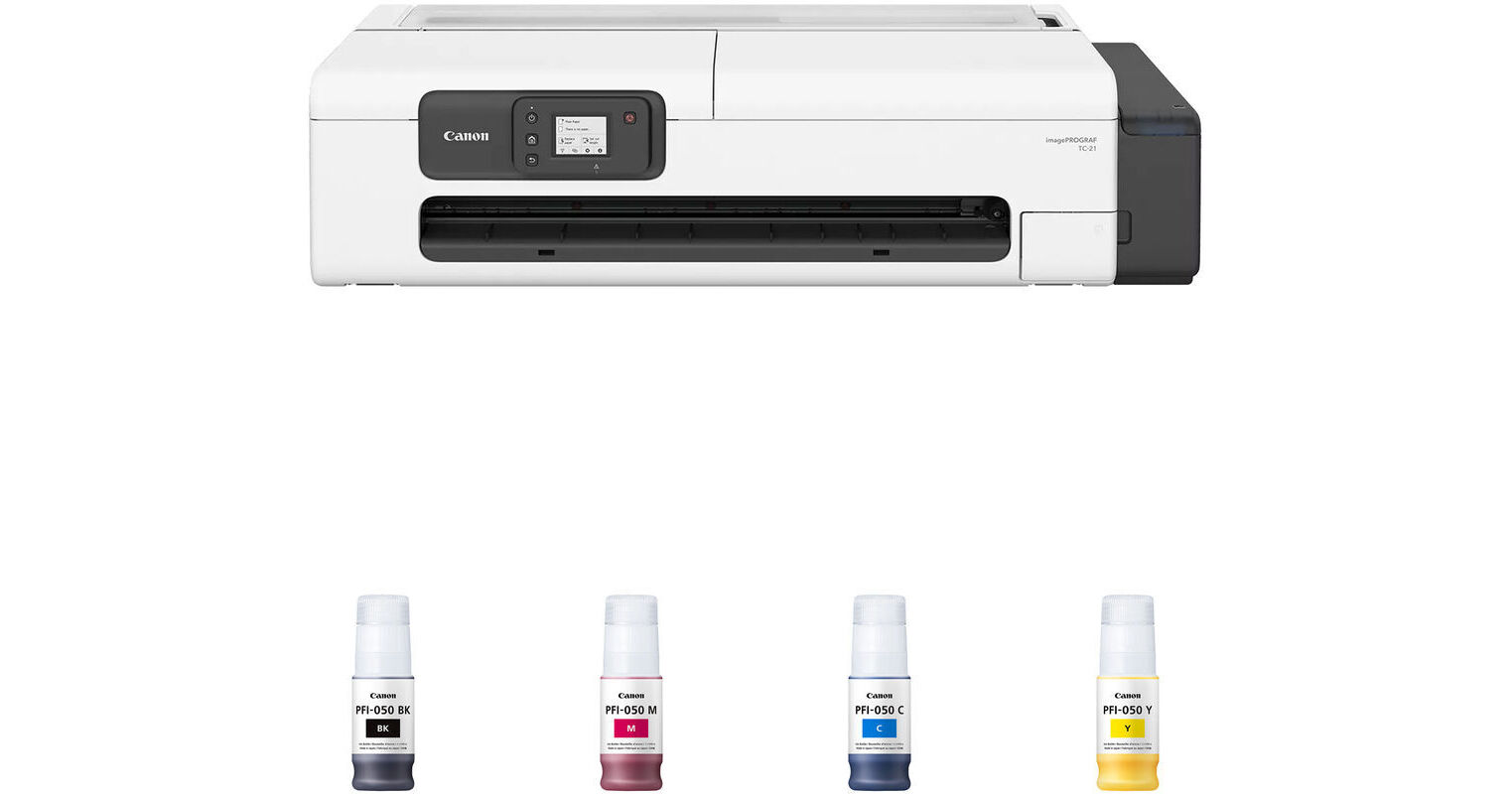
Canon imagePROGRAF TC-21 24" Large Format Desktop Printer with PFI-050 4-Color Ink Tank Kit

BH #CAIPTC21PKT (B&H Kit)
Print
Canon imagePROGRAF TC-21 24" Large Format Desktop Printer with PFI-050 4-Color Ink Tank Kit
Key Features
  • Max Resolution: 2400 x 1200 dpi
  • Automatic Sheet Feeder
  • Print from Roll Media
  • Support Printing Up to A1+
Print from roll media and cut sheets using USB, Ethernet, and Wi-Fi using the Canon imagePROGRAF TC-21 24" Large Format Desktop Printer with PFI-050 4-Color Ink Tank Kit from B&H. The included PFI-050 ink tanks are black, magenta, cyan, and yellow.
More Details
In Stock
No Store Display
Free Standard Shipping
Protect Your Gear
Add a protection plan from $77.99
Ask an Expert
800-606-6969
Kit Contains:

From Manufacturer

Print from roll media and cut sheets using USB, Ethernet, and Wi-Fi using the Canon imagePROGRAF TC-21 24" Large Format Desktop Printer with PFI-050 4-Color Ink Tank Kit from B&H. The included PFI-050 ink tanks are black, magenta, cyan, and yellow.

Canon imagePROGRAF TC-21 24" Large Format Desktop Printer

Designed for customers in architecture, engineering, construction, design, hospitality, retail, and education, the imagePROGRAF TC-21 24" Large Format Desktop Printer from Canon builds on the success of its predecessor. It offers enhanced media handling, a tiltable operation panel, minimal margin printing, and an eco-friendly design. The printer supports output up to A1+, making it suitable for architectural drawings, restaurant menus, retail posters, and educational materials. With the Auto Sheet Feeder (ASF), it also prints on A5/A6 flyers, labels, postcards, and envelopes.

Continuous printing between roll paper and cut sheet. Supports various sizes of printouts in different applications
Switch between office and home printing, with integrated software including Direct Print Plus
Mobile printing possible via Canon PRINT app, which is compatible with iOS and Android
Wireless connectivity with Wi-Fi
Posters can be printed with minimized borders, denser color, and better image quality
The tiltable operation panel allows a better visualization of information on the panel at all heights
Easily recyclable 70mL plastic ink bottles with low TCO
Easy to set up roll paper, with less space needed
UPC: 013803385236
Canon PFI-050 Black Pigment Ink Tank for imagePROGRAF TC-20 (70mL)

The Canon PFI-050 Black Pigment Ink Tank is a 70mL bottle, which is the maximum capacity supported by the imagePROGRAF TC-20 large format printer. The ink provides crisp text and vibrant graphics and is highlighter- and water-resistant.

UPC: 013803349344
Canon PFI-050 Magenta Pigment Ink Tank for imagePROGRAF TC-20 (70mL)

The Canon PFI-050 Magenta Pigment Ink Tank is a 70mL bottle, which is the maximum capacity supported by the imagePROGRAF TC-20 large format printer. The ink provides crisp text and vibrant graphics and is highlighter- and water-resistant.

UPC: 013803349412
Canon PFI-050 Cyan Pigment Ink Tank for imagePROGRAF TC-20 (70mL)

The Canon PFI-050 Cyan Pigment Ink Tank is a 70mL bottle, which is the maximum capacity supported by the imagePROGRAF TC-20 large format printer. The ink provides crisp text and vibrant graphics and is highlighter- and water-resistant.

UPC: 013803349399
Canon PFI-050 Yellow Pigment Ink Tank for imagePROGRAF TC-20 (70mL)

The Canon PFI-050 Yellow Pigment Ink Tank is a 70mL bottle, which is the maximum capacity supported by the imagePROGRAF TC-20 large format printer. The ink provides crisp text and vibrant graphics and is highlighter- and water-resistant.

UPC: 013803349436
Kit Contains:

Canon imagePROGRAF TC-21 24" Large Format Desktop Printer

Key Specs
Functions
Print
Printing Technology
Inkjet
Color Type
Color
Configuration
4x Built-In Tank
Ink Type
Pigment-Based (Black, Cyan, Magenta, Yellow)
Ink Color
1x Black
1x Cyan
1x Magenta
1x Yellow
Print Resolution
2400 x 1200 dpi
Wireless
Wi-Fi 5 (802.11ac) / Wi-Fi 4 (802.11n) / 802.11a/b/g Wi-Fi
Power Source
AC Power (Cable Built-In/Included)
Functions
Print
Printer
Printing Technology
Inkjet
Color Type
Color
Configuration
4x Built-In Tank
Ink Type
Pigment-Based (Black, Cyan, Magenta, Yellow)
Ink Color
1x Black
1x Cyan
1x Magenta
1x Yellow
Compatible Cartridges
Canon PFI-050
Number of Nozzles
4352 Nozzles (Total)
1280 Nozzles (Matte Black)
1024 Nozzles (Per Other Color)
Print Resolution
2400 x 1200 dpi
Borderless Printing
Yes: 0.02 x 0.02" / 0.05 x 0.05 cm
Printer Language
SG Raster
Line Accuracy
±0.1%
Printer Media Handling
Media Handling
Manual Feed, Media Bin, Media Cutter, Output Tray, Roll Feed
Media Sizes
Sheet Width: 3.5 to 12" / 8.9 to 30.5 cm
Roll Width: 12 to 24" / 30.5 to 61 cm
Media Thickness
3.15 to 11.02 mil / 0.08 to 0.28 mm
Media Roll Diameter
2" / 5.1 cm (Core)
4.3" / 10.9 cm (Outer)
Margins
0.2" / 5 mm
Connectivity
Data I/O
1x RJ45 Input/Output
1x USB-B Input/Output
Wireless
Wi-Fi 5 (802.11ac) / Wi-Fi 4 (802.11n) / 802.11a/b/g Wi-Fi
Direct Printing
Apple AirPrint, Canon PRINT, Mopria, Wi-Fi Direct
Internal Memory
1 GB (RAM)
OS Compatibility
Computer: Windows 7 or Later / Windows Server 2008 or Later / macOS 11 or Later
Mobile: Android/iOS via Included Adapter
General
Display Size
2.7"
Display Type
Color Touchscreen LCD
Power Source
AC Power (Cable Built-In/Included)
Battery
No
Input Power
100 to 240 VAC, 50 / 60 Hz
Power Consumption
28 W (Maximum)
1.7 W (Sleep)
0.07 W (Off)
Max Acoustic Noise
41.5 dBA
Operating Conditions
59 to 86°F / 15 to 30°C at 10 to 80% Humidity
Certifications
CB, CE mark, EPEAT Gold
Dimensions (W x H x D)
38 x 16 x 21" / 96.5 x 40.6 x 53.3 cm (with Basket Open)
38 x 10 x 21" / 96.5 x 25.4 x 53.3 cm (with Basket Closed)
Weight
71 lb / 32.2 kg
Packaging Info
Package Weight
93 lb
Box Dimensions (LxWxH)
43.5 x 28 x 15"

Canon TC-21 Reviews

It’s as simple as any printer

By Greg
Rated 5 out of 5
Date: 2026-09-02

We use this printer for posters, cards, all sizes. We just create and print and the output is wonderful. And we don’t even touch the kind of software professionals use to max out the image. It’s not that critical for our use but I imagine that would make it even better. We use generic replacement ink that is inexpensive from Amazon and that works very well in this printer as well. For us it’s just “Chat, make a flyer (or poster whatever)” give it chat the parameters and share/print.

Great value for money

By Nolan
Rated 5 out of 5
Date: 2025-06-30

It takes a bit of time to get it up and running and learn the quirks of how it functions, so hopefully this helps someone. As another review stated, they dropped this off without a signature for me as well. It's 90lbs, so I guess the driver didn't want to take another trip. It took me multiple hours to discover that the software that Canon has you download to use to print with (Free Layout Plus), overrides a lot of your color settings in the printer's preferences. I've ended up not using that software, and just use Faststone Image Viewer as my printing software instead with the Preview before printing option enabled in the printer's preferences. You just have to change the paper size to get the correct image layout you want if you're not going to use canon's software. Another important thing to note is to enable unidirectional printing on the printer itself. Without that on, my images were getting a weird texture. This printer was not designed for images, so there is no color calibration on it. I went through a bunch of test prints to get the colors where I wanted them. Which varies depending on your paper. For a gloss paper that I had, I adjusted my brightness up, and contrast down and left the other colors alone to get the correct balance. Paper choice on the printer affects this heavily. Once I finally got all of those settings dialed in, it's producing FANTASTIC images and I have no complaints with the quality, even if it is only a 4 color printer, they look great. Remember, garbage in garbage out. Low quality images will result in low quality prints. So you're paying a lower price at the cost of a bit more manual adjustments. This is more of a benefit in my book as it allows you to learn more. The one con: One quirk I can't seem to get working is the minimal margin printing. It throws me an error saying it can't print with that setting enabled. But if you buy the right picture frame, it'll hide the white border anyway. Note that this printer is 2 core paper rolls only. However, I accidentally bought a 3 core, and it doesn't fit in the printer. If you're insane like me, you can buy or 3D print some core adapters, and unroll half of the roll onto another core, and cut it so it fits in the printer. So instead of one 100' roll, I have two 50' rolls. I'm currently doing that and it's functioning just fine. So far, I've printed four 24 corner to corner full color prints, + all of the test prints (over 50 8x6 photos) , and I can't even tell if the ink level has dropped, so I think it's pretty efficient with the ink use too. Would recommend

See any errors on this page?

Hello, I only need to print monochrome. Do I ...

Hello, I only need to print monochrome. Do I still need to maintain the color cartridges? Thanks
Asked by: Alan
This Canon imagePROGRAF TC-21 24" Large Format Desktop Printer does utilize some small amount of color ink in its monochrome prints, and it does require some ink to be present in each tank in order to work.
Answered by: Jordan K
Date published: 2025-08-19

Does this printer work with Pictorico Ultra ...

Does this printer work with Pictorico Ultra Premium OHP Transparency Film 24" x 66'?
Asked by: Jennifer
Yes, the Canon imagePROGRAF TC-21 can print on transparent media such as Pictorico Ultra Premium OHP Transparency Film 24" x 66'. The printer should be set to heavy weight photo paper since there is not a specific transparent media setting.
Answered by: Dan W
Date published: 2025-11-30
  • y_2026, m_9, d_7, h_9CST
  • bvseo_bulk, prod_bvqa, vn_bulk_3.0.48
  • cp_1, bvpage1
  • co_hasquestionsanswers, tq_2
  • loc_en_US, sid_1952597, prod, sort_[SortEntry(order=HAS_STAFF_ANSWERS, direction=DESCENDING)]
  • clientName_bhphotovideo
Whatever You Need, We've Got It