Sony Global

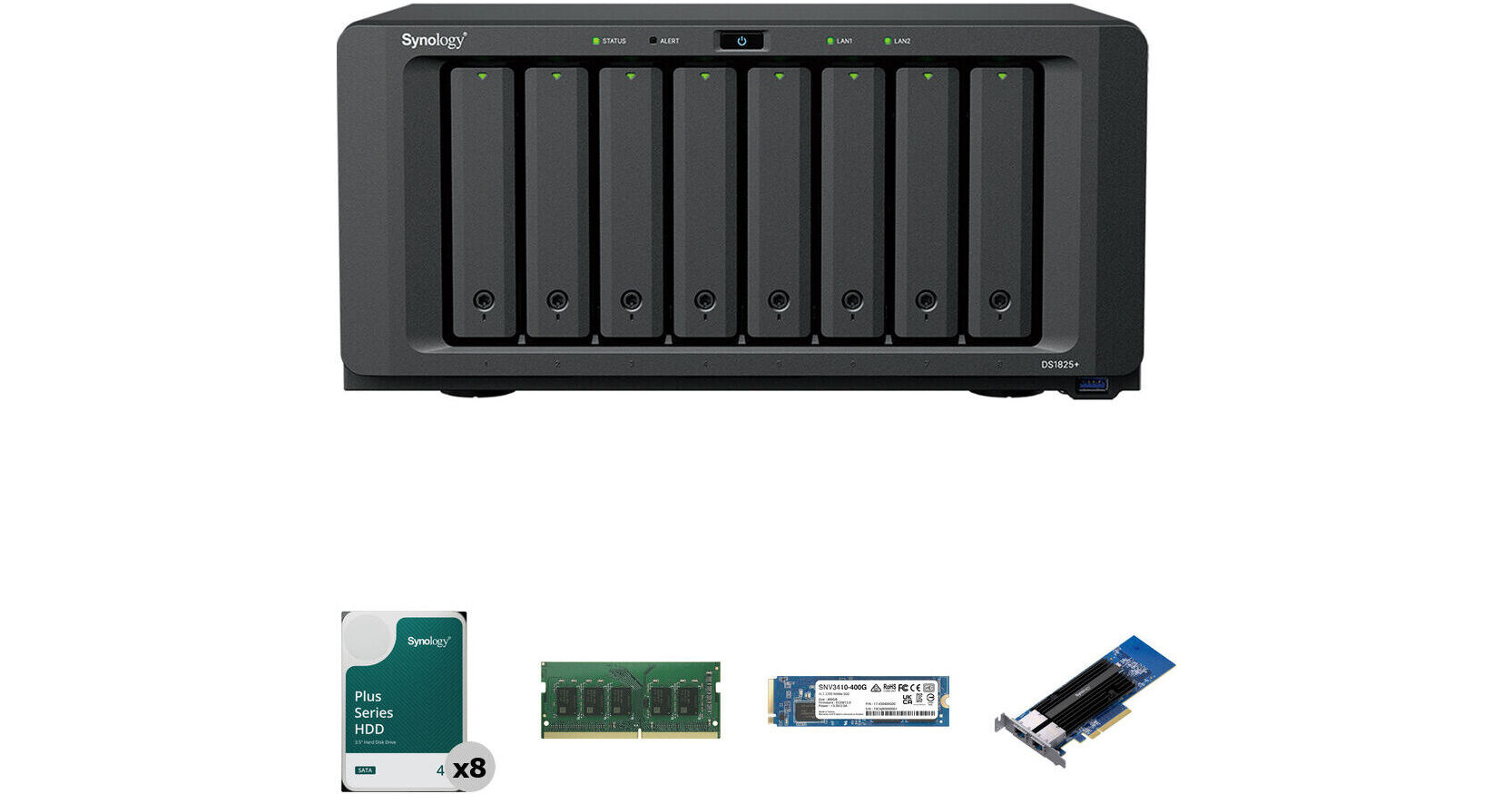
Synology 32TB DiskStation DS1825+ 8-Bay NAS Enclosure Kit with Internal SSD, RAM Expansion, and 10G Ethernet Card (8 x 4TB)

BH #SYDS1825PK1 (B&H Kit)
Print
Synology 32TB DiskStation DS1825+ 8-Bay NAS Enclosure Kit with Internal SSD, RAM Expansion, and 10G Ethernet Card (8 x 4TB)
Key Features
  • 32TB Storage Capacity
  • 8 x 4TB 5400 rpm SATA III 3.5" NAS HDDs
  • Includes 400GB NVMe M.2 2280 SSD
  • Includes 2-Port 10G RJ45 to PCIe Card
This B&H Kit combines the Synology DiskStation DS1825+ 8-Bay NAS Enclosure with eight Synology 4TB HAT3300 Plus 5400 rpm SATA III 3.5" Internal NAS HDDs for a storage capacity of 32TB. Also included is a Synology 8GB DDR4 SO-DIMM ECC Memory Module, bringing the total amount of memory to 16GB, a Synology 400GB SNV3410 NVMe M.2 2280 SSD for caching, and a Synology E10G30-T2 2-Port 10G RJ45 Ethernet to PCIe 3.0 Adapter Card for network connectivity.
More Details
Temporarily Out of Stock
No Store Display
Free Expedited Shipping

Business Financing Options

Ask an Expert
800-606-6969
Kit Contains:

This B&H Kit combines the Synology DiskStation DS1825+ 8-Bay NAS Enclosure with eight Synology 4TB HAT3300 Plus 5400 rpm SATA III 3.5" Internal NAS HDDs for a storage capacity of 32TB. Also included is a Synology 8GB DDR4 SO-DIMM ECC Memory Module, bringing the total amount of memory to 16GB, a Synology 400GB SNV3410 NVMe M.2 2280 SSD for caching, and a Synology E10G30-T2 2-Port 10G RJ45 Ethernet to PCIe 3.0 Adapter Card for network connectivity.

Synology DiskStation DS1825+ 8-Bay NAS Enclosure

Designed for businesses that need a scalable and customizable storage solution for their growing data needs, the DiskStation DS1825+ 8-Bay NAS Enclosure from Synology is a flexible all-in-one solution for data sharing, synchronization, backup, and surveillance. Powered by Synology's DiskStation Manager (DSM), the DS1825+ can be expanded with 10 additional drive bays via two DX525 enclosures or use the PCIe 3.0 x8/x4 slot to install a 10 or 25GbE network card.

The DS1825+ is equipped with a 2.2 GHz AMD Ryzen V1500B 4-Core processor and 8GB of DDR4 ECC memory that can be expanded up to 32GB, while also delivering sequential read speeds of up to 2239 MB/s and sequential write speeds of up to 1573 MB/s. This NAS is equipped with 8 drive bays that natively support 3.5" SATA hard drives, as well as 2.5" SATA hard drives and SSDs for data storage. Also available are two M.2 2280 NVMe slots for data caching.

The DS1825+ runs on the Synology DiskStation Manager (DSM) OS, which is a browser-based operating system that helps to simplify managing your Synology NAS. Also featured are three USB-A 3.2 Gen 1 ports for peripherals and accessories, plus two USB-C expansion ports for two DX525 expansion units. Network connectivity is achieved via two 2.5 Gigabit Ethernet ports and, for those who require RAID support, the DS1825+ supports RAID 0, 1, 5, 6, and 10, as well Hybrid and Basic, each of which offers performance, data redundancy, or a combination of both. For those who do not require a RAID, JBOD is also available, allowing each drive bay to be individually utilized.

The DS1825+ is engineered to be energy efficient. Not only does it offer two 120 x 120mm fans to help keep the system running cool, its noise-dampening design makes for quiet operation. The server supports numerous scheduled power on / off cycles and hard drive hibernation to further minimize power consumption and operation expenses.

The Synology DiskStation DS1825+ 8-Bay NAS Enclosure operates on 100-240 VAC at 50/60 Hz and includes an accessory pack, an AC power cord, and two RJ45 LAN cables. Protection is provided by a limited 3-year warranty.

Fast, Out-of-the-Box Performance with 25GbE Support
The DS1825+ features built-in 2.5GbE networking and supports both SATA SSDs and HDDs in 2.5/3.5" internal bays, as well as M.2 NVMe drives via M.2 2280 slots for use as cache. Its support for expansion cards allows configuration flexibility, supporting faster networking of up to 25GbE.
Expand Capacity for Evolving Needs
Consolidate your data with large amounts of raw storage across 8 bays. Need more space? Add capacity with two DX525 units.
Store, Share, and Protect
Manage all your documents, photos, and other files, back up applications and devices, or protect your assets with professional video surveillance.
Private Cloud for Seamless Data Access
Streamlined File Management and Collaboration
Store, sync, access, and share data from any device, wherever you are. Work seamlessly between different platforms and devices, and access your files through mobile apps, desktop clients, and a browser-based interface. Quickly and easily roll back files in case of accidental deletion, mistakes, malware, and more with versioning.

A Private Photo Storage and Management Solution
Effortlessly back up and organize photos, videos, and other visual assets using intuitive management tools. Automatically organize your content into albums and create secure share links for stakeholders and teammates.

Boost Team Productivity with Collaborative Tools
Enhance workplace collaboration with Synology's productivity solutions. Create, edit, and share documents across teams in real time. Host an on-premises mail server to provide web-based email access while maintaining full data ownership. Additionally, stay connected through secure one-on-one chats, public channels, encrypted private channels, and group conversations.
Multi-Site Synchronization to Empower Global Workflows
NAS-to-NAS Synchronization
Improve workflow efficiency and team alignment across data sites with automatic one- or two-way site-to-site syncing. Files and folders are kept up to date across sites, so everyone stays aligned, whether at home, in the office, or across different branches - all while maintaining full control of your data.

Cloud-Powered Multi-Site Syncing
Empower global workflows with high-speed access to data from anywhere in your network. Synology's hybrid cloud solution caches frequently used files locally for rapid access, while less frequently accessed data is stored in the cloud, reducing your on-site storage requirements.

Sync to Public Cloud Providers
Automatically keep data in sync between Synology NAS and major cloud providers, including BackBlaze B2, Dropbox, Google Drive, and Microsoft OneDrive. Multiple protocol support, client-side encryption, and customizable sync and bandwidth controls enable efficient storage management across various platforms.
Comprehensive Data Backup, Protection, and Recovery Solutions
Back Up PCs, Smartphones, Cloud Apps, and More
Consolidate and automate backup tasks for PCs, file servers, VMs, SaaS applications, and more. Administer device backups remotely through a centralized portal and quickly restore specific files or entire devices to keep your business up and running. Take advantage of built-in backup solutions designed to protect your data with seamless 3-2-1 backup configurations.

Comprehensive and Flexible Synology System Backups
Protect all data, applications, and configurations on your Synology systems with comprehensive scheduled backups, including bare-metal backups, to local and remote servers, external drives, or cloud storage destinations, including Synology C2 Storage.

Tamper-Proof Protection with Immutable Snapshots
Safeguard critical LUNs and shared folders with automated immutable snapshots backed by custom retention policies. Built-in support for offsite replication further ensures robust business continuity.
Smart Surveillance
Synology Surveillance Station
Protecting your business has never been easier, with centralized management, support for over 8700 IP camera models, and remote monitoring and playback. Synology's scalable video management system provides all the tools you need for live monitoring, investigation, management, and backup.

Dual Recording to the Cloud
Secure your surveillance footage with robust cloud backup that supports end-to-end encryption. Our cloud-based surveillance backup solution safeguards your Surveillance Station recordings, allowing you to access, view, share, and download footage through a convenient web portal. Ensure your data remains available even if your on-premises system is compromised
Versatile Testing Platform
Create a versatile environment for application testing and evaluation, supporting Docker containers and virtual machines. For package and security testing, Virtual DSM acts as a dedicated test environment, ensuring isolation between applications, systems, and data.
Centralized Monitoring and Management
Monitor and manage your Synology fleet from a central interface, on-prem or in the cloud.
Central Management System
Manage Synology servers from a central console using group policies, task delegation, batch updates, and more.
Active Insight
Monitor your global Synology fleet's performance, backup status, login activity, and more with the power of the cloud.
UPC: 846504006021
Synology 4TB HAT3300 Plus 5400 rpm SATA III 3.5" Internal NAS HDD

Designed to meet the reliability, endurance, and performance requirements of 24/7 storage in small and medium-sized business storage systems, the 4TB HAT3300 Plus 5400 rpm SATA III 3.5" Internal NAS HDD from Synology delivers NAS-class reliability to ensure consistent performance in high-uptime and multi-user environments. The HAT3300 Plus has passed 300,000 hours of testing, has a Mean Time to Failure (MTTF) rating of 1 million hours, and a yearly workload rating of 180TB. Also featured is a storage capacity of 4TB, a SATA III 6 Gb/s interface, a 256MB cache, and a rotational speed of 5400 rpm, all of which help to ensure uninterrupted data transfers with sustained speeds of up to 202 MB/s.

Please check Synology's compatibility list, as this drive is not compatible with all storage systems.

Reliable Always-On Operation
Backed by 1 million hours MTBF and 180 TB/year workload rating.
Tested for Maximum Reliability
Stringent validation and up to 300,000 hours of testing ensure reliability in Synology systems.
Seamless Firmware Updates
Firmware updates can be performed directly in Synology DSM.
Reliable Recording Technology
Conventional magnetic recording (CMR) technology offers consistent performance.
Engineered for Endurance
Synology Plus Series HDDs are backed by a 1 million hour Mean Time Between Failures (MTBF) rating and 180TB per year workload rating, which is up to three times the limit of conventional desktop hard drives. Over 300,000 hours of compatibility and stress testing ensure smooth operation even under multi-user workloads.
Convenient Firmware Updates
Users are automatically notified when firmware updates become available for Synology Plus Series HDDs and can update drives seamlessly from DiskStation Manager (DSM) on their Synology storage system, eliminating the need for third-party tools and disk removal for firmware updates.
UPC: 846504005123
Synology 8GB DDR4 SO-DIMM ECC Memory Module

Refresh NAS performance with the 8GB DDR4 SO-DIMM ECC Memory Module from Synology. Unbuffered and utilizing error-correcting code (ECC), this 260-pin SO-DIMM module provides 8GB of DDR4 RAM that is compatible with select Synology NAS arrays.

Compatbility
  • 25 Series: DS1825+, DS1525+, DS925+, and DS725+
  • 23 Series: DS1823xs+, DS923+, and DS723+
  • 22 Series: RS822RP+, RS822+, DS3622xs+, DS2422+, and DS1522+
UPC: 846504006458
Synology 400GB SNV3410 NVMe M.2 2280 SSD

Boost the performance of your compatible NAS with the 400GB SNV3410 NVMe M.2 2280 SSD from Synology, which has been tailored for their NAS models with built-in M.2 slots. It can handle tough caching workloads in 24/7 multi-user environments, while its consistent I/O performance boosts system responsiveness and speeds up the handling of frequently accessed data to provide a streamlined storage experience while minimizing service disruptions.

This SSD has an overall capacity of 400GB, an NVMe PCIe 3.0 x4 interface, an M.2 2280 form factor, sequential read speeds of up to 3000 MB/s, sequential write speeds of up to 750 MB/s, random 4K reads of 225,000 IOPS, and random 4K writes of up to 45,000 IOPS. It also features an endurance of 491 TBW (terabytes written), a 1.8 million hour MTBF (mean time between failures), and an UBER (uncorrectable bit error rate) of <1 sector per 1017 bits read.

General Features
Consistently Fast Caching for 24/7 Environments
Built for system cache, SNV3410 drives push up random I/O performance and reduce latency in demanding 24/7 environments. They provide a durable caching experience with random reads of up to up to 225,000 IOPS, random writes of up to 45,000 IOPS, and a 491 TBW endurance rating, which is suitable for multi-user environments, multimedia post-production, and database applications. The SNV3410 features an M.2 2280 form factor and allows you to build a highly efficient storage system with exceptional performance, without sacrificing any 3.5" drive bays
Data Integrity Safeguards
SSD caching boosts your system's read/write performance by storing transient data in solid-state drives to increase retrieval efficiency and cut down recurring requests to the primary storage. Data integrity is important, as cached data are continuously relocated. The Synology SNV3410 series offers end-to-end data protection to safeguard data integrity over the entire transfer path.
Lifetime Analytics Based on Actual Workload
Full integration with Synology's DiskStation Manager (DSM) operating system allows Synology systems to provide lifetime analytics based on actual workloads for each SNV3410 drive. Timely notifications allow you to plan further ahead for uninterrupted system performance and longevity. Easy monitoring allows you to make optimal use of each SSD.
Purpose Built for Synology NAS
Firmware versions and component changes can over time cause SSD compatibility issues. Synology SNV3410 series SSDs are thoroughly tested for compatibility with their systems following each engineering change, while firmware and component changes are strictly managed. Firmware updates can be installed through Synology DSM at a touch of a button. Intensive I/O stress, power cycling, and temperature trials ensure that all products meet Synology's strictest standards for quality and reliability.
UPC: 846504004591
Synology E10G30-T2 2-Port 10G RJ45 Ethernet to PCIe 3.0 Adapter Card

Add high-speed connectivity to your compatible Synology NAS or server with this E10G30-T2 2-Port 10G RJ45 Ethernet to PCIe 3.0 Adapter Card. Each of the two RJ45 ports supports up to 10 Gb/s transfers with compatible devices, delivering high throughput and redundancy. They may be combined using link aggregation for 20 Gb/s throughput.

This network adapter card may be installed into an available PCIe 3.0 x8 expansion slot. Built-in CPU offloading and load balancing technologies help to optimize performance.

UPC: 846504004812
Kit Contains:

Synology DiskStation DS1825+ 8-Bay NAS Enclosure

Key Specs
RAID
Yes: Supported RAID Modes: 0 / 1 / 5 / 6 / 10 / JBOD / Basic / Hybrid
Number of Bays
8x 2.5"/3.5" SATA III (Hot-Swap)
2x M.2 (2280) NVMe
Inputs/Outputs
2x RJ45 2.5GbE
3x USB-A 3.0 / 3.1/3.2 Gen 1
2x USB-C
Computing
CPU
Quad-Core: Up to 2.2 GHz
Processor
AMD Ryzen V1500B
Memory
8 GB ECC DDR4
RAM Configuration / Capacity
1x User-Replaceable 8 GB Module / 2 Slots Supporting up to 32 GB (SO-DIMM)
Drives
RAID
Yes: Supported RAID Modes: 0 / 1 / 5 / 6 / 10 / JBOD / Basic / Hybrid
Transfer Rates
2239 MB/s (Read)
1573 MB/s (Write)
General
Number of Bays
8x 2.5"/3.5" SATA III (Hot-Swap)
2x M.2 (2280) NVMe
Inputs/Outputs
2x RJ45 2.5GbE
3x USB-A 3.0 / 3.1/3.2 Gen 1
2x USB-C
Media Card Slots
No
PCI Expansion
1x PCIe 3.0 x8 (x4 Electrical)
Networking
Link Aggregation and Failover Support
Yes
iSCSI Support
Yes: 128 LUN / 64 Target
Software
Installed Operating System
No
OS Compatibility
Windows
macOS
Linux
Mobile App Compatible
Yes: Android & iOS
Security
Encryption
Yes, AES-NI (Hardware-Based)
Security Features
Kensington Security Slot, Lockable Bay Door
VPN Connections
8 (Server)
Electrical
Input Power
100 to 240 VAC, 50 / 60 Hz
Power Consumption
60.1 W (Typical)
18.34 W (Standby)
PSU
1 x 250 W
Physical
Operating Conditions
32 to 104°F / 0 to 40°C at 8 to 80% Humidity
Storage Conditions
-5 to 140°F / -20 to 60°C at 5 to 95% Humidity
Certifications
BIS, BSMI, CCC, CE, EAC, FCC, KC, RCM, RoHS, UKCA, VCCI
Cooling
2x 120 mm Fan
Noise Level
23.8 dBA
Dimensions
13.5 x 9.6 x 6.5" / 343 x 243 x 166 mm
Weight
13.2 lb / 6.0 kg
Packaging Info
Package Weight
17.55 lb
Box Dimensions (LxWxH)
18.7 x 14 x 11.8"

Synology DS1825+ Reviews

Exceedes expectations! Easy set up, quiet, cables included. Perfect for a home environment.

By David
Rated 5 out of 5
Date: 2026-03-28

I was worried that this thing would be noisy because it is sitting next to my WiFi router in the TV room, only about 3 feet from where someone might sit. Granted, the amount of noise will depend on how many and what type of drives you install, but you can set the fans to "quiet mode" and they don't make any noticeable sound. The drives murmur a bit now and then, but that's to be expected. Visually, you can turn down the brightness of the LEDs, or turn them off completely. It's very inconspicuous. Set up was very easy and it comes with 2 internet cables, so I didn't need to buy anything else. The only thing I had to look up was how to allow it through the Windows firewall, and then it was up and running. For my setup, it took about 24 hours for the drives to be configured for optimal efficiency (this happens automatically in the background) but you can start using it immediately. How many CDs, DVDs, old laptops, and old desktop computers do *you* have laying around? If you ever wished for a Bag of Holding for all your digital assets, this is it!

Recognized my old Synology drives and migrated flawlessly

By Steven
Rated 5 out of 5
Date: 2026-01-29

All good. I installed the five drives that came from my Synology DiskStation DS1512+ 5-Bay NAS into the new Synology DiskStation DS1825+ 8-Bay NAS and it immediately recognized the drives and migrated all my data to the newest Synology OS. All data and security information was preserved and it came right up as the old NAS. As for the (4) Seagate Ironwolf Pro 28TB drives, I have installed two (no problems) and have two more to go to expand the NAS. I have a spare 5th drive that I will add to the pool. The install, migrate and upgrade process has run smoothly.

See any errors on this page?

do they even take recent Iron Wolf HDDs that work ...

do they even take recent Iron Wolf HDDs that work fine with ds1817+ and ds1821+ without nagware?
Asked by: Richard
The current Operating System allows for third party drives.
Answered by: Colin
Date published: 2026-03-27

Does it still have nagware for non-synology ...

Does it still have nagware for non-synology drives?
Asked by: Richard
Yes, the Synology DiskStation DS1825+ 8-Bay NAS Enclosure, B&H # SYDS1825P, will display a message alerting you that the drive is not on their compatibility list, and it might not allow you to use it at all; we would not recommend using any drives that are not listed by Synology on the compatibility list for the DS1825+.
Answered by: Miguel M
Date published: 2026-02-25

can I migrate my 8 20TB Seagate drives from my ...

can I migrate my 8 20TB Seagate drives from my DS1821+ bought here directly just by moving the drives over?
Asked by: Richard
Synology is now allowing 3rd party drive (check their compatibility lists) as of the 7.3 DSM update. They are finally listening to feedback from the customers.
Answered by: Nick
Date published: 2025-12-01

for the M.2 2280 NVMe SSD, do i have to use ...

for the M.2 2280 NVMe SSD, do i have to use synology brand only? Is there a limit on the size of storage capacity for th M.2s?
Asked by: Brian
Yes, for the Synology DiskStation DS1825+ 8-Bay NAS Enclosure, Synology officially requires you to use only Synology-branded M.2 2280 NVMe SSDs. Synology does not publish a specific capacity limit for individual M.2 drives, but the DS1825+ has a maximum single volume size of 108 TB by default.
Answered by: JP A
Date published: 2025-09-25

Looks like a great replacement for my old ds1817. ...

Looks like a great replacement for my old ds1817. How do I transfer the old seagate drives with data on them?
Asked by: Richard
The Synology DiskStation DS1825+ 8-Bay NAS Enclosure is currently only compatible with Synology-branded drives, so old Seagate drives would not work with it.
Answered by: Michael S
Date published: 2026-02-25

what dsm does it run?

what dsm does it run?
Asked by: Richard
The Synology DiskStation DS1825+ 8-Bay NAS Enclosure would run Synology's latest DSM.
Answered by: Michael S
Date published: 2025-07-20

Can I use different capacity drives in this ...

Can I use different capacity drives in this enclosure?
Asked by: Anthony M.
Depending on how you have the drives configured, drives of various sizes can be used in the Synology DiskStation DS1825+ 8-Bay NAS Enclosure. Keep in mind if you have the drives configured in a RAID volume, then all of the drives in the volume will behave as though they have the capacity of the smallest drive in the volume, so it may not be ideal to use different-sized drives.
Answered by: Kenneth C
Date published: 2026-02-09

Cannot afford 8 new 20TB drives. How do I install ...

Cannot afford 8 new 20TB drives. How do I install my old DS1821 drives with data?
Asked by: Richard
The Synology DiskStation DS1825+ 8-Bay NAS Enclosure is currently only compatible with Synology-branded drives.
Answered by: Michael S
Date published: 2026-02-25
  • y_2026, m_5, d_17, h_13CST
  • bvseo_bulk, prod_bvqa, vn_bulk_3.0.43
  • cp_1, bvpage1
  • co_hasquestionsanswers, tq_8
  • loc_en_US, sid_1959934, prod, sort_[SortEntry(order=HAS_STAFF_ANSWERS, direction=DESCENDING)]
  • clientName_bhphotovideo
Whatever You Need, We've Got It