Video Chat with a Pro Video Expert - Live

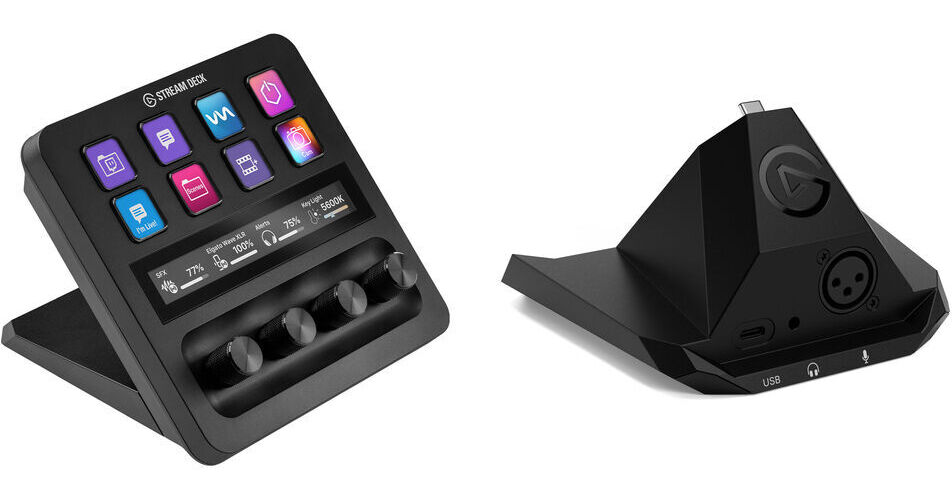
Elgato Stream Deck + with XLR Dock MK.2

BH #ELSDPLUSXDK (B&H Kit)
Print
Elgato Stream Deck + with XLR Dock MK.2
Key Features
  • Stream Deck +
  • XLR Dock MK.2
  • Streaming Console for macOS/Windows
  • 3-Pin XLR Input to USB-C Output
Control your post-production edit workflow with ease and add VST capability using the Elgato Stream Deck + with XLR Dock MK.2 Kit from B&H. The kit bundles a Stream Deck + with an XLR Dock MK.2 with a VST insert and digital signal processing.
More Details
Temporarily Out of Stock
Expected availability: 7-14 Business Days
Free 2-Day Shipping
Ask an Expert
800-606-6969

Elgato Stream Deck + Overview

Learn from B&H Experts

From Manufacturer

Control your post-production edit workflow with ease and add VST capability using the Elgato Stream Deck + with XLR Dock MK.2 Kit from B&H. The kit bundles a Stream Deck + with an XLR Dock MK.2 with a VST insert and digital signal processing.

Professional Mic Interface
  • 3-pin XLR input for dynamic or condenser microphones with 48V phantom power
  • 80 dB ultralow noise gain and Clipguard 2.0 multilayered signal protection
  • 3.5mm stereo headphone output for zero-latency monitoring
Integrated Effects and Processing
  • Wave FX onboard effects processor with real-time DSP voice shaping
  • VST insert support for direct effects application without virtual routing
  • USB-C output connects directly to Stream Deck + for single-cable convenience
  • Use with Wave Link software on macOS and Windows for full control over mix, effects, and recording
UPC: 840440498414
Kit Contains:

Elgato Stream Deck + (Black)

Controls
8x Programmable Key with Integrated Display
4x Dial
Display
1x 4.2" LCD Touchscreen
OS Compatibility
Windows 10 (64-Bit Only)
macOS 10.15 or Later
Inputs / Outputs
USB I/O
1x USB-C 2.0 Female Input
Power
Power Source
USB (Included)
Physical
Dimensions
5.5 x 5.4 x 4.3" / 140 x 138 x 110 mm
Weight
1 lb / 465 g
Packaging Info
Package Weight
2.28 lb
Box Dimensions (LxWxH)
7.6 x 6.9 x 5.4"

Elgato Stream Deck + Reviews

See any errors on this page?

Can the text on the display and button labels be ...

Can the text on the display and button labels be inverted so the Stream Deck+ can be operated with the knobs on top?
Asked by: Rex
Yes, the Elgato Stream Deck + does allow you to set the device orientation and the buttons will adjust to the orientation setting you choose to work with. More info about Elgato Stream Deck — Device Orientation: https://bhpho.to/3y6Qsgp
Answered by: Chris H
Date published: 2024-05-08

Paired with Companion, can I program each knob to ...

Paired with Companion, can I program each knob to a different camera’s input audio on an ATEM switcher?
Asked by: Randy
Jonathan, I looked it up and you can control the audio on an ATEM switcher using Companion. https://www.youtube.com/watch?v=enNAXN9HnuM
Answered by: Randy
Date published: 2023-12-06

Does this work with Davinci Resolve?

Does this work with Davinci Resolve?
Asked by: Aaron
Yes, the Elgato Stream Deck + is compatible with Blackmagic Design DaVinci Resolve Studio.
Answered by: Tim Z
Date published: 2024-04-15

Can you use the dials to pan left/right on a PTZ ...

Can you use the dials to pan left/right on a PTZ NDI camera?
Asked by: Kevin
The Elgato Stream Deck + has an extensive Macro system, that would allow you to assign functions to any of the buttons and control PTZ camera functions. Elgato says the dials can be used for adjust volume levels, image details, camera zoom, brightness, white balance, and much more. PTZOptics has an overview: https://bit.ly/3QSswD3
Answered by: Chris H
Date published: 2023-11-24

Are you able to control Photoshop and Lightroom ...

Are you able to control Photoshop and Lightroom with this device?
Asked by: James
Yes, any MIDI controller can handle custom assignable functions, to be used as an interface within Adobe Photoshop.
Answered by: Jonathan S
Date published: 2023-10-16

Is the base removable at all? I want to setup a ...

Is the base removable at all? I want to setup a different mount for this in a portable rig.
Asked by: Mark
Yes, you can remove the base. It has 2 Philips screws at the bottom that are easily removable.
Answered by: Customer Care
Date published: 2026-04-08
  • y_2026, m_5, d_20, h_12CST
  • bvseo_bulk, prod_bvqa, vn_bulk_3.0.46
  • cp_1, bvpage1
  • co_hasquestionsanswers, tq_6
  • loc_en_US, sid_1972609, prod, sort_[SortEntry(order=HAS_STAFF_ANSWERS, direction=DESCENDING)]
  • clientName_bhphotovideo
Whatever You Need, We've Got It