Video Chat with a Pro Audio Expert - Live

MXL MicMate Pro USB Adapter Interface for Microphones with XLR Outputs

BH #MXMMP • MFR #MICMATE-PRO
Print
MXL MicMate Pro USB Adapter Interface for Microphones with XLR Outputs
Key Features
  • Converts XLR to USB Output
  • Supplies +48V Phantom Power
  • Headphone Monitoring with Level Control
  • Mic Input Gain Control
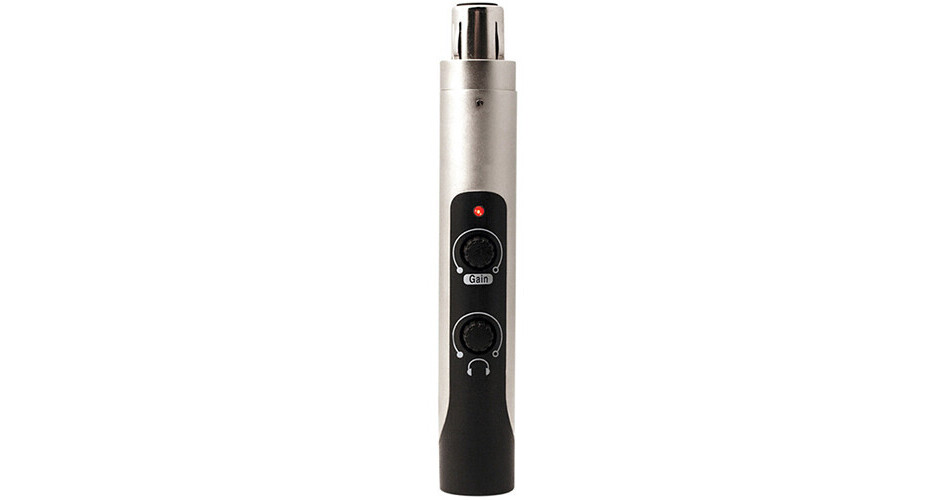
The MXL MicMate Pro USB Adapter Interface converts the XLR output on professional microphones to a USB output for direct connection to laptop and desktop computers. The MicMate Pro will work with any microphone with an XLR output and sends +48V phantom power to condenser microphones.
More Details
In Stock
No Store Display
$59.95
Free 2-Day Shipping
Protect Your Gear
Add a protection plan from $6.99
Ask an Expert
800-606-6969

MXL MicMate Pro Overview

The MXL MicMate Pro USB Adapter Interface converts the XLR output on professional microphones to a USB output for direct connection to laptop and desktop computers. The MicMate Pro will work with any microphone with an XLR output and sends +48V phantom power to condenser microphones.

In addition to all this, the MicMate Pro features a 3.5mm connection with level control for headphone monitoring. A microphone input gain control is also featured. Its compact size and plug-and-play operation make it a suitable choice for bands, solo recording artists, podcasters, and more.

Studio-quality USB preamplifier for microphones
Direct connection to any computer
+48V phantom power to condenser microphones
3.5mm headphone output with level control for monitoring
Microphone gain level control
16-bit resolution for excellent digital audio quality
Compact design is no larger than an in-line transformer
Includes USB cable
UPC: 801813125344

MXL MicMate Pro Specs

Key Specs
Channels of I/O
1 Input / 1 Output
Maximum Sampling Rate
44.1 kHz / 16-Bit
Number of Microphone Inputs
1
Analog Audio I/O
1x XLR 3-Pin Mic Input
1x 1/8" / 3.5 mm TRS Headphone Output
Digital Audio I/O
No
Host Connection
1x Mini-USB
Power Requirements
USB Bus Power
General
Display
No
Channels of I/O
1 Input / 1 Output
Built-In DSP
No
Maximum Sampling Rate
44.1 kHz / 16-Bit
Number of Microphone Inputs
1
Built-In Microphone
No
Input Level Adjustment
1x Knob
Signal Processing
Pad
No
Solo/Mute
No
Connectivity
Analog Audio I/O
1x XLR 3-Pin Balanced Mic Input
1x 1/8" / 3.5 mm TRS Headphone Output
Phantom Power
48 V
Digital Audio I/O
No
Host Connection / USB
1x Mini-USB
Host Connection Protocol
USB 2.0
USB (Non-Host)
No
Sync I/O
No
Network I/O
No
MIDI I/O
No
Expansion Slots
No
Wireless
No
Digital Audio
Sample Rates
44.1 kHz
Bit Depths
16-Bit
Latency
Zero-Latency Direct Monitoring
Sync Sources
No
Audio Storage & Playback
Media/Memory Card Slot
No
Compatibility
OS Compatibility
macOS / Windows
Mobile Device Compatibility
No
Required Hardware
USB 2.0 Port
Power
Power Requirements
USB Bus Power
Packaging Info
Package Weight
0.7 lb
Box Dimensions (LxWxH)
6.6 x 5.1 x 2.1"

MXL MicMate Pro Reviews

convenient

By Christoph
Rated 5 out of 5
Date: 2020-05-29

Takes the place of my large audio interface. Love the size and got a great sound after a few tweaks

Works Great Every Day

By Anonymous
Rated 5 out of 5
Date: 2016-08-15

I use it every day to record reporter voice tracks into Avid Media Composer in my van. It took some trial and error on the original setup levels between Windows, Avid, and the device but has worked perfectly ever since.

See any errors on this page?

question

Anyone try this with an iphone/ipad with Apple Lightning to USB 3 Camera Adapter? Looks like, it should work but just want to make sure.
Asked by: Mike K.
thank you for your question.This unit will not work with iOS devices.
Answered by: Anthony
Date published: 2019-09-24

question

Hi, is the other end XLR female or XLR male?
Asked by: Simon S.
The MICMATE PRO features a female XLR for connection to a microphone.
Answered by: Jeff P.
Date published: 2018-08-27

question

Could I plug a wireless Sennheiser lavalier receiver into this for Skype?
Asked by: Tim F.
Yes. It can supply doc power to the mic if needed.Ralph King
Answered by: Ralph K.
Date published: 2018-08-27

What's the size of usb cable that plugs into the ...

What's the size of usb cable that plugs into the unit it self. I need a cable to connect into a new iMac?
Asked by: Kieth
The MicMate has a USB Mini connector.
Answered by: John
Date published: 2020-01-07

question

I use two MXL ribbon mics which DO NOT (and shouldn't) have phantom power. Is the phantom power switchable on this USB adapter??
Asked by: Anonymous
There is a 48v power button on the front, so yes the phantom power is switchable
Answered by: Jason G.
Date published: 2019-04-09
  • y_2026, m_6, d_4, h_10CST
  • bvseo_bulk, prod_bvqa, vn_bulk_3.0.46
  • cp_1, bvpage1
  • co_hasquestionsanswers, tq_5
  • loc_en_US, sid_576806, prod, sort_[SortEntry(order=HAS_STAFF_ANSWERS, direction=DESCENDING)]
  • clientName_bhphotovideo
Whatever You Need, We've Got It