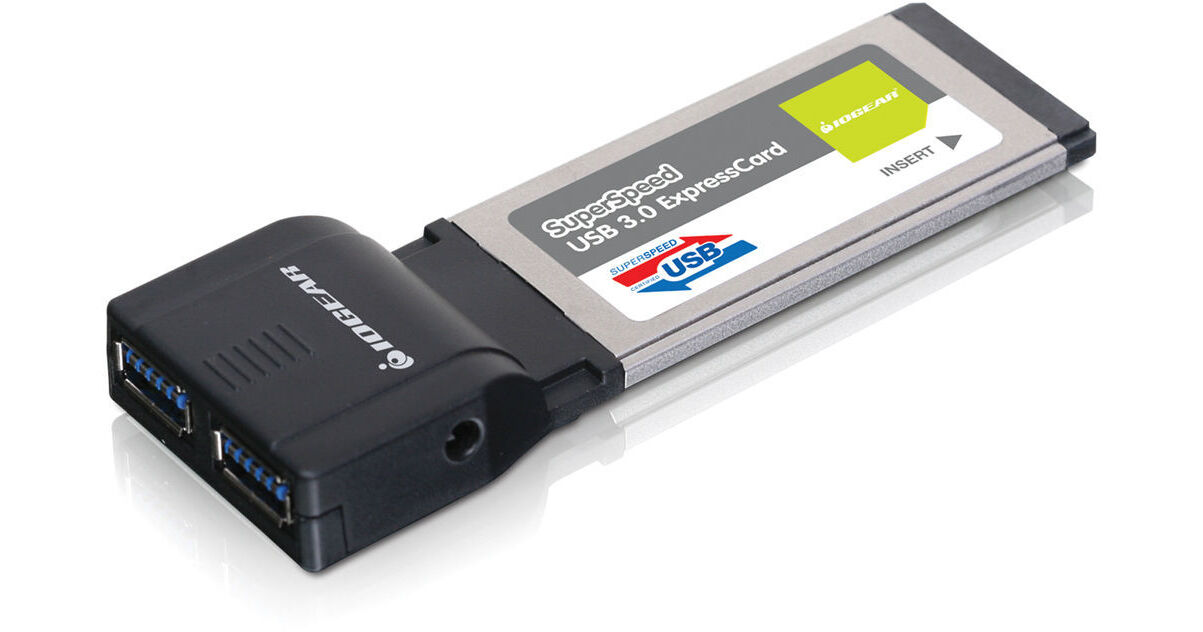
IOGEAR USB 3.1 Gen 1 ExpressCard

BH #IOGEU302 • MFR #GEU302
Print
IOGEAR USB 3.1 Gen 1 ExpressCard
Key Features
  • Dual USB 3.0 Ports
  • Data Transfer Speeds Up to 5 Gbps
  • Backwards Compatible w/ USB 2.0 and 1.1
  • ExpressCard/34 Form Factor
If you're hoping to upgrade your Windows laptop or notebook for use with USB 3.0 peripherals, Iogear has a fast, easy-to-install solution, their USB 3.0 ExpressCard. This adapter features two USB 3.0 ports and fits into an available ExpressCard/34 slot in your laptop or notebook. Upgrading to USB 3.0 means that you will have up to 5 Gbps of connection bandwith at your disposal when using the adapter with USB 3.0 devices. In turn, you will be able to transfer data between your computer and other devices at a rate that is up to 10x faster than with a USB 2.0 connection. Each of these ports is backwards compatible with devices that have USB 2.0 and 1.1 interfaces. Connect printers, external hard drives, camcorders, or any other USB 3.0, 2.0, or 1.1 devices. If you're looking to upgrade your laptop with two exceedingly fast USB 3.0 ports in a tidy, easy-to-install setup, you might have just ended your search.
More Details
No Longer Available
No Store Display
Ask an Expert
866-264-7509

IOGEAR GEU302 Overview

If you're hoping to upgrade your Windows laptop or notebook for use with USB 3.0 peripherals, Iogear has a fast, easy-to-install solution, their USB 3.0 ExpressCard. This adapter features two USB 3.0 ports and fits into an available ExpressCard/34 slot in your laptop or notebook. Upgrading to USB 3.0 means that you will have up to 5 Gbps of connection bandwith at your disposal when using the adapter with USB 3.0 devices. In turn, you will be able to transfer data between your computer and other devices at a rate that is up to 10x faster than with a USB 2.0 connection. Each of these ports is backwards compatible with devices that have USB 2.0 and 1.1 interfaces. Connect printers, external hard drives, camcorders, or any other USB 3.0, 2.0, or 1.1 devices. If you're looking to upgrade your laptop with two exceedingly fast USB 3.0 ports in a tidy, easy-to-install setup, you might have just ended your search.

USB 3.0 Speed in Practice
Transferring a 25GB HD movie:
Using USB 2.0 it would take 13.9 minutes to download, with USB 3.0 only 70 seconds

Transferring 16GB from a flash drive:
Using USB 2.0 it would take 8.9 minutes, with USB 3.0 only 53 seconds

Backing up 1TB of data:
Using USB 2.0 it would take 9.3 hours, using the new USB 3.0 only 47 minutes
A Range of Data Speeds
With the two ports being compatible with USB 3.0, 2.0, and 1.1 devices, each supports the varying data speeds for each type of USB connection. The ports support the following data transfer rates:

1.5 Mbps found with Low-Speed USB 1.1 devices
12 Mbps found with Full-Speed USB 1.1 devices
480 Mbps found with High-Speed USB 2.0 devices
5 Gbps found with SuperSpeed USB 3.0 devices
Compliant
Compliant with the USB 3.0 revision as well as the ExpressCard 1.0 specification
Form Factor
Installs in your notebook or laptop's ExpressCard/34 slot
Hot-Swappable
Hot-swapping feature allows you to connect or disconnect devices from the USB 3.0 ports without powering down the system
Downstream
2 downstream ports for all USB devices

IOGEAR GEU302 Specs

Form Factor
ExpressCard/34
USB
2x   USB 3.0
Backwards compatible with USB 1.1 and 2.0
Data Transfer Speed
Low-speed at 1.5Mbps
Full-speed at 12Mbps
High-speed at 480Mbps
SuperSpeed at 5Gbps
System Requirements
Windows XP, Windows Vista (32/64-bit), Windows 7 (32/64-bit)
Available ExpressCard slot
Environmental Requirements
Operating Temperature: 32 to 130°F / 0 to 55°C
Storage Temperature: 32 to 155°F / 0 to 70°C
Humidity: 20 to 80% RH
Power Consumption
900mAh per port (with external AC adapter)
Dimensions
6 x 8.75 x 2.25" / 15.24 x 22.22 x 5.71 cm
Weight
0.1 lb / 0.04 kg
Packaging Info
Box Dimensions (LxWxH)
7.3 x 6.1 x 2.4"

IOGEAR GEU302 Reviews

See any errors on this page?
Whatever You Need, We've Got It