UPS Power Backup

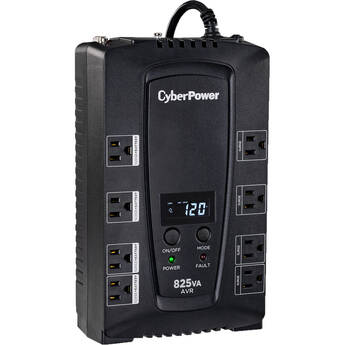
CyberPower CP825AVRLCD Intelligent LCD UPS (825VA)
- Output: 450W / 825VA
- Six NEMA 5-15R Outlets
- Recharge Time: 8 Hours
- Audible Alarms
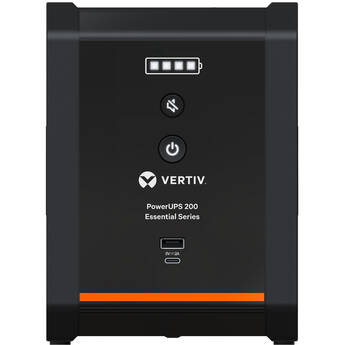
VERTIV Liebert PSA6E-1000LVT PowerUPS 200 Essential Line Interactive UPS (1000VA / 550W)
- Output: 1000VA / 550W
- Input: 120VAC at 50/60 Hz
- 6 x Battery and Surge NEMA-5-15R Outlets
- 2 x Surge Only NEMA 5-15R Outlets
VERTIV Liebert PSA6-850LVT PowerUPS 200 Standard Line Interactive UPS (850VA / 530W)
- Output: 850VA / 530W
- Input: 120VAC at 50/60 Hz
- 7 x Battery and Surge NEMA 5-15R Outlets
- 3 x Surge-Only NEMA 5-15R Outlets
Ubiquiti UniFi 600W Uninterruptible Power Supply Tower
- 600W Power Capacity
- 8 x NEMA 5-15R Outlets
- 2 x RJ45 GbE Surge In/Out Ports
- 1 x 100/10 MbE Management Port
APC Power-Saving Back-UPS Pro 700 (120V)
- Output: 420W/700VA
- Input: 120V
- 3x Battery Backup, 3x Surge Protection
- NEMA 5-15R
CyberPower CP1200AVR AVR Mini-Tower UPS (1200VA/720W)
CyberPower CP850PFCLCD Uninterrupted Power Supply
- 11 min Runtime at Half Load
- 2 min Runtime at Full Load
- 8 Hour Typical Recharge Time
- Line-Interactive UPS Topology
APC BVK Series 950VA UPS Battery Backup
CyberPower BRG1000AVRLCD Intelligent LCD Series Uninterruptible Power Supply
- 1000VA/600W Simulate Sine Wave UPS
- Line-Interactive Topology
- Automatic Voltage Regulation (AVR)
- 10 Outlets / USB Port / RJ11 Protection
Xtreme Power Conversion S71 Line Interactive UPS (700VA)
- Output: 700VA / 420W at 60 Hz
- Input: 120 VAC at 60 Hz
- Six NEMA 5-15R Outlets
- Recharge Time: Up to 6 Hours
APC BVK Series 1200VA UPS Battery Backup
- Output: 650 Watts
- Input: 150V
- 8 x NEMA 5-15R Out
- Recharge Time: 6 Hours
CyberPower CP1350AVRLCD3 Intelligent LCD Series UPS
- Output: 1350 VA/850W at 60 Hz
- Input: 120 VAC at 57-63 Hz
- 12 NEMA 5-15R Outlets
- 6 Battery/Surge and 6 Surge Outlets
CyberPower CP1500AVRT AVR Mini-Tower UPS (1500VA/900W)
CyberPower CP1350PFCLCD PFC Sinewave UPS
- Output: 1350 VA / 880W @ 60 Hz
- Input: 88-144 VAC @ 57-63 Hz
- 12 x NEMA 5-15R Total Outlets
- 6 x Battery/Surge & 6 x Surge Outlets
CyberPower Intelligent LCD CP1500AVRLCDTAA Uninterrupted Power Supply
- Output: 900 Watts / 1500 VA
- Input: 120V
- 6 x Battery & Surge Protected Outlets
- 6 x Surge Protected Outlets
Ubiquiti UniFi 2U Rackmountable 1000W Uninterruptible Power Supply
- 1000W Power Capacity
- 8 x NEMA 5‑15R Outlets
- 2 x RJ45 GbE Surge In/Out Ports
- 1 x 100/10 MbE Management Port
CyberPower BRG1500AVRLCD2 Intelligent LCD Series UPS
- Output: 1500 VA / 900W at 60 Hz
- Input: 120 VAC at 57-63 Hz
- 12 x Total NEMA 5-15R Outlets
- Battery/Surge and Surge-Only Outlets
CyberPower GX150C2 13-Outlet Sine Wave UPS with RGB
- 1000W Capacity
- 6 x Surge Protected Outlets
- 7 x Surge Outlets with Battery Backup
- 2 x USB-C Charging Ports
CyberPower CP1500PFCLCDTAA PFC Sinewave UPS
- Output: 1500 VA / 1000W at 60 Hz
- Input: 88-144 VAC at 57-63 Hz
- 12 NEMA 5-15R Total Outlets
- 6 Battery/Surge & 6 Surge Outlets
Lowell Manufacturing UPSA6-850 Standby UPS
- Power Rating: 850VA (500W)
- 5 x NEMA 5-15R Battery Backup and Surge
- 5 x NEMA 5-15R Surge Only
- Sealed Maintenance-Free Lead Acid
Tripp Lite SMART1500PSGLCD Pure Sine Wave Gaming UPS (1500VA, 900W)
- Output: 1500VA / 900W at 60 Hz
- Input: 120 VAC
- 10 x NEMA 5-15R Total Outlets
- 5 x Battery / Surge & 5 x Surge Outlets
iStarUSA 9-Port ClayPower Surveillance System UPS and Power Distribution Unit (500VA / 250W)
Xtreme Power Conversion S71 Line Interactive UPS (1500VA)
- Output: 1500VA / 900W at 60 Hz
- Input: 120 VAC at 60 Hz
- Six NEMA 5-15R Outlets
- Recharge Time: Up to 6 Hours
CyberPower OR1000PFCLCD PFC Sinewave UPS
- Output: 1000 VA / 700W
- Input: 78-142 VAC
- 8 x NEMA 5-15R Total Outlets
- 8 x Battery/Surge Protected Outlets
VERTIV Liebert PSl5-750MT120 Mini Tower UPS
- Output: 675W / 750 VA
- Input: 75-146VAC @ 60Hz (Auto-Sensing)
- 5 x NEMA 5-15R Outlets
- 1 x NEMA 5-15P Input Connection (6')
Minuteman Entrust Line-Interactive Mini-Tower UPS (1000VA, 600W)
iStarUSA 14-Port ClayPower Surveillance System UPS and Power Distribution Unit (700VA / 360W)
Xtreme Power Conversion J60 350VA Lithium-Ion UPS
- 350VA / 200W Simulated Sine Wave UPS
- Lithium Battery Built-In
- 3 Total Outlets
- Auto-Restart After an Outage
Understanding Uninterruptible Power Supplies (UPS) Battery Backup
UPS backups protect computers and prevent loss of data during power outages or brownouts. The principle is simple: Uninterrupted power supplies (UPS) keep the power on for a period, allowing users to safely shut down computer systems. There are various types, each providing a different degree of protection. However, the most crucial decision is selecting a UPS that has enough power to keep your computer system running long enough for it to properly shut down.
Types of UPS Systems
The most common type of UPS is a standby or battery backup system. Under normal conditions, it supplies power from the mains, but automatically switches over to battery backups during power failures. A line interactive UPS is similar, but it also incorporates a special transformer that regulates the output voltage to minimize the effect of power surges and brownouts. While both systems provide a degree of protection against mains disturbances, critical systems often use an online UPS. As the name suggests, this type supplies UPS power all the time. The mains supply charges the UPS battery, which in turn supplies power to the UPS, ensuring there's no possibility of a mains disturbance affecting the power supplied to the load.
Calculating UPS Power Requirements
The first step is to work out how much power you need. Desktop power supplies usually draw the most power, typically between 400 and 650 watts. You may need a technician to open your computer to establish its power supply rating, or alternatively, make a conservative assumption. Other items to consider include monitors, routers, and peripherals. To estimate the required volt-amps, multiply the total wattage by 1.6. A good practice is to choose a UPS that comfortably exceeds this figure. The runtime figures at full and half load give an indication of how long UPS power lasts. Remember that battery capacity, not power rating, is the key factor that determines how long a UPS runs. It's possible to add batteries to some types of UPS units to extend runtime.
Installation of UPS Power Supplies
Smaller UPS systems are freestanding for placement in any convenient location, while larger units are usually rack mounted. Most have several power outlets, and if necessary, you can extend these using power strips. Installation is usually plug and play, and no special tools are necessary. You may need additional AC power and extension cords, especially with a rack-mounted UPS.
Desktop Communication
Most uninterrupted power-supply units have desktop software, allowing you to monitor their status. Additionally, many can automatically shut down your computer in the event of a power failure, which is an important feature for unattended computers. Some types use the computer's serial port, while others connect through a USB port. In some instances, you may need to install a UPS management card in your computer.
Prevent loss of precious data during power failures and brownouts with a UPS backup from B&H Photo and Video.