Webcams
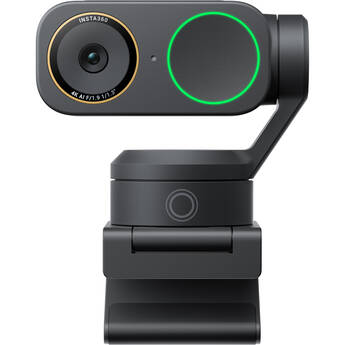
Insta360 Link 2 Pro 4K AI Webcam
- Up to UHD 4K Resolution at 30 fps
- 1/1.3" CMOS Sensor
- 84° Diagonal Field of View
- Integrated 2-Axis Gimbal

Logitech MX Brio 4K Webcam (Black)
- UHD 4K Resolution at 30 fps
- Sony Starvis 1/2.8" Sensor
- 90 / 78 / 65° Diagonal Field of View
- Auto Focus
Logitech BRIO Ultra HD Pro Webcam
- Up to 4K Ultra HD Resolution
- Frame Rates up to 90 fps
- Up to 90° Diagonal Field of View
- Auto Focus, Glass Lens
Logitech C920e 1080p Business Webcam
- Up to Full HD 1080p Resolution
- 30 fps Frame rate
- 78° Diagonal Field of View
- Auto Focus, Glass Lens
Logitech C920s HD Pro Webcam
- FHD 1080p / HD 720p at 30 fps
- Wide 78° Diagonal Field of View
- HD Auto-Focus
- Automatic Light Correction
Logitech C270 HD Webcam (Black)
- Up to 720p HD Resolution
- Frame Rates up to 30 fps
- 60° Field of View
- Fixed Focus Lens
Insta360 Link 2 4K AI Webcam (Black)
- Up to UHD 4K Resolution at 30 fps
- 1/2" CMOS Sensor
- 79.5° Diagonal Field of View
- Auto Focus
Logitech MX Brio 705 4K Webcam for Business (Graphite)
- UHD 4K Resolution at 30 fps
- Sony Starvis 8.5MP Sensor
- 90 / 78 / 65° Diagonal Field of View
- Auto Focus
OBSBOT Tiny 3 AI-Powered PTZ 4K Webcam
- Compact 4K USB PTZ Webcam with 4x Zoom
- 50MP 1/1.3" CMOS
- Spatial, Omni & Directional Audio
- AI Tracking, Desk & Whiteboard Modes
Logitech Brio 505 Full HD Webcam (Graphite, TAA Compliant)
- 1080p Resolution at 30 fps
- 4MP Camera
- Up to 90° Digital FOV
- Autofocus
iContact Camera Pro 4K Webcam
- UHD 4K Resolution
- 1/2" Image Sensor
- Pivoting Onscreen Camera
- Narrow Field of View
Insta360 Link 2C Pro 4K AI Webcam
- Up to UHD 4K Resolution at 30 fps
- 1/1.3" CMOS Sensor
- 84° Diagonal Field of View
- Compact Design
Logitech Brio 300 1080p Full HD Webcam (Graphite)
- Up to Full HD 1080p Resolution at 30 fps
- 70° Diagonal Field of View
- Auto Focus, Glass Lens
- Mono Noise-Reducing Mic
OBSBOT Meet 2 4K Webcam (Space Gray)
- UHD 4K Resolution at 30 fps
- 1/2" CMOS Sensor
- 79.4° Diagonal Field of View (4:3)
- Phase Detection Auto Focus
Elgato Facecam 4K Studio Webcam
- 4K Resolution at up to 60 fps
- 90° Field of View
- 1/1.8" Sony CMOS Sensor
- Lens Filter Support
Logitech Brio 500 1080p Full HD Webcam (Graphite)
- Up to Full HD 1080p Resolution at 30 fps
- 90° Diagonal Field of View
- Auto Focus, Glass Lens
- Dual Noise-Reducing Mics
YoloLiv YoloCam S3 AI-Powered 4K Live Streaming Webcam
- Webcam with AI Technology
- Capture up to 4K30 or 1080p60 Video
- Large 1/1.3" CMOS Sensor, HDR Support
- Phase-Detection Autofocus
EMEET C980 Pro Full HD Webcam
- Full HD 1080p Resolution at 30 fps
- Fixed Focus
- 90° Field of View
- Quad Mic Array with Noise Reduction
Logitech C925e Webcam
- Up to Full HD 1080p Resolution
- 30 fps Frame rate
- 78° Field of View
- Auto Focus, Glass Lens
OBSBOT Tiny 2 Lite AI-Powered 4K PTZ Webcam
- Compact USB-C PTZ Webcam with 4x Zoom
- Supports up to UHD 4K30 Video and HDR
- 1/2" CMOS Sensor, Optimal Low-Light Use
- AI Auto-Tracking with Auto Zoom
Logitech MX Brio 4K Webcam (Pale Gray)
- UHD 4K Resolution at 30 fps
- Sony Starvis 1/2.8" Sensor
- 90 / 78 / 65° Diagonal Field of View
- Auto Focus
Elgato Facecam MK.2 1080p Webcam
- 1080p Resolution at up to 60 fps
- 720p & 540p Resolution at up to 120 fps
- 84° Field of View
- Fixed Focus
OBSBOT Meet SE AI-Powered Full HD Webcam (Space Gray)
- Compact and Lightweight Design
- 1080p at 100 fps or 720p at 150 fps
- Plug and Play
- Adjustable Settings
Logitech C930e Webcam
- Up to Full HD 1080p Resolution
- 30 fps Frame rate
- 90° Field of View
- Auto Focus, Glass Lens
Insta360 Link 2 Pro 4K AI Webcam & Wave Speakerphone Conferencing Kit
- For Conference Calls and Meetings
- AI-Powered Conference Speakerphone
- Up to UHD 4K Resolution at 30 fps
- 1/1.3" CMOS Sensor
Dell UltraSharp 4K Webcam
- Up to 4K UHD Resolution | Up to 60 fps
- Up to 90° Field of View
- Large Sony STARVIS 8.3MP CMOS Sensor
- Auto Focus | 5x Digital Zoom
OBSBOT Tiny 3 Lite AI-Powered PTZ 4K Webcam
- Compact 4K USB PTZ Webcam with 4x Zoom
- 48MP 1/2" CMOS
- Spatial, Omni & Directional Audio
- AI Tracking, Desk & Whiteboard Modes
Lenovo Performance Full HD Webcam
- Up to Full HD 1080p Resolution
- 95° Diagonal Field of View
- Dual Mics
- Windows Hello Compatible
All About Computer Camera, USB & HD WebCams
Because of recent social distancing policies, webcams are now more vital than ever. Whether you need it for work from home, play, or just to stay in touch, the right webcam can help stay connected even as we’re forced to be apart. But just what is the “right” webcam? Which one should you get and what do you need to use it? We’ve put together this primer to get you started. Give it a read, then give us a shout if you have any questions or need help selecting gear.
As always, B&H is happy to answer all your questions, including everything you want to know about webcams, livestreaming, and other types of remote communications, such as learning from home. You can also check out our Intro to Livestreaming article for some additional tips on webcams.
What Is a Webcam?
Generally speaking, a webcam is a camera that’s designed to transmit still images or video through your computer to a network (e.g., the Internet). Webcams can either be internal (built-in) or external, and each comes with its own unique set of features and specifications (image resolution, field of view, microphone type, etc.) Webcams have countless applications, including teleconferencing, vlogging, virtual meetups, livestreaming performances, remote worship, and so on.
What Makes a Good Webcam?
As with most gear, what makes a webcam “good” depends on the user and application. A particular webcam might be perfectly fine for video calls, but it can’t meet the demands of an advanced livestreaming production. Likewise, if you’re only using a webcam for weekly chats with a relative, there’s no need to invest in some high-dollar, dual-camera setup. Know your application before you shop webcams. That will make it easier to find a webcam that delivers the best video and audio quality for your needs.
What Do I Need to Use a Webcam?
Every webcam has its own specific set of computer requirements. On top of that, different applications call for additional gear, equipment, and even services (Twitch, Zoom, Facebook Live, etc.) However, if you’re using a webcam to transmit video to a network, you must have a reliable Internet connection with suitable transfer speeds. Regardless of webcam quality, if your connection speeds are too slow, your production will not work.
Need more help with webcams? Contact us any time. Our chat lines remain open and we are always ready to help.