PC Workstations

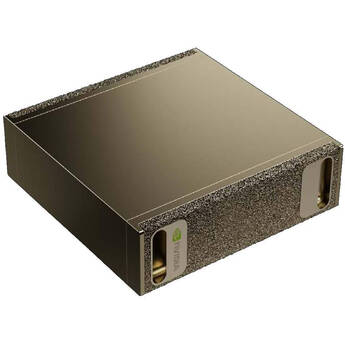
NVIDIA DGX Spark AI Workstation
- NVIDIA GB10 Grace Blackwell Superchip
- 128GB of LPDDR5x RAM
- 4TB NVMe M.2 PCIe 4.0 SSD
- 1 x 10G RJ45 Ethernet Port
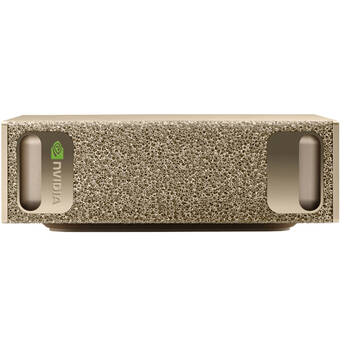
PNY NVIDIA DGX Spark AI Workstation
- NVIDIA GB10 Grace Blackwell Superchip
- 128GB of LPDDR5x RAM
- 4TB NVMe M.2 PCIe 4.0 SSD
- 1 x 10G RJ45 Ethernet Port
Gigabyte AI TOP ATOM AI Workstation
- Based on NVIDIA DGX Spark GB10 Platform
- NVIDIA GB10 Grace Blackwell Superchip
- 128GB of LPDDR5x RAM
- 4TB NVMe M.2 PCIe 4.0 SSD
HP Z2 G1i Tower Workstation
- Intel Core Ultra 9 285 24-Core
- 32GB of 5600 MHz DDR5 RAM
- NVIDIA RTX 4000 Ada (20GB GDDR6)
- 1TB PCIe 4.0 x4 M.2 SSD
HP Z2 Mini G1i Workstation
- Intel Core Ultra 7 265 20-Core
- 32GB of 6400 MT/s DDR5 RAM
- NVIDIA RTX Pro 4000 (24GB GDDR7)
- 1TB M.2 NVMe PCIe SSD
HP Z2 Mini G1i Workstation
- Intel Core Ultra 7 265K 20-Core
- 32GB of 6400 MT/s DDR5 RAM
- NVIDIA RTX Pro 4000 (24GB GDDR7)
- 1TB M.2 NVMe PCIe SSD
Lenovo ThinkStation P5 Gen 2 Workstation
- 2.7 GHz Intel Xeon 634 12-Core
- 32GB of 6400 MHz ECC DDR5 RAM
- NVIDIA RTX A1000 (8 GB VRAM)
- 512GB M.2 NVMe PCIe 5.0 SSD
HP Z2 G1i Small Form Factor Workstation
- Intel Core Ultra 7 265 20-Core
- 32GB of 5600 MHz DDR5 RAM
- NVIDIA RTX Pro 4000 (24GB GDDR7)
- 1TB PCIe 4.0 x4 M.2 SSD
Lenovo ThinkStation PGX Small Form Factor AI Workstation
- Based on NVIDIA DGX Spark GB10 Platform
- NVIDIA GB10 Grace Blackwell Superchip
- 128GB of LPDDR5x Unified RAM
- 1TB M.2 NVMe PCIe 4.0 SSD
HP Z2 G1i Tower Workstation
- Intel Core Ultra 7 265 20-Core
- 32GB of 5600 MHz DDR5 RAM
- NVIDIA RTX Pro 4000 (24GB GDDR7)
- 1TB PCIe 4.0 x4 M.2 SSD
ASUS Ascent GX10 AI Workstation
- Based on NVIDIA DGX Spark GB10 Platform
- NVIDIA GB10 Grace Blackwell Superchip
- 128GB of LPDDR5x Unified RAM
- 1TB NVMe M.2 PCIe 4.0 SSD
Gigabyte AI TOP ATOM AI Workstation
- Based on NVIDIA DGX Spark GB10 Platform
- NVIDIA GB10 Grace Blackwell Superchip
- 128GB of LPDDR5x RAM
- 4TB NVMe M.2 PCIe 5.0 SSD
NextComputing Edge XTA Tower Desktop Workstation
- 4.3 GHz AMD Ryzen 9 9950X 16-Core
- 32GB of 5600 MHz DDR5 RAM
- NVIDIA GeForce RTX 5070 (12GB GDDR7)
- 2TB M.2 NVMe PCIe 4.0 SSD
HP Z2 G1i Tower Workstation
- Intel Core Ultra 7 265K 20-Core
- 32GB of 5600 MHz DDR5 RAM
- NVIDIA RTX Pro 4000 (24GB GDDR7)
- 1TB PCIe 4.0 x4 M.2 SSD
HP Z6 G5 Series Tower Workstation
- 2.1 GHz Intel Xeon w5 12-Core
- 16GB of 4800 MHz DDR5 ECC Registered RAM
- NVIDIA RTX 2000 Ada (16GB GDDR6)
- 512GB PCIe 4.0 x4 M.2 SSD
NextComputing Edge XTI Tower Desktop Workstation
- 4.2 GHz Intel Core Ultra 5 245K 14-Core
- 64GB of 6400 MHz DDR5 RAM
- NVIDIA GeForce RTX 5070 (12GB GDDR7)
- 2TB M.2 NVMe PCIe 4.0 SSD
HP Z4 G5 Workstation
- 3.5 GHz Intel Xeon w3-2525 8-Core
- 16GB of 4800 MHz DDR5 ECC Registered RAM
- NVIDIA RTX 2000 Ada GPU (16GB GDDR6)
- 512GB PCIe 4.0 x4 M.2 SSD
HP ZGX Nano G1n AI Workstation
- Based on NVIDIA DGX Spark GB10 Platform
- NVIDIA GB10 Grace Blackwell Superchip
- 128GB of LPDDR5x Unified RAM
- 4TB M.2 NVMe M.2 PCIe 4.0 SSD
HP Z4 G5 Workstation
- 3.5 GHz Intel Xeon w5-2545 12-Core
- 16GB of 4800 MHz DDR5 ECC Registered RAM
- NVIDIA RTX 2000 Ada GPU (16GB GDDR6)
- 512GB PCIe 4.0 x4 M.2 SSD
HP Z2 G1i Small Form Factor Workstation
- Intel Core Ultra 7 265K 20-Core
- 64GB of 5600 MHz DDR5 RAM
- NVIDIA RTX Pro 4000 (24GB GDDR7)
- 1TB PCIe 4.0 x4 M.2 SSD
NextComputing Edge XTA Tower Desktop Workstation
- 4.4 GHz AMD Ryzen 9 9900X 12-Core
- 32GB of 5600 MHz DDR5 RAM
- NVIDIA RTX 2000 Ada (16GB GDDR6)
- 1TB M.2 NVMe PCIe 4.0 SSD
HP Z2 G1i Small Form Factor Workstation
- Intel Core Ultra 9 285 24-Core
- 64GB of 5600 MHz DDR5 RAM
- NVIDIA RTX Pro 4000 (24GB GDDR7)
- 1TB PCIe 4.0 x4 M.2 SSD
HP Z6 G5 Series Tower Workstation
- 3.2 GHz Intel Xeon w5 20-Core
- 16GB of 4800 MHz DDR5 ECC Registered RAM
- NVIDIA RTX 2000 Ada (16GB GDDR6)
- 512GB PCIe 4.0 x4 M.2 SSD
NextComputing Edge XTA Tower Desktop Workstation
- 4.4 GHz AMD Ryzen 9 9900X 12-Core
- 64GB of 5600 MHz DDR5 RAM
- NVIDIA GeForce RTX 5070 (12GB GDDR7)
- 4TB + 1TB M.2 NVMe PCIe 4.0 SSDs
HP Z2 G1i Tower Workstation
- Intel Core Ultra 9 285K 24-Core
- 64GB of 5600 MHz DDR5 RAM
- NVIDIA RTX Pro 4000 (24GB GDDR7)
- 1TB PCIe 4.0 x4 M.2 SSD
HP Z4 Rack G5 Workstation
- 3.5 GHz Intel Xeon w3-2525 8-Core
- 16GB of 4800 MHz DDR5 ECC Registered RAM
- NVIDIA RTX 2000 Ada GPU (16GB GDDR6)
- 512GB NVMe PCIe 4.0 x4 M.2 SSD
NextComputing Edge XTI Tower Desktop Workstation
- 4.2 GHz Intel Core Ultra 5 245K 14-Core
- 64GB of 6400 MHz DDR5 RAM
- NVIDIA RTX 2000 Ada (16GB GDDR6)
- 2TB M.2 NVMe PCIe 4.0 SSD
HP Z4 G6i Tower Workstation
- 2.7 GHz Intel Xeon 634 12-Core
- 32GB of 6400 MHz DDR5 ECC Registered RAM
- No Graphics Card Installed
- 1TB PCIe 5.0 x4 M.2 SSD
Learning About Workstation PCs
A workstation PC is a desktop computer dedicated to performing demanding computing tasks. It's more powerful than a personal PC, and mostly used for business, professional, technical, and scientific applications. HP, Lenovo, and Dell are the three leading hardware brands still producing this type of computer.
What's a Desktop Workstation Computer?
This high-performance PC is equipped with a high-end, multi-core processor, lots of high-speed RAM, a huge storage capacity, and a powerful graphics card. Built to handle complex computational tasks and memory-hogging software, this machine uses CPUs, RAM modules, and storage units optimized for extreme multitasking. An older definition also refers to workstations as computers connected to a mainframe computer. By this definition, the product category includes office computers as well as terminal and thin clients.
Uses of Workstation Computers
The primary use is for running demanding professional and industry-specific applications. You'll find these machines in engineering and architectural firms where they run 3D simulations and render high-definition images. Graphics designers also use them for CAD, rendering videos, and creating animations. Financial institutions take advantage of the high processing power of Windows workstations for their power-trading software and to analyze huge amounts of market data.
Types of Workstation PCs
The four main form factors are micro/mini, all-in-one (AIO), small form factor (SFF), and tower. You can find HP workstations in all four categories. A micro/mini workstation is the smallest kind, as a book-sized, ultra-portable desktop computer that takes up very little space. Mini units are entry-level workstations with fewer ports than tower and SFF models. AIO models look identical to all-in-one desktop computers. They have sleek, space-saving designs with integrated monitors, and like mini units, offer limited ports and expandability.
SFF workstations are bigger than mini models, but smaller than towers. They're usually mid-range units with powerful CPUs and dedicated GPUs. Tower models come in different sizes, and have ample room for high-end processors and graphics cards. Some pack dual CPUs and support multiple GPUs, hard disk drives, and solid-state drives.
Choosing a Workstation Computer
First, consider size. Mini workstations are ideal for small work spaces and running lightweight applications. Pick towers when looking for very powerful models. These have high-end mainstream and server-class CPUs with four cores or more. To run demanding tasks, consider units with Intel Core i7 and i9 processors or Intel Xeon CPUs for extreme performance. AMD's equivalent processors are Ryzen 7, Threadripper, and Opteron/EPYC, respectively.
Look for DDR4 RAM modules. These are faster, come in higher capacities, and consume less power than DDR3 units. Workstations usually have higher RAM capacities than regular computers. While there are mini models with 4GB to 8GB of RAM, true workstation capabilities come with 32GB of RAM and higher.
Workstations are PCs optimized to run memory and graphics-intensive applications smoothly. Check B&H Photo and Video to find a varied selection of HP, Lenovo, and Dell workstations. The retailer also stocks necessary components such as barebone PCs, CPUs, RAM sticks, and storage drives for anyone trying to build their own workstations.