Mobile Audio Interfaces
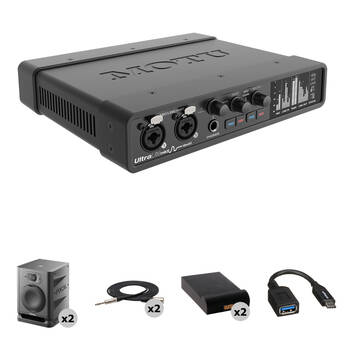
MOTU UltraLite-mk5 USB-C Audio/MIDI Interface with Mixing Kit
Shipping Restriction:
- Ideal Kit for Learning to Mix Audio
- Studio Monitors for Accurate Playback
- Specialized Multimedia Creation Tools
- AC-Powered, Mac / Windows / iOS
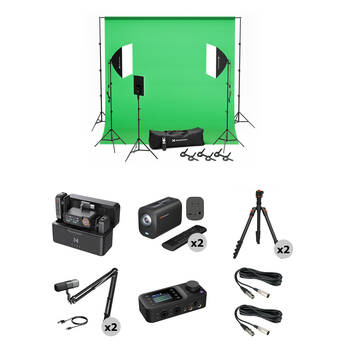
NearStream Duo Podcast Kit for Business
- 2 VM20 4K Streaming Cameras
- Wireless Mic, 2 Condenser Mics, Booms
- Green Screen with Lighting Kit
- 2 Tripods, USB-C Audio Interface
Universal Audio Volt 476 Portable 4x4 USB-C Audio/MIDI Interface with Home Studio Kit
Shipping Restriction:
- Complete Home Recording Kit
- Record and Mix Directly with Computers
- High-Quality Sound Out of the Box
- Easily Capture Voice and Instruments
TASCAM Mixcast 2-Person Podcast Studio Kit with Shure SM7B Microphones
Shipping Restriction:
- Mixcast 4 All-In-One Podcast Recorder
- 2 Shure SM7B Dynamic Vocal Mics
- 2 Cabled Broadcast Arms
- 2 Closed-Back Studio Headphones
Universal Audio Volt 476P Portable 4x4 USB Audio/MIDI Interface with Home Studio Kit
Shipping Restriction:
- Complete Home Recording Kit
- Record and Mix Directly with Computers
- High-Quality Sound Out of the Box
- Easily Capture Voice and Instruments
RME Babyface Pro FS 24-Channel USB-B Audio/MIDI Interface with Voiceover Kit
Shipping Restriction:
- Complete Recording Kit for Voiceovers
- Keeps Speech Clean and Intelligible
- Bus- or AC-Powered, Mac/Windows
- 2 Mic / Line / Hi-Z Preamps, 2 Line In
RME Babyface Pro FS 24-Channel USB-B Audio/MIDI Interface with Mixing Kit
Shipping Restriction:
- Ideal Kit for Learning to Mix Audio
- 24-Channel USB-B Audio/MIDI Interface
- Specialized Multimedia Creation Tools
- Bus- or AC-Powered, Mac/Windows
RME Babyface Pro FS 24-Channel USB-B Audio/MIDI Interface with Songwriting Kit
- For Recording Voice Directly to Computer
- High-Quality Sound Right Out of the Box
- Specialized Audio Creation Tools
- Bus- or AC-Powered, Mac/Windows
MOTU UltraLite-mk5 USB-C Audio/MIDI Interface with Home Studio Kit
Shipping Restriction:
- Complete Home Recording Kit
- Record and Mix Directly with Computers
- High-Quality Sound Out of the Box
- Easily Capture Voice and Instruments
NearStream Quad Podcast Kit
- Four VM20 4K Streaming Cameras
- Four ST30 Tripods with Ball Heads
- Four Condenser Mics with Boom Arms
- Two USB-C/Bluetooth Audio Interfaces
RME Babyface Pro FS 24-Channel USB-B Audio/MIDI Interface with Home Studio Kit
Shipping Restriction:
- Complete Home Recording Kit
- Record and Mix Directly with Computers
- High-Quality Sound Out of the Box
- Easily Capture Voice and Instruments
RME Babyface Pro FS Kit with Interface, Neumann TLM-102 Mic, Neumann NDH 20 Headphones, Cable, and Stand
Shipping Restriction:
- Includes RME Babyface Pro FS Interface
- Includes TLM-102 LDC Microphone
- Includes Neumann NDH 20 Headphones
- Includes XLR Cable and Mic Stand
NearStream Quad Podcast Kit for Business
- 4 VM20 4K Streaming Cameras
- 2 Wireless Mics, 4 Condenser Mics, Booms
- Green Screen with Lighting Kit
- 4 Tripods, 2 USB-C Audio Interfaces
All About Audio Interfaces for iOS Devices (iPhone & iPad)
Audio interfaces give you many advantages, most notably better sound quality from your computer. Use audio interfaces for iOS devices with iPads and iPhones to easily make recordings in your home or on location. Add iOS mixers to fine tune levels for a more professional sound.
How Do Digital Audio Interfaces Work?
An audio interface improves the sound capabilities of your computer. It prepares the audio before you send it to your computer's output, to ensure high-quality audio and extend the number of outputs and inputs available. Many varieties enable you to connect different instruments and microphones for digital recording. These options typically possess XLR inputs as well as independent headphone jacks. Whether you want to create music, record a podcast, or edit a movie in post-production, an audio interface is a must. You can even get a USB microphone interface that has an audio interface built into the device itself.
Connecting Audio Interfaces to a Computer or iOS Device
There are a few ways to connect an audio interface to a computer. To determine what kind of interface to get, consider the inputs your computer or iOS device has. Some iPad recording interfaces require a USB port as well as an Apple USB camera adapter to connect to the charging port. However, other USB audio interfaces connect directly to a computer's USB input without the need for additional cables or connectors.
Accessories for Audio Interfaces
Using accessories for your interface or device enhances workflow in addition to other advantages. If you’re planning on recording with an iPad or similar device, cables and adapters for iOS devices are essential components to consider. This way, you won't have any problem connecting different gear for recording. Other useful accessories are stands and mounts for iOS devices. They hold everything in place so you can work hands-free, and many varieties have adjustable height, rotate, and swivel options.