Computer Hubs

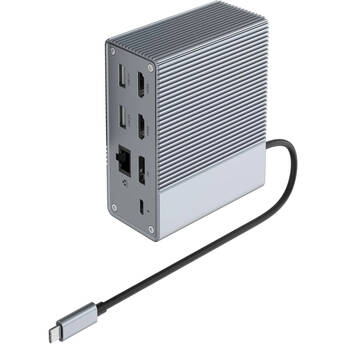
HYPER Hyperdrive GEN2 10-in-1 USB-C Docking Station
- 2 x USB-A 3.2 Gen 2 Ports
- 2 x USB-A 2.0 Ports
- 2 x HDMI | 1 x DisplayPort
- 1 x RJ45 Port
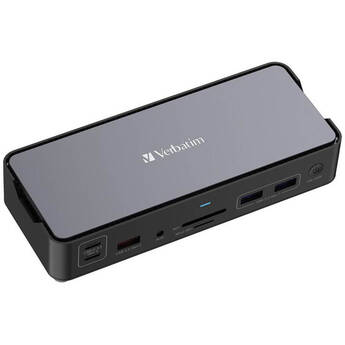
Verbatim 15-in-1 USB-C Pro Docking Station
- 2 x HDMI Ports
- 1 x DisplayPort
- Supports up to 8K (7680 x 4320) at 30 Hz
- 1 x RJ45 Gigabit Ethernet Port
ATEN US3342 4-Port USB 3.2 Gen 2 Sharing Switch with Power Pass-Through
- 3 x USB 3.2 Gen 2 Type-A Ports
- 1 x USB 3.2 Gen 2 Type-C Port
- 2 x USB 3.2 Gen 2 Type-C Host Connectors
- 1 x USB Type-C Power Pass-Through Port
Comprehensive VersaDock USB Type-C 4K Dual Display Docking Station
- USB Type-C Host Connection
- HDMI and VGA Display Outputs
- 1 x USB 3.1 Gen 1 Type-C, 2 x Type-A
- Gigabit Ethernet, SD Card, 3.5mm Audio
IOGEAR 13-Port Dock Pro USB Type-C Triple HD Dock with Power Delivery 3.0
- Provides up to 130W of Power Delivery
- Integrated USB 3.1 Gen 1 Type-C Cable
- 1 x USB Type-C Power Delivery 3.0 Port
- 4 x USB 3.1 Gen 1 Type-A Ports
Belkin Multiport to HDMI Digital AV Adapter
- Four Input Connections in One Device
- Ultra HD 4K and Audio Support
- VGA Input | Mini DisplayPort Input
- HDMI Input and Output
j5create Multi-Angle Dual HDMI Docking Stand
- Holds Most Laptops up to 16"
- Detachable Mini Docking Station
- 2 x USB-A | 1 x USB-C 3.2 Gen 1
- 2 x HDMI | Gigabit Ethernet
Plugable 7-in-1 USB-C Dual HDMI Mini Docking Station
- Dual-Monitor Support up to 4K60
- 1 x USB-A 3.2 Gen 2 Port
- 1 x USB-C 3.2 Gen 2 Port
- 1 x Gigabit Ethernet Port
Verbatim 15-in-1 USB-C Pro Docking Station with 256GB Vi3000 SSD
- 2 x HDMI Ports
- 1 x DisplayPort
- Supports up to 8K (7680 x 4320) at 30 Hz
- 1 x RJ45 Gigabit Ethernet Port
Panasonic Desktop Dock for TOUGHBOOK 40 Laptop
- For Panasonic TOUGHBOOK 40 Laptop
- 3 x USB-A | 3 x USB-C
- 1 x HDMI | 1 x Serial
- 2 x RJ45 LAN Ports
CAMVATE 5-in-1 USB Multiport Adapter
- USB-A Host Connection
- 4 x USB-A 3.0 Gen
- 1 x USB-C Port
- 5W Charging Pass-Through
Rocstor 4-Port USB 3.0 Type-A Female Hub with USB Type-C Male Connector
- USB 3.0 (USB 3.2 Gen 1) 5 Gb/s
- 4 x USB Type-A Female Ports
- 1 x USB Type-C Male Connector
- Bus Powered
C2G 4-Port USB 2.0 Type-A Hub
- 4 x USB 2.0 Type-A Ports
- Data Transfer Rates of up to 480 Mb/s
- Slim & Portable Design
- Integrated Cable with USB Type-A Male
Sabrent HB-C4WP USB-C 3-Port Hub
- 5.9" Integrated USB-C Host Cable
- 1 x USB-A 3.2 Gen 1 | 2 x USB-A 2.0
- 1 x USB-C with 100W Power Delivery 3.0
- Aluminum Housing
Transcend 4-Port USB 3.1 Gen1 Hub
- 4 x USB-A 3.1 Gen1 Ports
- Data Transfer Rates of up to 5 Gb/s
- Bus-Powered Design
- Ultra-Slim & Portable
Plugable USB-C 4-Port Hub (Black)
- 4 x USB-A Ports
- USB-A Host Connection
- USB 3.2 Gen 1 Interface
- Up to 5 Gb/s Data Transfer Speeds
UGREEN 4-Port USB 3.2 Gen 1 Hub (Black)
- 4 x USB-A 3.2 Gen 1 Ports
- 1.6' USB-A Host Cable
- Data Transfer Speeds up to 5 Gb/s
- Micro-USB Port for AC Adapters
StarTech USB-C to 4-Port USB-A 3.2 Gen 1 Mini Hub (Black)
- USB-C 3.2 Gen 1 Male Connector
- 4 x USB-A 3.2 Gen 1 Female Ports
- Cable Management Clip
- Bus Powered
C2G 4-Port USB 3.1 Gen 1 Type-A Hub
- 4 x USB 3.1 Gen 1 Type-A Ports
- Data Transfer Rates of up to 5 Gb/s
- Slim & Portable Design
- Integrated Cable with USB Type-A Male
Monoprice 4-Port USB 3.0 Switch Hub
- 4 x USB 3.0 / 3.1 Gen 1 Type-A Ports
- USB 3.1 Gen 1 Type-A Male Host Connector
- Data Transfer Rates up to 5 Gb/s
- Individually Switched Ports
StarTech 4-Port USB-A 3.2 Gen 1 Mini Hub (Black)
- USB-A 3.2 Gen 1 Male Connector
- 4 x USB-A 3.2 Gen 1 Female Ports
- Cable Management Clip
- Bus-Powered
StarTech Portable 4-Port SuperSpeed Mini USB 3.0 Hub
- 4 x USB 3.0 Type-A Female Ports
- Integrated USB 3.0 Cable
- Data Transfer Rates up to 5 Gbps
- Backwards Compatible with USB 2.0/1.x
Rocstor 4-in-1 Portable USB Hub (Black)
- USB-C Host Connection
- 4 x USB-A Ports
- USB 3.2 Gen 1 Interface
- Windows, Mac, Linux & ChromeOS Support
Anker 5-in-1 USB-C Hub
- Integrated 9.84" USB-C Cable
- 1 x USB-C PD Charging Port (100W Max)
- 1 x USB-A 3.2 Gen 1 Port
- 2 x USB-A 2.0 Ports
Sabrent USB 3.0 4-Port Aluminum Hub (Black)
- 4 x USB 3.0 Ports/3.1 Gen 1
- Up to 5 Gb/s Data Transfer Rate
- Plug-and-Play
- Aluminum Mac-Style Design
Manhattan 4-Port USB 3.0 Type-A Hub
- 4 x USB 3.0 Type-A Ports
- For USB Type-C Systems
- Bus Powered - No External Power Required
- Plug-and-Play Compatible
CAMVATE 5-in-1 USB-C Multiport Adapter (Silver)
- 1 x USB-A 2.0
- 1 x USB-A 3.2 Gen 1
- SD & microSD Card Slots
- RJ45 LAN Port
Rocstor 4-Port USB 3.0 Hub
- USB 3.0 Interface (5 Gb/s)
- 4 x USB Type-A Female Ports
- 1 x USB Type-A Male Connector
- 6" Integrated Cable
What You Need to Know About Computer Hubs & USB Hubs
Computer hubs serve as network hardware devices that expand a single USB port into several ports that you can connect with other devices such as printers, computers, and other peripheral hardware for convenient data exchange. You can also use your computer hub to share a local area network and its bandwidth with multiple computers.
What Are Computer USB-C Hubs?
USB-C hubs have USB extenders that expand the female USB-C port on your devices to allow multiple possibilities of connectivity. They have the ability to connect to HDMI output cables, producing crystal clear video streaming with incredible fluency. USB-C hubs also have a slim and compact design that's perfect for everyday carrying. Models like the Thunderbolt 3 hub come with Ethernet ports to offer direct access to internet cables. With these multi-port USB hubs, you can connect keyboards, mice, thumb drives, cameras, scanners, and other devices. They also enable you to charge and synchronize your mobile devices to a local network. To achieve the connectivity to various USB ports, some hubs may require USB controller cards. Ethernet network interface cards are essential to connect computers to FireWire hubs for quick transfer of data.
Powered vs. Unpowered USB Hubs
USB hubs are available as powered or unpowered. Powered USB hubs use an external power source to bring each hub port into the same energy level as the system port. They also don't divide power consumption across all connected devices, but have converters and splitters, which split data bandwidth across all the devices. They're ideal for offices, as you can connect and charge multiple devices without any lag on your system.
Unpowered USB hubs lack an external power source and use the power from the computer's USB port. Since computer USB ports produce small amounts of current, they're ideal for devices that need low voltages like smartphones and tablets. Additionally, most of these models are portable and easy to use—simply plug and play.
Check out B&H Photo and Video's wide selection of computer hubs to find the right accessory for your USB connectivity needs.