Docking Stations

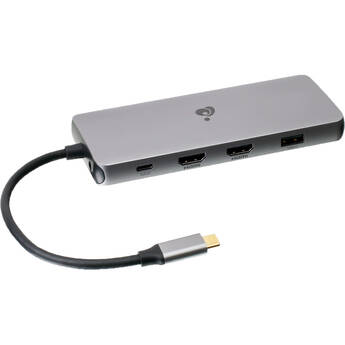
IOGEAR 11-Port USB Type-C Triple HD Pocket Dock with Power Delivery 3.0
- 1 x USB Type-C Power Delivery 3.0 Port
- 2 x USB 3.1 Gen 1 Type-A Ports
- 2 x USB 2.0 Type-A Ports
- SD Card Slot | Gigabit Ethernet Port
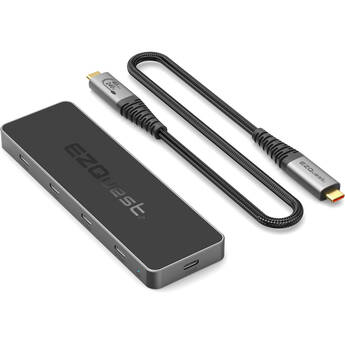
EZQuest 8-Port USB4 Pro Series Dual Display Hub
- Single 8K30 or Dual 4K60 Displays
- 3 x USB4 Ports
- 4 x USB-C 10 Gb/s Ports
- 1 x USB-C PD 3.0 Power Port
Wavlink Triple Display 11-in-1 USB-C Docking Station
- Connect up to Three External Monitors
- Supports Resolutions up to 8K30
- USB-C Host Cable & Charger Included
- Up to 125W of Power Pass Through
Rocstor RD14 USB4 Portable Dock
- USB4 Host Connection
- Up to 40 Gb/s Throughput
- Dual UHD 8K 7680 x 4320 30 Hz Support
- 2 x DisplayPort
EZQuest Ultimate Plus 12-Port USB Type-C Multimedia Hub
- USB Type-C Host Connection
- 2 x HDMI | 1 x VGA
- Supports up to 3840 x 2160 Resolution
- 4 x USB 3.1 Gen 1 Type-A Ports
Belkin Multiport to HDMI Digital AV Adapter
- Four Input Connections in One Device
- Ultra HD 4K and Audio Support
- VGA Input | Mini DisplayPort Input
- HDMI Input and Output
j5create Multi-Angle Dual HDMI Docking Stand
- Holds Most Laptops up to 16"
- Detachable Mini Docking Station
- 2 x USB-A | 1 x USB-C 3.2 Gen 1
- 2 x HDMI | Gigabit Ethernet
iVANKY 12-in-2 USB-C Docking Station Pro
- For Select MacBook Pro & Air Laptops
- Integrated Dual USB-C Host Connector
- 4 x USB-A 3.2 Gen 2 Ports
- 1 x USB-C Gen 2 Port
ALOGIC 10-in-1 USB-C Dual 4K Display Portable Dock for Mac
- 1 x USB-C 3.2 Gen 1 PD 3.0 Port (100W)
- 1 x USB-C 3.2 Gen 1 Port
- 2 x USB-A 3.2 Gen 1 Ports
- 2 x HDMI 2.0 Ports
Adesso 12-in-1 USB-C Multi-Port Docking Station
- 1 x USB-C Port (up to 100W)
- 1 x USB-C 3.2 Gen 1 Port
- 3 x USB-A 3.2 Gen 1 Ports
- 2 x DisplayPort (up to 8K30)
Kensington 10-in-1 100W Triple-Display Docking Station
- For Laptops Running Windows 10/11
- Up to 100W PD via USB-C Alt Mode
- Up to 10 Gb/s Data Transfer Rates
- Connect up to Three External Monitors
Wavlink 11-in-1 8K Triple Display USB-C Docking Station
- Connect up to Three External Monitors
- Supports Resolutions up to 8K30
- USB-C Host Cable Included
- Up to 125W of Power Passthrough
Belkin Universal 11-In-1 Pro Dock (Silver)
- 2 x USB-A 3.2 Gen 2 Ports
- USB-C 3.2 Gen 2 Port
- 2 x HDMI Ports
- SD & microSD Card Slots
HYPER Hyperdrive GEN2 10-in-1 USB-C Docking Station
- 2 x USB-A 3.2 Gen 2 Ports
- 2 x USB-A 2.0 Ports
- 2 x HDMI | 1 x DisplayPort
- 1 x RJ45 Port
Wavlink 13-in-1 Dual 4K 100W USB-C Docking Station
- USB-C Host Port with 100W Power
- Output to Dual 4K60 or One 5K60 Display
- 2 x DisplayPort 1.2 Ports
- 2 x HDMI 2.0 Ports
BLACKJET 17-in-1 RX-4 Raiden Thunderbolt 4 Docking Station (Black)
- Thunderbolt 4 Host Connection
- 1 x Thunderbolt 4 Port
- 4 x USB-C 3.2 Gen 2 Ports
- 3 x USB-A 3.2 Gen 1 Ports
BLACKJET 17-in-1 RX-4 Raiden Thunderbolt 4 Docking Station (Space Gray)
- Thunderbolt 4 Host Connection
- 1 x Thunderbolt 4 Port
- 4 x USB-C 3.2 Gen 2 Ports
- 3 x USB-A 3.2 Gen 1 Ports
Kensington SD4781P EQ USB-C & USB-A Dual 4K Docking Station
- Supports up to 4K (4096 x 2160) at 60 Hz
- 2 x DisplayPort 1.2 Inputs
- 2 x HDMI 2.0 Ports
- USB-A & USB-C 3.2 Gen 2 Ports
HYPER HyperDrive GEN2 16-in-1 USB-C Docking Station
- Supports up to 3 External Displays
- 2 x HDMI & 1 x DisplayPort
- Up to 4K60 HDR Resolution
- 1 x Digital Coax & 1 x TOSLINK Optical
Brydge ProDock Solo for 14" MacBook Pro
- Supports a Single Display at 4K60
- 1 x HDMI 2.0 Port
- 2 x USB-C 3.1 Gen 1 Ports
- 3 x USB-A 3.1 Gen 1 Ports
Brydge ProDock Solo for 16" MacBook Pro
- Supports a Single Display at 4K60
- 1 x HDMI 2.0 Port
- 2 x USB-C 3.1 Gen 1 Ports
- 3 x USB-A 3.1 Gen 1 Ports
Atech Flash Technology Blackjet MiniRaiden Thunderbolt 5 Dock for Mac Mini M4/M4 Pro
- For Apple Mac mini M4 & Mac mini M4 Pro
- Matches Size, Shape & Color of Mac mini
- Fixes Access to Mac mini Power Button
- Acts as Stand & Improves Airflow
Ulanzi QT03 Docking Station with SSD Enclosure
- Up to 40 Gb/s USB4 Host Connection
- Compartment for an Optional M.2 NVMe SSD
- Supports SSD Drives up to 8TB
- 1 x HDMI 4K60
Sabrent Thunderbolt 4 Docking Station
- 2 x Thunderbolt 4
- 2 x USB-C 3.2 Gen 2
- 2 x USB-A 3.2 Gen 1
- 1 x USB-A 3.2 Gen 2
Wavlink 15-in-1 Quad Display 4K 100W DisplayPort/HDMI Docking Station (2025 Edition)
- Connect up to Four External Monitors
- Up to 10K60, 8K60 & 4K120 Resolutions
- 2 x DisplayPort | 2 x HDMI Ports
- Up to 100W PD Laptop Power Passthrough
IOGEAR Dock Pro Duo USB-C Docking Station
- Dock 2 USB-C Laptops, Expand to 11 Ports
- Dual 10 Gb/s USB-C System Connections
- 1 x USB-C 3.2 Gen 2
- 2 x USB-A 3.2 Gen 2 | 2 x USB-A 2.0
Belkin Thunderbolt 4 Dock
- Thunderbolt 4 Host Connection
- Up to 96W of PD Charging
- Up to 40 Gb/s Data Transfer
- Up to 3 Displays at 4K60
Wavlink 15-in-1 Quad Display 4K 100W DisplayPort Docking Station (2025 Edition)
- Connect up to Four External Monitors
- Up to 10K60, 8K60 & 4K120 Resolutions
- 4 x DisplayPort Ports
- Up to 100W PD Laptop Power Passthrough
Computer Docking Stations and Port Replicators
If you need to connect your laptop or notebook to computer peripherals and devices, consider using docking stations and port replicators. With a docking station, you can essentially turn your laptop into a home computer. As soon as you plug your notebook or laptop into the docking station, you'll instantly connect with all of your pre-attached devices, including your speakers, printer, keyboard, and more.
How Docking Stations Work
Docking stations are all about convenience. If you connected your notebook or laptop to multiple devices every time you came home or arrived at your office, you'd continuously deal with bundles of wires and adapters. These accessories reduce everything to a single connection. Some docking stations also include a network interface card, which allows you to connect to a local area network.
What's a Port Replicator?
A port replicator is a type of docking station. Generally speaking, port replicators work with specific laptops models, and they're not standardized or universal. Each docking station has slightly different ports and connections, so you're likely looking for a particular functionality, such as USB 3.0, Thunderbolt, HDMI, VGA, DVI, and many others. Some models connect seamlessly to your device, and they're easily portable. Others are larger and more suitable to keep where you do most of your work on your notebook or laptop.
Using Computer/Laptop Docking Stations
Using Thunderbolt 3 docks, you can tether up to six Thunderbolt 3 devices with a single cable. This is useful if you want to connect a laptop, multiple monitors, and an extended storage device using a single dock. As long as you have USB-C docking stations, you can use Thunderbolt 3 cables to tether devices together. But while USB-C and Thunderbolt 3 cables use identical ports, using Thunderbolt 3 in a USB-C port won't give you the same level of functionality as a dedicated Thunderbolt 3 port. Using notebook tethering accessories is a smart way to add tons of features to your device.