Docking Stations

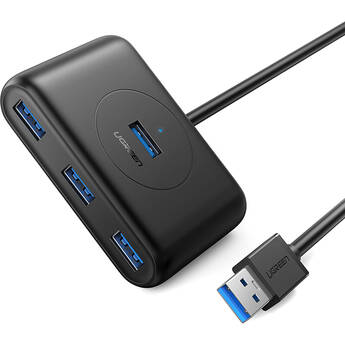
UGREEN 4-Port USB 3.2 Gen 1 Hub (Black)
- 4 x USB-A 3.2 Gen 1 Ports
- 1.6' USB-A Host Cable
- Data Transfer Speeds up to 5 Gb/s
- Micro-USB Port for AC Adapters
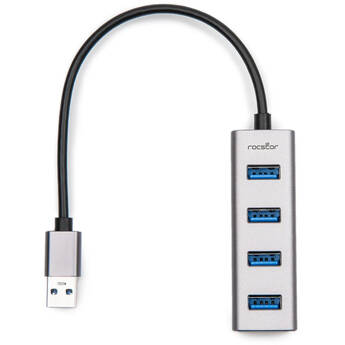
Rocstor Portable 4-Port USB-A Hub (Silver)
- USB-A 3.2 Gen 1 Interface
- 4 x USB-A Ports
- USB-A Host Connector
- Plug and Play Design
Sabrent 3-Port Mini USB 3.0 Rotating Hub (Black)
- 3 USB-A 3.0 Ports
- USB-A Host Interface
- USB 3.0/3.2 Gen 1/3.1 Gen 1 Standard
- Data Transfer Rates up to 5 Gb/s
Verbatim Essentials 4-Port USB-C 3.2 Gen 1 Hub
- USB-C 3.2 Gen 1 Male Host Connector
- Up to 5 Gb/s Throughput
- 2 x USB-A Ports
- HDMI Port
CAMVATE 5-in-1 Docking Station Multiport Adapter (Silver)
- 2 x USB-A 2.0
- 1 x USB-A 3.2 Gen 1
- SD & microSD Card Slots
- USB-C Host Connection
TP-Link UH5020C USB-C 5-in-1 Hub
- USB-C Male Connector
- 1 x HDMI Female Port (4K @ 60 Hz)
- 1 x USB-C Female Port (100W PD)
- 1 x USB-C 3.2 Gen 1 Female Port (5 Gb/s)
CAMVATE 4-Port USB-A Hub (Silver)
- USB-C Host with USB-A Adapter
- 4 x USB-A Ports
- USB 3.0 Interface
- Aluminum Alloy Shell
EDIMAX Technology EU-4308 3-Port USB 3.1 Gen 1 Multi-Adapter Hub with Gigabit Ethernet
- 3 x High-Speed USB 3.0 Ports
- 1 x Gigabit Ethernet Port
- Up to 5 Gbps Data Transfer Rate
- Portable, Lightweight Design
C2G 4-Port USB 2.0 Hub
- 4 x USB 2.0 Ports
- Data Transfer Rates of up to 480 Mb/s
- Slim & Portable Design
- AC Powered
CAMVATE 7-in-1 USB-C Multiport Adapter (Silver)
- USB-C Host Connector with USB-A Adapter
- 1 x USB-A 3.2 Gen 1
- 4 x USB-A 2.0
- 5W USB-C Power Delivery Port
CAMVATE 4-in-1 USB-C Multiport Adapter (Silver)
- USB-C Host Cable
- USB-A 2.0 Port
- USB-A 3.0 Port
- HDMI Video Output
Rocstor Premium USB Type-C to USB Type-A 3-Port Hub with Gigabit Ethernet
Sabrent 4-in-1 Multi-Port USB-C Hub (Gray)
- 1 x USB-A 3.2 Gen 1
- 2 x USB-A 2.0
- 1 x HDMI 2.0
- USB-C Host Connection
Belkin F4U042BT 4-Port Ultra-Slim Travel USB Hub
- 4 x USB 2.0 Ports
- Plug & Play Compatible
- Up to 480 Mb/s Maximum Data Rate
- PC & Mac Compatible
Rocstor USB-C 5-in-1 4K Multi-Port Adapter
- USB-C Host Interface
- 1 x HDMI Port (UHD 4K60)
- 1 x USB-C Port (Power & Data)
- 3 x USB-A 3.2 Gen 1 Port (5 Gb/s)
Rocstor USB-C 3-in-1 Multiport Adapter with DP 1.4 Alt Mode
- Integrated USB-C Host Cable
- 1 x HDMI Port
- 1 x USB-A 3.2 Gen1, 5 Gb/s Port
- 1 x USB-C 140W PD Data & Charging Port
Rocstor USB-C Hub to Quad USB-C 3.1 Gen 2 (Silver)
- 1 x USB-C Input
- 4 x USB-C 3.1 Gen 2 Output
- 10 Gb/s Data Transfer
- 1.5A Downstream Charging Per Slot
Rocstor 3-Port USB 3.0 Hub with Gigabit Ethernet
- 3x USB Type-A Ports
- 1x Gigabit Ethernet LAN
- USB 3.0 Type-A Interface
- Integrated USB Cable
Belkin Connect 5-Port USB-C Hub (Indigo)
- 1 x USB-C Power Delivery 3.0 Port (100W)
- 1 x USB-C 3.2 Gen 1 Port
- 2 x USB-A 3.2 Gen 1 Ports
- 1 x HDMI Port (4K/60 Hz)
Verbatim Essentials 6-Port USB-C 3.2 Gen 1 Hub with RJ45
- USB-C 3.2 Gen 1 Male Host Connector
- Up to 5 Gb/s Throughput
- 3 x USB-A Ports
- RJ45 Gigabit Ethernet Port
Belkin F4U041TT 7-Port Ultra-Slim Desktop USB Hub
- 7 x USB 2.0 Ports
- Plug & Play Compatible
- Up to 480 Mb/s Maximum Data Rate
- PC & Mac Compatible
Lemorele TC550 7-in-1 USB-C Docking Station
- Attached USB-C Host Cable
- 1 x HDMI Port at 4K60
- 1 x USB-C DP Alt Mode at 4K60
- 1 x 100W USB-C PD Pass-Through Charging
CAMVATE 7-in-1 USB-C Multiport Adapter (Silver)
- USB-C Host Connector
- 1 x USB-A 3.2 Gen 1
- 2 x USB-A 2.0
- SD & microSD Card Slots
CAMVATE 5-in-1 USB-C Multiport Adapter
- USB-C Host Connection
- 3 x USB-A 3.2 Gen 1 Ports
- 1 x 100W USB-C Power Delivery Port
- 1 x RJ45 Gigabit Ethernet Port
EZQuest 5-Port USB-C Pro Series Multi-Adapter Hub with HDMI (Black)
- Single 4K60 Display
- 1 x USB-C 3.0 5 Gb/s Port
- 2 x USB-C 2.0 480 Mb/s Ports
- 1 x USB-C PD 3.0 Power Port
j5create Eco-Friendly USB-C to 4-Port USB-A 3.2 Gen 2 Hub (White)
- 4 x USB-A 3.2 Gen 2 Ports
- 1 x USB-C 3.2 Gen 2 Input Connector
- Plug and Play
- Windows, macOS, and ChromeOS Support
EZQuest 4-Port USB 3.0 Hub Adapter with USB Type-C PD 3.0
- 1 x USB Type-C Port with PD 3.0 (100W)
- 1 x USB 3.0 Type-A Port with BC 1.2
- 3 x USB 3.0 Type-A Ports
- Fast Role Swap (FRS) for USB Type-C
Sabrent 13-Port USB 2.0 Hub with Power Adapter
- 13 USB 2.0 Ports
- Data Transfer Rate up to 480 Mb/s
- Hot-Swappable
- Plug-and-Play
Computer Docking Stations and Port Replicators
If you need to connect your laptop or notebook to computer peripherals and devices, consider using docking stations and port replicators. With a docking station, you can essentially turn your laptop into a home computer. As soon as you plug your notebook or laptop into the docking station, you'll instantly connect with all of your pre-attached devices, including your speakers, printer, keyboard, and more.
How Docking Stations Work
Docking stations are all about convenience. If you connected your notebook or laptop to multiple devices every time you came home or arrived at your office, you'd continuously deal with bundles of wires and adapters. These accessories reduce everything to a single connection. Some docking stations also include a network interface card, which allows you to connect to a local area network.
What's a Port Replicator?
A port replicator is a type of docking station. Generally speaking, port replicators work with specific laptops models, and they're not standardized or universal. Each docking station has slightly different ports and connections, so you're likely looking for a particular functionality, such as USB 3.0, Thunderbolt, HDMI, VGA, DVI, and many others. Some models connect seamlessly to your device, and they're easily portable. Others are larger and more suitable to keep where you do most of your work on your notebook or laptop.
Using Computer/Laptop Docking Stations
Using Thunderbolt 3 docks, you can tether up to six Thunderbolt 3 devices with a single cable. This is useful if you want to connect a laptop, multiple monitors, and an extended storage device using a single dock. As long as you have USB-C docking stations, you can use Thunderbolt 3 cables to tether devices together. But while USB-C and Thunderbolt 3 cables use identical ports, using Thunderbolt 3 in a USB-C port won't give you the same level of functionality as a dedicated Thunderbolt 3 port. Using notebook tethering accessories is a smart way to add tons of features to your device.