External Hard Drives
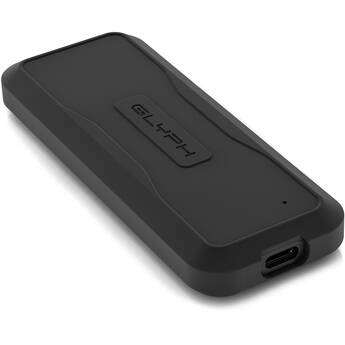
Glyph Technologies 8TB Atom EV USB 3.2 Gen 2 Type-C External SSD
- 8TB Storage Capacity
- 10 Gb/s USB 3.2 Gen 2 Type-C Interface
- Up to 1 GB/s Data Transfer Speed
- Bus Powered
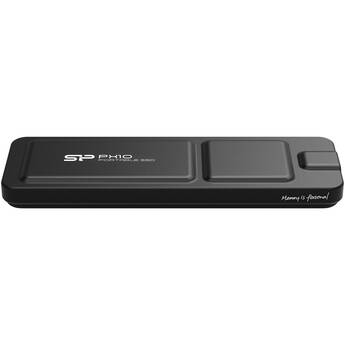
Silicon Power PX10 Plus Gen 2 Portable SSD (512GB, Black)
- Records Apple ProRes 4K at 60p
- 1050 MB/s Data Speeds
- 10 Gb/s USB-C 3.2 Gen 2
- Aluminum Construction
CORSAIR 1TB EX300U USB 3.2 Gen 2 External SSD
- 1TB Storage Capacity
- 10 Gb/s USB-C 3.2 Gen 2 Interface
- Read and Write Speeds up to 1100 MB/s
- Bus Powered, Plug-and-Play
Silicon Power 4TB Vault A60 External Hard Drive
- 4TB Storage Capacity
- USB-A 3.2 Gen 1 Interface (5 Gb/s)
- Silicone Material (Shockproof)
- IPX4 Rating (Water-Resistant)
Lexar 1TB SL500 USB 3.2 Gen 2x2 Portable SSD
- 1TB Storage Capacity
- USB-C 3.2 Gen 2x2 Interface
- Read Speeds up to 2000 MB/s
- Write Speeds up to 1800 MB/s
WD 5TB My Passport for Mac USB 3.1 Gen 1 External Hard Drive (Midnight Blue)
- 5TB Storage Capacity
- USB 3.1 Gen 1 (USB 3.0) Interface
- Bus Powered
- 256-Bit AES Encryption
Silicon Power 4TB Bolt B75 Pro External SSD
- 4TB Storage Capacity
- USB-C 3.2 Gen 2
- Up to 520 MB/s Read Speeds
- Up to 420 MB/s Write Speeds
Lexar 2TB ARMOR 700 USB 3.2 Gen 2x2 Portable SSD
- 2TB Storage Capacity
- 20 Gb/s USB-C 3.2 Gen 2x2 Interface
- Up to 2000 MB/s Data Transfer Speed
- Bus Powered
Apricorn 4TB Aegis Fortress L3 FIPS 140-2 Level 3 Encrypted Portable Hard Drive
- 4TB Capacity
- USB 3.0/3.1 Gen 1 Micro-B Interface
- Real-Time AES-XTS 256-Bit Encryption
- FIPS 140-2 Level 3 Standard
CORSAIR 2TB EX400U Survivor USB4 External SSD
- 2TB Storage Capacity
- USB4 (USB-C) Interface
- Read Speeds up to 4000 MB/s
- Write Speeds up to 3600 MB/s
G-DRIVE 6TB G-DRIVE Enterprise-Class USB 3.2 Gen 2 External Hard Drive
- 6TB Storage Capacity
- 7200 rpm Ultrastar Enterprise-Class HDD
- 1 x USB-C 3.2 Gen 2 Port
- Sequential Read Speeds up to 250 MB/s
Samsung 2TB T9 Portable SSD with MagSafe/Cold Shoe SSD Holder (Black)
- 2TB Storage Capacity
- USB-C 3.2 Gen 2x2 Port (20 Gb/s)
- PCIe NVMe Technology
- Sequential Read Speed: 2000 MB/s
WD 14TB Elements Desktop USB 3.2 Gen 1 External Hard Drive
- 14TB Storage Capacity
- Micro-USB 3.2 Gen 1 Interface
- AC Powered
- USB 2.0 Compatible
WD 16TB My Book Desktop USB 3.2 Gen 1 External Hard Drive
- 16TB Storage Capacity
- Micro-USB 3.2 Gen 1 Interface
- Includes AC Adapter
- 256-Bit AES Hardware Encryption
Silicon Power 250GB DS72 Dual USB 3.2 Gen 2 Portable SSD (USB-C / USB-A)
- 250GB Storage Capacity
- 1 x USB-C 3.2 Gen 2 Connector
- 1 x USB-A 3.2 Gen 2 Connector
- Read Speeds up to 1050 MB/s
WD 4TB My Passport USB 3.2 Gen 1 Portable Hard Drive
- 4TB Storage Capacity
- Micro-USB 3.2 Gen 1 Interface
- Bus Powered
- 256-Bit AES Hardware Encryption
CORSAIR 1TB EX400U Survivor USB4 External SSD
- 1TB Storage Capacity
- USB4 (USB-C) Interface
- Read Speeds up to 4000 MB/s
- Write Speeds up to 3600 MB/s
G-DRIVE 4TB G-DRIVE ArmorATD USB 3.2 Gen 1 Portable Hard Drive
- 4TB Storage Capacity
- 5 Gb/s USB-C 3.2 Gen 1 Interface
- Read Speeds up to 130 MB/s
- Bus Powered
SanDisk 2TB Extreme PRO Portable SSD V2
- 2TB Total Storage Capacity
- USB 3.2 Gen 2x2 Type-C
- Up to 2000 MB/s Read & Write Speeds
- Bus Powered
SanDisk 2TB Creator Series Pro USB 3.2 Gen 2x2 Portable SSD
- 2TB Storage Capacity
- 20 Gb/s USB-C 3.2 Gen 2x2
- Read and Write Speeds up to 2000 MB/s
- Bus Powered
Glyph Technologies 2TB Atom EX80 High-Intensity USB4 80 Gb/s Portable SSD with Location Track
- 2TB Storage Capacity
- 80 Gb/s USB4 Interface
- Up to 7000 MB/s Data Transfer Speed
- Bus Powered
SanDisk 4TB Extreme Portable SSD V3
- 4TB Total Storage Capacity
- 20 Gb/s USB-C 3.2 Gen 2x2 Interface
- Read Speeds up to 2000 MB/s
- Bus Powered
Glyph Technologies 4TB Atom Pro NVMe Thunderbolt 3 SSD
- 4TB Storage Capacity
- Thunderbolt 3
- Up to 2800 MB/s Read Speed
- Up to 2600 MB/s Write Speed
LaCie 4TB Rugged SSD4 USB4 External SSD
- 4TB Storage Capacity
- USB4 (USB-C) Interface
- Read Speeds up to 4000 MB/s
- Bus Powered
Silicon Power 1TB PC60 USB-C 3.2 Gen 2 Portable External SSD
- 1TB Storage Capacity
- USB-C 3.2 Gen 2
- Up to 540 MB/s Read Speeds
- Up to 500 MB/s Write Speeds
WD 2TB My Passport for Mac USB 3.1 Gen 1 External Hard Drive (Midnight Blue)
- 2TB Storage Capacity
- USB 3.1 Gen 1 (USB 3.0) Interface
- Bus Powered
- 256-Bit AES Encryption
Silicon Power 5TB Vault A60 External Hard Drive
- 5TB Storage Capacity
- USB-A 3.2 Gen 1 Interface (5 Gb/s)
- Silicone Material (Shockproof)
- IPX4 Rating (Water-Resistant)
Apricorn 1TB Aegis Fortress L3 FIPS 140-2 Level 3 Encrypted Portable Hard Drive
- 1TB Capacity
- USB 3.0/3.1 Gen 1 Micro-B Interface
- Real-Time AES-XTS 256-Bit Encryption
- FIPS 140-2 Level 3 Standard
Portable & USB Hard Drives
An external hard disk drive is a standalone storage device that provides additional space for your data. You can use it to backup important files from your computer's internal hard drive and to transfer files between computers. It has a larger storage capacity than other external storage devices, like USB drives and memory cards.
Portable vs. Desktop External Hard Drives
A portable external storage drive is smaller and lighter than a desktop model. It's a compact unit that houses a 2.5-inch hard drive in a protective enclosure. Desktop external hard disks have bigger housings, and usually use larger 3.5-inch hard drives. You can turn the internal hard disk in your old laptop (2.5-inch) or desktop PC (3.5-inch) into an external storage unit with the right hard drive enclosure.
Another difference between desktop and portable external hard drives is their power sources. Portable units are bus-powered. This means that they draw power with the same USB cable used for transferring data. Desktop units have separate AC adapters and draw more power. Hard drive arrays are another class of external storage devices. These have two or more drive bays for 2.5-inch or 3.5-inch hard disks. They serve as network-attached servers and support RAID levels that help them prioritize data redundancy, transfer speed, and storage capacity.
What's the Difference Between SSD and HDD?
A USB external hard drive can store files on a solid-state drive or a hard disk drive. While HDDs record data on spinning platters, SSDs use flash memory chips. With no moving parts, SSDs are faster and more durable. They’re also quieter and use less power. However, HDDs are more affordable and available in higher capacities.
Some brands offer SSDs in multiple form factors. For example, you can find 2.5-inch (direct replacement for laptop HDDs), M.2, and PCIe solid state drives in the HP hard drive line. Note that you need a 2.5-inch SSD and a 2.5-inch drive enclosure to build a SATA external hard drive. SATA, or Serial ATA, is a high-speed bus interface for connecting storage devices like HDDs and SSDs to computer motherboards. An external SATA (eSATA) drive enclosure connects a SATA HDD or SSD to a computer via USB.
Consider Speed When Selecting External Storage Drives
The overall data transfer speed of an external storage device depends on the speed of the drive used and the speed of the connection between the drive and your computer. Connection interface options for external drives include USB 2.0, 3.0, and 3.1, as well as eSATA and Thunderbolt. USB 3.0 external hard drives are 10 times faster than models with USB 2.0.
Most brands offer hard disks in two drive speeds: 5400 and 7200 rpm. Each type has its merits. For example, if you’re looking for a portable Toshiba hard drive, pick one with a 5400 rpm HDD. It has a lower power draw and is quick enough for everyday use. Pick a model with a 7200 rpm HDD if you regularly transfer large files and need a desktop external drive.
Keep important files safe by regularly backing them up onto an external hard disk. Find the right one, including fast SSD options, in the extensive selection of portable storage devices at B&H Photo and Video.