Monitor Table Top Stand Mounts

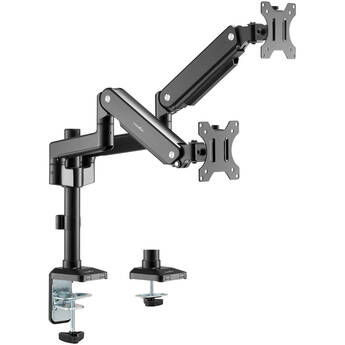
Rocstor ErgoReach EP9 Premium Dual Ergonomic Monitor Pole Mount Arm
- Holds Two Displays up to 27"
- 22 lb Weight Capacity per Display
- C-Clamp or Grommet Mounting
- ±70° of Tilt
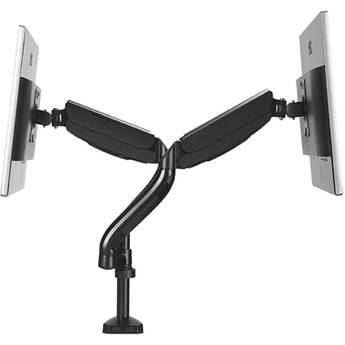
Uncaged Ergonomics Dual Monitor Arm Stand
- Dual Adjustable Arms
- Supports up to 17.6 lb per Arm
- 75x75 & 100x100mm Mount Patterns
- Fits Up to 3.15" Thick Desks
Peerless-AV LCT100S Desktop Mount for 10 to 30" Flat-Panel Displays
- Supports 10 to 30" Monitors up to 20 lb
- Mounts to Desks up to 3" Thick
- VESA 75 x 75 & 100 x 100mm Compatible
- Height Adjustable
Pixio PS2S Single-Arm Monitor Desk Mount for up to 49" Displays (Black)
- Recommended for 17 to 49" Screens
- Weight Capacity of 33 lb
- Gas Spring Arm for Toolless Adjustment
- ± 45° Tilt Range
Rocstor ErgoReach EP18 Premium Aluminum Dual Ergonomic Monitor Mounted Arm
- Holds Two Displays 17 to 32"
- 19.8 lb Weight Capacity
- ±90° of Tilt
- ±90° of Swivel
Gabor Levitouch Single-Arm Desktop Monitor Mount for 17 to 32" Displays
- Supports 17 to 32" Displays
- Holds Displays up to 19.8 lb
- 75 x 75 & 100 x 100mm VESA Support
- Mounts to Desk Edge or Through Grommet
Mount-It! Single-Monitor Desk Arm Mount for 13 to 27" Monitors (Black)
- Supports One Display up to 20 lb
- 75 x 75 & 100 x 100mm Mount Patterns
- Provides ±90° of Tilt Adjustment
- Provides 360° of Rotation Adjustment
MSI MAG MT201G Single-Arm Monitor Mount for 17 to 49" Displays
- Supports One 17 to 49" Monitor
- 44 lb Weight Capacity
- 75 x 75 and 100 x 100mm VESA Support
- Up to 20" of Height Adjustment
Atdec Visidec VFS-DH Freestanding Dual Horizontal
- Supports 2 Screens up to 26.5 lbs Each
- Monitors are Independently Adjusted
- Portrait to Landscape Rotation
- Small Footprint
Pixio PS2S Titan Single Arm Monitor Desk Mount (White)
- For up to 57" Ultrawide Monitors
- Weight Capacity of 59.4 lb
- -20 to 60° Tilt Range
- ±90° Swivel & Rotation
Pixio PS2D Dual-Arm Monitor Desk Mount for up to 49" Displays (White)
- Recommended for 17 to 35" Screens
- Holds 2 Displays Side-by-Side
- Weight Capacity of 33 lb per Arm
- Gas Spring Arms for Toolless Adjustment
CTA Digital Single-Arm Monitor Mount with USB Hub & Keyboard Tray
- For Desks up to 3.45" Thick
- 75x75 VESA Compatible
- Built-In 2-Port USB-A Hub
- Keyboard Tray with Lip & Anti-Slip Grip
Mount-It! MI-2762 Dual-Monitor Desk Mount
- Supports Two 13 to 32" Displays
- Supports Displays up to 17.6 lb Each
- 75 x 75 & 100 x 100mm Mount Patterns
- -90 to 90° of Tilt Adjustment
Kanto Living DM1 Monitor Desk Mount for 17 to 40" Displays (Black)
- For Displays from 17 to 40"
- Weight Capacity of 22.1 lb.
- Clamp or Grommet Installation
- Up to 21.7" Arm Extension
Rocstor ErgoReach ED7 Single Ergonomic Heavy-Duty Monitor Arm with USB-A & USB-C Ports
- Supports Screens from 24 to 57"
- Integrated USB-C and USB-A Ports
- Articulated Arm, Load Capacity: 59.4 lb
- Detachable VESA Plate Design
ViewSonic Universal Tabletop Display Stand (Black)
- Supports Displays up to 43"
- 60 lb Weight Capacity
- 90° Tilt and 45° Swivel
- 200 x 200 to 400 x 400 VESA Compliant
StarTech Heavy-Duty Dual Stacked Monitor Desk Mount for up to 49" Ultrawide Displays
- For Vertically Stacking 2 Monitors
- Holds up to 49" 32:9 Ultrawide Screens
- Weight Capacity of 28.7 lb per Display
- Adjust Height Along 27.4" Pole
Ergotron WorkFit Single HD Monitor Kit (Black)
- For Heavy 16-28 lb Monitors
- Cost-Effective Height-Adjustable Mount
- Patented CF Motion Technology
- Reduces Eye, Back, and Neck Strain
Atdec Spacedec SD-DP-1150 45.3" Quick-Shift Donut Pole (Black)
- For 12 to 24" Displays
- Fits 75 x 75 or 100 x 100 VESA Patterns
- Quick-Shift Lever for Easy Adjustment
- Adjustable Viewing Angle and Orientation
Atdec Spacedec SD-DP-750 29.5" Quick-Shift Donut Pole (Black)
- For 12 to 24" Displays
- Fits 75 x 75 or 100 x 100 VESA Patterns
- Quick-Shift Lever for Easy Adjustment
- Adjustable Viewing Angle and Orientation
Kanto Living DMS1000 Desktop Monitor Mount (Black)
- Increased Monitor Viewing Positions
- Gain Access to More of Your Desk
- Up to 9.5" of Height Adjustment
- 360-Degree Swivel
SIIG Triple Monitor Stand for 13 to 27" Displays
- Supports Three 13 to 27" Displays
- Supports Displays up to 17.6 lb Each
- 75 x 75 and 100 x 100mm VESA Patterns
- Mount Displays Flush or Angled Inward
Chief Kontour K2C120B Articulating Column Single-Monitor Desk Mount (Black)
- Supports 10 to 30" Displays Up to 40 lb
- 75 x 75 & 100 x 100mm Mount Patterns
- ±15° of Tilt Adjustment
- Provides 7" of Manual Height Adjustment
Allen & Heath Desktop Stand (Black)
Atdec Heavy-Duty Arm (18.1", Black)
- For Flat Monitors Weighing up to 31 lb
- Curved Monitors Weighing up to 26.5 lb
- Tilts 55° Upward and 35° Downward
- VESA Patterns of 75 x 75 and 100 x 100mm
Ergotron LX Pro Desk Arm (Dark Gray)
- Supports Displays up to 34"
- 22 lb Weight Capacity
- 75 x 75 & 100 x 100mm VESA Support
- Clamp for 0.4 to 2.4" Desk/Counter Tops
Mount-It! Dual Monitor Mount for 17 to 32" Displays
- For 17 to 32" Screens up to 19.8 lb Each
- Dual Display Side-by-Side Mounting
- Gas Spring Arms for Easy Articulation
- Crossbar for Lateral Adjustment
ALOGIC Glide Flexible Double-Monitor Arm
- Supports Displays up to 35"
- 23.1 lb Weight Capacity Per Monitor
- 75 x 75 & 100 x 100mm VESA Support
- 20" Full Arm Extension
Choosing Monitor Table Stands
Monitor table stands are devices used for mounting computer monitors and displays without placing them directly on your desk. Use monitor stands for single and multi-monitor setups.
Finding the right monitor stand requires knowledge of what you're looking for in a monitor setup. The main factors to take into account are the number of monitors you'll be using, the size of the monitors in question, and the type of mount you want.
Screen Size and Weight
Measure your monitor diagonally in inches to determine the screen size. When selecting a stand, make sure that your monitor screen size is at or below its maximum supported size. Stands also have weight limits to consider, especially once you begin packing on multiple displays. To prevent any potential issues, be sure to check both the size and weight of your monitor(s) against the capacity of your stand.
Styles and Adjustability
Beyond compatibility concerns, you have a personal preference to take into account. Monitor table stands come in different styles, and these styles allow for different adjustment capabilities. Some mounts may offer full-swing adjustments, meaning you can adjust the monitor's exact position above your computer desk with great freedom. Others may instead focus on things like adjustable height, tilt, or swivel. If you don't want your monitor moving at all, you also have the option of selecting a fixed-style mount. Even some of these offer height adjustment.
Mount Type
There are multiple mount types to choose from, but the most popular are clamping mounts and standing mounts. A clamping mount attaches to the edge of your desk or table to stay secure. Conversely, a standing mount uses a substantial base to stay secure, sometimes with additional straps or rubber feet. Clamping mounts are more common for multi-monitor configurations, as balancing would be a concern for standing mounts.
Mounting Hole Patterns and VESA
The format of the mounting hole patterns is [number] x [number] in millimeters. This measurement refers to the distance between mounting holes in either the mount or monitor. With monitor table stands, the mounting hole patterns follow the VESA mounting standard, which is an industry-standard established by several major display manufacturers.
Before grabbing any desk mount monitor stands, it's essential to verify that your monitor has a compatible mounting hole interface. You can find this information by either measuring the holes in the back of your monitor yourself, or consulting its product specifications.
Whether you need monitor stands for desks or dual computer monitor stands, find what you need at B&H Photo and Video.