Monitor Table Top Stand Mounts

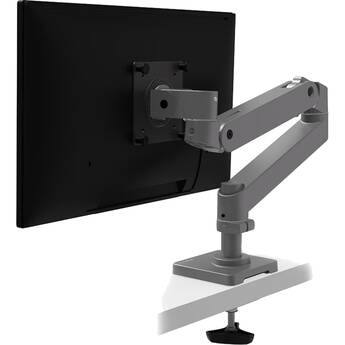
Ergotron LX Pro Desk Arm with Grommet Mount (Dark Gray)
- Supports Displays up to 34"
- 22 lb. Weight Capacity
- 75 x 75 & 100 x 100mm VESA Support
- 2.4" Deep, 2" Wide Grommet Mount
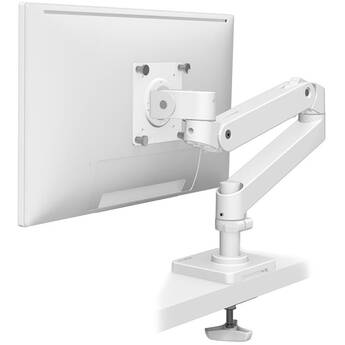
Ergotron LX Pro Desk Arm with Grommet Mount (White)
- Supports Displays up to 34"
- 22 lb. Weight Capacity
- 75 x 75 & 100 x 100mm VESA Support
- 2.4" Deep, 2" Wide Grommet Mount
ALOGIC Glide Flexible Double-Monitor Arm
- Supports Displays up to 35"
- 23.1 lb Weight Capacity Per Monitor
- 75 x 75 & 100 x 100mm VESA Support
- 20" Full Arm Extension
Ergotron LX Extension Arm Kit (White)
- Works with LX Arms and Tall Poles
- Adds an Arm to Your Existing Setup
- Supports Displays from 7 to 25 lb
- Supports Displays up to 40"
Chief Kontour K1C Dynamic Column Mount for 1 Monitor (Black)
- Forged Aluminum Arms
- Enhanced Patented Centris Extreme Tilt
- Enhanced Column Interface
- Total Height Adjustment Range Is 20"
Ergotron MX Desk Mount LCD Arm
- Supports LCD Displays up to 30"
- 14 to 30 lb Weight Capacity
- 5" Lift
- 80° Tilt
ALOGIC Aspekt Fold Stand for 32" Monitors (Space Gray)
- For Use with Aspekt 32" Monitors
- Easy Snap-In Installation
- Fold Down Flat to Draw
- Aluminum Construction
Chief K2C22HS Kontour K2C Articulating Column Mount for Dual Monitor Array (Silver)
Ergotron LX Desk Monitor Arm with Low-Profile Clamp (Matte Black)
- Fits up to 34", 25 lb Display
- 75 x 75 to 100 x 100mm VESA Mount
- 75° Tilt
- 13" Height Adjustment
O.C. White ProBoom Ultima Gen2 Adjustable Monitor Arm for 4 to 14 lb Displays
Ergotron LX Pro Single-Arm Monitor Mount for up to 34" Displays (Black)
- For Monitors up to 34" & 22 lb.
- For Desks with 0.4 to 2.0" Grommets
- Up to 22" of Arm Extension
- Up to 13" of Height Adjustment
Ergotron LX Pro Single-Arm Monitor Mount for up to 34" Displays (White)
- For Monitors up to 34" & 22 lb.
- For Desks with 0.4 to 2.0" Grommets
- Up to 22" of Arm Extension
- Up to 13" of Height Adjustment
Ergotron LX Pro Desk Arm with Tall Pole (Dark Gray)
- Supports Displays up to 34"
- 22 lb Weight Capacity
- 75 x 75 & 100 x 100mm VESA Support
- Clamp for 0.4 to 2.4" Desk/Counter Tops
Chief KONTOUR K3 Grommet Mounted 3x1 / 2x1 Array (Silver)
Ergotron LX Pro Desk Dual Direct Arm Mount for Up to 27" Displays (Gray)
- For Two Side-by-Side Displays Up to 27"
- Weight Capacity of 9.4 lb. per Screen
- Up to 27" Extension
- 30° Individual Tilt Range
Chief KONTOUR K3 Dual- or Tri-Monitor Array (Black)
- Supports Two 30" or Three 27" Displays
- Supports Displays up to 15 lb
- Provides 12° of Tilt on Outer Heads
- Provides 10° of Tilt on Center Head
Winsted W6491 Articulating Single LCD Pole Mount
- Supports Single LCD Display
- Versa-Trak Mounting System Attachment
- 10" (25.4 cm) Hinged Arm
- 15" (38.1cm) Pole / Pivot & Tilt Mount
Atdec AWMS-2-4640 Dual Monitor Arms on Post (Silver)
- For Two Displays up to 32"
- Holds 26.5 lb per Flat Monitor
- Holds 17.6 lb per Curved Monitor
- -15 to 40° Tilt
Kanto Living DMS2000 Dual Arm Desktop Monitor Mount (Black)
- Autonomous Control of 2 Monitors
- Increased Monitor Viewing Positions
- Gain Access to More of Your Desk
- Up to 9.5" of Height Adjustment
Peerless-AV Desktop Stand for Two 24 to 49" Ultra-Wide Monitors
- For Two 24 to 49" Ultra-Wide Monitors
- 75 x 75 & 100 x 100mm VESA Support
- For Curved or Flat Monitors
- Supports up to 60 lb
Ergotron HX Wall Monitor Arm with VHD Pivot for Extreme-Depth Curved Screens (White)
- For Ultrawide Curved Displays from 9.1-13.8" Deep and 28.7-37.5 lb, like the Samsung 57" Odyssey G9 Gaming Monitor
Ergotron DS100 Dual-Monitor Vertical Desk Stand (Black)
- Patented Paraview Technology
- Portrait or Landscape Viewing
- Durable Aluminum & Steel Construction
- Cable Management System
Ergotron LX Pro Dual Stacking Arm Desk Mount for up to 24" Displays (Dark Gray)
- For 2x Monitors up to 24" & 22 lb. Each
- Side-by-Side or Stacked Configuration
- -15 to 70° Tilt Range
- 25" Maximum Arm Extension
Ergotron HX Desk Monitor Arm (Matte Black)
- Supports Up to 57" 1000R Curved Displays
- 37.5 lb. Weight Capacity
- 75 x 75 & 100 x 100mm VESA Support
- 2.6" Thick Desk Clamp or Grommet Mount
Mount-It! MI-63156 Full-Motion Quad-Monitor Desk Mount with Clamp & Grommet for Up to 27" Displays
- Fits 4 Displays Up to 27" Each
- Weight Capacity of 24 lb per Screen
- +90° to -15° of Tilt
- ±120° Screen Swivel Range
Ergotron LX Dual Desk Mount Stacking Arm for Displays up to 40" (White)
- Supports Two Displays Up to 40"
- Supports up to 20 lb per Arm
- 75 x 75 & 100 x 100mm Mount Patterns
- For 0.5 to 2.6" Desk or Counter Tops
Chief Kontour KXC220S Dual-Monitor Desk Mount (Silver)
- Supports Two 10 to 30" Displays
- Supports Displays up to 25 lb Each
- 75 x 75 & 100 x 100mm Mount Patterns
- -10 to 75° of Tilt Adjustment
Ergotron LX Dual Stacking Arm for Displays up to 24" (Polished Aluminum)
- Supports Two Displays up to 24"
- Supports up to 20 lb per Arm
- 75 x 75 & 100 x 100mm Mount Patterns
- For up to 2.6" Desk or Countertops
Choosing Monitor Table Stands
Monitor table stands are devices used for mounting computer monitors and displays without placing them directly on your desk. Use monitor stands for single and multi-monitor setups.
Finding the right monitor stand requires knowledge of what you're looking for in a monitor setup. The main factors to take into account are the number of monitors you'll be using, the size of the monitors in question, and the type of mount you want.
Screen Size and Weight
Measure your monitor diagonally in inches to determine the screen size. When selecting a stand, make sure that your monitor screen size is at or below its maximum supported size. Stands also have weight limits to consider, especially once you begin packing on multiple displays. To prevent any potential issues, be sure to check both the size and weight of your monitor(s) against the capacity of your stand.
Styles and Adjustability
Beyond compatibility concerns, you have a personal preference to take into account. Monitor table stands come in different styles, and these styles allow for different adjustment capabilities. Some mounts may offer full-swing adjustments, meaning you can adjust the monitor's exact position above your computer desk with great freedom. Others may instead focus on things like adjustable height, tilt, or swivel. If you don't want your monitor moving at all, you also have the option of selecting a fixed-style mount. Even some of these offer height adjustment.
Mount Type
There are multiple mount types to choose from, but the most popular are clamping mounts and standing mounts. A clamping mount attaches to the edge of your desk or table to stay secure. Conversely, a standing mount uses a substantial base to stay secure, sometimes with additional straps or rubber feet. Clamping mounts are more common for multi-monitor configurations, as balancing would be a concern for standing mounts.
Mounting Hole Patterns and VESA
The format of the mounting hole patterns is [number] x [number] in millimeters. This measurement refers to the distance between mounting holes in either the mount or monitor. With monitor table stands, the mounting hole patterns follow the VESA mounting standard, which is an industry-standard established by several major display manufacturers.
Before grabbing any desk mount monitor stands, it's essential to verify that your monitor has a compatible mounting hole interface. You can find this information by either measuring the holes in the back of your monitor yourself, or consulting its product specifications.
Whether you need monitor stands for desks or dual computer monitor stands, find what you need at B&H Photo and Video.