Monitor Table Top Stand Mounts

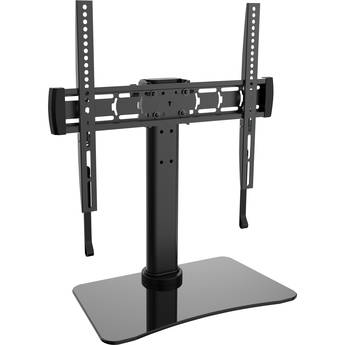
Peerless-AV Tabletop Stand for 32 to 60" Displays
- Supports 32 to 60" Displays up to 60 lb
- Up to 400 x 400mm Mount Pattern
- Provides -5 to 10° of Tilt Adjustment
- Provides up to ±45° of Swivel Adjustment
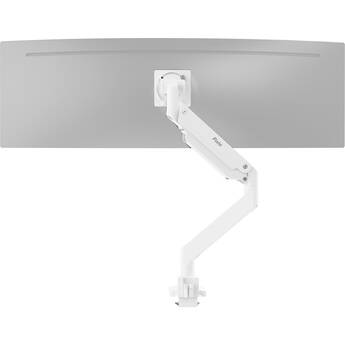
Pixio PS2S Titan Heavy-Duty Articulating Desk Mount for up to 57" Displays (White)
- For up to 57" Ultrawide Monitors
- Weight Capacity of 59.4 lb
- -20 to 60° Tilt Range
- ±90° Swivel & Rotation
StarTech Desk-Mount Vertical Dual Monitor Mount
- Space Saving Design
- Supports 2 x 13 to 27" Monitors
- Tilt, Swivel, and Rotation Adjustment
- Heavy-Duty Steel Construction
CTA Digital Dual VESA Desk Mount with Storage Compartment (White)
- Supports Two 75 x 75mm VESA Surfaces
- Interior Cable Routing
- Key-Locked Compartment
- Padded Base Protects Surfaces
CTA Digital Dual VESA Desk Mount with Storage Compartment (Black)
- Supports Two 75 x 75mm VESA Surfaces
- Interior Cable Routing
- Key-Locked Compartment
- Padded Base Protects Surfaces
Mount-It! All-In-One Studio Mount for Single Displays up to 32"
- For Single 17 to 32" Monitors
- Weight Capacity of 19.8 lb per Screen
- Holds a Camera & Ring Light
- Integrated Microphone Boom Arm
DTEN ME Stand
- For DTEN ME Display
- Desktop Stand and Mount
- Solid Metal Construction
- 100 x 100mm VESA Mount Pattern
Video Mount Products LCD-2 Small Flat Panel Table/Desk Mount - Black
- Mounts Most 10-23" Flat Panels
- Rotatable 360°
- Tilts 60º at Arm
- Tilts -5º to +30º at Display
Ergotron NX Monitor Arm (Matte Black)
- Single Monitor Mount
- Supports up to 17.6 lb
- 75 x 75 & 100 x 100mm VESA Support
- Clamp up to 1.97" Desk/Counter Tops
Peerless-AV LCT620A Desktop Monitor Arm Mount for up to 29" Monitors
- Supports Displays up to 29"
- Supports Displays up to 17.8 lb
- For Desk or Counter Tops 0.2 to 2.2"
- Clamp-on Mounting Base
Pixio PS2D Dual-Arm Monitor Desk Mount for up to 35" Displays (White)
- Recommended for 17 to 35" Screens
- Holds 2 Displays Side-by-Side
- Weight Capacity of 33 lb per Arm
- Gas Spring Arms for Toolless Adjustment
Pixio PS2D Dual-Arm Monitor Desk Mount for up to 35" Displays (Black)
- Recommended for 17 to 35" Screens
- Holds 2 Displays Side-by-Side
- Weight Capacity of 33 lb per Arm
- Gas Spring Arms for Toolless Adjustment
Mount-It! All-In-One Studio Mount for Dual Displays up to 32"
- For Dual 17 to 32" Monitors
- Weight Capacity of 19.8 lb per Screen
- Holds a Camera & Ring Light
- Integrated Microphone Boom Arm
Gator Tower for Frameworks ID Series Creator Tree System (31")
- Ideal for Vlogging, Podcasting & More
- Supports Various ID Series Accessories
- 31" in Height
- Top Mount for Optional Mic Boom Arm
CTA Digital Single-Arm Monitor Mount with USB Hub & Keyboard Tray
- For Desks up to 3.45" Thick
- 75x75 VESA Compatible
- Built-In 2-Port USB-A Hub
- Keyboard Tray with Lip & Anti-Slip Grip
CTA Digital Gas Spring Monitor Arm with Dual USB Ports (Red)
- 4 to 17.7" Gas Spring Height Adjustment
- 75 x 75mm & 100 x 100mm VESA Compliant
- Locking Gas Spring Arm Height Adjustment
- Tilt Adjustment and 360° Rotation
CTA Digital Gas Spring Monitor Arm with Dual USB Ports (Gold)
- 4 to 17.7" Gas Spring Height Adjustment
- 75 x 75mm & 100 x 100mm VESA Compliant
- Locking Gas Spring Arm Height Adjustment
- Tilt Adjustment and 360° Rotation
LG ST-652T Stand for 65SE3B and 65SM3B LED Monitors
Kanto Living DM1 Monitor Desk Mount for 17 to 40" Displays (White)
- For Displays from 17 to 40"
- Weight Capacity of 22.1 lb.
- Clamp or Grommet Installation
- Up to 21.7" Arm Extension
Kanto Living DM1 Monitor Desk Mount for 17 to 40" Displays (Black)
- For Displays from 17 to 40"
- Weight Capacity of 22.1 lb.
- Clamp or Grommet Installation
- Up to 21.7" Arm Extension
Gator Tower for Frameworks ID Series Creator Tree System (26")
- Ideal for Vlogging, Podcasting & More
- Supports Various ID Series Accessories
- 26" in Height
- Top Mount for Optional Mic Boom Arm
Mount-It! Quick Connect Single Monitor Desk Mount with Articulating Swivel Arm
- Mount 1 Monitor Above Your Desk
- Fits Flat-Screen Monitors from 13 to 24"
- Supports Monitors up to 19.8 lb
- VESA 75 x 75, 100 x 100mm Compatible
ViewSonic STND-060 Desk Stand for ID2456 Interactive Pen Display (Black)
- Ideal for ViewSonic myPodium ID2456
- 11 lb Weight Capacity
- 100 x 100mm VESA Mount Compatible
- 0.44 to 12.89" Height Adjustment
Atdec 24" Dynamic Modular Monitor Arm (Silver)
- Works with AWM Series Components
- Supports Flat Displays up to 20 lb
- Supports Curved Displays up to 13.5 lb
- 75 x 75 & 100 x 100mm VESA Support
Peerless-AV LCT620A-G Desktop Monitor Arm Mount for up to 29" Monitors
- Supports Displays up to 29"
- Supports Displays up to 17.8 lb
- For Desk or Counter Tops 0.2 to 2.2"
- Grommet Mounting Base
Mount-It! Triple Arm Freestanding Monitor Stand
- Supports 3 Screens up to 24"
- Supports Monitors up to 22 lb Each
- Freestanding, Requires No Installation
- Optional Grommet Attaches to Desk
Choosing Monitor Table Stands
Monitor table stands are devices used for mounting computer monitors and displays without placing them directly on your desk. Use monitor stands for single and multi-monitor setups.
Finding the right monitor stand requires knowledge of what you're looking for in a monitor setup. The main factors to take into account are the number of monitors you'll be using, the size of the monitors in question, and the type of mount you want.
Screen Size and Weight
Measure your monitor diagonally in inches to determine the screen size. When selecting a stand, make sure that your monitor screen size is at or below its maximum supported size. Stands also have weight limits to consider, especially once you begin packing on multiple displays. To prevent any potential issues, be sure to check both the size and weight of your monitor(s) against the capacity of your stand.
Styles and Adjustability
Beyond compatibility concerns, you have a personal preference to take into account. Monitor table stands come in different styles, and these styles allow for different adjustment capabilities. Some mounts may offer full-swing adjustments, meaning you can adjust the monitor's exact position above your computer desk with great freedom. Others may instead focus on things like adjustable height, tilt, or swivel. If you don't want your monitor moving at all, you also have the option of selecting a fixed-style mount. Even some of these offer height adjustment.
Mount Type
There are multiple mount types to choose from, but the most popular are clamping mounts and standing mounts. A clamping mount attaches to the edge of your desk or table to stay secure. Conversely, a standing mount uses a substantial base to stay secure, sometimes with additional straps or rubber feet. Clamping mounts are more common for multi-monitor configurations, as balancing would be a concern for standing mounts.
Mounting Hole Patterns and VESA
The format of the mounting hole patterns is [number] x [number] in millimeters. This measurement refers to the distance between mounting holes in either the mount or monitor. With monitor table stands, the mounting hole patterns follow the VESA mounting standard, which is an industry-standard established by several major display manufacturers.
Before grabbing any desk mount monitor stands, it's essential to verify that your monitor has a compatible mounting hole interface. You can find this information by either measuring the holes in the back of your monitor yourself, or consulting its product specifications.
Whether you need monitor stands for desks or dual computer monitor stands, find what you need at B&H Photo and Video.