
Sony Global
NAS Drives

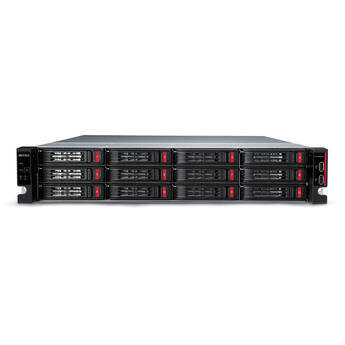
Buffalo TeraStation 51220RH 32TB 12-Bay Rackmount NAS Server (4 x 8TB)
- 32TB Storage Capacity
- 12 x Total Drive Bays / 4 x 8TB HDDs
- 2.0 GHz Annapurna Labs AL524 Processor
- 16GB of DDR4 RAM
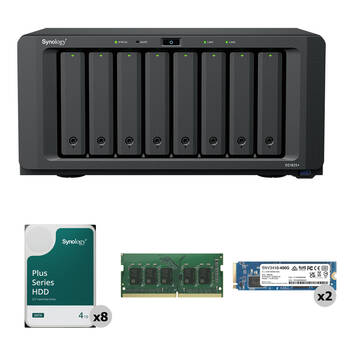
Synology 32TB DiskStation DS1825+ 8-Bay NAS Enclosure Kit with Dual Internal SSDs and RAM Expansion (8 x 4TB)
- 32TB Storage Capacity
- 8 x 4TB 5400 rpm SATA III 3.5" NAS HDDs
- Includes 2 x 400GB NVMe M.2 2280 SSDs
- 8 x 3.5" / 2.5" SATA Drive Bays
QNAP 32TB TVS-h874T 8-Bay NAS Enclosure Kit (4 x 8TB)
- 4 x 8TB 7200 rpm SATA III 3.5" HDDs
- 8 x 3.5/2.5" SATA III 6 Gb/s Drive Bays
- 2 x M.2 2280 PCIe 4.0 x4 Slots
- Intel Core i7 12-Core (12th Gen)
Studio Network Solutions EVO Prodigy 8TB 4-Bay NAS Server (4 x 2TB)
- 8TB Storage Capacity
- 4 x 2TB Enterprise-Class SATA HDDs
- 64-Bit Multi-Core Processor
- 2 x Gigabit Ethernet Ports
QNAP 32TB TVS-h874T 8-Bay NAS Enclosure Kit (4 x 8TB)
- 4 x 8TB 7200 rpm SATA III 3.5" HDDs
- 8 x 3.5/2.5" SATA III 6 Gb/s Drive Bays
- 2 x M.2 2280 PCIe 4.0 x4 Slots
- Intel Core i9 16-Core (12th Gen)
Buffalo TeraStation 71210RH 32TB 12-Bay Rackmount NAS Server (4 x 8TB)
- 32TB Storage Capacity
- 12 x 3.5" Drive Bays / 4 x 8TB HDDs
- 2.2 GHz Intel Xeon D-1713NT Processor
- 16GB DDR4 RAM
OWC Jupiter Kore 32TB 8-Bay NAS Expansion Unit (8 x 4TB HDDs)
- 32TB Storage Capacity
- 8 x 4TB SATA III 3.5" HDDs
- 2 x Mini-SAS 8644 Ports
- 96 Gb/s of Total Bandwidth
Blackmagic Design 16TB Cloud Store Mini (4 x 4TB)
- 16TB NVMe M.2 Flash Storage
- Rackmount Design with Silent Cooling
- Configured as RAID 0
- 10GbE and 1GbE RJ45 Network Ports
OWC Jupiter Callisto 32TB 8-Bay NAS Server (8 x 4TB HDDs)
- 32TB Storage Capacity
- 8 x 4TB SATA III 3.5" HDDs
- 2.2 GHz Intel Xeon Silver 4210 10-Core
- 128GB of 2666 MHz DDR4 ECC RAM
OWC Jellyfish Nomad 16TB NAS Array (2 x 8TB)
- 16TB Storage Capacity
- 2 x 8TB NVMe Shuttle Drives
- 128GB of DDR4 ECC RAM
- 6 x 10GbE | 1 x 1GbE IPMI
Blackmagic Design 20TB Cloud Store
- 20TB NVMe M.2 Flash Storage
- Configured as RAID 5
- 4 x 10Gb Ethernet Ports and Switch
- 2 x Gigabit Ethernet Ports
OWC Jellyfish Studio 16TB NAS Array (8 x 2TB)
- 16TB Storage Capacity
- 8 x 2TB SATA SSDs
- 128GB of DDR4 ECC RAM | 480GB Boot NVMe
- 2 x 10GbE Ports
OWC Jellyfish Nomad 32TB NAS Array (2 x 16TB)
- 32TB Storage Capacity
- 2 x 16TB NVMe Shuttle Drives
- 128GB of DDR4 ECC RAM
- 6 x 10GbE | 1 x 1GbE IPMI
OWC Jellyfish Studio 32TB NAS Array (8 x 4TB)
- 32TB Storage Capacity
- 8 x 4TB SATA SSDs
- 128GB of DDR4 ECC RAM | 480GB Boot NVMe
- 2 x 10GbE Ports
Facilis HUB FLASHPoint 24S - 24TB System with Unlimited Seats of FastTracker
An Overview of NAS Servers
If you're looking to keep your data safe and accessible, NAS servers are an ideal choice for your home or business network. With so many options to consider, understanding what NAS servers are, and a little about their features, can help you make an informed decision.
What's a NAS Hard Drive/Device?
Network attached storage devices, or NAS devices, are file storage devices that are connected to your network, and are always on. The data on them remains accessible to anyone on the network who has the permission to access it. You can also, set your data to back up continuously.
NAS Devices vs. External Hard Drives
Many routers allow you to connect an external hard drive for shared access, but NAS drives offer more—they're computers, not just hard drives. NAS drives can be used as streaming servers, as host storage for remote users, to back your data up onto cloud storage servers, and to run apps.
NAS Backups and Data Redundancy
NAS servers often contain multiple NAS drive trays that house individual hard drives. The NAS device's operating system can use the trays to make copies of your data automatically. This redundancy ensures that there's no loss of data in the event of the failure of one drive.
Choosing a NAS Drive
As with all hard drive purchases, you'll want to consider how much data you need to back up, and decide on storage size. Fortunately, many servers allow you to switch out hard drives and increase the size of your server in the future. You can also opt for a NAS enclosure only, and add drives to your setup yourself. Having more drives available allows for greater redundancy in the event of a hard drive failure. The more precious your data, the more drive bays and drives you'll want to have available for data redundancy.
If you want to access the server using phones or tablets, you'll want to make sure it supports that protocol. Some servers also offer extra precautionary features, such as waterproofing, fireproofing, and theft protection to safeguard your data further.
If you want to ensure your data is both easy to access and well protected, B&H Photo and Video has a wide selection of NAS servers to consider.