Video Chat with a Pro Video Expert - Live

Lilliput BM280-4KS Carry-On 4K Broadcast Monitor (V-Mount)

BH #LIBM2804KSVB • MFR #BM280-4KS-VBP
Print
Lilliput BM280-4KS Carry-On 4K Broadcast Monitor (V-Mount)
Key Features
  • 28" 3840 x 2160 8-Bit LCD
  • Supports up to DCI 4K Input
  • HDR Support, Load Custom 3D LUTs via USB
  • HDMI, SDI, DVI, VGA, USB, Tally Inputs
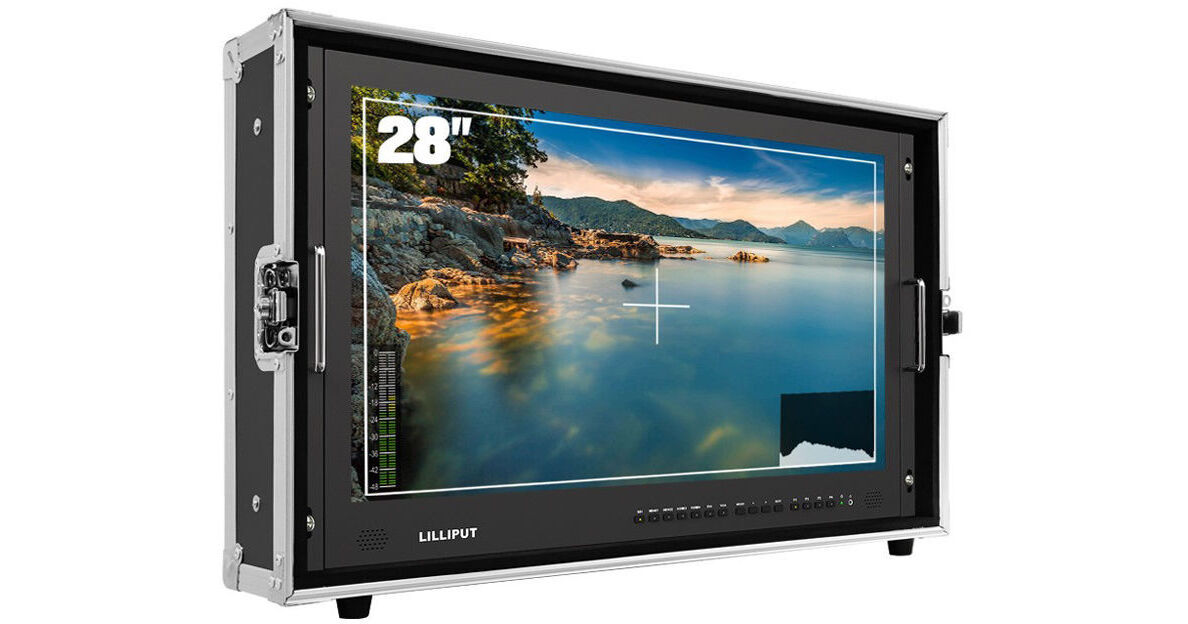
Built into a hard case, the Lilliput BM280-4KS Carry-On 4K Broadcast Monitor is a 28" native UHD 4K monitor with a V-mount battery plate, useful for both studio and field situations. The full capacity of the 3840 x 2160 UHD resolution 8-bit panel can be driven at up to 30 fps by any of the three HDMI 1.4 inputs, via one HDMI 2.0 input with up to DCI 4K sources, or via SDI input with up to 1080p60 sources.
More Details
In Stock
No Store Display
Free Expedited Shipping
Protect Your Gear
Add a protection plan from $77.99
Monitor Size
Battery Plate
Ask an Expert
800-606-6969

Lilliput BM280 Overview

Built into a hard case, the Lilliput BM280-4KS Carry-On 4K Broadcast Monitor is a 28" native UHD 4K monitor with a V-mount battery plate, useful for both studio and field situations. The full capacity of the 3840 x 2160 UHD resolution 8-bit panel can be driven at up to 30 fps by any of the three HDMI 1.4 inputs, via one HDMI 2.0 input with up to DCI 4K sources, or via SDI input with up to 1080p60 sources.

In addition to the four HDMI inputs available on the back panel, HD and SD sources include one 3G-SDI, one DVI, and one VGA port, and there is one loop-through SDI output. Video signals input via any of these ports will be properly scaled to fit the entire screen. Analog audio from the RCA inputs or embedded digital audio from video inputs can be heard using the monitor's built-in speakers or the 3.5mm headphone output. There is a tally input, and a DB-9 tally adapter is included to utilize tally information on the monitor. The monitor also supports adjustable HDR color spaces and you can choose built-in presets or load custom 3D LUTs via its USB port.

For power, this monitor accepts a wide range of voltages ranging from 12 to 24 VDC. In the studio, the included power supply plugs the BM280-4KS into the wall, and the 75/100mm VESA mount can be utilized for mounting on a stand. The included tally connector passes tally information through to the monitor when connected to a switcher. While in the field, the monitor will accept battery power via the built-in V-mount plate. It can stand up vertically using the rubber feet built into the monitor's hard case, and a sunshade is included for increased visibility outdoors.

Features
Monitoring Tools
  • Peaking
  • Check field
  • Image rotation/flip
  • Overscan
  • Underscan
  • Image freeze
  • Pixel to pixel
  • False color
  • Exposure (SDI-only)
  • Histogram (SDI-only)
  • Timecode (SDI-only)
  • Aspect ratio selection
  • Screen markers
  • Color space
  • HDR
  • Color temperature adjustment
HDR and 3D LUTs
When HDR is activated, the display reproduces a greater dynamic range of luminosity, allowing for colors and lighter and darker details to be displayed more clearly. You can use preset Logs or load your own custom LUTs via the USB port.
Assignable Buttons
Using the four assignable buttons on the front panel, you can quickly turn any four essential monitoring tools on and off without venturing into the monitor's menu system.
Carry-On Enclosure
The included hard case/enclosure improves the robustness of the monitor's metal chassis, useful when venturing outside controlled environments. A rear opening gives easy access to all the monitor's ports and accessory mounts.
Supports Wireless HDMI (WHDI) Technology
With a separately available WHDI receiver, the BM280-4KS can accept wireless HDMI signals up to 1080p60 from up to 164' away for a hassle-free cordless connection. With the WHDI system in place, one transmitter can broadcast to multiple receivers, so no splitter is required for multi-monitor viewing.

Lilliput BM280 Specs

Key Specs
Display Size
28.0" / 71.1 cm
Native Resolution
3840 x 2160
Touchscreen
No
HDR Support
No
Media/Memory Card Slot
No
Wireless
No
Video Format
HDMI (8-Bit)
DCI 4K
UHD 4K
1080p
1080i
720p
480p
SDI (8-Bit)
1080p: 60/59.94/50/30/29.97/25/24/23.98
1080PsF: 24/23.98
1080i: 60/59.94/50
720p: 60/59.94/50/30/29.97/25/24/23.98
576i: 50
480i: 59.94
Battery
1x V-Mount on Fixed Plate
Power Consumption
51 W
Display
Panel Type
IPS-Type LCD
Display Size
28.0" / 71.1 cm
Native Resolution
3840 x 2160
Aspect Ratio
16:9
Viewing Angle
Horizontal: 170°
Vertical: 160°
Touchscreen
No
Maximum Brightness
300 nits / cd/m2
Contrast Ratio
1000:1
Color Support
1.07 Billion Colors (8-Bit+FRC)
HDR Support
No
LUT Support
Yes
Image Controls
Check Field, Color Temperature Selection, False Color, Focus Peaking, Histogram, Pixel-to-Pixel Zoom, Scaling, Screen Markers, Underscan
Inputs/Outputs
Video I/O
1x HDMI 2.0 Input
3x HDMI 1.4 Input
1x BNC (3G-SDI) Input
1x BNC (3G-SDI) Output
1x DVI-I Dual-Link Input
1x VGA (RGBHV) Input
Audio I/O
1x 2RCA Line Input
1x 1/8" / 3.5 mm Headphone Output
Built-In Speaker
Mono
Power I/O
1x XLR 4-Pin Input
Other I/O
1x DE-9/DB-9 (Tally)
Media/Memory Card Slot
No
Wireless
Wireless
No
Wi-Fi
No
Bluetooth
No
Mobile App Compatible
No
Format Support
Video Format
HDMI (8-Bit)
DCI 4K
UHD 4K
1080p
1080i
720p
480p

SDI (8-Bit)
1080p: 60/59.94/50/30/29.97/25/24/23.98
1080PsF: 24/23.98
1080i: 60/59.94/50
720p: 60/59.94/50/30/29.97/25/24/23.98
576i: 50
480i: 59.94
Power
Input Power
12 to 24 VDC at 3.4 A
Battery
1x V-Mount on Fixed Plate
Power Consumption
51 W
Mounting
VESA Mounting-Hole Pattern
75 x 75 mm, 100 x 100 mm
General
Operating Conditions
32 to 140°F / 0 to 60°C
Storage Conditions
-4 to 140°F / -20 to 60°C
Dimensions
30 x 18.7 x 6.8" / 76.1 x 47.4 x 17.3 cm (Including Case)
26.4 x 16.7 x 1.8" / 67 x 42.5 x 4.5 cm
Weight
46.30 lb / 21.00 kg, Including Case
20.72 lb / 9.4 kg
Packaging Info
Package Weight
53 lb
Box Dimensions (LxWxH)
32 x 21.5 x 9.4"

Lilliput BM280 Reviews

Excellent product

By Hugo
Rated 4 out of 5
Date: 2024-06-30

So far I have found a monitor with various options for use and practice as false color

Great monitor!

By Dustin
Rated 5 out of 5
Date: 2023-02-14

Only monitor to have multiple angles without having other accessories to change angles. It's heavy, with a case, but I like it! Very professional and great price. If I can find out how to install Luts, I would be even happier!

See any errors on this page?

Is there an option for the monitor, in the case, ...

Is there an option for the monitor, in the case, to be secured in the viewing position, to a tabletop for safety? I'm thinking
Asked by: Michael
Aside from using some form of straps there isn't going to be a a way to mount the Lilliput BM280-4KS Carry-On 4K Broadcast Monitor (V-Mount) to a table top while it is inside it's hard case, as the hard case does not have nay mounting points. You could consider removing the monitor from the hard case, and then use a table top VESA mount monitor stand to mount the monitor to the table.
Answered by: Paige K
Date published: 2023-10-09

Can this be used with the Roland V-8HD HDMI Video ...

Can this be used with the Roland V-8HD HDMI Video Switcher?
Asked by: Debbie
Yes, you can use the Roland V-8HD with the Lilliput BM280-4KS Carry-On 4K Broadcast Monitor to multiview.
Answered by: Nick Y
Date published: 2022-04-03

what is the different on BM280-4K model and ...

what is the different on BM280-4K model and BM280-4KS??
Asked by: Fabian
The new Lilliput BM280-4KS adds HDR and 3D LUT support.
Answered by: Chris H
Date published: 2022-02-08

How do I get an enter key to activate the LUT ...

How do I get an enter key to activate the LUT Converter?
Asked by: Mu Chian
Please contact Lilliput and give them your computer ID number to get an Enter key to activate the converter.
Answered by: Dennis L
Date published: 2021-08-30

How do you add LUTs to this monitor? Seems like a ...

How do you add LUTs to this monitor? Seems like a very complicated process.
Asked by: Salvatore
Please see instruction in the user manual or contact LILLIPUT USA for detail,thanks!
Answered by: Joanna
Date published: 2021-06-20

Do you need to remove the hard case to use the ...

Do you need to remove the hard case to use the vesa mount on a c-stand?
Asked by: Morgan
Yes, you have to remove it from the hardcase and also remove the Vmount battery slot to access the VESA mounting holes.
Answered by: Angelito
Date published: 2024-07-23

Can I see all 4 inputs (picture-in-picture) ...

Can I see all 4 inputs (picture-in-picture) simultaneously?
Asked by: Amir
YES
Answered by: Joanna
Date published: 2023-07-21

One of the other answers on here says that each ...

One of the other answers on here says that each input will only "use a portion of the 1080p screen". Is this not a 4k screen?
Asked by: Albert
The Lilliput BM280-4K Carry-On 4K Monitor (V-Mount) is a 3840 x 2160 resolution display. Each of the four camera inputs will take up a resolution of 1920 x 1080 when doing a quad pattern. 4K resolution is four times the pixel resolution of 1920 x 1080.
Answered by: Richard
Date published: 2023-07-18
  • y_2026, m_8, d_9, h_10CST
  • bvseo_bulk, prod_bvqa, vn_bulk_3.0.48
  • cp_1, bvpage1
  • co_hasquestionsanswers, tq_37
  • loc_en_US, sid_1484327, prod, sort_[SortEntry(order=HAS_STAFF_ANSWERS, direction=DESCENDING)]
  • clientName_bhphotovideo
Whatever You Need, We've Got It