
Black Friday

Video Chat with a Photography Expert - Live

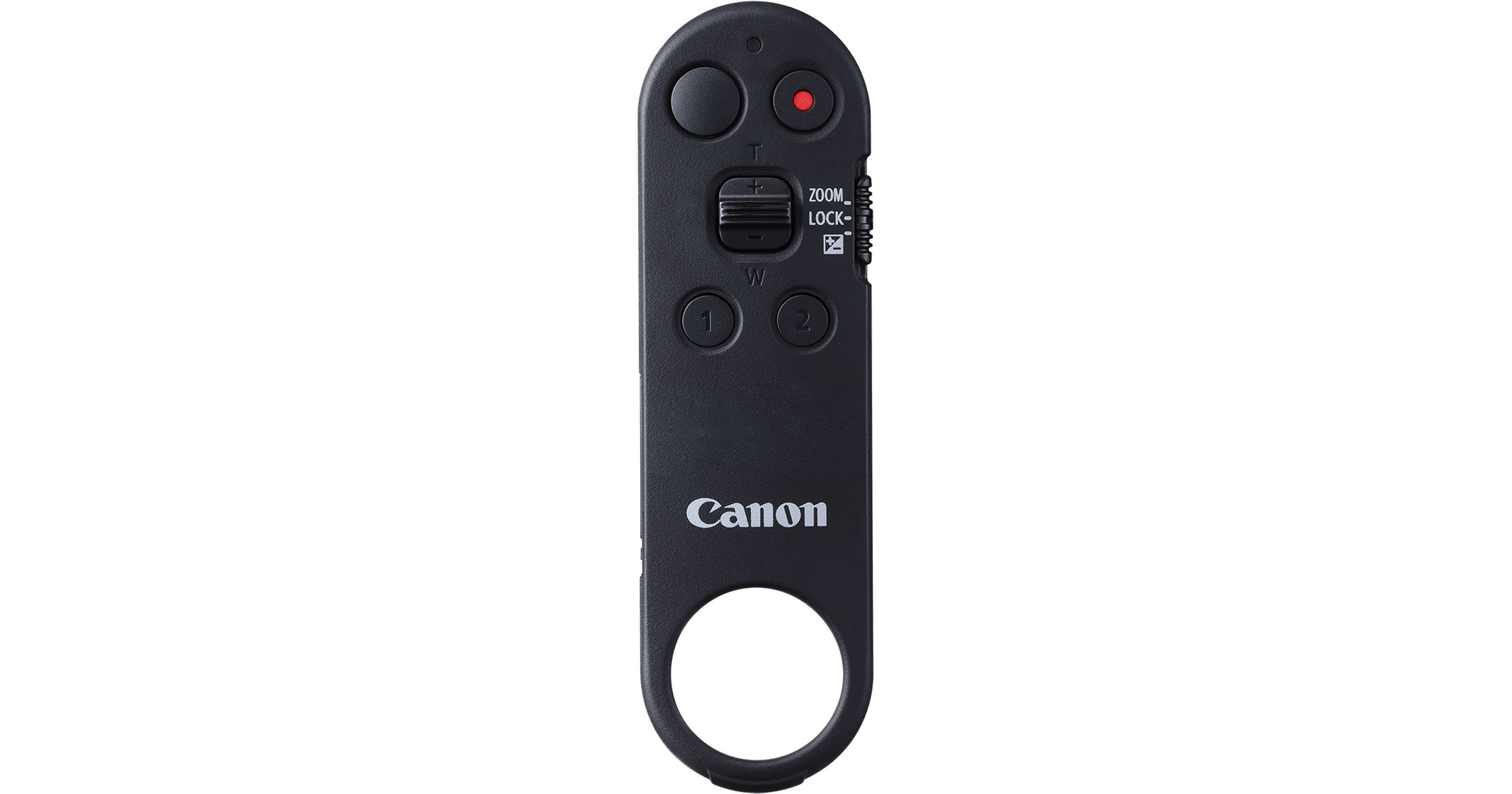
Canon BR-E2 Bluetooth Remote

BH #CABRE2 • MFR #7439C001
Print
Canon BR-E2 Bluetooth Remote
Key Features
  • Wireless Remote for Select Canon Cameras
  • Remotely Start/Stop Video & Take Photos
  • Control Power Zoom & Autofocus
  • Two User-Assignable Function Buttons
Enable convenient wireless control of select Canon cameras with this BR-E2 Bluetooth Remote. Featuring an expanded range of controls, the remote starts and stops video recording, takes photos, triggers autofocus, changes exposure compensation, and controls the power zoom function of compatible lenses. It also sports two user-assignable buttons for convenient, customizable controls. Easily switch between cameras without needing to unlink the BR-E2, and enjoy the freedom of remote control up to a 16.4 ft operating range.
More Details
Top Seller
In Stock
No Store Display
Free Delivery: Wed, Dec 2
to
Protect Your Gear
Add a protection plan from $12.99
Ask an Expert
800-952-1815

Canon BR-E2 Overview

Enable convenient wireless control of select Canon cameras with this BR-E2 Bluetooth Remote. Featuring an expanded range of controls, the remote starts and stops video recording, takes photos, triggers autofocus, changes exposure compensation, and controls the power zoom function of compatible lenses. It also sports two user-assignable buttons for convenient, customizable controls. Easily switch between cameras without needing to unlink the BR-E2, and enjoy the freedom of remote control up to a 16.4 ft operating range.

Compatible Canon Cameras
  • EOS R1
  • EOS R3
  • EOS R5 Mark II
  • EOS R6 Mark II, EOS R6 Mark III
  • EOS R6 V
  • EOS R7
  • EOS R8
  • EOS R10
  • EOS R50
  • EOS R50 V
  • EOS R100
  • EOS M50 Mark II
  • PowerShot G7 X Mark III
  • PowerShot G5 X Mark II
  • PowerShot V1
UPC: 013803389685

Canon BR-E2 Specs

Item Type
Wireless: Bluetooth
Control Modes/Options
Photo & Video Trigger Buttons with Programmable Function/Zoom/Focus Control
Wireless Range
16.4' / 5 m
Power Source
Battery (1x CR2032)
Dimensions
3.6 x 2.5 x 1.3" / 9.1 x 6.4 x 3.3 cm
Weight
0.6 oz / 17 g
Packaging Info
Package Weight
0.095 lb
Box Dimensions (LxWxH)
4.15 x 2.5 x 1.35"

Canon BR-E2 Reviews

No Attachments - No Wires - Simple Setup - NICE

By Rob
Rated 5 out of 5
Date: 2026-11-26

When you want a remote that doesn't required phone setup, no wire, no attachments, this is perfect. Yeah. I have all the other options. Phone is fine if you have time to set things up almost every time. Wired release works reliably, but it's wired. Wireless works when you need to shoot from 50 yards away. This is best when you just want a wireless shutter that is simple to setup, no wires, and no attachments within Bluetooth range.

Works but a big step down from RC-6

By Paul
Rated 3 out of 5
Date: 2026-09-15

Needed to purchase this as my R6m3 was not compatible with the wireless remote I had used for older DSLRs. The BR-E2 works for my use case of triggering single shots, but is a big step down from the RC-6 in multiple ways: - Bluetooth is less reliable than IR, and the camera can only connect to one BT device (e.g. phone) at a time - Battery access mechanism is incredibly difficult/fiddly - More expensive than RC-6 - Size is unnecessarily large - Lacks a protective carrying pouch I'd say the single advantage is not needing to have line-of-sight to an IR receiver on the camera, but the downsides are not worth the tradeoff. If I didn't need to trigger from distance, I'd likely opt for a wired trigger instead.

See any errors on this page?

not compatible with the C50?

not compatible with the C50?
Asked by: Patrick
The Canon BR-E2 Bluetooth Remote is not compatible with the Canon C50.
Answered by: Kenneth C
Date published: 2026-05-19

Does this stay connected / paired with the camera

Does this stay connected / paired with the camera well or will it be like the app that disconnects if you step away for more than 30 seconds? Hoping to use it on a Canon R8.
Asked by: Daniel
The Canon BR-E2 Bluetooth Remote once paired with the camera like the R8, does not lose that information.
Answered by: Rob K
Date published: 2026-11-01

Hi can 2 cameras usethis one remote? R62 and the ...

Hi can 2 cameras usethis one remote? R62 and the r50v?
Asked by: Ashton
The Canon BR-E2 Bluetooth Remote is compatible with the Canon EOS R6 Mark II and Canon EOS R50 V Mirrorless Cameras. While you can register the remote with up to 12 devices, it will not allow simultaneous control of multiple cameras.
Answered by: Trey C
Date published: 2026-11-20

How are the "user assignable buttons" assigned to

How are the "user assignable buttons" assigned to specific functions on an R5Mk2?
Asked by: Gustave
According to the manufacturer, the user assignable buttons on the Canon BR-E2 Bluetooth Remote cannot be used with the Canon Eos R5 Mark 2 camera.
Answered by: Dan W
Date published: 2026-07-17

Will this work or compatible with the Canon EOS R5

Will this work or compatible with the Canon EOS R5?
Asked by: David
Yes, the Canon BR-E2 Bluetooth Remote is compatible with the Canon EOS R5.
Answered by: Andrea B
Date published: 2026-05-16

Would this work for bulb mode with the Canon R6 Mk

Would this work for bulb mode with the Canon R6 Mk II?
Asked by: Brandon
Yes, the Canon BR-E2 Bluetooth Remote works with Canon R6 Mark II mirrorless camera for bulb exposures. Once the camera is in bulb mode, start the exposure with one press and end it with another.
Answered by: Samik G
Date published: 2026-06-26

Can I play/stop video on multiple cameras at once?

Can I play/stop video on multiple cameras at once?
Asked by: John
The Canon BR-E2 Bluetooth Remote (BH #CABRE2) can start/stop video recording for one camera at a time, not multiple cameras at the same time.
Answered by: Boyd H
Date published: 2026-11-15

Is this compatible with cano EOS 60D?

Is this compatible with cano EOS 60D?
Asked by: Gregory
Unfortunately, the Canon BR-E2 Bluetooth Remote is not compatible with the Canon EOS 60D DSLR Camera.
Answered by: Marvin H
Date published: 2026-08-24
  • y_2026, m_11, d_28, h_6CST
  • bvseo_bulk, prod_bvqa, vn_bulk_3.0.50
  • cp_1, bvpage1
  • co_hasquestionsanswers, tq_9
  • loc_en_US, sid_1970925, prod, sort_[SortEntry(order=HAS_STAFF_ANSWERS, direction=DESCENDING)]
  • clientName_bhphotovideo
Whatever You Need, We've Got It