Video Chat with a Pro Video Expert - Live

MOTU HD Express Video Interface w/ PCI Express Card

BH #MACHDMID • MFR #4200
Print
MOTU HD Express Video Interface w/ PCI Express Card
Key Features
  • Works with Final Cut Pro 6.0.5 and Up
  • Supports Adobe Premiere Pro CS5.5 (Win)
  • Capture and Monitor HD & SD (NTSC/PAL)
  • PCI Express Interface for Desktop System
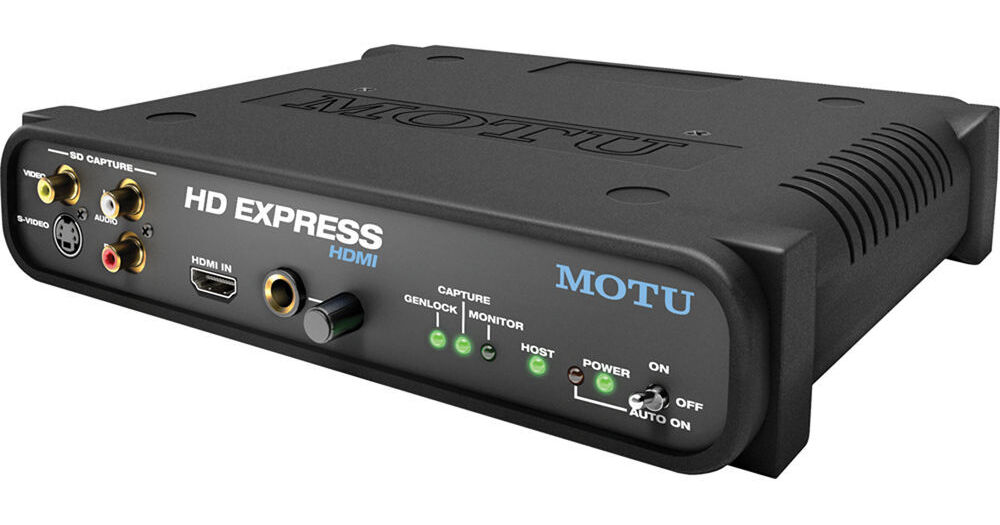
The MOTU HD Express Video Interface w/ PCI Express Card is a high-definition video and audio capture and monitoring device with support for Final Cut Pro (Mac) and Adobe Premiere Pro CS5.5 (Windows). The HD Express connects to your desktop computer by filling an open PCI Express slot. The PCIe card then connects via the included HDMI cable to the main 1RU, half-rack-wide I/O interface.

The HD Express features HDMI input and output, for both capture and monitoring of HDMI-conveyed video and its eight embedded channels of audio. The HDMI input enables you to directly connect an HDMI-capable camera and capture full-raster, uncompressed HD video straight from its image sensor(s), before it's processed and recorded. The video interface's HDMI output enables monitoring on any modern flat-panel monitor or projector with a corresponding input. Resolutions up to 1920 x 1080 are supported.

For import to the nonlinear editor, select the supported codec of your choice for the video you capture with the HD Express, and the video interface will support it for monitoring output. By importing the video directly as a supported codec (such as Apple ProRes or ProRes HQ in Final Cut Pro) from the HD Express, you eliminate unnecessary compression stages that might result from copying wrapped video files to the desktop.

The HD Express also supports broadcast-quality SD video capture and monitoring for both PAL and NTSC regions. The device features connections for component HD/SD, composite, and S-Video in 10-bit 4:2:2.

Perhaps owing to MOTU's technological heritage, audio is well-served by the HD Express interface. Besides embedded audio channels from the HDMI connections, there's also S/PDIF in and out, stereo RCA analog audio input, and eight channels of RCA analog audio out, for monitoring on 5.1 or 7.1 surround-sound speakers. The interface supports all standard audio sample rates from 44.1 to 96 kHz.

More Details
Special Order
Expected availability: 2-4 Weeks
No Store Display
This item cannot be canceled or returned.
Free Standard Shipping
Protect Your Gear
Add a protection plan from $38.99
Ask an Expert
800-606-6969

MOTU HD Express Overview

The MOTU HD Express Video Interface w/ PCI Express Card is a high-definition video and audio capture and monitoring device with support for Final Cut Pro (Mac) and Adobe Premiere Pro CS5.5 (Windows). The HD Express connects to your desktop computer by filling an open PCI Express slot. The PCIe card then connects via the included HDMI cable to the main 1RU, half-rack-wide I/O interface.

The HD Express features HDMI input and output, for both capture and monitoring of HDMI-conveyed video and its eight embedded channels of audio. The HDMI input enables you to directly connect an HDMI-capable camera and capture full-raster, uncompressed HD video straight from its image sensor(s), before it's processed and recorded. The video interface's HDMI output enables monitoring on any modern flat-panel monitor or projector with a corresponding input. Resolutions up to 1920 x 1080 are supported.

For import to the nonlinear editor, select the supported codec of your choice for the video you capture with the HD Express, and the video interface will support it for monitoring output. By importing the video directly as a supported codec (such as Apple ProRes or ProRes HQ in Final Cut Pro) from the HD Express, you eliminate unnecessary compression stages that might result from copying wrapped video files to the desktop.

The HD Express also supports broadcast-quality SD video capture and monitoring for both PAL and NTSC regions. The device features connections for component HD/SD, composite, and S-Video in 10-bit 4:2:2.

Perhaps owing to MOTU's technological heritage, audio is well-served by the HD Express interface. Besides embedded audio channels from the HDMI connections, there's also S/PDIF in and out, stereo RCA analog audio input, and eight channels of RCA analog audio out, for monitoring on 5.1 or 7.1 surround-sound speakers. The interface supports all standard audio sample rates from 44.1 to 96 kHz.

HDMI video capture and monitoring for Mac & PC – Capture uncompressed-quality, digital HD from HDMI-equipped camcorders. Monitor pixel for pixel on plasma and LCD screens
Analog video I/O – Capture and monitor component HD or SD, plus composite and S-Video (NTSC or PAL)
Connects to a Mac or PC tower via PCI Express for ultra-fast operation
Comprehensive video capture & monitoring – supports all standard SD and HD video formats up to and including 1080p30 (720p, 1080i, 1080p & 1080PsF)
Captures and plays uncompressed HD and SD – 10-bit 4:2:2 color depth and 1920x1080 resolution
Support for ProRes and other popular codecs – capture and monitor full-raster (1920x1080 or 1280x720) Apple ProRes, ProRes HQ, or other popular host-based codecs supported by Apple Final Cut Pro and (for Windows 7 or Vista, 64-bit only) Adobe Premiere Pro
Support for file-based workflows – lets you capture, edit and monitor in any codec supported natively in Final Cut, including XDCAM, P2, AVC Intra, DVCPRO and others with no transcoding needed
Broadcast quality – 10-bit 4:2:2 signal path throughout
Comprehensive audio – Capture 8 channels of embedded HDMI audio. Play back stereo, 5.1, or even 7.1 surround sound directly to powered speakers. Connect speakers, a home theater amp or an audio mixer and monitor your mix in stereo or full 5.1 or 7.1 surround sound. Also provides S/PDIF digital I/O with sample-rate conversion
Supports 12 channels of simultaneous audio input and 16 channels of simultaneous audio output
Front-panel 1/4" headphone jack with dedicated volume control
Half rack space form factor with dedicated connectors – no cable swapping or gangly, inconvenient breakout cables. Includes rack mounting brackets
UPC: 839128005648

MOTU HD Express Specs

Operating System
Mac OS X
Windows 7 / Vista SP1 or later (64-bit versions only)
Minimum System Requirements
1 GB of RAM; 2 GB or more is recommended
Available PCI-Express x1 slot
Large hard disk drive (preferably at least 500 GB)
CD-ROM disc drive for installation
For Mac OS X:
Multi-processor or multi-core Intel Mac
Mac OS X v10.5.7 or later
For use with Final Cut Pro 6.0.5 or later; Final Cut Pro 7.0 or later is recommended under Mac OS X v10.6
For Windows:
Intel Core 2 Duo, AMD Phenom II, or equivalent 64-bit processor; multiple processors or multi-core processor required
2 GB of RAM; 4 GB or more is recommended
Windows 7 or Vista, 64-bit versions only; Vista SP1 or later required
For use with Adobe Premiere Pro CS5 or CS5.5; version 5.0.3 or later required
Software Supported
Final Cut Pro 6.0.5 or higher on Mac OS X
(Coming soon: Adobe Premiere Pro 4.0.1 or higher on Windows 7 / Vista / XP)
Drivers
Supports CoreAudio driver
(Coming soon: support for Wave and ASIO drivers)
Video Input/Output
1x HDMI in and out (4:2:2 10-bit, YCbCr, or RGB)
1x DVI output with HDMI-to-DVI adapter (sold separately)
1x HD/SD component in and out (10-bit, YPbPr, or RGB) on 3x RCAs
1x composite in (10-bit) on RCA
1x S-Video in (10-bit) on 4-pin mini-DIN
1x composite in and out (10-bit CVBS) on shared RCA
1x S-Video in and out (10-bit Y/C) on shared RCA
Video Formats
SD: 576i25 (PAL), 486i29.97 (NTSC)
HD: 720p23.976, 720p24, 720p25, 720p29.97, 720p30, 720p50, 720p59.94, 720p60, 1080p23.976, 1080p24, 1080p25, 1080p29.97, 1080p30, 1080PsF23.976, 1080PsF24, 1080PsF25, 1080PsF29.97, 1080PsF30, 1080i25, 1080i29.97, 1080i30
Audio Input/Output
8x RCA analog outputs
2x RCA analog input
2x S/PDIF digital input and output with sample rate conversion
8x HDMI embedded audio in and out
Sample Rates
Supports all standard audio sample rates from 44.1 to 96 kHz
Headphone Jack
1/4" w/ volume knob; matches analog outputs 1-2 on rear panel
Rack Height
With rack ears attached, fits in one-half of a standard 19 inch (48.3 cm) rack at 1U high
Dimensions
Excluding rack ears, knobs & connectors: 1.75 x 8.6 x 7" (4.4 x 21.9 x 17.8 cm)
Packaging Info
Package Weight
4.6 lb
Box Dimensions (LxWxH)
14.9 x 11.4 x 5.3"

MOTU HD Express Reviews

Media Composer-Yes; Pro Tools-No

By Paul K.
Rated 4 out of 5
Date: 2014-09-16

I've been looking for a reasonably priced IO for a co-install of Avid Media Composer and Pro Tools. I've always liked MOTU products and noticed they used the ASIO driver and thought there was a chance it could work with Pro Tools as well as Media Composer on a qualified system. It installed easily and worked well with Media Composer. It would not work with Pro Tools and gave me a sampling rate error. Customer support was easy to reach and stated simply it is not intended to work with Pro Tools -end of story.

I love this

By Hessler
Rated 4 out of 5
Date: 2011-09-26

Being able to preview your work on your own TV screen is a life saver, specially when you're doing color correction. I have not being able to make it work with Premiere CS5, I gotta keep trying, in FCS is quite easy to use.

See any errors on this page?

Does it come with capture software? Or do you ...

Does it come with capture software? Or do you need to use an old version of Premiere Pro to capture? Can you also set how long it will capture for then stop?
Asked by: Justin
It does not come with capture software, but should work on versions of Premiere CS5 or later, as per manufacturer specs. In and out points are not set on this device but should be entered on the software interface being used.
Answered by: Bruno
Date published: 2020-12-15

question

Is the PCIe HDMI card an HDMI-in ?
Asked by: jon r.
Sorry, but the answer is no. The PCI card is used only for connection to the interface. It does not pass a raw HDMI signal.
Answered by: Dennis A L.
Date published: 2018-08-28

How well does this work for leagacy video ...

How well does this work for leagacy video transfer from VHS without dropping frames or stopping at dropped frames?
Asked by: Justin
The HD Express likely would have worked well for this application, but since MOTU is moving away from video interfaces, I can't in good faith recommend the HD Express due to its compatibility limitations: If you need further assistance, please contact [email protected].
Answered by: Nick Y
Date published: 2020-12-14

I read on the MOTU site that this has no support ...

I read on the MOTU site that this has no support for Premiere CC. Has anyone tested this? will it work as a capture device?
Asked by: Joseph
Yes, according to recent tests performed with this device and Adobe Premiere Pro CC, there was no compliance between the two products.
Answered by: Bruno
Date published: 2020-08-14

question

Will this stream Ustream or Livestream and work with Sony Vegas?
Asked by: Anonymous
No, as of right now this will only support Final Cut Pro 6.0.5 or higher on Mac OS Xand Adobe Premiere Pro 4.0.1 or higher on Windows 7 / Vista / XP.
Answered by: Muriel A.
Date published: 2018-08-28

question

I can use it as a monitor on real 5.1 final cut pro x ?
Asked by: Max
Yes, you can use the HD Express for 5.1 audio monitoring with FCPX.
Answered by: Dennis A L.
Date published: 2018-08-28

question

does the hdmi out on the back output signal at the same time the hdmi out to the pci card is used?
Asked by: Anonymous
Yes, the HDMI out port is available at the same time as the connection to the pci card.Thank you for your question.
Answered by: Mike B. MOTU Expert
Date published: 2018-08-28

question

I have an older Macbook Pro (around 2008). Will this work?I want to capture video from the component output of my old Sony HVR Z1U camcorder to 1080p in Final Cut Pro or Adobe Premiere Pro.Will this do it?Many thanks.
Asked by: Adrian
Sorry update: Not my Macbook Pro. My Mac Pro (tower).Couldn't find a way to edit the original question.
Answered by: Adrian S.
Date published: 2018-08-28
  • y_2026, m_5, d_31, h_13CST
  • bvseo_bulk, prod_bvqa, vn_bulk_3.0.46
  • cp_1, bvpage1
  • co_hasquestionsanswers, tq_8
  • loc_en_US, sid_689497, prod, sort_[SortEntry(order=HAS_STAFF_ANSWERS, direction=DESCENDING)]
  • clientName_bhphotovideo
Whatever You Need, We've Got It