Video Chat with a Pro Video Expert - Live

MOTU HD Express Video Interface w/ PCI Express Card

BH #MACHDMID • MFR #4200
Print
MOTU HD Express Video Interface w/ PCI Express Card
Key Features
  • Works with Final Cut Pro 6.0.5 and Up
  • Supports Adobe Premiere Pro CS5.5 (Win)
  • Capture and Monitor HD & SD (NTSC/PAL)
  • PCI Express Interface for Desktop System
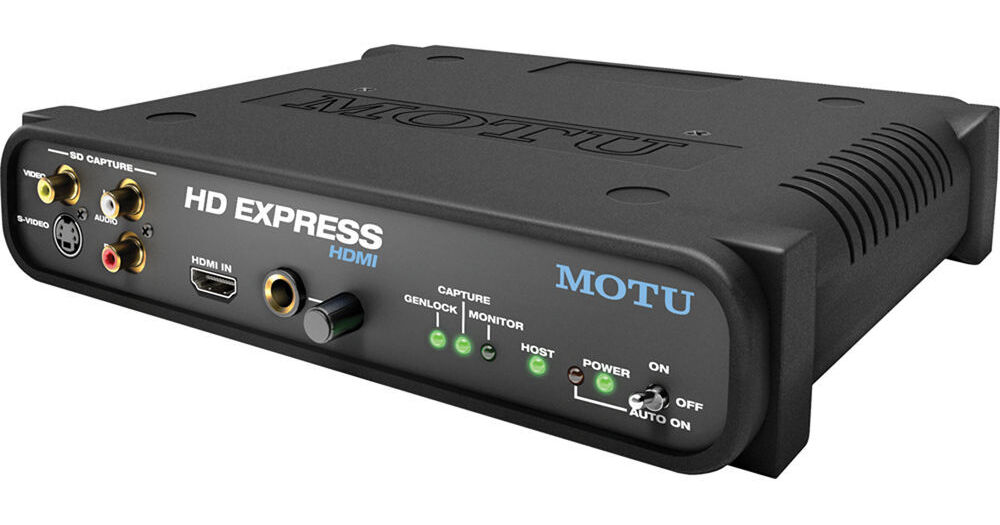
The MOTU HD Express Video Interface w/ PCI Express Card is a high-definition video and audio capture and monitoring device with support for Final Cut Pro (Mac) and Adobe Premiere Pro CS5.5 (Windows). The HD Express connects to your desktop computer by filling an open PCI Express slot. The PCIe card then connects via the included HDMI cable to the main 1RU, half-rack-wide I/O interface.

The HD Express features HDMI input and output, for both capture and monitoring of HDMI-conveyed video and its eight embedded channels of audio. The HDMI input enables you to directly connect an HDMI-capable camera and capture full-raster, uncompressed HD video straight from its image sensor(s), before it's processed and recorded. The video interface's HDMI output enables monitoring on any modern flat-panel monitor or projector with a corresponding input. Resolutions up to 1920 x 1080 are supported.

For import to the nonlinear editor, select the supported codec of your choice for the video you capture with the HD Express, and the video interface will support it for monitoring output. By importing the video directly as a supported codec (such as Apple ProRes or ProRes HQ in Final Cut Pro) from the HD Express, you eliminate unnecessary compression stages that might result from copying wrapped video files to the desktop.

The HD Express also supports broadcast-quality SD video capture and monitoring for both PAL and NTSC regions. The device features connections for component HD/SD, composite, and S-Video in 10-bit 4:2:2.

Perhaps owing to MOTU's technological heritage, audio is well-served by the HD Express interface. Besides embedded audio channels from the HDMI connections, there's also S/PDIF in and out, stereo RCA analog audio input, and eight channels of RCA analog audio out, for monitoring on 5.1 or 7.1 surround-sound speakers. The interface supports all standard audio sample rates from 44.1 to 96 kHz.

More Details
Special Order
Expected availability: 2-4 Weeks
No Store Display
This item cannot be canceled or returned.
Free Standard Shipping
Protect Your Gear
Add a protection plan from $38.99
Ask an Expert
800-606-6969
See any errors on this page?

Does it come with capture software? Or do you ...

Does it come with capture software? Or do you need to use an old version of Premiere Pro to capture? Can you also set how long it will capture for then stop?
Asked by: Justin
It does not come with capture software, but should work on versions of Premiere CS5 or later, as per manufacturer specs. In and out points are not set on this device but should be entered on the software interface being used.
Answered by: Bruno
Date published: 2020-12-15

question

Is the PCIe HDMI card an HDMI-in ?
Asked by: jon r.
Sorry, but the answer is no. The PCI card is used only for connection to the interface. It does not pass a raw HDMI signal.
Answered by: Dennis A L.
Date published: 2018-08-28

How well does this work for leagacy video ...

How well does this work for leagacy video transfer from VHS without dropping frames or stopping at dropped frames?
Asked by: Justin
The HD Express likely would have worked well for this application, but since MOTU is moving away from video interfaces, I can't in good faith recommend the HD Express due to its compatibility limitations: If you need further assistance, please contact [email protected].
Answered by: Nick Y
Date published: 2020-12-14

I read on the MOTU site that this has no support ...

I read on the MOTU site that this has no support for Premiere CC. Has anyone tested this? will it work as a capture device?
Asked by: Joseph
Yes, according to recent tests performed with this device and Adobe Premiere Pro CC, there was no compliance between the two products.
Answered by: Bruno
Date published: 2020-08-14

question

Will this stream Ustream or Livestream and work with Sony Vegas?
Asked by: Anonymous
No, as of right now this will only support Final Cut Pro 6.0.5 or higher on Mac OS Xand Adobe Premiere Pro 4.0.1 or higher on Windows 7 / Vista / XP.
Answered by: Muriel A.
Date published: 2018-08-28

question

I can use it as a monitor on real 5.1 final cut pro x ?
Asked by: Max
Yes, you can use the HD Express for 5.1 audio monitoring with FCPX.
Answered by: Dennis A L.
Date published: 2018-08-28

question

does the hdmi out on the back output signal at the same time the hdmi out to the pci card is used?
Asked by: Anonymous
Yes, the HDMI out port is available at the same time as the connection to the pci card.Thank you for your question.
Answered by: Mike B. MOTU Expert
Date published: 2018-08-28

question

I have an older Macbook Pro (around 2008). Will this work?I want to capture video from the component output of my old Sony HVR Z1U camcorder to 1080p in Final Cut Pro or Adobe Premiere Pro.Will this do it?Many thanks.
Asked by: Adrian
Sorry update: Not my Macbook Pro. My Mac Pro (tower).Couldn't find a way to edit the original question.
Answered by: Adrian S.
Date published: 2018-08-28
  • y_2026, m_5, d_31, h_13CST
  • bvseo_bulk, prod_bvqa, vn_bulk_3.0.46
  • cp_1, bvpage1
  • co_hasquestionsanswers, tq_8
  • loc_en_US, sid_689497, prod, sort_[SortEntry(order=HAS_STAFF_ANSWERS, direction=DESCENDING)]
  • clientName_bhphotovideo
Whatever You Need, We've Got It