
Video Chat with a Lighting Expert - Live

Impact SF-ABRL Flash Head Kit

BH #IMSFABRL160K • MFR #SFABRL160K
Print
Impact SF-ABRL Flash Head Kit
Key Features
  • 160W/s Output
  • Lightweight Polycarbonate Design
  • Accepts Softboxes Without Speed Ring
  • 5/8" Stand Mount
The Impact SF-ABRL Flash Head Kit offers a lightweight 160W/s stand mounted flash head with 2 key light modifiers for creative control.
More Details
In Stock
No Store Display
Free 2-Day Shipping
Protect Your Gear
Add a protection plan from $16.00
Ask an Expert
800-606-6969
Kit Contains:

The Impact SF-ABRL Flash Head Kit offers a lightweight 160W/s stand mounted flash head with 2 key light modifiers for creative control.

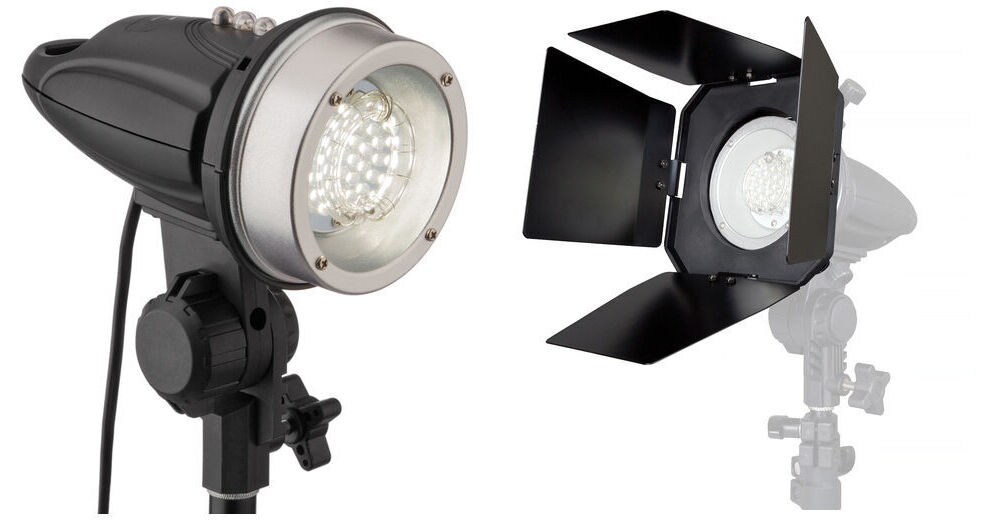
The included Impact SF-ABRL160 Stand Mount Flash has a 160W/s output and features a bright LED modeling lamp that, unlike its quartz counterparts, is virtually maintenance-free. And instead of lasting 100 hours, the LED typically lasts approximately 25,000 hours. The SF-ABRL160 has a built-in optical slave for wireless triggering, a sync cord for direct firing from your camera, a built-in umbrella receptacle, and a 5/8" standard stand mount.

The included Impact Barndoor Kit is comprised of a snap-on 4-leaf barndoor set, filter frame, 3 colored gels and a diffusion gel. The barndoors shape and direct the SF-ABRL160's light output. The SF-ABRL Flash Head Kit includes an additional light-shaping tool. The Impact Snoot fits over the head and narrows the output into a soft circle that is smaller as you move closer to your subject and grows larger as you move it away. For a still smaller circle of light, a removable 30-degree honeycomb grid is included. The snoot is ideal for creative effects on backgrounds or for a hair or accent light. Gels can be taped over it for creative color effects.

Impact SF-ABRL160 Stand Mount Flash with LED Modeling Light

The Impact SF-ABRL160 Stand Mount Flash with LED Modeling Light is a lightweight monolight with straightforward features that make it ideal for most applications. The 160 watt second strobe features a bright LED modeling lamp that, unlike its quartz counterparts, is virtually maintenance-free. And instead of lasting 100 hours, the LED typically lasts approximately 25,000 hours.

The SF-ABRL160 has a built-in optical slave for wireless triggering, a sync cord for direct firing from your camera, a built-in umbrella receptacle, and a 5/8" standard stand mount. It accepts Impact's 50 x 50 cm (FF-SB50) and 50 x 70 cm (FF-SB70) Softboxes without a speed ring thanks to the head's built-in flex rod holes. An easy-to-mount barndoor set with filters, filter frame, and a honeycomb grid (SF-BDK) are available as optional accessories, as is a snoot (SF-SNT) with its own removable grid. Selectable flash output is full and 1/2 power.

UPC: 847628563926
Impact Barndoor Kit for SF-ABRL160 Flash

The Impact Barndoor Kit for SF-ABRL160 Flash is comprised of a snap-on 4-leaf barndoor set, a filter frame, 3 colored gels and a diffusion gel. The barndoors shape and direct the SF-ABRL160's light output while the gels can be used to change the color or the softness of the light output.

UPC: 847628563933
Kit Contains:

Impact SF-ABRL160 Stand Mount Flash with LED Modeling Light

Key Specs
Item Type
1x Monolight
Includes Flash Tube
Yes
Included Storage Case
No
Power Range
160 Ws
Power Control
Yes
TTL Metering
No
Modeling Light
LED Built-In
Wireless Remote Control Type
Optical Receiver Built-In
Power Source
AC Power (Cable Built-In)
Inputs/Outputs
1x Barrel / Coax Female Flash Sync Input
1x Built-In Cable with USA Type-A/B AC Power Plug
Fixture Mounting
1x 5/8" Receiver
Weight
1.5 lb / 680 g
Light Fixture
Item Type
1x Monolight
Includes Flash Tube
Yes
Included Storage Case
No
Power Range
160 Ws
Power Control
Yes
Color Temperature
Not Specified by Manufacturer
TTL Metering
No
Cooling System
No
Umbrella Mount
Yes
Front Accessory Mount
No
Replaceable Flash Tube
Yes (Requires Service)
Modeling Light
Modeling Light
LED Built-In
Control Modes
Full On, Off
On/Off Switch
Yes
Connectivity
Wireless Remote Control Type
Optical Receiver Built-In
Mobile App Compatible
No
Power & I/O
Power Source
AC Power (Cable Built-In)
Inputs/Outputs
1x Barrel / Coax Female Flash Sync Input
1x Built-In Cable with USA Type-A/B AC Power Plug
Input Power
120 VAC, 60 Hz
Included Adapter / Cable
1x PC Male to Barrel / Coax Male Cable
Auto Dump
No
Mounting
Fixture Mounting
1x 5/8" Receiver
General
Display
No
Dimensions
7.5 x 6.5 x 4.2" / 19 x 16.5 x 10.7 cm
Weight
1.5 lb / 680 g
Packaging Info
Package Weight
2.05 lb
Box Dimensions (LxWxH)
7.65 x 6.95 x 4.5"

Impact SF-ABRL160 Reviews

Solid versatile little strobe

By Breanna
Rated 5 out of 5
Date: 2025-04-21

I have purchased many of these little strobes for different applications. The strobes have been quite dependable and durable. I think it's one of the least expensive options. That gives you bang for your buck.

cute but slow sync.

By Robert
Rated 3 out of 5
Date: 2021-07-27

Decent build quality for the price. Output adequate. Bought it for background fill. Only issue is: the slave only syncs at 1/4 second and slower.

See any errors on this page?

question

Why am I not seeing any light in my photos? I see the flash trigger, I see the light on my subject, but the photos are not lit at all. Is there something I am doing wrong? The only light difference is when I turn on the modeling lamp.
Asked by: Alison D.
I would first check to see that the flash is working by pressing the TEST button on the flash and see if the strobe fires. If the strobe is working, I would then check to see if the strobe fires when you press the shutter button (ensuring your camera's PC sync connection and the sync cable are operating). If that works, then I would next recommend checking your exposure, ensuring you are shooting in Manual mode and setting your aperture and shutter independently. Ensure that the shutter speed is at or below your camera's maximum flash sync speed (check your camera's instruction manual or the Specifications tab on our website for your camera model - it was not listed above in your inquiry), and your flash is close enough to your subject. Using a handheld strobe meter to ensure your exposure is set correctly would be beneficial, as using a shutter speed that is too fast to capture the flash or an ISO setting that is too low to capture the flash based on its distance may cause the light not to be seen in the photos. If all of these are okay, I would then recommend contacting Impact Studio Lighting directly to inquire if they have any recommendations for your equipment, or if the equipment needs to be sent in for inspection or repair. You may contact Impact Studio Lighting either by calling them directly at (212) 594-2120 or by e-mailing them at [email protected] with your inquiry.
Answered by: Manzell L.
Date published: 2018-08-28

How many settings are there to reduce the light ...

How many settings are there to reduce the light output? Thanks!
Asked by: Rick
The fixture has a three position switch. High, low, and off.
Answered by: Reuben K
Date published: 2019-04-04

Hi there. What are the specs for replacement ...

Hi there. What are the specs for replacement bulb? I would like to buy also replacement bulbs to have as a backup in the future. thank you
Asked by: geo
The flash tube for the Impact SF-ABRL160 Stand Mount Flash with LED Modeling Light is not user replaceable.
Answered by: Gradus Support
Date published: 2019-06-18

I am having trouble getting this Impact ...

I am having trouble getting this Impact SF-ABRL-160 to flash with my Canon 4000D. I have the cable and the PC adapter on the hot shoe. I can't get the camera to recognize the external flash. What else do i need?
Asked by: Ken
The camera should be set to manual exposure mode and the sync cord/adapter connection should be checked to make sure they are secure.
Answered by: Kirk R
Date published: 2019-08-06

How to put in half power and full power dose not ...

How to put in half power and full power dose not show in instruction
Asked by: Robert
On the Impact SF-ABRL160 Stand Mount Flash with LED Modeling Light BH #IMSFABRL160 you can switch the power level with the black switch.
Answered by: Reuben K
Date published: 2023-05-01

question

What do the I & II markers mean?
Asked by: David
The 'I' marker refers to the light being set at full power while the 'II' marker refers to the light being set at half power.
Answered by: Kirk R.
Date published: 2018-08-28

question

Can this be used with pocket wizards?
Asked by: Anonymous
You may use the PocketWizard PlusX 2 Pack B&H # WIPWPX2P, which includes a miniphone to miniphone cable to connect to the SF-ABRL160. An image is shown below.
Answered by: Kirk R.
Date published: 2018-08-28

question

Can this be used with a beauty dish? And if so, what would I need to put the dish on?
Asked by: Anonymous
Unfortunately, this flash cannot accept a beauty dish.
Answered by: Kirk R.
Date published: 2018-08-28
  • y_2026, m_8, d_9, h_10CST
  • bvseo_bulk, prod_bvqa, vn_bulk_3.0.48
  • cp_1, bvpage1
  • co_hasquestionsanswers, tq_21
  • loc_en_US, sid_971714, prod, sort_[SortEntry(order=HAS_STAFF_ANSWERS, direction=DESCENDING)]
  • clientName_bhphotovideo
Whatever You Need, We've Got It